1. Pengenalan
This manual provides detailed instructions for the SUUNY H10 Pro Smartwatch. Please read this guide thoroughly to ensure proper use and optimal performance of your device. The H10 Pro features a 1.9-inch HD screen, Bluetooth calling, NFC access control, and comprehensive health monitoring.
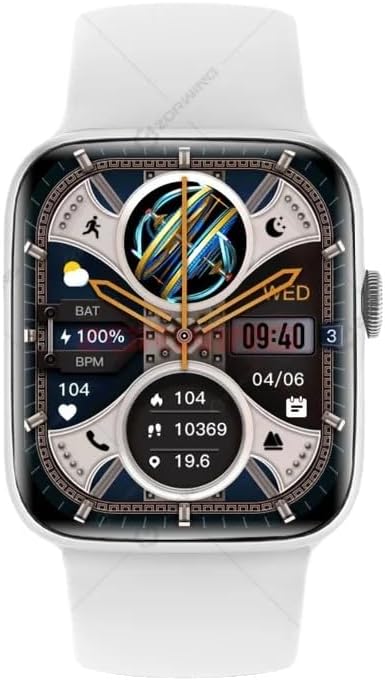
Figure 1: SUUNY H10 Pro Smartwatch (Silver model with white strap)
2. Kandungan Pakej
Sahkan bahawa semua item terdapat dalam pakej produk anda:
- 1 x SUUNY H10 Pro Smartwatch
- 1 x Kabel Pengecasan Magnet
- 1 x Manual Pengguna
- 1 x Kotak Asal
3. Persediaan
3.1. Mengecas Jam Pintar
Before initial use, fully charge your SUUNY H10 Pro Smartwatch. The device uses magnetic wireless charging.
- Sambungkan kabel pengecas magnet kepada penyesuai kuasa USB (tidak disertakan).
- Place the smartwatch on the magnetic charging base. Ensure the charging pins align correctly with the watch's charging points.
- The watch screen will indicate charging status. A full charge typically takes approximately 2 hours.
3.2. Pemasangan Aplikasi dan Penggandingan Peranti
To unlock the full functionality of your smartwatch, you need to install the companion application on your smartphone and pair the devices.
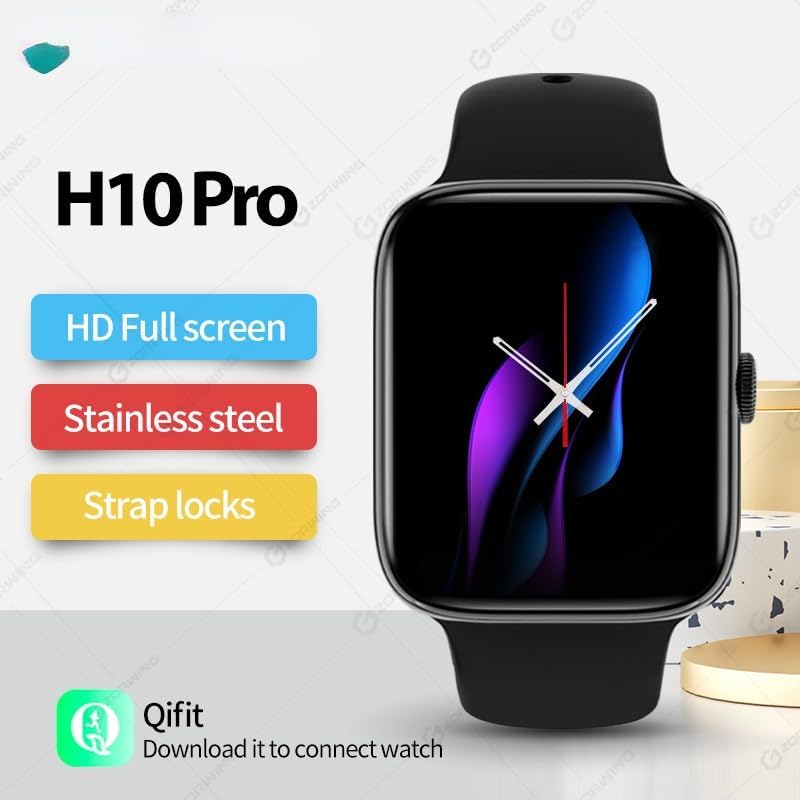
Figure 2: H10 Pro features and Qifit app information
- Download the Qifit App: Cari untuk "Qifit" in your smartphone's app store (Google Play Store for Android or Apple App Store for iOS) and install it.
- Dayakan Bluetooth: Pastikan Bluetooth didayakan pada telefon pintar anda.
- Open Qifit App: Launch the Qifit application and follow the on-screen instructions to create an account or log in.
- Pasangkan Peranti: Within the Qifit app, navigate to the device pairing section. The app will search for available devices. Select "H10 Pro" or a similar device name from the list.
- Sahkan Gandingan: A pairing request may appear on both your phone and smartwatch. Confirm the pairing on both devices.
Nota: For GPS positioning, the smartwatch relies on the Qifit mobile phone software to push location information to the watch. The watch does not have a built-in GPS chip.
4. Arahan Operasi
4.1. Navigasi Asas
The H10 Pro Smartwatch features a 1.9-inch HD full touch screen and a smart rotary knob for navigation.
- Skrin Sentuh: Swipe left, right, up, or down to access different functions and menus. Tap to select items.
- Smart Rotary Knob: Rotate the knob to scroll through menus or adjust settings. Press the knob to return to the home screen or confirm selections.
- Cover Screen to Turn Off: Covering the screen with your palm can turn off the display.
4.2. Panggilan Bluetooth
Once paired with your smartphone, the H10 Pro allows you to make and receive calls directly from your wrist.
- Membuat Panggilan: Access the dialer function on the watch to input numbers or select contacts from your synced phonebook.
- Menerima Panggilan: Apabila panggilan masuk, jam tangan akan memaparkan ID pemanggil. Anda boleh menjawab atau menolak panggilan terus dari jam tangan.
4.3. NFC Access Control
The smartwatch includes a built-in NFC chip for access control functionality. There is no dedicated NFC software icon on the watch.
- Kad yang Disokong: The NFC function supports IC door cards with a frequency of 13.56 MNZ. It does not support other NFC functions like mobile payments.
- Proses Pendaftaran: To use the watch as an access card, you must register its NFC ID with your access control system. This typically involves adding the watch's NFC identifier through the access control system's administration interface (e.g., at a community property management office for encrypted access control).
- Fingerprint Locks: For fingerprint locks, enter the administrator mode, then select "add card" and "write" to register the watch.
4.4. Pemantauan Kesihatan
The H10 Pro provides various health monitoring features:
- Pemantauan Denyut Jantung: Real-time heart rate tracking. Access this feature from the main menu or a dedicated widget.
- Pemantauan Tidur: Tracks sleep patterns and quality. Wear the watch during sleep for accurate data.
- Pedometer: Mengira langkah anda sepanjang hari.
- Peringatan Sedentari: Alerts you when you have been inactive for too long.
4.5. Mod Berbilang Sukan
The smartwatch supports various multi-sport modes to track your exercise activities. Select the appropriate mode before starting your workout for accurate data recording.
4.6. Pembantu Suara AI
Utilize the integrated AI voice assistant for quick commands and information retrieval. Activate the assistant through the watch interface and speak your commands.
4.7. Kawalan Muzik
Control music playback on your paired smartphone directly from the watch. This includes playing, pausing, skipping tracks, and adjusting volume.
4.8. Always-On Display & Custom Watch Faces
The H10 Pro supports an always-on display mode. You can also customize the watch face from a selection of pre-installed options or personalize it further through the Qifit app.
4.9. Tetapan Bahasa
The smartwatch supports the following languages:

Figure 3: Supported languages for the H10 Pro Smartwatch
- Inggeris
- bahasa Sepanyol
- Portugis
- bahasa Turki
- bahasa arab
- Thai
- bahasa Vietnam
To change the language, navigate to the settings menu on your watch.
5. Penyelenggaraan
5.1. Garis Panduan Rintangan Air
The SUUNY H10 Pro Smartwatch is designed with "life waterproof" capabilities, meaning it can withstand daily activities such as hand washing and exposure to rain. However, it is important to adhere to the following guidelines to prevent damage:
- Jangan Tenggelamkan: The watch is not suitable for swimming, bathing, or prolonged submersion in water.
- Avoid Corrosive Liquids: Prevent contact with corrosive liquids such as hand sanitizer, soap, or detergents, as these can penetrate the watch and cause damage to internal components.
- Elakkan Air Panas: Do not expose the watch to hot water or steam (e.g., in saunas or hot showers).
5.2. Pembersihan
Untuk mengekalkan penampilan dan fungsi jam tangan pintar anda:
- Lap skrin dan badan dengan kain lembut dan tidak berbulu.
- Jika perlu, sedikit dampbasahkan kain dengan air, tetapi elakkan kelembapan berlebihan.
- Bersihkan kenalan pengecas secara berkala untuk memastikan pengecasan yang cekap.
6. Penyelesaian masalah
- Tonton tidak dihidupkan: Pastikan jam tangan dicas sepenuhnya. Sambungkannya ke pengecas dan tunggu beberapa minit sebelum cuba menghidupkannya.
- Tidak boleh berpasangan dengan telefon:
- Pastikan Bluetooth didayakan pada telefon dan jam tangan anda.
- Make sure the Qifit app is installed and running.
- Mulakan semula jam tangan dan telefon anda, kemudian cuba pasangkan semula.
- Pastikan jam tangan belum dipasangkan dengan peranti lain.
- Data kesihatan tidak tepat: Pastikan jam tangan dipakai dengan kemas di pergelangan tangan anda, tetapi tidak terlalu ketat. Bersihkan sensor di bahagian belakang jam tangan.
- NFC access not working:
- Verify that the access card system uses 13.56 MNZ IC cards.
- Confirm that the watch's NFC ID has been correctly registered with the access control system.
- Ensure the watch is held close enough to the reader.
- GPS tidak berfungsi: The watch uses your phone's GPS via the Qifit app. Ensure your phone's GPS is active and the Qifit app has location permissions.
7. Spesifikasi
Detailed technical specifications for the SUUNY H10 Pro Smartwatch:
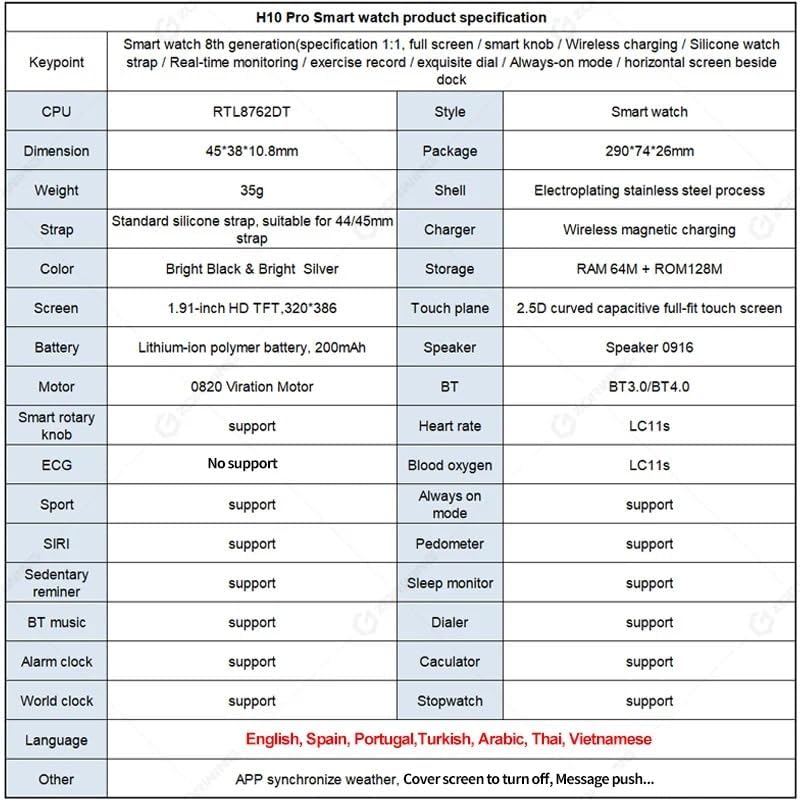
Figure 4: H10 Pro Smartwatch detailed specifications
| Ciri | Spesifikasi |
|---|---|
| Jenama | SUUNY |
| Nombor Model | H10 Pro (2023) |
| Pemproses | RTL8762DT |
| Dimensi | 45 x 38 x 10.8 mm |
| Bahan Kes | Electroplated Stainless Steel |
| tali | Standard Silicone, suitable for 44/45mm straps |
| Pengecas | Pengecasan Tanpa Wayar Magnetik |
| Penyimpanan | RAM 64M + ROM 128M |
| Skrin | 1.9-inch HD TFT, 320 x 386 resolution |
| Panel Sentuh | 2.5D Curved Capacitive Full-fit Touch Screen |
| Bateri | 200 mAh Polymer Lithium-ion Battery |
| Penceramah | 0916 Penceramah |
| Motor | 0820 Vibration Motor |
| Bluetooth | Dual Bluetooth (BT3.0/BT4.0) |
| Sistem Operasi | Android (serasi dengan iOS) |
| Ciri yang Disokong | Heart Rate Monitoring, Sleep Monitoring, Multi-Sport Modes, Always-on Display, AI Voice Assistant, Pedometer, Sedentary Reminder, BT Music, Dialer, Alarm, Calculator, World Clock, Stopwatch, NFC Access Control (13.56 MNZ IC cards) |
| GPS | Via smartphone (Qifit app) |
| Bahasa yang Disokong | English, Spanish, Portuguese, Turkish, Arabic, Thai, Vietnamese |
8. Waranti dan Sokongan
Information regarding product warranty and specific support contacts is not available in the provided product details. Please refer to the seller or manufacturer's official website for warranty terms and customer support options.


