1. Pengenalan dan Lebihview
The Phomemo M832 is a portable thermal printer designed for convenience and efficiency. It utilizes advanced direct thermal technology, eliminating the need for ink, toner, or ribbons. This printer supports various thermal paper sizes, including US Letter (8.5" x 11") and A4, making it suitable for a wide range of printing tasks on the go. Its compact design and wireless connectivity options ensure you can print documents, receipts, and more, wherever you are.

Image 1.1: The Phomemo M832 printer highlighting its versatility and support for multiple thermal paper sizes.
Ciri-ciri Utama:
- Pencetakan Terma Tanpa Dakwat: No need for ink cartridges, toner, or ribbons, reducing operational costs.
- Kesambungan Bluetooth Wayarles: Connects to iOS and Android phones/tablets via the "Phomemo" app.
- Kesambungan Berwayar USB: Compatible with Windows (7 and later), macOS (10.14 and later), Linux, and Chrome OS via USB cable.
- Keserasian Kertas yang Luas: Supports US Letter (8.5" x 11"), A4, and thermal paper rolls of 10 cm, 8.14 cm, and 5.8 cm widths.
- Resolusi Tinggi: 300 dpi for clear and crisp prints.
- Reka Bentuk Mudah Alih: Lightweight and compact, ideal for travel, home, office, or school use.
- Bateri tahan lama: Built-in 2600 mAh rechargeable battery, capable of printing up to 150 US Letter sheets on a full charge.
2. Kandungan Pakej
Sila tandai kotak untuk item berikut:
- 1 x Phomemo M832 Portable Thermal Printer (Gray)
- 1 x Phomemo M832 Printer Case
- 1 x USB Data Cable (80 cm)
- 1 x Manual Pengguna
- 1 x Thermal Paper Roll (21 x 28 cm, US Letter size)
- Additional thermal paper rolls (10 cm, 8.14 cm, 5 cm widths) may be included depending on the package.
3. Rajah Produk

Image 3.1: Phomemo M832 printer with its protective case and a document being printed. The image illustrates the compact size and functionality.
The Phomemo M832 printer features a minimalist design. Key components include the paper input slot, paper output slot, power button, status indicator light, and USB-C port for charging and wired connection.
4. Persediaan
4.1 Mengecas Pencetak
Before initial use, fully charge the printer. Connect the provided USB-C cable to the printer's USB-C port and the other end to a compatible USB power adapter (not included) or a computer's USB port. The status indicator light will show charging status (e.g., red for charging, green for fully charged). The printer has a 2600 mAh rechargeable battery.
Nota: Do not use chargers with an output above 5V. Fast charging is not supported.
4.2 Memuatkan Kertas Terma
- Open the paper cover of the printer.
- Insert the thermal paper roll or stack of thermal sheets into the paper compartment, ensuring the printable side faces the print head.
- Adjust the paper guides to fit the width of the paper snugly.
- Close the paper cover. Ensure the paper is loaded correctly to prevent jams.
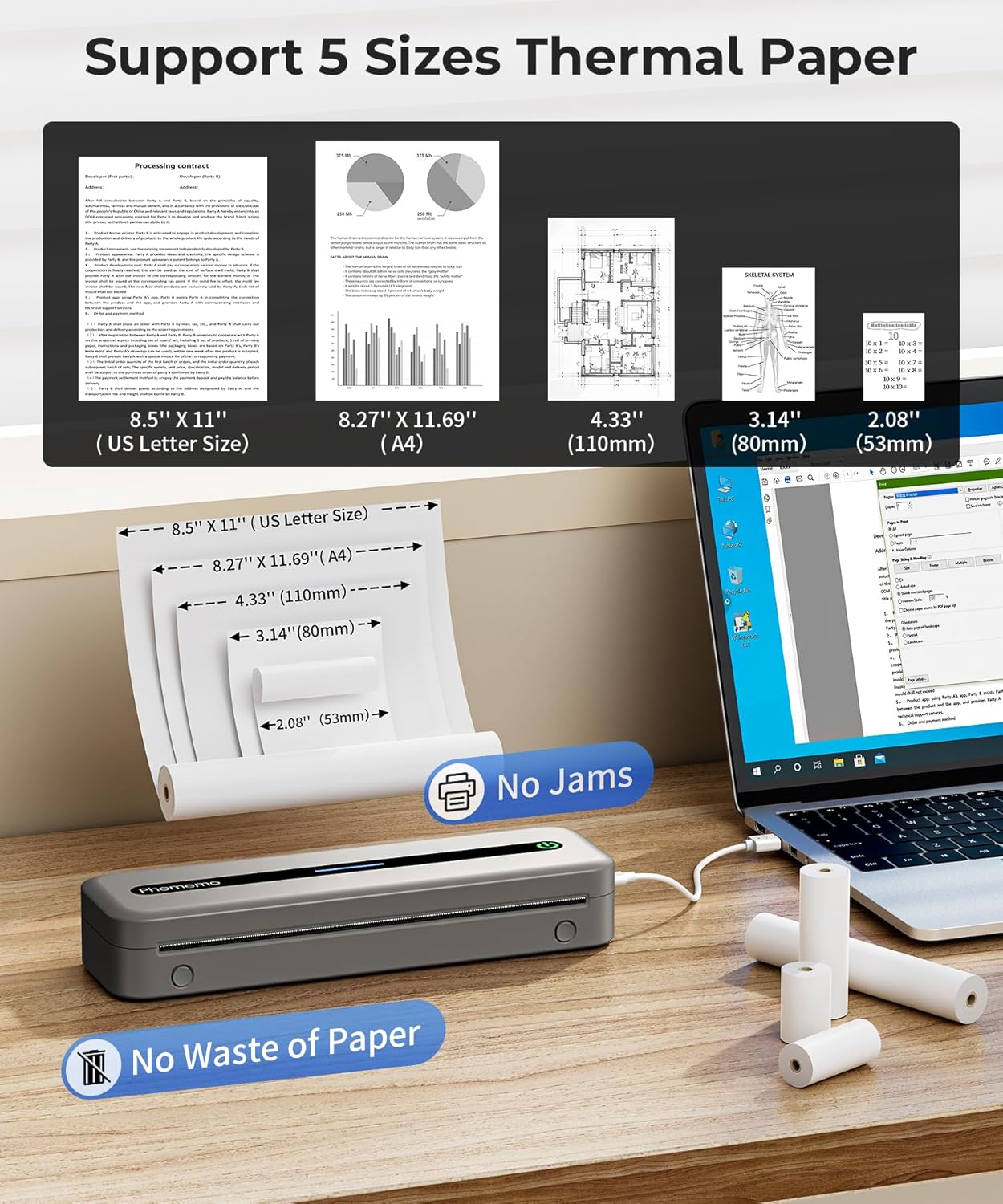
Image 4.1: The Phomemo M832 printer demonstrating its compatibility with five different thermal paper sizes, including US Letter and A4, and highlighting jam-free operation.
5. Arahan Operasi
5.1 Menghidupkan/Mematikan
- Untuk Menghidupkan: Press and hold the power button until the status indicator light illuminates.
- Untuk Mematikan: Press and hold the power button until the status indicator light turns off.
5.2 Connecting via Bluetooth (for Phones/Tablets)
The Phomemo M832 connects to iOS and Android devices exclusively through the "Phomemo" application.
- Download the "Phomemo" app from the App Store (iOS) or Google Play Store (Android).
- Ensure your printer is powered on and Bluetooth is enabled on your phone or tablet.
- Open the Phomemo app and follow the in-app instructions to search for and connect to your M832 printer.
- Once connected, you can select documents or images within the app to print.
Penting: Do not attempt to connect the printer directly via your phone's or tablet's Bluetooth settings. Connection must be initiated through the Phomemo app.

Image 5.1: Demonstrates connecting the Phomemo M832 printer to a mobile device using Bluetooth via the dedicated Phomemo application.
5.3 Connecting via USB (for Laptops/PCs)
The Phomemo M832 can be connected to Windows, macOS, Linux, and Chrome OS computers via a USB data cable.
- Ensure your printer is powered on.
- Connect the printer to your computer using the provided USB data cable.
- Your computer may automatically install the necessary drivers. If not, drivers can be downloaded from the official Phomemo webtapak.
- Once drivers are installed, the printer will appear in your computer's list of available printers. You can then print documents as you would with any standard printer.
Penting: The Phomemo M832 does not support Bluetooth connection with laptops or PCs; only USB wired connection is available for these devices.

Image 5.2: Illustrates the USB wired connection between the Phomemo M832 printer and a laptop, compatible with various operating systems.
6. Penyelenggaraan
6.1 Membersihkan Kepala Cetak
Untuk mengekalkan kualiti cetakan, bersihkan kepala cetakan secara berkala. Gunakan kain lembut dan bebas bulu dengan lembutampened with isopropyl alcohol. Gently wipe the print head surface. Ensure the printer is powered off and completely dry before use.
6.2 Penjagaan Bateri
- Elakkan menyahcas sepenuhnya bateri dengan kerap.
- If storing the printer for an extended period, charge it to approximately 50% every three months to preserve battery life.
- Jangan dedahkan pencetak kepada suhu yang melampau.
6.3 Penyimpanan
Store the printer in a cool, dry place away from direct sunlight and excessive dust. When not in use, it is recommended to store the printer in its protective case to prevent damage.

Image 6.1: The Phomemo M832 protective case, designed to shield the printer from impacts and organize accessories.
7. Penyelesaian masalah
| Masalah | Kemungkinan Punca | Penyelesaian |
|---|---|---|
| Pencetak tidak dihidupkan. | Bateri lemah atau butang kuasa tidak ditekan dengan betul. | Charge the printer. Press and hold the power button for a few seconds. |
| Tidak dapat menyambung melalui Bluetooth. | Not using the Phomemo app, Bluetooth is off, or printer is out of range. | Ensure you are connecting through the Phomemo app. Turn on Bluetooth on your device. Move the printer closer to your device (within 10 meters). |
| Poor print quality or blank pages. | Incorrect paper loading, low battery, or dirty print head. | Reload paper correctly (printable side facing print head). Charge the printer. Clean the print head as per maintenance instructions. |
| Kertas jem. | Pemuatan kertas yang tidak betul atau objek asing. | Power off the printer. Carefully open the paper cover and remove any jammed paper. Ensure paper is loaded straight. |
| Pencetak tidak dikenali oleh PC melalui USB. | Missing or outdated drivers. | Download and install the latest drivers from the official Phomemo website. Try a different USB port or cable. |
8. Spesifikasi
| Ciri | Perincian |
|---|---|
| Model | M832 |
| Teknologi Percetakan | Terma Terus |
| Resolusi Cetakan | 300 dpi |
| Ketersambungan | Bluetooth (for phones/tablets), USB-C (for laptops/PCs) |
| Peranti Serasi | iOS (10+), Android (8+), Windows (7+), macOS (10.14+), Linux, Chrome OS |
| Saiz Media Maks | 21 x 28 cm (US Letter / A4) |
| Saiz Kertas yang Disokong | 8.5'' x 11'' (US Letter), A4, 4.33'' (110mm), 3.14'' (80mm), 2.08'' (53mm) |
| Max Sheet Input Capacity | 150 helai |
| Bateri | 2600 mAh rechargeable Lithium Polymer |
| Kelajuan Cetakan (Monokrom) | 5 ppm |
| Dimensi Produk | 34.8 x 10.6 x 7.9 cm (13.7 x 4.17 x 3.11 inci) |
| Berat Produk | 700 g (1.54 paun) |
| Ingatan | 64 MB |
9. Waranti dan Sokongan
Phomemo products are designed for reliability and performance. For specific warranty details, please refer to the warranty card included with your product or visit the official Phomemo website. If you encounter any issues or have questions regarding your Phomemo M832 printer, please contact Phomemo customer support for assistance.
Sokongan Pelanggan: Please visit the Phomemo official website or refer to the contact information provided in your product packaging for support.


