STRICH SBA-10 Mini Bass AmpManual Pengguna yang lebih hidup
Model: SBA-10
1. Pengenalan
The STRICH SBA-10 is a compact and portable mini bass amplifier designed for practice and personal use. Featuring dual 5W subwoofers, it delivers clear bass tones in a small form factor. This amplifier includes both Clean and Drive channels, Bluetooth connectivity, an AUX input, and a headphone output for versatile practice options. Its rechargeable battery ensures portability for extended use.

Image 1.1: The STRICH SBA-10 Mini Bass Amppenguat, pertunjukancasing reka bentuk padat dan panel kawalannya.
2. Kandungan Pakej
Pastikan semua item ada dalam pakej:
- 1 x STRICH SBA-10 Electric Bass Amp
- 1 x Kabel Pengecas USB
- 1 x Manual Pengguna
3. Ciri-ciri Produk
- Reka bentuk padat dan mudah alih: Features 2x5W subwoofers in a small size (17.20 x 9.20 x 12.60 CM / 6.77 x 3.62 x 4.96 INCH), ideal for desktop use and easy transport.
- Hayat Bateri yang Panjang: Equipped with a 3000mAh battery, providing up to 4 hours of continuous operation.
- Saluran Dwi: Switch between CLEAN and DRIVE channels for varied sound textures.
- Kawalan Kelantangan Bebas: Separate volume controls for Bluetooth/AUX input and instrument input allow for balanced mixing of background music and instrument sound.
- Output Fon Kepala: A 1/8" (3.5mm) headphone jack enables private practice sessions.
- Bass Dipertingkatkan: Utilizes a professional low-frequency algorithm and specialized bass speaker for optimal bass instrument performance.
- Pembinaan Tahan Lama: Built with hard material edges and rubber pads for stability and protection.
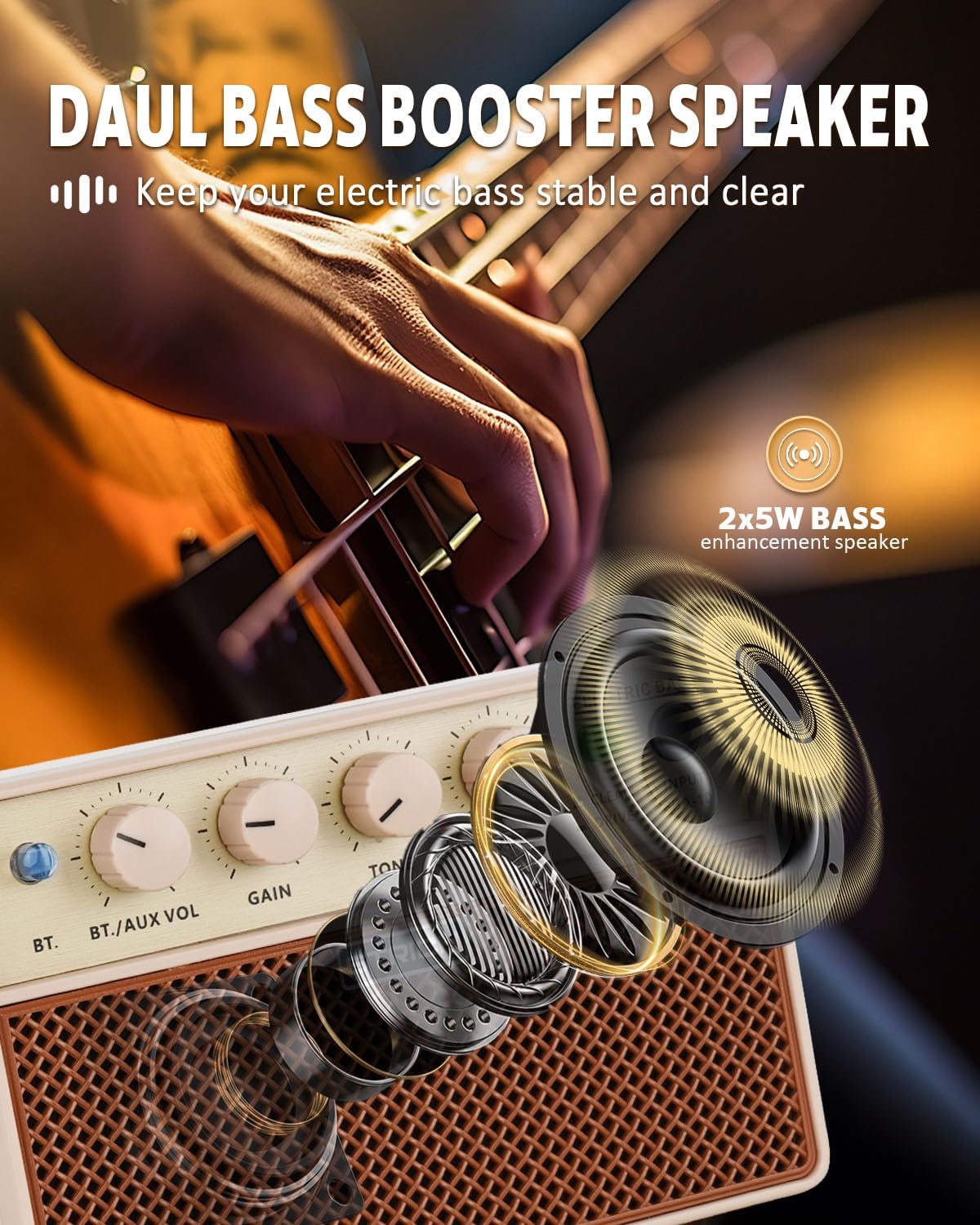
Image 3.1: Diagram illustrating the dual bass booster speaker system of the SBA-10.
4. Kawalan dan Sambungan

Image 4.1: Detailed diagram of the SBA-10 amplifier's front panel controls and rear panel ports.
Kawalan Panel Depan:
- Butang BT: Mengaktifkan mod gandingan Bluetooth.
- BT./AUX VOL Knob: Adjusts the volume level for Bluetooth and AUX input audio.
- Tombol GAIN: Controls the input signal gain for your instrument.
- Tombol TONE: Adjusts the tonal characteristics of your instrument's sound. Turning clockwise brightens the tone, counter-clockwise warms it.
- POWER VOL Knob: Functions as the master volume control for the amplifier and also serves as the power ON/OFF switch.
- Suis BERSIH/PEMACU: Toggles between the clean instrument tone and the overdriven (distorted) tone.
- INPUT Jack: 1/4" (6.35mm) input for connecting your bass guitar or other instrument.
Port Panel Belakang:
- 5V DC Charging Port: USB-C port for charging the internal battery.
- 1/8" Headphone Output: Bicu 3.5mm untuk menyambungkan fon kepala.
- 1/8" Audio Input (AUX): Bicu 3.5mm untuk menyambungkan sumber audio luaran.
5. Persediaan
5.1 Pengecasan Awal
Before first use, fully charge the SBA-10 amplifier. Connect the provided USB charging cable to the 5V DC Charging Port on the rear of the amplifier and to a standard USB power adapter (not included). The charging indicator light will show the charging status.
5.2 Menyambungkan Instrumen Anda
Plug your bass guitar or other instrument into the INPUT jack on the front panel using a standard 1/4" instrument cable.
6. Arahan Operasi
6.1 Menghidupkan/Mematikan
Untuk menghidupkan amplifier, rotate the VOL KUASA knob clockwise until it clicks and the power indicator light illuminates. To power off, rotate the VOL KUASA knob counter-clockwise until it clicks off.
6.2 Pemilihan Saluran
Gunakan BERSIH/MEMANDU switch to select your desired sound:
- BERSIH: Provides a normal, uncolored instrument tone.
- PEMANDU: Produces an overdriven or distorted tone, suitable for rock music and other genres requiring saturation.

Image 6.1: Illustration of the two working modes, Clean and Drive, available on the SBA-10 amplebih hidup.
6.3 Melaraskan Bunyi
- DAPATKAN: Laraskan DAPATKAN knob to control the input sensitivity and the amount of overdrive (especially in Drive mode).
- NADA: Gunakan TONA knob to shape the frequency response of your instrument.
- POWER VOL: Laraskan VOL KUASA knob for the overall output volume of the amplebih hidup.
6.4 Kesambungan Bluetooth
The SBA-10 allows you to connect a Bluetooth device to play backing tracks or music.
- Tekan ke BT button on the front panel. The Bluetooth indicator light will flash, indicating pairing mode.
- On your device (smartphone, tablet, etc.), enable Bluetooth and search for "SBA-10".
- Select "SBA-10" to pair. Once connected, the Bluetooth indicator light will remain solid.
- Adjust the volume of the Bluetooth audio using the BT./AUX VOL tombol.

Image 6.2: Diagram showing how to connect a smartphone via Bluetooth to the SBA-10 amplebih hidup.
6.5 Menggunakan Input AUX
To connect an external audio source via cable:
- Connect your audio device (e.g., MP3 player, laptop) to the 1/8" Audio Input (AUX) on the rear panel using a 3.5mm audio cable.
- Adjust the volume of the AUX audio using the BT./AUX VOL tombol.
6.6 Penggunaan Fon Kepala
For silent practice, plug your headphones into the 1/8" Headphone Output on the rear panel. The internal speakers will automatically mute when headphones are connected.

Image 6.3: A musician practicing with headphones connected to the SBA-10 amplifier, demonstrating quiet practice capability.
7. Mengecas Bateri
The SBA-10 features a built-in 3000mAh lithium battery. When the battery is low, the power indicator light may change color or flash. To charge:
- Connect the USB charging cable to the Port Pengecasan DC 5V di bahagian belakang amplebih hidup.
- Sambungkan hujung kabel USB yang satu lagi ke sumber kuasa USB yang serasi (cth, penyesuai dinding, port USB komputer).
- The charging indicator will show the charging status. A full charge typically provides 3-4 hours of continuous use.

Image 7.1: Visual representation of the SBA-10's 3000mAh battery, indicating 3-4 hours of continuous play time.
8. Penyelenggaraan
- Bersihkan ampLap dengan kain lembut dan kering. Jangan gunakan pembersih atau pelarut yang kasar.
- Elakkan daripada mendedahkan amplifier to extreme temperatures, humidity, or direct sunlight.
- Jangan sekat bukaan pengudaraan.
- Simpan amplifier in a dry, cool place when not in use.
9. Penyelesaian masalah
| Masalah | Kemungkinan Punca | Penyelesaian |
|---|---|---|
| Tiada bunyi dari amplebih hidup | Amplifier is off; Volume is too low; Instrument cable faulty; Instrument not connected; Headphones connected. | Hidupkan amplifier and increase POWER VOL; Check instrument cable and connection; Disconnect headphones. |
| Bluetooth tidak bersambung | Bluetooth not enabled on device; Amplifier not in pairing mode; Device too far. | Ensure Bluetooth is on and press BT button on amp; Move device closer to amplebih hidup. |
| Hayat bateri yang rendah | Battery not fully charged; High volume usage. | Cas sepenuhnya amplifier; Reduce volume for longer battery life. |
| Distorted sound (in Clean mode) | GAIN knob set too high; Faulty instrument or cable. | Reduce GAIN; Check instrument and cable. |
10. Spesifikasi
| Ciri | Spesifikasi |
|---|---|
| Nombor Model | SBA-10 |
| Output Wattage | 2 x 5 Watts (10W total) |
| Sumber Kuasa | Dikuasakan oleh Bateri (Bateri Litium 3000mAh) |
| Hayat Bateri | 3-4 hours continuous use |
| Dimensi Produk | 3.74 x 6.54 x 4.49 inci (9.5 x 16.6 x 11.4 cm) |
| Berat Barang | 1.41 paun (0.64 kg) |
| Jenis Penyambung | 1/4" Instrument Input, 3.5mm AUX Input, 3.5mm Headphone Output, USB-C Charging Port |
| Jenis Bahan | PVC |
| Peranti Serasi | Bass Guitar, Double Bass, other electric instruments |
11. Waranti dan Sokongan
STRICH is committed to providing quality products and customer satisfaction.
- Perkhidmatan Waranti: The STRICH SBA-10 amplifier comes with up to a 12-month warranty from the date of purchase. Please retain your proof of purchase for warranty claims.
- Polisi Pemulangan: A 30-day free return policy is available for eligible purchases.
- Sokongan Pelanggan: For any inquiries, technical assistance, or warranty claims, please contact STRICH customer service. We aim to provide a prompt response to email chat assistant requests within 24 hours.
For further assistance, please visit the official STRICH webtapak atau hubungi peruncit anda.

Imej 11.1: Selesaiview of STRICH customer care services, including prompt response, warranty, and return policy.


