
1. Pengenalan
Terima kasih kerana memilih Stesen Janakuasa Mudah Alih BLUETTI AC20. Manual ini menyediakan maklumat penting untuk pengendalian peranti anda yang selamat dan cekap. Sila baca dengan teliti sebelum digunakan dan simpan untuk rujukan pada masa hadapan.
Kandungan Pakej
- BLUETTI AC20 portable power station
- Penyesuai AC
- Kabel Jenis-C
- Kabel pengecas kereta
- Manual pengguna
- Kad jaminan

An illustration showing the BLUETTI AC20 power station along with its included accessories: user manual, warranty card, AC adapter, Type-C cable, DC6530 to DC5521 cable, DC7909 to Car Charger cable, and cigarette lighter adapter.
2. Arahan Keselamatan
Untuk memastikan operasi yang selamat, sentiasa ikuti garis panduan ini:
- Jangan membongkar, memperbaiki atau mengubah unit.
- Keep the unit away from fire or direct sunlight.
- Do not use or store the unit in a bathroom or in an area exposed to water or rain.
- Do not use the unit if it is damaged or modified.
- Jauhkan daripada kanak-kanak.
- Pastikan pengudaraan yang betul semasa digunakan untuk mengelakkan terlalu panas.
- Gunakan hanya kabel dan penyesuai pengecas asli atau yang diperakui.
The BLUETTI AC20 is built with an Auto-level battery cell and a premium BMS (Battery Management System) for comprehensive battery protection.
3. Panduan Persediaan
Caj Permulaan
Before first use, fully charge the BLUETTI AC20. Connect the provided AC adapter to the input port on the power station and plug it into a wall outlet. The display will indicate charging status.
Memahami Paparan
The integrated display provides real-time information on battery level, input power, and output power for various ports.
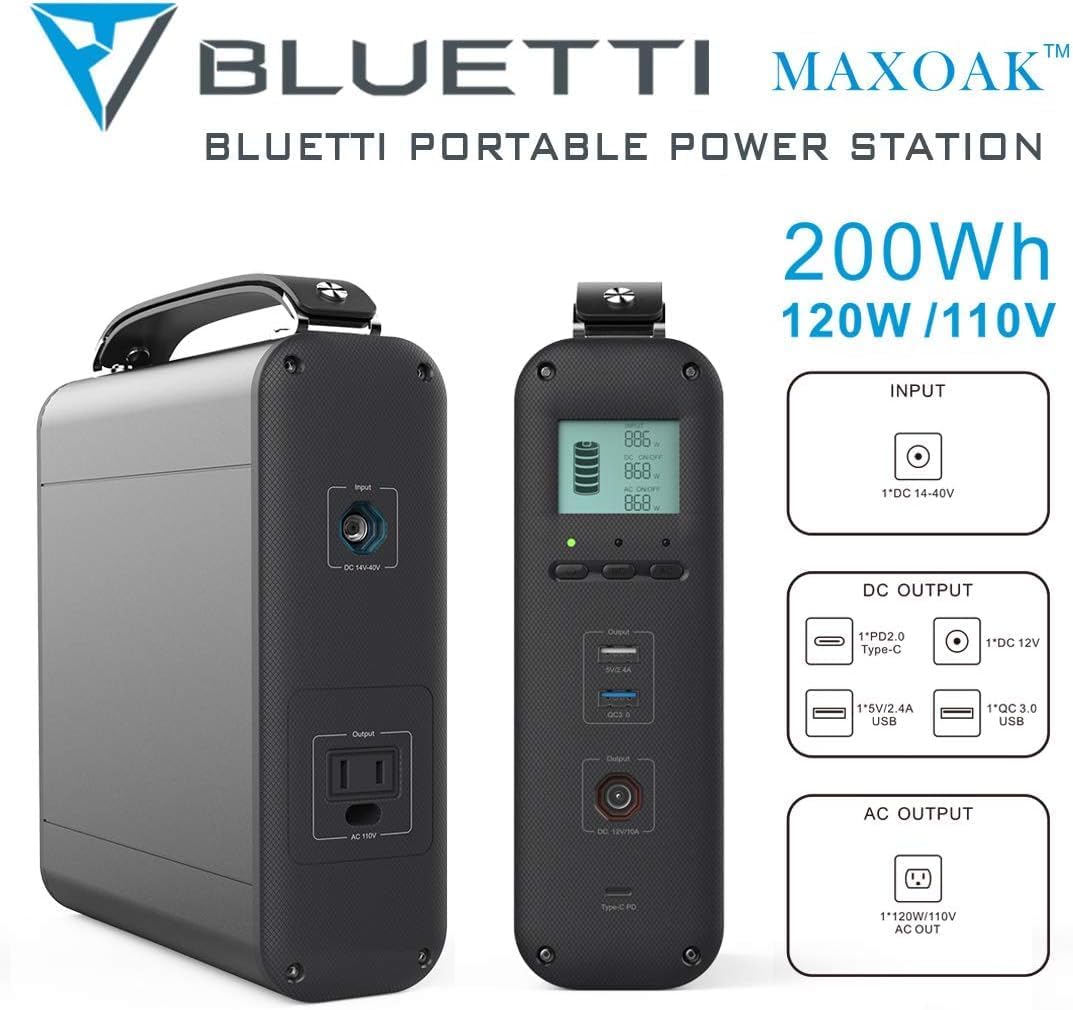
A terperinci view of the BLUETTI AC20 power station highlighting its input and output ports, including the DC 14-40V input, PD2.0 Type-C, 5V/2.4A USB-A, QC 3.0 USB, DC 12V, and 120W/110V AC outlet.
4. Arahan Operasi
Menghidupkan/Mematikan
Press and hold the power button for 3 seconds to turn the unit on or off.
Mengecas Peranti
The AC20 offers multiple output options:
- Outlet AC: Provides 120W AC output for small appliances.
- Port USB-C: Untuk peranti yang serasi dengan pengecasan pantas.
- Port USB-A: Standard USB ports for charging phones, tablets, and other USB-powered devices.
- DC 12V Car Output: Untuk menguasakan peralatan kereta 12V.
- QC USB Port: Quick Charge enabled USB port.
Simply plug your device into the appropriate port. The power station will automatically detect and begin charging.

The BLUETTI AC20 power station simultaneously charging a laptop, tablet, and multiple smartphones, demonstrating its versatility for various electronic devices.
Recharging the AC20
The BLUETTI AC20 can be recharged via:
- Saluran Keluar Dinding AC: Using the provided AC adapter.
- Panel Suria (Pilihan): Connect a compatible solar panel to the DC input port for eco-friendly charging.
- Pengecas Kereta: Use the included car charging cable to recharge from your vehicle's 12V outlet.
Monitor the display for charging progress.
5. Penyelenggaraan
- Storan: Simpan unit di tempat yang sejuk dan kering, jauh dari cahaya matahari langsung dan suhu yang melampau.
- Kekerapan Pengecasan: Untuk hayat bateri yang optimum, cas unit sepenuhnya setiap 3-6 bulan, walaupun tidak digunakan.
- Pembersihan: Use a dry, soft cloth to clean the exterior. Do not use harsh chemicals or abrasive materials.
- Pengudaraan: Pastikan bukaan pengudaraan bersih daripada habuk dan serpihan.

The BLUETTI AC20 power station positioned outdoors near a tent and a person, illustrating its suitability for camping and off-grid use.
6. Penyelesaian masalah
| Masalah | Kemungkinan Punca | Penyelesaian |
|---|---|---|
| Unit tidak dihidupkan | Bateri habis. | Charge the unit fully using the AC adapter. |
| Tiada output daripada port | Output port not activated or device draws too much power. | Ensure the unit is on and the specific output port is active. Check if the device's power consumption exceeds the AC20's limits (120W AC). |
| Pengecasan perlahan | Using a non-optimal charging method or cable. | Use the original AC adapter for fastest charging. Ensure solar panels are in direct sunlight if applicable. |
| Terlalu panas | Pengudaraan yang lemah atau beban yang berlebihan. | Place the unit in a well-ventilated area. Reduce the number or power of connected devices. |
7. Spesifikasi
- model: MS-US-AC20
- kapasiti: 200Wj
- Keluaran AC: 1 x 120W AC Outlet (110V)
- Output USB-C: 1 x Type-C (PD2.0)
- Keluaran USB-A: 1 x 5V/2.4A, 1 x QC 3.0
- Output DC: 1 x DC 12V Car Output
- Input: DC 14-40V
- Dimensi: 7.87 x 8.15 x 2.63 inci
- Berat: 7.7 paun
- Jenis Bateri: Auto-level battery cell
- Kitaran Kehidupan: 1000+ kitaran
- Ciri Khas: Built-in BMS for battery protection

An image of the BLUETTI AC20 power station with callouts indicating its 200Wh capacity, 120W/110V output, and various input/output ports including DC 14-40V input, PD2.0 Type-C, 5V/2.4A USB, QC 3.0 USB, DC 12V, and AC 120W/110V.
8. Waranti dan Sokongan
The BLUETTI AC20 Portable Power Station comes with a Waranti 24 bulan dari tarikh pembelian. Waranti ini melindungi kecacatan pada bahan dan mutu kerja di bawah penggunaan biasa.
For technical support, warranty claims, or any inquiries, please contact BLUETTI customer service through their official webtapak atau maklumat hubungan yang diberikan pada kad jaminan anda.
BLUETTI Official Webtapak: www.bluettipower.com
9. Pelupusan Mesra Alam
Do not dispose of the BLUETTI AC20 with household waste. This product contains a battery and should be recycled responsibly. Please contact your local waste management authority for information on proper disposal and recycling options for electronic devices and batteries.


