1. Pengenalan
Thank you for choosing the Gtech AirFOX Platinum Cordless Stick Vacuum Cleaner. This manual provides essential information for the safe and efficient operation, maintenance, and troubleshooting of your new appliance. Please read this manual thoroughly before first use and keep it for future reference.
Ciri-ciri Utama:
- 3 Power Modes: ECO (80 mins), AUTO (45 mins), MAX (15 mins) for varied cleaning needs.
- Paparan LCD: Provides real-time information on operational mode, battery charge, and suction levels.
- Prestasi Unggul: 450W brushless motor for consistent suction and >99% small dust particle retention.
- Motorised Anti-Hair Wrap Brush Bar: Prevents hair and debris build-up, maintaining performance.
- Aksesori Serbaguna: Includes nozzle, brush, upholstery, and flexible tools for comprehensive cleaning.
- Reka bentuk 2-dalam-1: Easily converts from upright to handheld mode.

Figure 1.1: Gtech AirFOX Platinum in various configurations, highlighting its versatility and brush bar design.
2. Maklumat Keselamatan
Sentiasa ikuti langkah berjaga-jaga keselamatan asas apabila menggunakan peralatan elektrik untuk mengurangkan risiko kebakaran, renjatan elektrik atau kecederaan.
- Baca semua arahan sebelum menggunakan perkakas.
- Jangan gunakan di luar atau di permukaan basah.
- Jangan biarkan digunakan sebagai mainan. Perhatian yang rapi diperlukan apabila digunakan oleh atau berhampiran kanak-kanak.
- Gunakan hanya seperti yang diterangkan dalam manual ini. Gunakan hanya lampiran yang disyorkan pengilang.
- Jangan gunakan dengan kord atau palam yang rosak. Jika perkakas tidak berfungsi sebagaimana mestinya, telah terjatuh, rosak, ditinggalkan di luar rumah, atau terjatuh ke dalam air, kembalikannya ke pusat servis.
- Jangan tarik atau bawa dengan kord, gunakan kord sebagai pemegang, tutup pintu pada kord, atau tarik kord di sekeliling tepi atau sudut yang tajam. Jangan jalankan perkakas di atas kord. Jauhkan kord dari permukaan yang dipanaskan.
- Jangan cabut plag dengan menarik kord. Untuk mencabut palam, pegang palam, bukan kordnya.
- Jangan pegang palam atau perkakas dengan tangan yang basah.
- Jangan letakkan sebarang objek ke dalam bukaan. Jangan gunakan dengan mana-mana bukaan yang disekat; jauhkan daripada habuk, serabut, rambut dan apa sahaja yang boleh mengurangkan aliran udara.
- Jauhkan rambut, pakaian longgar, jari dan semua bahagian badan daripada bukaan dan bahagian yang bergerak.
- Jangan ambil apa-apa yang terbakar atau berasap, seperti rokok, mancis, atau abu panas.
- Jangan gunakan untuk mengambil cecair mudah terbakar atau mudah terbakar, seperti petrol, atau gunakan di kawasan yang mungkin terdapat.
- Jangan gunakan tanpa beg habuk dan/atau penapis di tempatnya.
- Matikan semua kawalan sebelum mencabut plag.
- Gunakan lebih berhati-hati semasa membersihkan di tangga.
- Store the appliance indoors. Put the appliance away after use to prevent trip hazards.
- Elakkan permulaan yang tidak disengajakan. Pastikan suis berada dalam kedudukan mati sebelum mengambil atau membawa perkakas.
- Isi semula hanya dengan pengecas yang ditentukan oleh pengilang. Pengecas yang sesuai untuk satu jenis pek bateri mungkin menimbulkan risiko kebakaran apabila digunakan dengan pek bateri yang lain.
- Gunakan peralatan hanya dengan pek bateri yang ditetapkan secara khusus. Penggunaan mana-mana pek bateri lain boleh menyebabkan risiko kecederaan dan kebakaran.
- Apabila pek bateri tidak digunakan, jauhkan ia daripada objek logam lain, seperti klip kertas, syiling, kunci, paku, skru atau objek logam kecil lain, yang boleh membuat sambungan dari satu terminal ke terminal yang lain. Pemintas terminal bateri boleh menyebabkan melecur atau kebakaran.
- Dalam keadaan kesat, cecair mungkin dikeluarkan daripada bateri; elakkan bersentuhan. Jika terkena secara tidak sengaja, siram dengan air. Jika cecair terkena mata, dapatkan bantuan perubatan tambahan. Cecair yang dikeluarkan daripada bateri boleh menyebabkan kerengsaan atau melecur.
- Jangan gunakan pek bateri atau perkakas yang rosak atau diubah suai. Bateri yang rosak atau diubah suai mungkin menunjukkan tingkah laku yang tidak dapat diramalkan yang mengakibatkan kebakaran, letupan atau risiko kecederaan.
- Jangan letakkan bateri atau perkakas ke api atau suhu yang berlebihan. Pendedahan api atau suhu melebihi 130 ° C (265 ° F) boleh menyebabkan letupan.
- Ikuti semua arahan pengecasan dan jangan cas pek bateri atau perkakas di luar julat suhu yang dinyatakan dalam arahan. Mengecas secara tidak betul atau pada suhu di luar julat yang ditentukan boleh merosakkan bateri dan meningkatkan risiko kebakaran.
- Servis dilakukan oleh pembaikan bertauliah dengan hanya menggunakan alat ganti yang sama. Ini akan memastikan keselamatan produk dikekalkan.
- Jangan ubah suai atau cuba membaiki perkakas atau pek bateri (yang berkenaan) kecuali seperti yang ditunjukkan dalam arahan penggunaan dan penjagaan.
3. Apa yang ada di dalam Kotak
Carefully unpack all components and check against the list below. If any items are missing or damaged, please contact Gtech customer support.
- Gtech AirFOX Platinum Main Unit (Motor/Dust Bin Assembly)
- Power Head with Motorised Brush Bar
- Extension Tube/Wand
- Bateri Litium-Ion (dipasang atau berasingan)
- Penyesuai/Pengecas
- Alat Celah
- Alat Berus
- Alat Pelapis
- Alat Fleksibel
- Lekap di dinding
- Manual Pengguna (dokumen ini)

Figure 3.1: Included versatile accessories for the Gtech AirFOX Platinum.
4. Persediaan
4.1 Perhimpunan
- Attach the Power Head: Align the power head with the bottom of the extension tube and push firmly until it clicks into place.
- Pasangkan Unit Utama: Align the main unit (motor/dust bin) with the top of the extension tube and push firmly until it clicks into place.
- Pasang Bateri: If the battery is separate, slide it into the battery compartment on the main unit until it clicks. Ensure it is securely seated.
4.2 Mengecas Bateri
Sebelum penggunaan pertama, cas bateri sepenuhnya. Pengecasan penuh biasanya mengambil masa lebih kurang 4 jam.
- Sambungkan penyesuai ke soket kuasa.
- Connect the charging cable to the charging port on the battery or the main unit (if charging in place).
- The LCD display will indicate charging status. When fully charged, the display will show 100%.
- Cabut plag pengecas setelah pengecasan selesai.
4.3 Pemasangan Pemasangan Dinding (Pilihan)
Pemasangan dinding yang disertakan membolehkan penyimpanan dan pengecasan yang mudah.
- Choose a suitable location near a power outlet, ensuring it is at a height that allows the vacuum to hang freely.
- Mark the drilling points using the wall mount as a template.
- Drill holes and insert wall plugs (if necessary for your wall type).
- Secure the wall mount to the wall using the provided screws.
- Hang the vacuum cleaner on the wall mount. The charging port on the main unit can align with the charging connector on the mount (if applicable) or you can plug the adapter directly into the battery.

Figure 4.1: The Gtech AirFOX Platinum can be conveniently stored and charged using the included wall mount.
5. Arahan Operasi
5.1 Menghidupkan/Mematikan dan Pemilihan Mod
- To turn on, press the power button located on the main unit.
- The vacuum will start in ECO mode. Press the mode selection button to cycle through AUTO and MAX modes.
- Untuk mematikan, tekan butang kuasa sekali lagi.

Figure 5.1: The LCD display provides real-time information on battery and power mode.
5.2 Understanding Power Modes and Runtime
- Mod ECO: Provides sufficient suction for light cleaning tasks with an extended runtime of up to 80 minutes. Ideal for daily quick clean-ups.
- Mod AUTO: Intelligently adjusts suction levels based on floor type and debris, offering an impressive 45 minutes of runtime. Suitable for general cleaning.
- Mod MAX: Delivers maximum power for stubborn dirt and deep cleaning, with a runtime of approximately 15 minutes. Use for heavily soiled areas.
5.3 Menggunakan sebagai Vakum Genggam
The Gtech AirFOX Platinum easily converts into a handheld vacuum for versatile cleaning.
- Press the release button at the top of the extension tube to detach the main unit.
- Attach desired accessory (crevice tool, brush tool, upholstery tool, or flexible tool) directly to the main unit's suction inlet.
- Proceed with cleaning stairs, upholstery, car interiors, or other hard-to-reach areas.
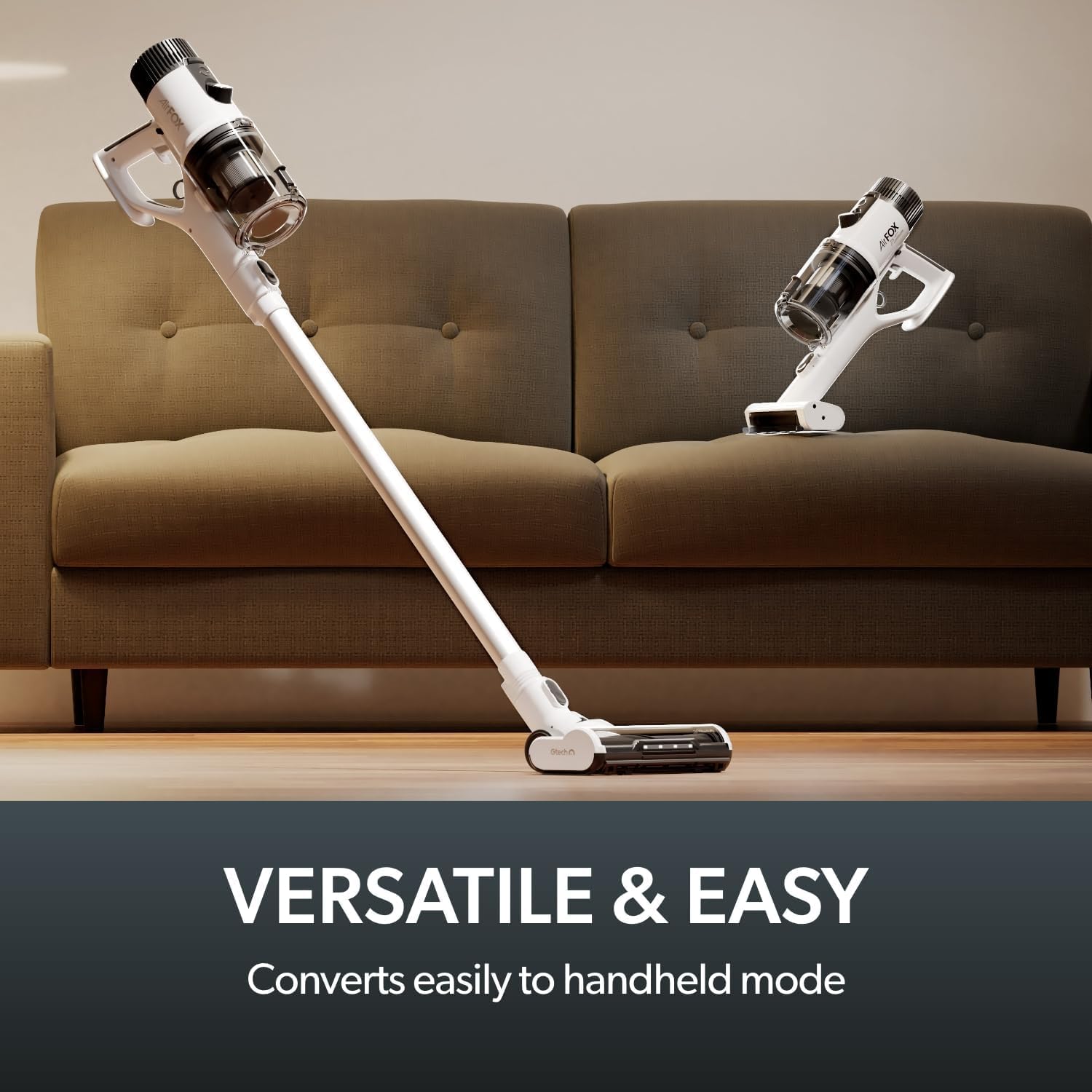
Figure 5.2: The vacuum easily converts to handheld mode for versatile cleaning.
5.4 Menggunakan Lampiran
The various attachments enhance the cleaning capabilities of your vacuum.
- Alat Celah: Ideal untuk celah sempit, sudut dan tepi.
- Alat Berus: Sesuai untuk mengelap habuk pada permukaan, bidai dan barang-barang halus.
- Alat Pelapis: Designed for cleaning fabric surfaces like sofas, chairs, and curtains.
- Flexible Tool: Extends reach for awkward spaces, such as under car seats or behind furniture.

Figure 5.3: LED headlights on the power head assist in illuminating hidden dust.
6. Penyelenggaraan
Regular maintenance ensures optimal performance and extends the lifespan of your Gtech AirFOX Platinum.
6.1 Mengosongkan Tong Habuk
Empty the dust bin when the 'bin full' indicator appears on the LCD display or when debris reaches the MAX fill line.
- Pastikan vakum dimatikan.
- Locate the dust bin release button on the main unit. Press it to detach the dust bin.
- Position the dust bin over a waste bin. Press the dust bin release latch to open the bottom flap and empty contents.
- Close the flap securely and reattach the dust bin to the main unit until it clicks.
6.2 Membersihkan Penapis
The filter should be cleaned regularly to maintain suction power. It is recommended to clean the filter monthly or more frequently with heavy use.
- Keluarkan tong habuk seperti yang diterangkan di atas.
- Twist and pull out the filter assembly from the dust bin.
- Ketik penapis perlahan-lahan di atas tong sampah untuk mengeluarkan habuk yang longgar.
- Bilas penapis di bawah air sejuk yang mengalir sehingga airnya jernih. Jangan gunakan detergen.
- Allow the filter to air dry completely for at least 24 hours before reinserting. Ensure it is completely dry to prevent damage to the motor.
- Reassemble the filter and dust bin, then reattach to the main unit.

Figure 6.1: The washable filter system ensures efficient dust retention.
6.3 Cleaning the Motorised Brush Bar
Periodically check the brush bar for tangled hair or debris and remove as necessary.
- Ensure the vacuum is turned off and disconnected from the charger.
- Turn the power head upside down.
- Locate the brush bar release mechanism (usually a latch or screw on the side). Open it to remove the brush bar.
- Carefully cut away any tangled hair or threads using scissors.
- Wipe the brush bar and its housing with a dry cloth.
- Reinsert the brush bar and secure the release mechanism.

Figure 6.2: The anti-hair wrap brush bar minimizes tangles and maintains cleaning efficiency.
7. Penyelesaian masalah
If you encounter issues with your Gtech AirFOX Platinum, refer to the following table for common problems and solutions.
| Masalah | Kemungkinan Punca | Penyelesaian |
|---|---|---|
| Vakum tidak dihidupkan. | Bateri tidak dicas atau tidak dipasang dengan betul. | Pastikan bateri dicas sepenuhnya dan diklik pada tempatnya dengan selamat. |
| Kehilangan sedutan. | Dust bin is full. Filter is clogged. Obstruction in nozzle, tube, or brush bar. | Empty dust bin. Clean or replace filter. Check for and remove any blockages. |
| Bar berus tidak berputar. | Brush bar is jammed with debris. Power head is not properly connected. | Clean brush bar of tangled hair/debris. Ensure power head is securely attached. |
| Masa jalan yang singkat. | Battery not fully charged. Using MAX mode excessively. Battery degradation. | Fully charge battery. Use ECO or AUTO mode for longer cleaning sessions. If battery life significantly degrades, consider battery replacement. |
| Bunyi yang tidak biasa. | Obstruction in brush bar or air pathways. Loose component. | Check for and remove any blockages. Ensure all components are securely assembled. |
If the problem persists after trying these solutions, please contact Gtech customer support for further assistance.
8. Spesifikasi
| Ciri | Perincian |
|---|---|
| Nombor Model | AF01 |
| Dimensi Produk | 27 x 24 x 118 cm |
| Berat badan | 2.9 kg |
| Kuasa Motor | Motor Tanpa Berus 450W |
| Jenis Bateri | Lithium-Ion 37V |
| Masa Jalanan Maks | Sehingga 80 minit (mod ECO) |
| Jenis Penapis | Buih (Boleh dibasuh) |
| Faktor Bentuk | Stick (2-in-1 Upright & Handheld) |
| Ciri Khas | Portable, Lightweight, Cordless, Compact, Bagless, LCD Display, Anti-Hair Wrap Brush Bar, LED Headlights |
9. Waranti dan Sokongan
Gtech products are designed for durability and performance. For information regarding your product's warranty, please refer to the warranty card included with your purchase or visit the official Gtech webtapak.
For technical support, spare parts, or service inquiries, please contact Gtech customer service:
- Webtapak: www.gtech.co.uk
- Perkhidmatan Pelanggan: Rujuk kepada webtapak untuk nombor hubungan dan waktu operasi.
Please have your model number (AF01) and purchase details ready when contacting support.


