pengenalan
Thank you for choosing the VTech ES2051 Digital Cordless Phone. This manual provides comprehensive instructions for setting up, operating, and maintaining your new phone system. The ES2051 is designed for ease of use, featuring a digital answering machine, call blocking capabilities, volume amplification, and an antibacterial plastic construction for enhanced hygiene.
Please read this manual thoroughly before using your phone to ensure proper operation and to take full advantage ciri-cirinya.
Maklumat Keselamatan
Sentiasa ikuti langkah berjaga-jaga keselamatan asas apabila menggunakan produk ini untuk mengurangkan risiko kebakaran, kejutan elektrik dan kecederaan kepada orang.
- Jangan gunakan produk ini berhampiran air atau semasa anda basah.
- Avoid using the phone during a thunderstorm. There may be a remote risk of electric shock from lightning.
- Jangan gunakan produk ini untuk melaporkan kebocoran gas di sekitar kebocoran.
- Use only the power adapter and batteries provided with this product.
- Jangan buang bateri ke dalam api. Mereka mungkin meletup. Semak dengan kod tempatan untuk arahan pelupusan khas.
- Cabut plag produk ini dari salur keluar dinding sebelum membersihkan. Jangan gunakan cecair atau pembersih aerosol. Gunakan iklanamp kain untuk pembersihan.
Kandungan Pakej
Pastikan semua item ada dalam pakej anda:
- Main Base Unit with Digital Answering Machine
- Cordless Handset(s) (typically two for this model)
- Handset Charger(s) (for additional handsets)
- Penyesuai Kuasa
- Tali Talian Telefon
- NiMH AAA Rechargeable Batteries (4 included)
- Manual Pengguna (dokumen ini)
Persediaan
1. Menyambung Unit Pangkalan
- Palamkan hujung kecil penyesuai kuasa ke dalam bicu kuasa di bahagian belakang unit asas.
- Palamkan hujung besar penyesuai kuasa ke salur keluar dinding yang tidak dikawal oleh suis dinding.
- Plug one end of the telephone line cord into the telephone jack on the back of the base unit.
- Palamkan hujung satu lagi kord talian telefon ke dalam bicu dinding telefon.
2. Installing and Charging Batteries
- Buka penutup petak bateri di belakang telefon bimbit.
- Insert the supplied NiMH AAA batteries, observing the correct polarity (+ and -).
- Tutup penutup petak bateri.
- Place the handset in the base unit or charger to charge. The handset will beep, indicating it is charging.
- Allow the handset to charge for at least 16 hours before initial use. For optimal battery performance, keep the handset in the charger when not in use.

Image: The VTech ES2051 Digital Cordless Phone system, showing the main base with one handset and a charging cradle for the second handset, ready for setup.
Arahan Operasi
Membuat dan Menerima Panggilan
- Untuk Membuat Panggilan: Tekan BICARA / FLASH or PENCERAMAH, then dial the phone number.
- Untuk Menjawab Panggilan: Tekan BICARA / FLASH or PENCERAMAH apabila telefon berdering.
- Untuk Menamatkan Panggilan: Tekan OFF/CLEAR or place the handset back in the base/charger.
Mesin Penjawab Digital
The integrated digital answering machine can record up to 30 minutes of messages. It automatically answers calls when you are unavailable.
- Memainkan Mesej: Tekan MAIN/BERHENTI pada unit asas.
- Memadamkan Mesej: Tekan PADAM semasa main balik mesej.
- Merakam Pengumuman: Follow the instructions in the full manual for custom outgoing message recording.

Image: A woman interacting with the VTech ES2051 phone, highlighting the digital message counter on the base unit, which indicates the number of new messages.
Penyekat Panggilan
The selective call blocking feature allows you to block up to 100 unwanted numbers, preventing them from ringing your phone.
- Untuk Menyekat Nombor: During a call or from the Caller ID log, press the PANGGILAN PANGGILAN button (often represented by a specific icon) and follow the on-screen prompts to add the number to the blacklist.
- Mengurus Nombor Tersekat: Access the call block list through the handset menu to review or remove blocked numbers.

Image: A visual representation of the call blocker feature, showing a family in a kitchen setting with an icon indicating unwanted calls are being blocked.
Kelantangan Amplebih hidup
Kelantangan amplification feature enhances incoming sounds and voices, improving clarity and volume in the handset earpiece. This is particularly useful for users with hearing impairments or those who prefer a louder audio experience.
- Activating/Adjusting: During a call, press the dedicated PENINGKATAN VOLUME button (often indicated by a speaker icon with a plus sign) or use the volume up/down keys to increase the earpiece volume.
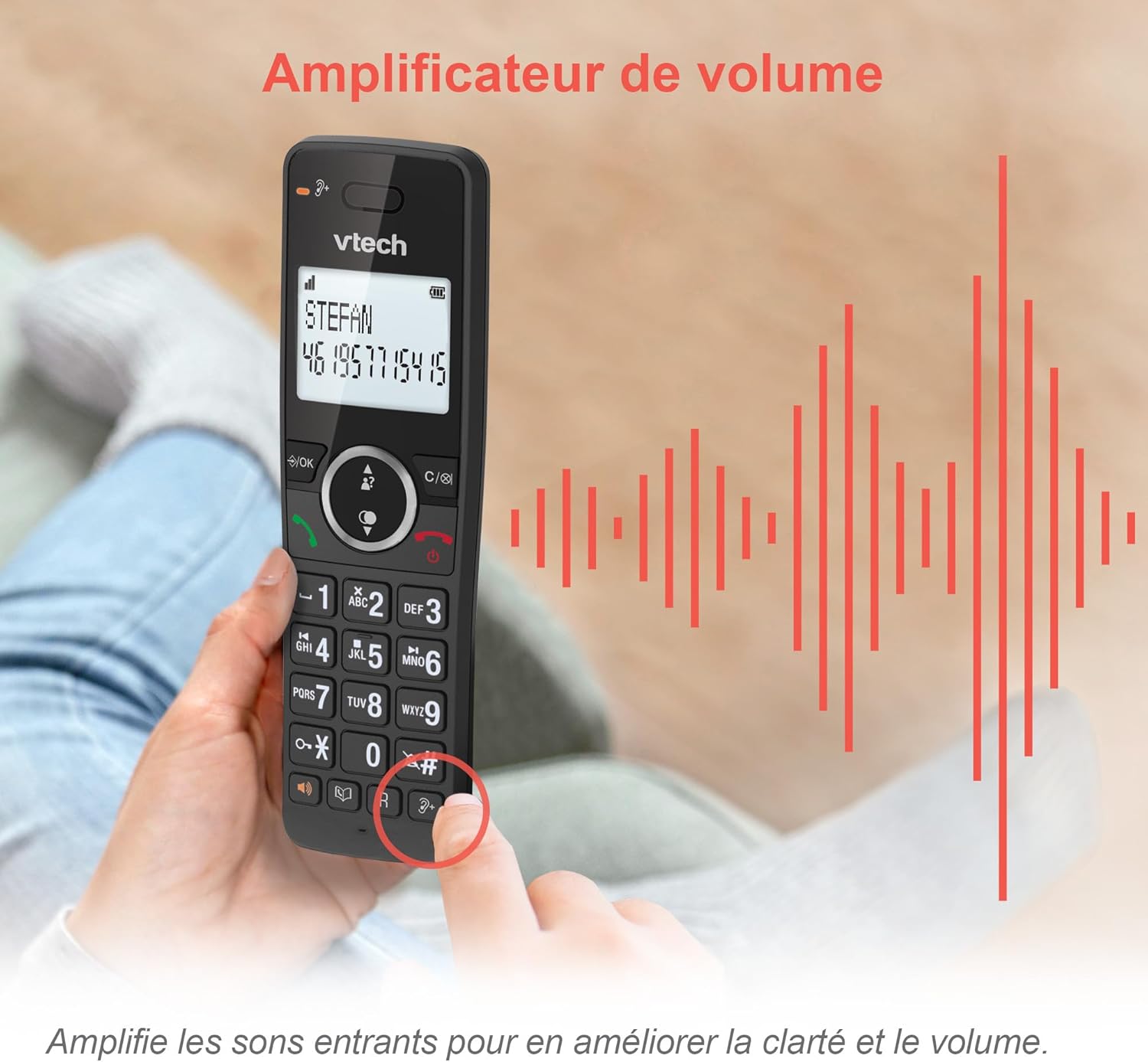
Image: A hand holding the VTech ES2051 handset, with graphic sound waves emanating from the earpiece, illustrating the volume ampciri lifikasi.
Conference Function
The conference function allows multiple users to participate in a single conversation. You can set up a three-way conference call with two internal callers (handsets) and one external caller.
- Memulakan Panggilan Persidangan: Refer to the detailed instructions in the full manual for specific steps on how to add a third party to an ongoing call.

Image: Three people engaged in a conversation, visually representing the three-way conference call capability of the VTech ES2051 phone system.
Fungsi Interkom
The intercom feature allows you to communicate between handsets within your home without using the landline. This is useful for calling family members in different rooms.
- Menggunakan Interkom: Tekan ke INTERKOM button (if available) or access the intercom function through the handset menu, then select the desired handset to call.
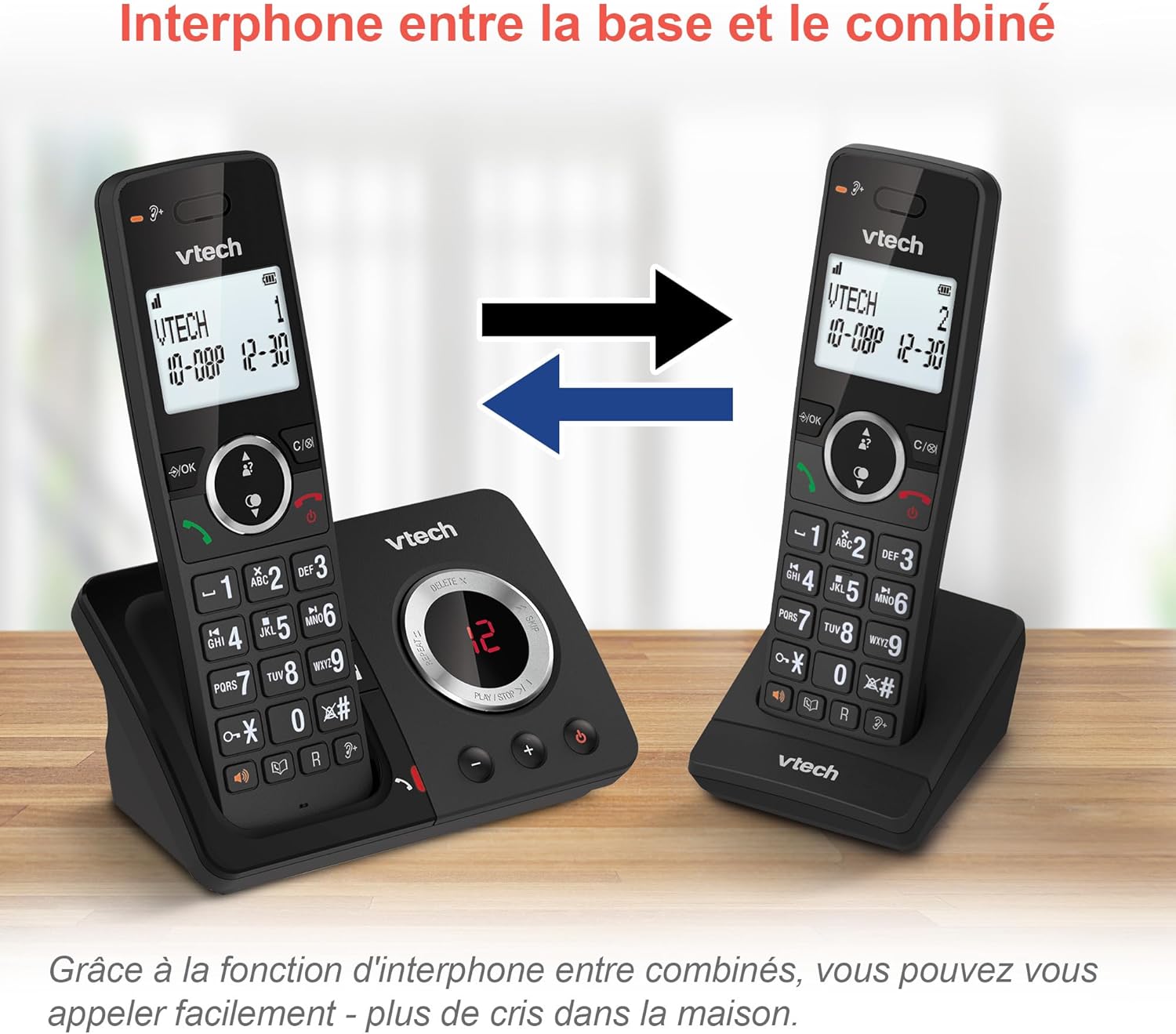
Image: A diagram showing two VTech ES2051 handsets with arrows indicating communication between them, illustrating the intercom feature.
Phonebook and Call Features
The phone includes a 100-name and number phonebook, 8 speed dial keys, and a backlit screen and keypad for easy visibility.
- Menyimpan Kenalan: Navigate to the phonebook menu to add, edit, or delete contacts.
- Dail Cepat: Assign frequently called numbers to the 8 speed dial keys for quick access.
- Caller ID Log: Review the last 20 incoming calls with Caller ID information.
- Panggil semula: Access the list of the last 10 dialed numbers for quick redialing.

Image: A collage of images showcasing various VTech ES2051 phone features, including the 100-entry phonebook, call display, redial function, and an 18-hour talk time battery life indicator.
Mod ECO
The ECO mode automatically adjusts and minimizes the radio frequency power based on the distance between the handset and the base unit. This feature helps conserve energy and reduce power consumption.
Penyelenggaraan
Membersihkan Telefon
The VTech ES2051 is made with antibacterial plastic and features a seamless, easy-to-clean design. To clean your phone:
- Unplug the base unit from the wall outlet and telephone line.
- Wipe the phone surfaces with a soft, damp kain. Jangan gunakan cecair atau pembersih aerosol.
- Ensure the phone is completely dry before plugging it back in.
Penjagaan Bateri
- Use only the supplied rechargeable NiMH AAA batteries.
- Jangan buang bateri ke dalam api.
- Jika telefon tidak akan digunakan untuk tempoh yang lama, tanggalkan bateri untuk mengelakkan kebocoran.
Menyelesaikan masalah
If you experience any issues with your VTech ES2051 phone, try the following troubleshooting steps:
| Masalah | Penyelesaian |
|---|---|
| Tiada nada dail | Ensure the telephone line cord is securely plugged into both the base unit and the wall jack. Check if other phones on the same line are working. |
| Tidak boleh membuat atau menerima panggilan | Check the power connection to the base unit. Ensure the handset batteries are charged. If using a DSL service, you may need a DSL filter. |
| Handset displays "Out of Range" or "No Power at Base" | Move the handset closer to the base unit. Ensure the base unit's power adapter is securely plugged in. |
| Mesin menjawab tidak merakam mesej | Check if the answering machine is turned ON. Ensure there is enough recording time available (max 30 minutes). |
| Kualiti audio yang teruk atau statik | Gerakkan telefon bimbit lebih dekat ke unit asas. Elakkan meletakkan unit asas berhampiran peranti elektronik lain (cth, gelombang mikro, penghala Wi-Fi) yang boleh menyebabkan gangguan. |
If the problem persists after trying these steps, please refer to the VTech support webtapak atau hubungi perkhidmatan pelanggan untuk bantuan lanjut.
Spesifikasi
| Ciri | Perincian |
|---|---|
| Jenama | VTech |
| Nombor Model | ES2051 |
| warna | hitam |
| Jenis Telefon | Tanpa wayar |
| Jenis Sistem Menjawab | digital |
| Masa Rakaman Mesin Penjawab Telefon | Sehingga 30 minit |
| Peranti Serasi | Landlines, Answering Machine |
| Bateri | 4 AAA - included |
| Komposisi Bateri | NiMH |
| Sumber Kuasa | Dikuasakan Bateri |
| bahan | Plastic (Antibacterial) |
| Jenis Pendail | Simple Keypad |
| Dimensi Item (L x W x H) | 18.3 x 13.5 x 11 sentimeter |
| Negara Asal | China |
Waranti dan Sokongan
VTech products are manufactured to high-quality standards. For information regarding warranty coverage, please refer to the warranty card included with your product or visit the official VTech webtapak untuk wilayah anda.
For technical support, frequently asked questions, or to download the full user manual, please visit the VTech support section online or contact their customer service helpline. Contact details can typically be found on the VTech webtapak atau pada pembungkusan produk.


