pengenalan
Thank you for choosing the FosPower Emergency Weather Radio (Model D8). This multi-functional device is designed to provide reliable communication, power, and illumination during emergencies, power outages, or outdoor activities. With its robust features and multiple charging methods, it ensures you stay connected and prepared.

Image: The FosPower Emergency Weather Radio (Model D8) in orange and black, shown charging a smartphone via its USB port. The radio features a digital display, a flashlight on one end, and a compass on its strap.
Produk Selesaiview
Familiarize yourself with the key components of your FosPower Emergency Weather Radio:
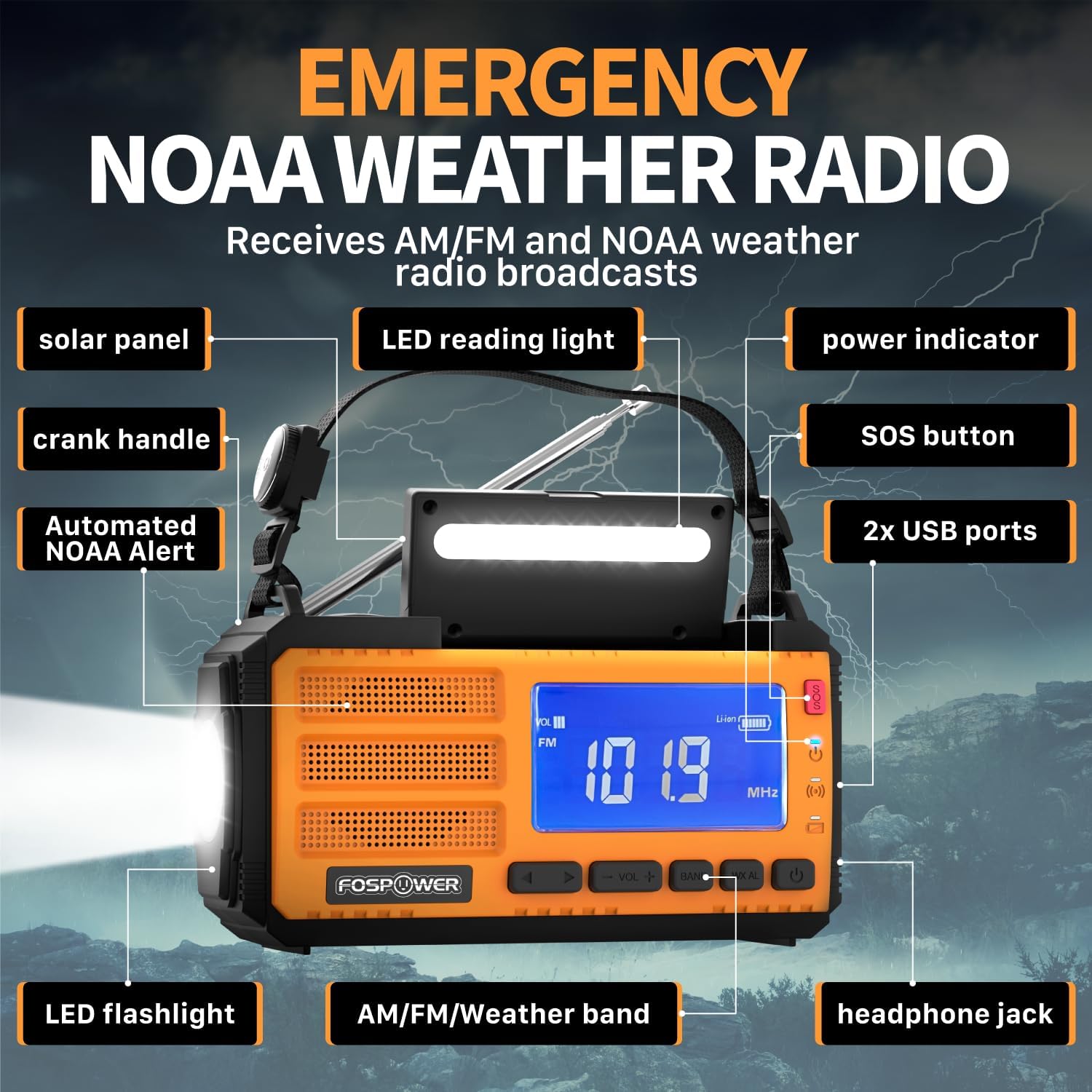
Image: A detailed diagram highlighting the various components of the FosPower Emergency Weather Radio, including the solar panel, LED reading light, power indicator, SOS button, USB ports, LED flashlight, AM/FM/Weather band controls, headphone jack, and crank handle.
- Panel Suria: Located on top for solar charging.
- Pemegang engkol: Foldable handle for manual power generation.
- Lampu suluh LED: Integrated on one end for directional lighting.
- Lampu Bacaan LED: Located under the solar panel for ambient light.
- Port USB: For charging external devices and recharging the radio.
- Butang SOS: Activates a loud siren and flashing light for emergencies.
- Penunjuk Kuasa: Memaparkan paras bateri semasa.
- AM/FM/Weather Band Controls: Buttons for radio tuning and volume.
- Jack fon kepala: Port 3.5mm untuk pendengaran peribadi.
- Automated NOAA Alert: Feature to monitor local NOAA channels.
- Holding Strap with Compass: For portability and navigation.
Persediaan
Pengecasan Awal
Before first use, it is recommended to fully charge the radio using the USB-C charging cable. Connect the USB-C end to the radio's input port and the USB-A end to a compatible USB power adapter (not included) or computer USB port. The power indicator lights will show charging progress.
Komponen yang Disertakan
- FosPower Emergency Weather Radio (Model D8)
- Holding Strap with Compass
- Kabel Pengecas USB-A ke USB-C
Arahan Operasi
Operasi Radio
- Hidupkan/Mati Kuasa: Tekan butang kuasa untuk menghidupkan atau mematikan radio.
- Pemilihan Band: Press the 'BAND' button to cycle through AM, FM, and NOAA Weather Band (WB) frequencies.
- tuning: Use the 'TUNE +/-' buttons to manually adjust the frequency. For automatic scanning, press and hold the 'TUNE +/-' button.
- Kawalan Kelantangan: Use the 'VOL +/-' buttons to increase or decrease the volume.
- Antena: Extend the telescopic antenna fully for optimal FM and Weather Band reception. For AM, rotate the radio for best signal.
Fungsi Cahaya

Image: The FosPower Emergency Weather Radio demonstrating its flashlight function on one end and its reading light function, which is located beneath the solar panel.
- Lampu suluh: Press the dedicated flashlight button to turn it on. Some models may have multiple brightness settings or a strobe function, which can be cycled by pressing the button repeatedly.
- Lampu Bacaan: Lift the solar panel to reveal the LED reading light. Press the reading light button to turn it on.
Penggera SOS
In an emergency, press and hold the 'SOS' button. This will activate a loud siren and a flashing light to attract attention. Press the button again to deactivate the alarm.

Image: The FosPower Emergency Weather Radio with a red pulsating light indicating the SOS alarm is active, set against a backdrop of a stormy sky with lightning.
Pilihan Pengecasan
The FosPower Emergency Weather Radio offers three versatile charging methods to ensure power availability in any situation:

Imej: Tiga pandangan dekat views of the FosPower Emergency Weather Radio demonstrating its multiple power sources: USB charging port, solar panel, and hand-crank.
- Pengecasan USB-C: For the fastest and most efficient charge, use the provided USB-C cable to connect the radio to a USB power source.
- Pengecasan Suria: Place the radio with the solar panel facing direct sunlight. This method is ideal for maintaining charge or for slow charging in outdoor environments.
- Pengecasan Engkol Tangan: Extend the hand crank and rotate it clockwise or counter-clockwise at a steady pace. This method provides power for short bursts of use or to generate enough charge for other charging methods.
Fungsi Power Bank
The radio features a 37000mWh (10000mAh) power bank, allowing you to charge your USB-powered devices, such as smartphones, during emergencies or when off-grid. Connect your device to the radio's USB output port using your device's charging cable.

Image: The FosPower Emergency Weather Radio set against a natural background, highlighting its "37000mWh INTERNAL BATTERIES" and stating "High-capacity batteries support all day use."
Penyelenggaraan
- Pembersihan: Lap radio dengan kain lembut dan kering. Jangan gunakan pembersih atau pelarut yang melelas.
- Storan: Simpan radio di tempat yang sejuk dan kering jauh dari cahaya matahari langsung dan suhu yang melampau.
- Penjagaan Bateri: For optimal battery life, fully charge the radio at least once every three months if not in regular use.
Menyelesaikan masalah
| Masalah | Kemungkinan Punca | Penyelesaian |
|---|---|---|
| Radio tidak dihidupkan. | Bateri lemah atau habis. | Charge the radio using USB-C, solar, or hand-crank methods. |
| Penerimaan radio yang lemah. | Antena tidak dilanjutkan atau kawasan isyarat lemah. | Fully extend the telescopic antenna. Try repositioning the radio or moving to an open area. For AM, rotate the radio. |
| Peranti luaran tidak dicas. | Radio battery too low or incorrect cable. | Pastikan radio mempunyai cas yang mencukupi. Gunakan kabel pengecas USB yang serasi untuk peranti anda. |
| Flashlight/Reading light not working. | Low battery or light button not pressed correctly. | Charge the radio. Ensure the light button is pressed firmly. |
Spesifikasi
- Dimensi Produk: 6.89 x 3.15 x 3.86 inci
- Berat Barang: 1.43 paun
- Nombor Model: FOSPWB-2436PP
- Bateri: 1 bateri Polimer Litium (termasuk)
- Sumber Kuasa: Solar, Battery, Handcrank
- Pancaragam Radio Disokong: AM, FM, WB (Weather Band)
- Ciri Khas: Built-In Flashlight, SOS Alarm, Power Bank
- Teknologi Ketersambungan: USB
Waranti dan Sokongan
FosPower offers a Waranti Seumur Hidup Terhad for this product. For any inquiries or support needs, please contact FosPower customer service. Details regarding the warranty and how to reach support can typically be found on the manufacturer's official webtapak atau melalui platform pembelian anda.
Join millions of satisfied customers with our limited lifetime warranty, backed by our experienced and dedicated USA based customer service.


