1. Pengenalan
Thank you for choosing the Gosund SP111 Smart WiFi Plug. This device allows you to control your electronic appliances remotely via a smartphone application or voice commands, and to set schedules for automated operation. Please read this manual carefully before use to ensure proper installation and operation.
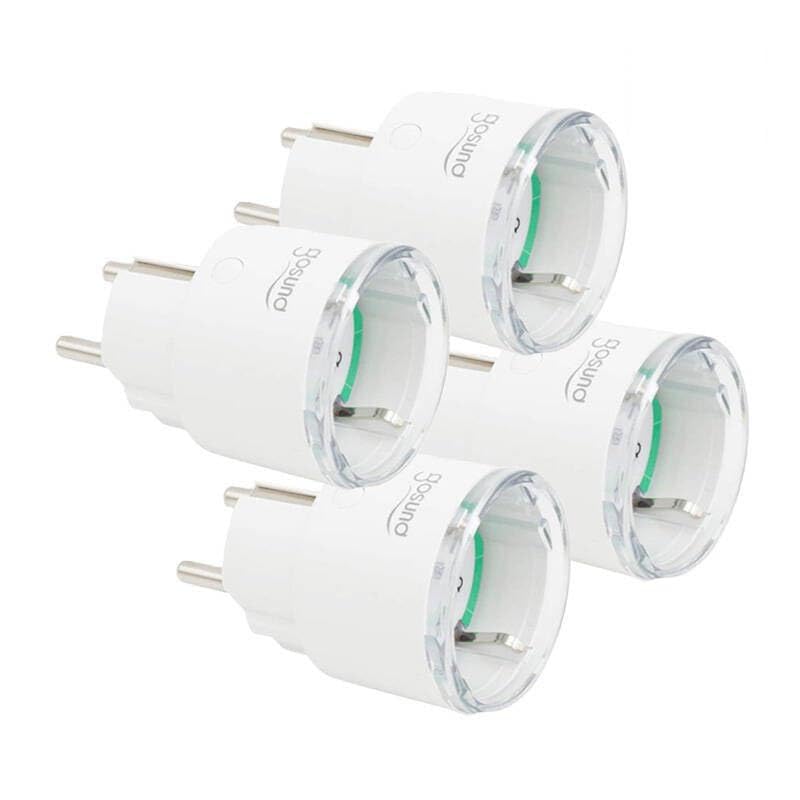
This image displays four white Gosund SP111 Smart WiFi Plugs. Each plug features a standard European Type F (Schuko) plug on one side and a corresponding socket on the other, with the Gosund logo printed on the side. A small indicator light and a button are visible on the top surface of each plug.
2. Maklumat Keselamatan
- Do not exceed the maximum load current of 16A or power of 3680W.
- Jangan buka atau ubah suai peranti.
- Jauhkan peranti daripada air, kelembapan dan suhu tinggi.
- Untuk kegunaan dalaman sahaja.
- Ensure the plug is fully inserted into the wall socket.
- Do not connect appliances that could cause a fire hazard if left unattended (e.g., irons, heaters).
3. Kandungan Pakej
Pakej termasuk item berikut:
- 4 x Gosund SP111 Smart WiFi Plugs
- 1 x Manual Pengguna (dokumen ini)
4. Produk Lebihview
Familiarize yourself with the components of your Gosund SP111 Smart WiFi Plug:
- Butang Kuasa: Press to manually turn the plug on/off. Press and hold for 5 seconds to enter pairing mode.
- Lampu Penunjuk: Indicates the status of the plug (e.g., solid blue for ON, flashing blue for pairing mode, off for OFF).
- Type F (Schuko) Socket: Untuk menyambungkan perkakas anda.
- Type F (Schuko) Plug: For inserting into a wall outlet.
5. Persediaan
5.1 Muat turun Aplikasi
The Gosund SP111 Smart WiFi Plug works with the Tuya Smart or Smart Life app. Download the app from the App Store (iOS) or Google Play Store (Android).
- Cari untuk "Tuya Smart" or "Smart Life".
- Pasang apl dan daftar akaun.
5.2 Tambah Peranti
- Plug the Gosund SP111 Smart WiFi Plug into a wall outlet.
- The indicator light should flash rapidly (approximately twice per second), indicating it's in pairing mode. If not, press and hold the power button for 5 seconds until it flashes rapidly.
- Buka aplikasi Tuya Smart atau Smart Life.
- Ketik ikon "+" di penjuru kanan sebelah atas untuk menambah peranti.
- Select "Electrical Outlet" or "Socket (Wi-Fi)".
- Sahkan bahawa lampu penunjuk berkelip dengan pantas.
- Enter your 2.4 GHz Wi-Fi network password (5 GHz Wi-Fi is not supported).
- Wait for the device to connect. Once connected, you can rename the plug.
6. Beroperasi
6.1 Kawalan Manual
Press the power button on the plug to manually turn the connected appliance on or off.
6.2 Kawalan Apl
- Jauh Hidup/Mati: Tap the plug icon in the app to turn it on or off from anywhere.
- Penjadualan: Set timers or schedules for the plug to turn on or off automatically at specific times.
- Kiraan balik: Set a countdown timer for the plug to turn off after a set duration.
- Pemantauan Tenaga: (If supported by the specific SP111 variant) View real-time and historical power consumption.
6.3 Kawalan Suara
The Gosund SP111 Smart WiFi Plug can be integrated with voice assistants like Amazon Alexa and Google Assistant via the Tuya Smart or Smart Life app. Follow the instructions within the app to link your smart home assistant account.
- Example perintah:
- "Alexa, turn on [Plug Name]"
- "Hey Google, turn off [Plug Name]"
7. Penyelenggaraan
- Cabut plag peranti sebelum membersihkan.
- Wipe the surface with a soft, dry cloth. Do not use liquid cleaners or abrasive materials.
- Simpan di tempat yang sejuk dan kering apabila tidak digunakan untuk tempoh yang lama.
8. Penyelesaian masalah
| Masalah | Penyelesaian |
|---|---|
| Plug cannot connect to Wi-Fi. |
|
| Lampu penunjuk padam. |
|
| Appliance connected to the plug does not turn on. |
|
9. Spesifikasi
| model: | SP111-4 |
| Input Voltage: | AC 230V, 50/60Hz |
| Muatan Maksimum Arus: | 16A |
| Kuasa Maks: | 3680W |
| Jenis wayarles: | Wi-Fi 2.4GHz (802.11 b/g/n) |
| Sokongan Aplikasi: | Tuya Smart / Smart Life |
| Suhu Operasi: | 0°C hingga 40°C (32°F hingga 104°F) |
10. Waranti dan Sokongan
Gosund products are designed and manufactured to the highest quality standards. For warranty information and technical support, please refer to the official Gosund webtapak atau hubungi peruncit anda. Simpan resit pembelian anda sebagai bukti pembelian.
Untuk bantuan lanjut, sila layari: www.gosund.com/support


