1. Produk Lebihview
The Superfire G12 Workshop Flashlight is a versatile and durable lighting tool designed for various tasks. It integrates two powerful light sources, a high-capacity rechargeable battery, and practical features like a digital display and power bank functionality. Its robust construction and adaptable mounting options make it an essential tool for workshops, outdoor activities, and emergency situations.
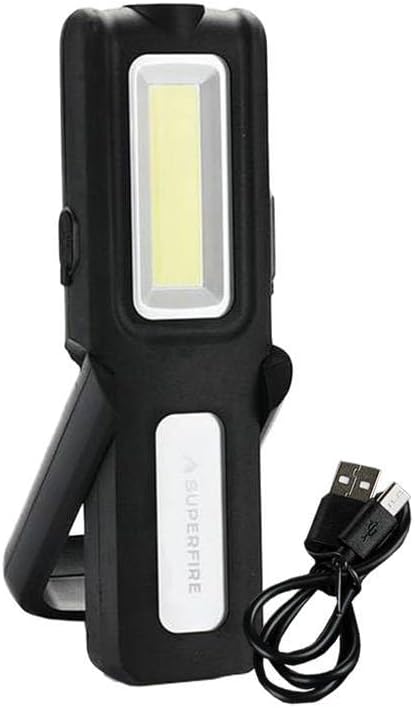
Image 1.1: The Superfire G12 Workshop Flashlight shown with its included USB charging cable. The flashlight features a main rectangular COB LED light panel and a smaller top LED spotlight. It has a black body with a white panel displaying the 'SUPERFIRE' logo and a foldable stand/handle.
2. Ciri-ciri Utama
- Sumber Cahaya Dwi: Equipped with a main COB LED panel for wide area illumination and a top LED spotlight for focused, long-range lighting.
- Kecerahan boleh laras: Easily control light intensity using dedicated '+' and '-' buttons.
- Bateri Berkapasiti Tinggi: Features a 1200mAh battery for extended operation.
- Fungsi Bank Kuasa: Can be used to charge other devices via its USB output.
- Paparan Bateri Digital: A clear digital screen indicates the remaining battery percentage.
- Pembinaan Tahan Lama: Made from robust TPR plastic with structural reinforcements for wear resistance.
- Pemasangan Serbaguna: Includes a 180° rotating handle, a 360° hanging hook, and strong magnetic elements for hands-free use on metal surfaces.
3. Kandungan Pakej
Sila semak pakej untuk item berikut:
- 1 x Superfire G12 Workshop Flashlight
- 1 x Kabel Pengecas USB
4. Persediaan
4.1 Pengecasan Awal
Before using your Superfire G12 flashlight for the first time, it is recommended to fully charge the battery. Connect the smaller end of the provided USB charging cable to the flashlight's micro USB port and the larger end to a standard USB power adapter (not included) or a computer's USB port. The digital display will show the charging status and battery percentage. Charging is complete when the display shows 100%.
5. Arahan Operasi
5.1 Kuasa Hidup/Mati dan Pemilihan Mod
- To turn on the flashlight, press the power button located on the side of the device.
- Subsequent presses of the power button will cycle through the different lighting modes: Main COB LED → Top LED Spotlight → Off.
5.2 Pelarasan Kecerahan
While the flashlight is on, use the '+' and '-' buttons to adjust the brightness level of the active light source. Pressing '+' will increase brightness, and pressing '-' will decrease it. The digital display may show the current brightness level or battery percentage depending on the model's specific implementation.
5.3 Using the Mounting Features
- Pemegang berputar: Adjust the integrated handle to your desired angle for comfortable handheld use or to position the light. The handle rotates 180 degrees.
- Cangkuk Gantung: Extend the 360-degree rotating hook from the top of the flashlight to hang it from ropes, branches, or other fixtures.
- Pangkalan Magnetik: The strong magnets on the base allow you to securely attach the flashlight to any ferrous metal surface for hands-free operation.
6. Fungsi Pengecasan dan Bank Kuasa
6.1 Recharging the Flashlight
When the battery level is low, as indicated by the digital display, recharge the flashlight using the provided USB cable. Connect the micro USB end to the flashlight and the USB-A end to a compatible power source (e.g., computer USB port, wall adapter, car charger). The digital display will show the charging progress.
6.2 Menggunakan sebagai Power Bank
The Superfire G12 can serve as an emergency power bank for small electronic devices. Connect your device's charging cable to the USB output port on the G12 flashlight. The flashlight's battery will then begin to charge your connected device. Monitor the G12's digital display to keep track of its remaining battery percentage.
7. Penyelenggaraan
- Pembersihan: Wipe the flashlight's exterior with a soft, slightly damp cloth. Do not use harsh chemicals, abrasive cleaners, or immerse the device in water.
- Storan: Store the flashlight in a cool, dry place away from direct sunlight and extreme temperatures. If storing for extended periods, charge the battery every 3-6 months to maintain its lifespan.
- Penjagaan Bateri: Avoid fully depleting the battery frequently. Recharge it when the battery indicator shows low levels.
8. Penyelesaian masalah
| Masalah | Kemungkinan Punca | Penyelesaian |
|---|---|---|
| Lampu suluh tidak menyala. | Bateri habis. | Cas lampu suluh sepenuhnya menggunakan kabel USB yang disediakan. |
| Cahaya malap atau berkelip. | Tahap bateri rendah. | Isi semula lampu suluh. |
| Cannot charge external device (power bank function). | Flashlight battery is too low or cable is faulty. | Ensure the flashlight is sufficiently charged. Try a different USB cable. |
9. Spesifikasi
| Atribut | Nilai |
|---|---|
| Jenama | Superfire |
| Rujukan Model | G12 |
| Keluaran Lumen | 566 lm |
| Kapasiti Bateri | 1200mAh |
| Port Pengecasan | USB mikro |
| bahan | TPR Plastic |
| ASIN | B0CWS6YMHY |
| Tarikh Tersedia Pertama | 29 Februari 2024 |
10. Waranti dan Sokongan
For detailed warranty information, product registration, or technical support, please refer to the warranty card included with your purchase or visit the official Superfire weblaman web. Anda juga boleh menghubungi tempat pembelian anda untuk mendapatkan bantuan.
Sila simpan bukti pembelian anda untuk sebarang tuntutan waranti.


