1. Pengenalan
This manual provides detailed instructions for the assembly, operation, maintenance, and troubleshooting of your FLEXISPOT E6 MAX Electric Height Adjustable Standing Desk. Please read this manual thoroughly before assembly and use to ensure safe and efficient operation of your desk.
The FLEXISPOT E6 MAX features a durable bamboo desktop, a robust dual-motor system for smooth height adjustments, and a programmable control panel for personalized ergonomic settings. It is designed to support a healthy and productive workspace.

Image: The FLEXISPOT E6 MAX standing desk in an office setup, showcasing its bamboo desktop and black frame with integrated control panel.
2. Maklumat Keselamatan
Arahan Keselamatan Penting:
Always use the height adjustment feature slowly and carefully to prevent injury. Do not exceed the weight capacity of 352 pounds to ensure stability and safety.
- Ensure all cables are properly managed and secured to prevent entanglement during height adjustments.
- Jauhkan kanak-kanak dan haiwan peliharaan dari meja semasa operasi.
- Jangan duduk atau berdiri di atas meja meja.
- Elakkan meletakkan cecair terus pada panel kawalan atau berhampiran komponen elektrik.
- Periksa dengan kerap semua pengikat dan sambungan untuk memastikan ia selamat.
- If any unusual noise or movement occurs, discontinue use and contact support.
3. Kandungan Pakej
Verify that all components are present before beginning assembly. If any parts are missing or damaged, please contact FLEXISPOT customer support.
- Bamboo Desktop (48"x24" Whole-Piece)
- Black Frame (Dual Motor, 3-Stage Legs)
- Control Panel with Digital Display and Memory Presets
- Penyesuai Kuasa dan Kabel
- Perkakasan Pemasangan (skru, bolt, dsb.)
- Assembly Tools (Hex keys, etc.)
- Complimentary Accessories:
- Velcro Straps (for cable management)
- Set of Wheels (casters)
- Cable Manager (under-desk clip)

Image: Complimentary accessories included with the desk, such as Velcro straps, a set of wheels, and a cable manager.
4. Persediaan dan Pemasangan
Assembly typically requires 1-2 hours. While it is possible to assemble alone, having a second person can make the process easier due to the weight of the components.
- Buka Pembungkusan Komponen: Keluarkan semua bahagian dari bungkusan dengan berhati-hati dan letakkannya di atas permukaan yang bersih dan lembut untuk mengelakkan calar.
- Pasang Kerangka Meja: Follow the included assembly guide to connect the crossbar, side brackets, and lifting columns. Ensure all bolts are tightened securely.
- Attach Feet/Casters: Decide whether to install the included casters (wheels) or the standard leveling feet.
- If installing casters, note that the lowest desk height will be approximately 27.5 inches. Removing the casters can lower the minimum height by an additional 2.5 inches.
- Pasang Desktop: Carefully place the bamboo desktop upside down on a soft surface. Align the assembled frame with the pre-drilled holes on the desktop.
- Nota: Some pre-drilled holes may not perfectly align, or some parts may require new holes. A power drill is highly recommended for securing all components firmly to the desktop.
- Pasang Panel Kawalan: Attach the control panel to the underside of the desktop in the designated location.
- Connect Motors and Control Box: Connect the motor cables to the control box, and then connect the control box to the control panel. Ensure all connections are firm.
- Pengurusan Kabel: Use the provided Velcro straps and cable manager to organize and secure all cables, preventing them from interfering with the desk's movement.
- Sambungan Kuasa: Connect the power adapter to the control box and then plug it into a wall outlet.

Image: Illustration of the desk's three-stage leg system, providing continuous height adjustment from 24.4 inches to 50 inches.
5. Arahan Operasi
The FLEXISPOT E6 MAX desk features a user-friendly control panel for easy height adjustments and memory settings.
5.1 Fungsi Panel Kawalan
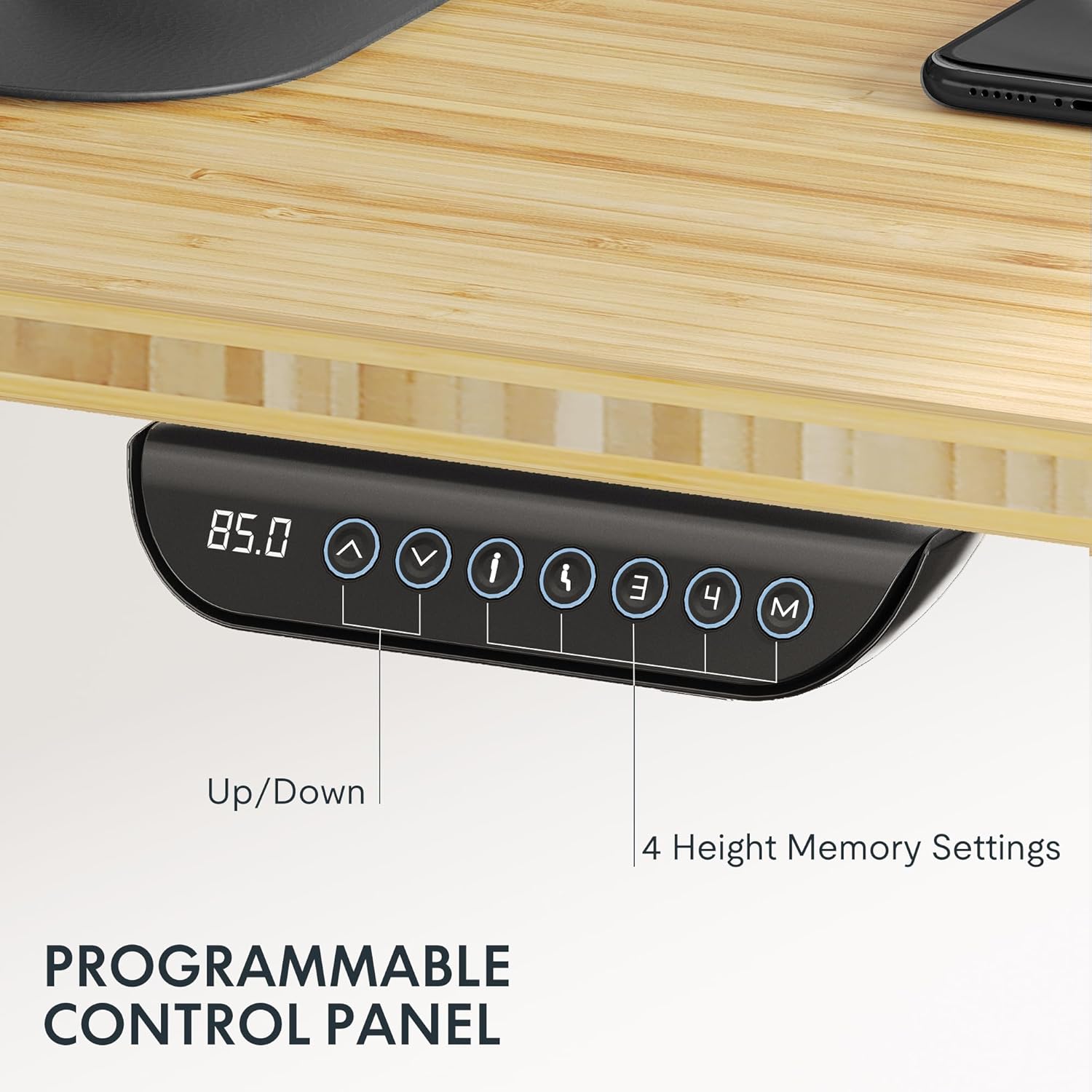
Image: The programmable control panel, featuring a digital height display, up/down buttons, and four memory preset buttons.
- Anak Panah Atas/Bawah (↑ / ↓): Press and hold to adjust the desk height manually. Release to stop.
- Paparan Digital: Menunjukkan ketinggian meja semasa dalam inci atau sentimeter.
- Butang Memori (1, 2, 3, 4): These buttons allow you to save and recall preferred height settings.
- Untuk Menjimatkan Ketinggian: Adjust the desk to your desired height. Press the "M" button, then immediately press one of the number buttons (1, 2, 3, or 4) until you hear a beep or see the display flash. The height is now saved.
- Untuk Mengingat Ketinggian: Press the corresponding number button (1, 2, 3, or 4). The desk will automatically move to the saved height.
- Ciri Anti-Perlanggaran: The desk is equipped with an anti-collision system. If the desk encounters an obstacle during adjustment, it will automatically stop and reverse slightly to prevent damage or injury.
5.2 Kapasiti Berat
The FLEXISPOT E6 MAX desk has a maximum load capacity of 330 lbs (150 kg). Do not exceed this weight to ensure proper function and safety.

Image: The desk demonstrating its robust 330 lbs load capacity with heavy items placed on the desktop.
6. Penyelenggaraan
- Pembersihan: Lap desktop dan bingkai dengan lembut, damp kain. Elakkan bahan kimia yang keras atau pembersih yang kasar.
- Pengurusan Kabel: Periodically check that all cables are securely managed and not interfering with the desk's movement.
- Pemeriksaan Pengikat: Every few months, inspect all screws and bolts to ensure they remain tight. Tighten if necessary.
- Pemeriksaan Motor: Listen for any unusual noises during operation. If you notice anything abnormal, contact customer support.
7. Penyelesaian masalah
If you encounter any issues with your FLEXISPOT E6 MAX desk, refer to the following common solutions. If the problem persists, contact customer support.
| Masalah | Kemungkinan Punca | Penyelesaian |
|---|---|---|
| Meja tidak bergerak | Power cable disconnected, control panel cable loose, overload. | Check power connection. Ensure all cables are securely plugged in. Reduce weight on the desk. Perform a reset (refer to specific reset instructions in the full manual, if available). |
| Pelarasan ketinggian tidak sekata | Obstruction, uneven weight distribution. | Kosongkan sebarang halangan. Agihkan semula berat secara sama rata di atas meja. |
| Meja berhenti semasa pelarasan | Anti-perlanggaran diaktifkan, motor terlalu panas. | Check for obstructions. Allow motors to cool down if used continuously for an extended period. |
| Pratetap memori tidak berfungsi | Pratetap tidak disimpan dengan betul. | Simpan semula tetapan ketinggian yang anda inginkan mengikut arahan dalam Bahagian 5.1. |
8. Spesifikasi
| Ciri | Perincian |
|---|---|
| Jenama | FLEXISPOT |
| Nombor Model | E6 |
| Bahan Desktop | Bamboo (Whole-Piece Board) |
| Bahan Bingkai | logam |
| Dimensi Desktop | 48"W x 24"D (121.9 cm x 61 cm) |
| Julat Pelarasan Tinggi | 24.4" - 50" (60 sm - 124 sm) |
| Jenis Motor | Motor Dwi |
| Stages | 3-Stage Lifting Columns |
| Kapasiti Muatan | Sehingga 330 paun (150 kg) |
| Tahap Kebisingan | Kurang daripada 50dB |
| Panel Kawalan | Programmable with 4 Memory Presets |
| Ciri Khas | Anti-collision system, Includes assembly tools, Optional casters |
| UPC | 810072854940 |

Image: Detailed dimensions of the desktop and the adjustable height ranges of the desk frame.
9. Maklumat Waranti
FLEXISPOT provides comprehensive warranty coverage for your E6 MAX Standing Desk:
- Perlindungan 10 Tahun: Applies to the desk frame and motor components.
- Perlindungan 2 Tahun: Applies to the control panel and other electronic components.
This warranty ensures peace of mind regarding the quality and durability of your product. For warranty claims or detailed terms and conditions, please contact FLEXISPOT customer support.
10. Sokongan Pelanggan
For any questions, assistance with assembly, troubleshooting, or warranty inquiries, please contact FLEXISPOT customer support.
You can find more information and contact details by visiting the official FLEXISPOT store:


