1. Pengenalan
Thank you for choosing the FLEXISPOT E6 MAX Standing Desk. This electric height-adjustable desk is designed to enhance your workspace ergonomics and productivity, allowing seamless transitions between sitting and standing positions. This manual provides essential information for the proper setup, operation, and maintenance of your new desk.
Please read this manual thoroughly before assembly and use to ensure safe and efficient operation.
2. Ciri-ciri Utama
- Durable Bamboo Desktop: Crafted from bamboo, known for its remarkable strength and flexibility, capable of withstanding daily use with a tensile strength of 28,000 pounds per square inch. The surface features a natural grain and elegant finish.
- Quiet Dual Motors: Equipped with dual motors for whisper-quiet height adjustments (less than 50dB). These powerful motors effortlessly lift up to 330 lbs (150KG), ensuring smooth transitions without disturbing your environment.
- Tiga-Stage Leg System: Provides continuous height adjustment, accommodating users of various heights, from children to extra tall adults.
- Programmable Control Panel: Features intuitive up/down buttons, blue backlighting, and four height memory settings for quick and precise ergonomic adjustments.
- Ciri Anti-Perlanggaran: Includes a built-in system that automatically retracts the desk upon encountering an obstacle, preventing accidents and protecting furniture, children, and pets.
- Complimentary Accessories: Comes with Velcro straps for cable management, a set of wheels for easy mobility, and a cable manager to keep your workspace tidy.
3. Spesifikasi Produk
| Atribut | Perincian |
|---|---|
| Jenama | FLEXISPOT |
| Nombor Model | E6 |
| Bahan Desktop | Bamboo (Whole-Piece Board) |
| Bahan Bingkai | Logam (Bingkai Hitam) |
| Dimensions (Desktop) | 55" D x 28" W |
| Julat Ketinggian | 23.6" - 50" (Continuous Adjustment) |
| Kapasiti Muatan | Up to 330 lbs (150KG) |
| Jenis Motor | Motor Dwi |
| Tahap Kebisingan | Kurang daripada 50dB |
| Panel Kawalan | Programmable with 4 Memory Presets |
| Perhimpunan Diperlukan | Ya (Alat disertakan) |
| UPC | 810072854988 |
4. Amaran Keselamatan Penting
- Had Berat: Do not exceed the maximum weight limit of 330 lbs (150KG). Exceeding this limit can cause damage to the desk and potentially lead to injury.
- Bunyi Motor: The desk's quiet dual motors generate less than 50dB of sound. Users should be aware of this minimal motor noise during operation.
- Sistem Anti-Perlanggaran: While the desk has an anti-collision feature, always ensure the area around the desk is clear during height adjustments to prevent accidents.
- Sumber Kuasa: Gunakan hanya penyesuai kuasa yang disediakan dan pastikan ia disambungkan ke soket yang dibumikan.
- Kanak-kanak dan Haiwan Kesayangan: Jauhkan kanak-kanak dan haiwan peliharaan dari meja semasa operasi untuk mengelakkan kecederaan.
5. Persediaan dan Pemasangan
Your FLEXISPOT E6 MAX Standing Desk arrives in two separate packages: one for the desktop and one for the frame components. All necessary assembly tools are included.
Langkah Perhimpunan:
- Buka bungkusan semua komponen dan sahkan terhadap senarai bahagian dalam manual yang disertakan.
- Assemble the frame according to the detailed instructions provided in the assembly guide. This typically involves attaching the crossbar, side brackets, and feet to the lifting columns.
- Attach the desktop to the assembled frame using the provided screws. The bamboo desktop comes with pre-drilled holes for easy alignment.
- Connect the motor cables to the control box and then connect the control box to the power supply.
- Install the control panel to the underside of the desktop in the designated area.
- Optionally, attach the included casters to the feet for easy mobility, or use the standard leveling feet for a stationary setup.
- Organize cables using the provided Velcro straps and cable manager for a clean and safe workspace.

Image: The FLEXISPOT E6 MAX Standing Desk fully assembled in a home office environment.

Image: Detail of the three-stage leg, illustrating continuous height adjustment from 24.4" to 50".
6. Arahan Operasi
Fungsi Panel Kawalan:
- Anak panah atas/bawah: Press and hold the up or down arrow buttons to manually adjust the desk height. Release the button to stop.
- Pratetap Memori (1, 2, 3, 4): The control panel features four programmable memory buttons.
- Menetapkan Pratetap Memori:
- Laraskan meja mengikut ketinggian yang diingini menggunakan anak panah atas/bawah.
- Press the 'M' button (Memory button). The display will show 'S-' or similar.
- Within 3 seconds, press the desired memory button (1, 2, 3, or 4) to save the current height. The display will confirm the setting.
- Mengingat Semula Pratetap Memori: Simply press the corresponding memory button (1, 2, 3, or 4), and the desk will automatically move to the saved height.
- Sistem Anti-Perlanggaran: The desk is equipped with an anti-collision sensor. If the desktop encounters an obstacle during movement, it will automatically stop and retract slightly to prevent damage.
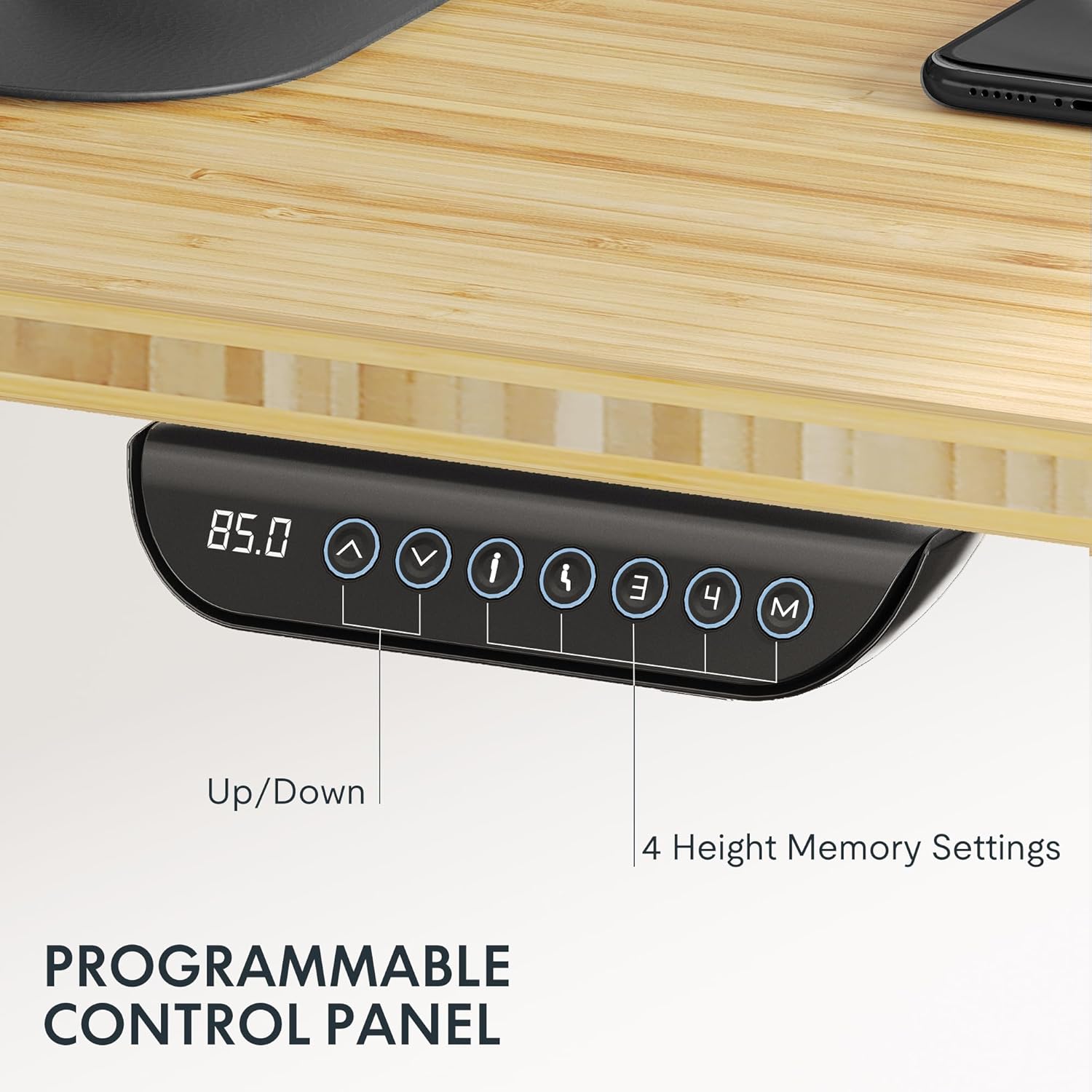
Image: The intuitive control panel allows for easy height adjustments and saving preferred positions.
Video: Official FLEXISPOT brand video showcasing general product features and operation. (Creator: FlexiSpot)
7. Penyelenggaraan
- Pembersihan: Lap desktop dan bingkai dengan lembut, damp kain. Elakkan bahan kimia yang keras atau pembersih kasar yang boleh merosakkan kemasan.
- Pemeriksaan biasa: Periodically check all screws and connections to ensure they are secure. Tighten if necessary.
- Pengurusan Kabel: Ensure cables remain tidy and are not pinched or tangled, especially during height adjustments.
8. Penyelesaian masalah
Isu dan Penyelesaian Biasa:
- Meja Tidak Bergerak:
- Periksa sama ada kord kuasa dipasang dengan selamat pada kedua-dua meja dan salur keluar dinding.
- Ensure the control box connections are firm.
- Ketinggian Tidak Sekata:
- Perform a reset procedure (refer to the detailed assembly manual for specific steps).
- Pastikan meja berada pada permukaan yang rata.
- Motor Noise is Excessive:
- While the motors are quiet, unusual loud noises may indicate an issue. Check for any obstructions or loose components.
- Ensure the desk is not overloaded beyond its maximum capacity.
- Anti-Collision Triggering Frequently:
- Ensure there are no objects in the desk's path during movement.
- Check if any cables are hanging loosely and interfering with the desk's movement.
9. Waranti dan Sokongan
FLEXISPOT stands behind the quality of its products. The E6 MAX Standing Desk comes with a comprehensive warranty:
- Jaminan 10 Tahun: Covers the desk frame and motor.
- Perlindungan 2 Tahun: Covers the control panel and electronics.
For any assistance, questions, or warranty claims, please contact FLEXISPOT Customer Support. Refer to your product packaging or the official FLEXISPOT webtapak untuk maklumat hubungan yang paling terkini.


