pengenalan
This manual provides detailed instructions for the operation and maintenance of your Timex Expedition CAT5 41mm Digital Watch, Model TW4B303009J. Please read this guide thoroughly to ensure proper use and to fully utilize all features of your timepiece. This watch is designed for durability and functionality, featuring a digital display, acrylic lens, and water resistance up to 100 meters.
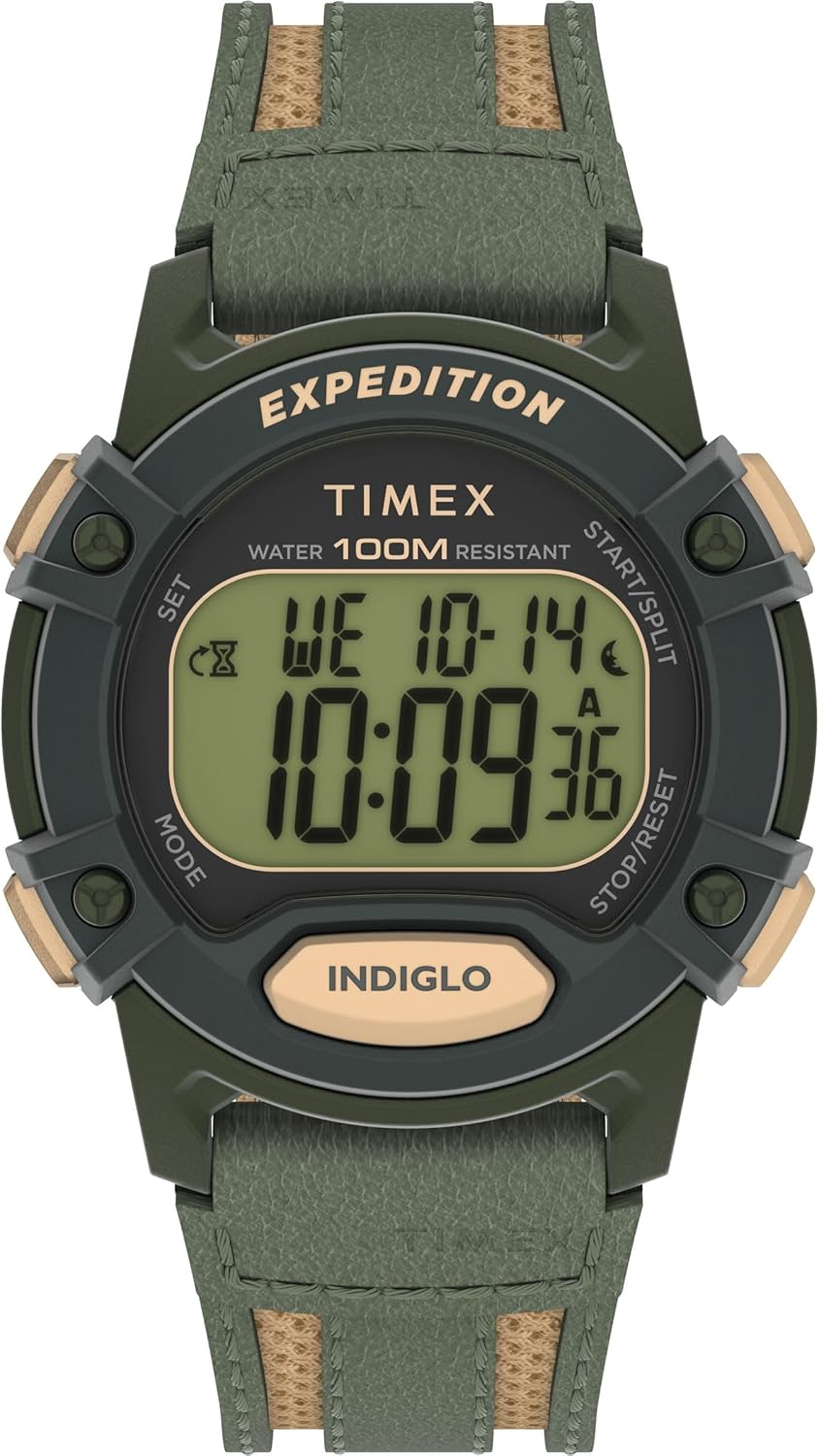
Rajah 1: Depan view of the Timex Expedition CAT5 41mm Digital Watch.
Setup: Setting Time and Date
Your Timex Expedition watch features two independent time zones (T1 and T2), each with its own time and date settings. This allows for tracking different locations simultaneously.
Butang Berfungsi Overview:
- SET (Top Left): Digunakan untuk masuk dan keluar dari mod tetapan.
- MOD (Kiri Bawah): Cycles through different watch modes (Chronograph, Timer, Alarms, Timekeeping). Also used to navigate between settings within a mode.
- START/SPLIT (Top Right): Used to increment values in setting modes or start/split functions in Chronograph/Timer.
- STOP/RESET (Bottom Right): Used to decrement values in setting modes or stop/reset functions in Chronograph/Timer.
- INDIGLO (Bottom Center): Mengaktifkan lampu latar.
Setting Time (T1 or T2)
- Ensure the watch is in Timekeeping mode. If not, press the MODE button repeatedly until the current time is displayed.
- Tekan dan tahan butang SET button (Top Left) until "HOLD TO SET" appears, followed by "SET TIME 1" or "SET TIME 2" with a blinking indicator.
- Gunakan MULAI / MENGGERAK (Top Right) or BERHENTI / RESET (Bottom Right) buttons to select either "TIME 1" or "TIME 2" for adjustment.
- Tekan ke MODE button (Bottom Left) to enter the time setting for the selected time zone. The hour value will begin blinking.
- Gunakan MULAI / MENGGERAK (Top Right) or BERHENTI / RESET (Bottom Right) buttons to adjust the hour. Press and hold for faster adjustment.
- Tekan ke MODE button to move to the minute setting. Adjust minutes using the MULAI / MENGGERAK or BERHENTI / RESET butang.
- Tekan ke MODE button to move to the seconds setting. Use the MULAI / MENGGERAK or BERHENTI / RESET buttons to reset seconds to zero.
- Setelah masa ditetapkan, tekan butang SET button (Top Left) to exit the setting mode.
Setting Date (Month, Day, Year, and Format)
- Ensure the watch is in Timekeeping mode.
- Tekan dan tahan butang SET button (Top Left) until "HOLD TO SET" appears, followed by "SET TIME 1" or "SET TIME 2". Select the desired time zone (T1 or T2) for date adjustment.
- Tekan ke MODE button repeatedly to cycle through time settings (hours, minutes, seconds) until the month value starts blinking.
- Gunakan MULAI / MENGGERAK or BERHENTI / RESET butang untuk melaraskan bulan.
- Tekan ke MODE button to move to the day setting. Adjust the day.
- Tekan ke MODE button to move to the year setting. Adjust the year.
- Tekan ke MODE button to cycle through time format (12HR/24HR) and date format (MM.DD / DD.MM). Adjust as desired using MULAI / MENGGERAK or BERHENTI / RESET.
- Once date and formats are set, press the SET butang untuk keluar.
Switching Main Time Zone Display (T1/T2)
Untuk cepat view your alternate time zone (T2 if T1 is main, or vice-versa), simply press the MULAI / MENGGERAK button (Top Right) once. The display will briefly show the alternate time zone.
To permanently switch your main displayed time zone:
- From Timekeeping mode, press and hold the MULAI / MENGGERAK button (Top Right) for a few seconds.
- The watch will switch its main display to the other time zone (e.g., from T1 to T2, or T2 to T1).
Ciri Operasi
Hourly Berpadu
hourly chime provides an audible alert at the top of each hour. There is no on-screen indicator for this feature.
- From Timekeeping mode, press and hold the SET button (Top Left) until "HOLD TO SET" appears, then "SET TIME 1" or "SET TIME 2".
- Tekan ke MODE button (Bottom Left) nine (9) times. The display will show "CHIME".
- Gunakan MULAI / MENGGERAK (Top Right) or BERHENTI / RESET (Bottom Right) buttons to toggle the chime "ON" or "OFF".
- Tekan ke SET butang untuk mengesahkan dan keluar.
Button Tones (Beep)
This feature controls the audible beep sound when buttons are pressed.
- From Timekeeping mode, press and hold the SET button (Top Left) until "HOLD TO SET" appears, then "SET TIME 1" or "SET TIME 2".
- Tekan ke MODE button (Bottom Left) ten (10) times. The display will show "BEEP".
- Gunakan MULAI / MENGGERAK (Top Right) or BERHENTI / RESET (Bottom Right) buttons to toggle the beep "ON" or "OFF".
- Tekan ke SET butang untuk mengesahkan dan keluar.
Alarms (ALM 1, ALM 2, ALM 3)
The watch has three independent alarms with various repeat options.
- From Timekeeping mode, press the MODE button (Bottom Left) repeatedly until "ALM 1", "ALM 2", or "ALM 3" is displayed.
- To turn an alarm ON/OFF without adjusting its time, use the MULAI / MENGGERAK (Top Right) or BERHENTI / RESET (Bottom Right) buttons. The display will show "DAILY", "WEEKDAYS", "WEEKENDS", or "OFF".
- To adjust an alarm's time: While on the desired alarm screen, press the SET button (Top Left). The hour will blink.
- Gunakan MULAI / MENGGERAK or BERHENTI / RESET butang untuk melaraskan jam.
- Tekan ke MODE button to move to minutes. Adjust minutes.
- Tekan ke MODE button to move to AM/PM indicator. Adjust AM/PM.
- Tekan ke MODE button to select the repeat option: "DAILY", "WEEKDAYS", or "WEEKENDS".
- Tekan ke SET button to confirm and exit. Adjusting an alarm automatically turns it ON.
An alarm icon will appear on the Timekeeping screen when any alarm is active.
Pemasa Undur
The countdown timer can be set from 1 second up to 24 hours, with options to stop or repeat.
- From Timekeeping mode, press the MODE button (Bottom Left) two (2) times to enter Timer mode.
- To start the timer with its current setting, press the MULAI / MENGGERAK button (Top Right).
- To stop the timer, press the BERHENTI / RESET button (Bottom Right).
- To reset the timer to its default value while stopped, press and hold the BERHENTI / RESET butang.
- To adjust the timer: While in Timer mode, press the SET button (Top Left). The hour value will blink.
- Gunakan MULAI / MENGGERAK or BERHENTI / RESET butang untuk melaraskan jam.
- Tekan ke MODE button to move to minutes. Adjust minutes.
- Tekan ke MODE button to move to seconds. Adjust seconds.
- Tekan ke MODE button to select the repeat option: "REPEAT" (timer restarts automatically) or "STOP" (timer stops after one cycle).
- Tekan ke SET butang untuk mengesahkan dan keluar.
Chronograph (Jam randik)
The chronograph measures elapsed time, including split/lap times.
- From Timekeeping mode, press the MODE button (Bottom Left) once to enter Chronograph mode. The display will show "CHRONO" and "00.00.00".
- Tekan ke MULAI / MENGGERAK button (Top Right) to start the chronograph.
- To record a split/lap time while running, press the MULAI / MENGGERAK button. The display will show the split time for 10 seconds, then resume showing the running total.
- To pause the chronograph, press the BERHENTI / RESET button (Bottom Right). Press MULAI / MENGGERAK untuk menyambung semula.
- To stop the chronograph, press the BERHENTI / RESET butang.
- To reset the chronograph to zero while stopped, press and hold the BERHENTI / RESET butang.
- To change the display format (Lap/Split vs. Split/Lap): While in Chronograph mode and reset to zero, press the SET button (Top Left). Use MULAI / MENGGERAK or BERHENTI / RESET to toggle between "LAP SPL" (Lap time on top, Split time on bottom) and "SPL LAP" (Split time on top, Lap time on bottom). Press SET untuk mengesahkan.
Lampu Latar Indiglo
The Indiglo backlight illuminates the watch face for easy viewdalam keadaan cahaya malap.
- Tekan ke INIGLO button (Bottom Center) to activate the backlight. It will stay on for approximately 4 seconds.
- If you continue to press other buttons while the backlight is active, it will remain on for 4 seconds after the last button press.
- There are no adjustable settings for backlight brightness or duration.
Penyelenggaraan
- Tahan Air: This watch is water resistant up to 100 meters. It is suitable for showering, swimming, and snorkeling, but not for scuba diving. Do not press buttons underwater.
- Bateri: The watch uses 1 Lithium Metal battery (included). Battery replacement should be performed by a qualified technician to ensure water resistance is maintained.
- Pembersihan: Bersihkan jam tangan dengan kain lembut,amp kain. Elakkan bahan kimia yang keras atau bahan yang melelas.
- Storan: Simpan jam tangan di tempat yang sejuk dan kering jauh dari cahaya matahari langsung dan suhu yang melampau.

Figure 2: Close-up of the watch back, indicating water resistance and battery information.
Menyelesaikan masalah
- Paparan Malap: If the digital display appears dim, the battery may be low and require replacement.
- Masa/Tarikh yang salah: Rujuk bahagian "Menetapkan Masa dan Tarikh" untuk melaraskan semula.
- Watch Not Functioning: Ensure the battery is properly installed and charged. If issues persist, contact Timex customer support.
- Pencerobohan Air: If water appears inside the watch, immediately take it to a qualified watch repair center.
Spesifikasi
| Ciri | Perincian |
|---|---|
| Nombor Model | TW4B303009J |
| Saiz Kes | 40mm |
| Panjang Tali | 8 inci |
| Jenis Dail | digital |
| Bahan Lensa | Akrilik |
| Tahan Air | 100 meter |
| Jenis Bateri | 1 Logam Litium (termasuk) |
| Dimensi Pakej | 4.41 x 3.03 x 2.56 inci |
| Berat Barang | 2.29 auns |
Waranti dan Sokongan
Untuk maklumat waranti, sokongan produk atau pertanyaan perkhidmatan, sila rujuk Timex rasmi webtapak atau hubungi perkhidmatan pelanggan mereka secara langsung. Simpan bukti pembelian anda untuk sebarang tuntutan waranti.


