1. Pemasangan dan Persediaan Awal
Before operating your new Candy Smart Pro Inverter washing machine, it is crucial to follow these installation steps carefully to ensure proper function and safety.
Membongkar
- Keluarkan semua bahan pembungkus dengan berhati-hati, termasuk alas polistirena dan sebarang filem pelindung.
- Remove the transit bolts located at the rear of the machine. These bolts secure the drum during transport and must be removed before use. Keep them for future transport if needed.
Kedudukan
- Place the washing machine on a firm, level surface. Ensure there is adequate space around the machine for ventilation and access.
- Adjust the leveling feet at the bottom of the machine to ensure it is perfectly stable and does not wobble. Use a spirit level for accuracy.
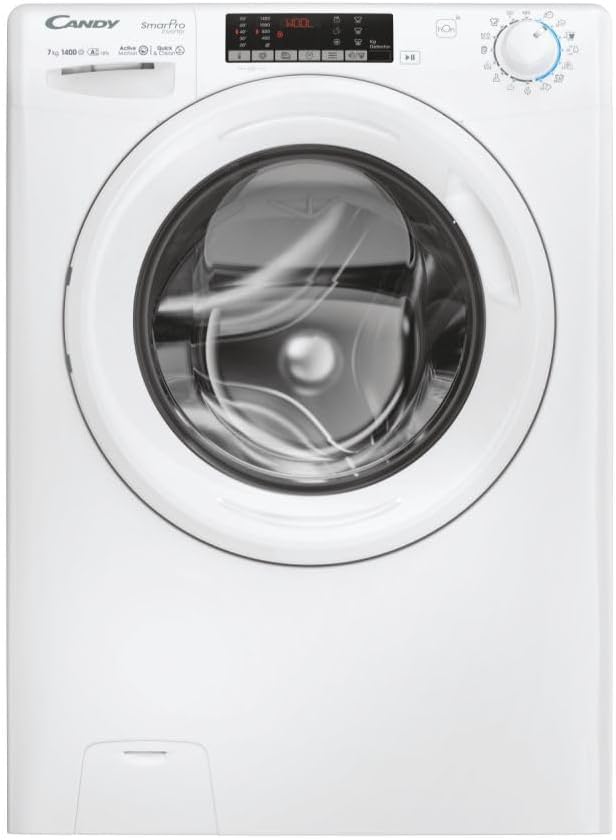
Rajah 1.1: Depan view of the Candy Smart Pro Inverter washing machine. This image shows the overall design of the appliance, including the control panel, detergent drawer, and main door.
Sambungan Air
- Sambungkan hos salur masuk air ke pili air sejuk dengan benang 3/4". Pastikan sambungannya ketat untuk mengelakkan kebocoran.
- Position the drain hose into a suitable standpipe or sink, ensuring it is securely fixed to prevent displacement during operation.

Figure 1.2: The washing machine with its front-loading door open, revealing the stainless steel drum. This view is useful for checking the drum and ensuring no packing materials remain inside.
Sambungan elektrik
- Palamkan kord kuasa ke salur keluar elektrik yang dibumikan. Pastikan voltage and frequency match the specifications on the machine's rating plate.
- Jangan gunakan kord sambungan atau penyesuai.
2. Arahan Operasi
This section provides a guide on how to use your Candy Smart Pro Inverter washing machine for optimal performance.
Panel Kawalan Terlaluview
The control panel allows you to select wash programs, adjust settings, and monitor the wash cycle.

Rajah 2.1: Terperinci view of the washing machine's control panel, showing the program selector dial, digital display, and various function buttons.
Memuatkan Dobi
- Buka pintu mesin basuh.
- Load laundry loosely into the drum, ensuring not to overload the machine. Refer to the maximum load capacity (7 kg) for different programs.
- Tutup pintu dengan kuat sehingga ia berbunyi.

Rajah 2.2: View of laundry placed inside the stainless steel drum of the washing machine, illustrating a typical load.
Menambah Detergen dan Bahan Tambahan
The detergent dispenser has compartments for pre-wash, main wash, and fabric softener.
- Tarik keluar laci detergen.
- Add the appropriate amount of detergent to the main wash compartment (II).
- If using, add fabric softener to the designated compartment (flower symbol).
- Tolak laci detergen ke dalam sepenuhnya.

Figure 2.3: The detergent dispenser drawer pulled out, showing the different compartments for detergent and fabric softener.
Pemilihan Program
- Turn the program selector dial to choose the desired wash program (e.g., Cotton, Synthetics, Delicates, Eco).
- Paparan akan menunjukkan suhu lalai dan kelajuan putaran untuk program yang dipilih.
Melaraskan Tetapan
- Use the temperature button to adjust the wash temperature.
- Use the spin speed button to modify the spin speed.
- Select any additional functions (e.g., pre-wash, extra rinse) using the corresponding buttons.
Memulakan Kitaran Mencuci
- Tekan butang 'Mula/Jeda' untuk memulakan kitaran basuh.
- The machine will automatically lock the door and begin filling with water.
3. Penyelenggaraan dan Penjagaan
Penyelenggaraan tetap memastikan jangka hayat dan operasi yang cekap mesin basuh anda.
Membersihkan Dispenser Detergen
- Remove the detergent drawer by pressing the release lever (if present) and pulling it out.
- Rinse the drawer under running water to remove any detergent residue.
- Clean the housing of the drawer with a brush to remove any build-up.
- Masukkan semula laci.
Membersihkan Drum
- Periodically run a maintenance wash cycle (e.g., a hot wash with no laundry and a descaling agent or washing machine cleaner) to prevent odors and limescale build-up.
- Biarkan pintu sedikit terbuka selepas setiap cucian untuk membolehkan dram kering di udara dan mencegah cendawan.
Pembersihan Penapis
- Cari penapis pam longkang, biasanya di bahagian bawah hadapan mesin.
- Letakkan bekas cetek di bawah penapis untuk menangkap sebarang sisa air.
- Buka skru dan tanggalkan penapis dengan berhati-hati. Bersihkan sebarang habuk, serpihan atau objek asing.
- Skrukan penapis kembali dengan kukuh.
Pembersihan Luaran
- Lap permukaan luar mesin dengan kain lembut,amp kain.
- Jangan gunakan pembersih atau pelarut yang melelas.
4. Panduan Penyelesaian Masalah
This section provides solutions to common issues you might encounter with your washing machine.
| Masalah | Kemungkinan Punca | Penyelesaian |
|---|---|---|
| Mesin tidak bermula | Tiada bekalan kuasa; Pintu tidak ditutup dengan betul; Program tidak dipilih. | Check power plug and fuse; Ensure door is firmly closed; Select a wash program and press 'Start'. |
| Air tidak mengisi | Paip air ditutup; Hos salur masuk air tertekuk atau tersumbat; Tekanan air terlalu rendah. | Open water tap; Straighten hose and check for blockages; Check household water pressure. |
| Mesin tidak kering | Hos saliran bengkok atau tersumbat; Penapis pam saliran tersumbat. | Straighten drain hose and check for blockages; Clean the drain pump filter. |
| Getaran / bunyi yang berlebihan | Transit bolts not removed; Machine not level; Uneven laundry load. | Remove transit bolts; Adjust leveling feet; Redistribute laundry inside the drum. |
| Sisa detergen dalam dispenser | Insufficient water pressure; Detergent drawer blocked. | Check water pressure; Clean the detergent drawer and its housing. |
5. Spesifikasi Teknikal
Detailed specifications for the Candy Smart Pro Inverter CO 474TWM6/1-S washing machine.
| Ciri | Spesifikasi |
|---|---|
| Jenama | gula-gula |
| Nama Model | CO 474TWM6/1-S |
| Kapasiti | 7 Kilogram |
| Akses Lokasi | Beban Depan |
| warna | Hitam |
| Mod Operasi | Separa automatik |
| Komponen yang Disertakan | 1 pakej |
| Jenis Pemasangan | Freestanding |
| Bahan Drum | Keluli Tahan Karat |
| Pengeluar | gula-gula |
6. Waranti dan Sokongan Pelanggan
For warranty information, please refer to the warranty card included with your appliance or visit the official Candy webtapak. Simpan bukti pembelian anda untuk sebarang tuntutan waranti.
If you require technical assistance or have questions not covered in this manual, please contact Candy customer support. Contact details can typically be found on the manufacturer's webtapak atau dalam dokumentasi produk anda.
Untuk bantuan lanjut, sila layari Official Candy Webtapak.


