pengenalan
The Outdoor Tech Turtle Shell 4.0 is a portable, rugged, and waterproof wireless Bluetooth speaker designed for outdoor adventures. It features 360-degree sound, a durable IPX7-rated construction, and an extended battery life, making it ideal for various environments from camping to poolside relaxation. This manual provides essential information for setting up, operating, and maintaining your speaker.

Figure 1: Turtle Shell 4.0 highlighting key features like waterproof, 18-hour battery, impressive sound, Siri/Power Bank, and simple controls.
Apa yang ada dalam Kotak
- Turtle Shell 4.0 Wireless Bluetooth Speaker
- Kabel pengecas USB-C
- Bawa beg
- Manual pengajaran (dokumen ini)
Persediaan
1. Mengisi Speaker
Before first use, fully charge your Turtle Shell 4.0. The charging port has been upgraded to USB-C for faster and more efficient charging.
- Sambungkan kabel pengecas USB-C yang disediakan ke port pengecasan pembesar suara.
- Sambungkan hujung kabel yang satu lagi ke penyesuai kuasa USB yang serasi (tidak disertakan) atau port USB komputer.
- A full charge takes approximately 3 hours. The LED indicator will change to show charging status (refer to LED indicator section for details).
2. Menghidupkan/Mematikan
- Untuk menghidupkan: Tekan dan tahan butang kuasa (⏻) until you hear an audible cue or see the LED indicator light up.
- To power off: Press and hold the power button (⏻) again until you hear an audible cue or the LED indicator turns off.
3. Berpasangan Bluetooth
The Turtle Shell 4.0 can be effortlessly paired with your smartphone or other Bluetooth-enabled devices from up to 65 feet away.
- Ensure the speaker is powered on and in pairing mode (the LED indicator will typically flash rapidly).
- Pada peranti anda, navigasi ke tetapan Bluetooth.
- Select "Turtle Shell 4.0" from the list of available devices.
- Sebaik sahaja disambungkan, penunjuk LED akan menunjukkan cahaya yang jelas dan anda akan mendengar nada pengesahan.
4. Daisy-Chaining Multiple Speakers
The Turtle Shell 4.0 features an upgraded daisy-chain function, allowing you to link up to 50 Shells together for a massive portable stereo sound experience.
- Ensure all speakers you wish to link are powered on and not currently paired to any device.
- Pair the first speaker (master speaker) to your device via Bluetooth as described above.
- On the master speaker, press the daisy-chain button (refer to button layout for specific icon).
- On the additional speakers, press their daisy-chain button. They will automatically connect to the master speaker.
- Repeat for up to 50 speakers.
Arahan Operasi
1. Fungsi Butang

Rajah 2: Sisi view of the Turtle Shell 4.0 with visible control buttons.
| Butang | Fungsi (Short Press) | Fungsi (Tekan Lama) |
|---|---|---|
| kuasa (⏻) | Semak status bateri | Hidupkan/Mati Kuasa |
| Kelantangan Rendah (-) | Kurangkan volum | Lagu sebelumnya |
| Multi-function (Bigfoot icon) | Main/Jeda, Jawab/Tamatkan Panggilan | Activate Siri/Google Assistant, Reject Call, Daisy-chain pairing |
| Naikkan Kelantangan (+) | Tingkatkan kelantangan | Trek seterusnya |
2. 360-Degree Audio Experience
The Turtle Shell 4.0's patented Dual-Directional Sound technology produces an immersive 360-degree audio experience, ensuring powerful sound from all angles. This is achieved through two full-range drivers and a bass radiator housed within its unique polygonal design.
3. Smart Assistant Compatibility
Activate your device's Siri or Google Assistant directly from the speaker by long-pressing the multi-function button (Bigfoot icon).
4. Panggilan Bebas Tangan
With the built-in microphone, you can answer and end calls directly through the speaker. Short press the multi-function button to answer or end a call. Long press to reject an incoming call.
5. Fungsi Bank Kuasa
The 4K mAh battery allows you to charge small devices while enjoying your music. Connect your device to the speaker's USB-A output port (located under the sealed port cover) using your device's charging cable.
6. Pilihan Pemasangan
The Turtle Shell 4.0 includes a standard 1/4"-20 camera threading mount and custom strap mounts for multiple easy carry and transport options, allowing you to secure it to various surfaces or gear.

Figure 3: The Turtle Shell 4.0 is versatile for various outdoor activities including camping, general outdoor use, beach, and pool.
Penyelenggaraan
1. Kalis Air dan Ketahanan
The Turtle Shell 4.0 is IPX7-rated waterproof, dustproof, and shockproof. This means it can be submerged in water up to 1 meter for 30 minutes. Ensure all port covers are securely sealed before exposing the speaker to water or dusty environments.

Figure 4: The Turtle Shell 4.0 demonstrating its IP67 waterproof capability.
2. Pembersihan
Untuk membersihkan pembesar suara, lap dengan lembut, damp cloth. Do not use abrasive cleaners or solvents. If exposed to saltwater or chlorinated water, rinse thoroughly with fresh water and allow to air dry completely before charging or opening port covers.
3. Penyimpanan
Store the speaker in a cool, dry place away from direct sunlight and extreme temperatures. For long-term storage, ensure the battery is partially charged (around 50%) to preserve battery health.
Menyelesaikan masalah
| Masalah | Kemungkinan Punca | Penyelesaian |
|---|---|---|
| Speaker tidak dihidupkan. | Bateri lemah. | Cas pembesar suara selama sekurang-kurangnya 30 minit. |
| Tidak boleh berpasangan melalui Bluetooth. | Pembesar suara tidak dalam mod berpasangan; peranti Bluetooth dimatikan; terlalu jauh dari pembesar suara. | Ensure speaker is in pairing mode (flashing LED). Turn device Bluetooth off and on. Move device closer to speaker (within 65 feet). Forget device on your phone and re-pair. |
| Herotan bunyi pada kelantangan tinggi. | Volume too high for audio source. | Kurangkan kelantangan pada pembesar suara atau peranti anda yang disambungkan. |
| Daisy-chaining not working. | Speakers not in correct mode; too many speakers. | Ensure all speakers are powered on and not paired to other devices before initiating daisy-chain. Confirm you are within the 50-speaker limit. |
| Pembesar suara tidak dicas. | Cable issue; port issue; power source issue. | Cuba kabel USB-C dan penyesuai kuasa yang berbeza. Pastikan port pengecasan bersih dan bebas daripada serpihan. |
Spesifikasi
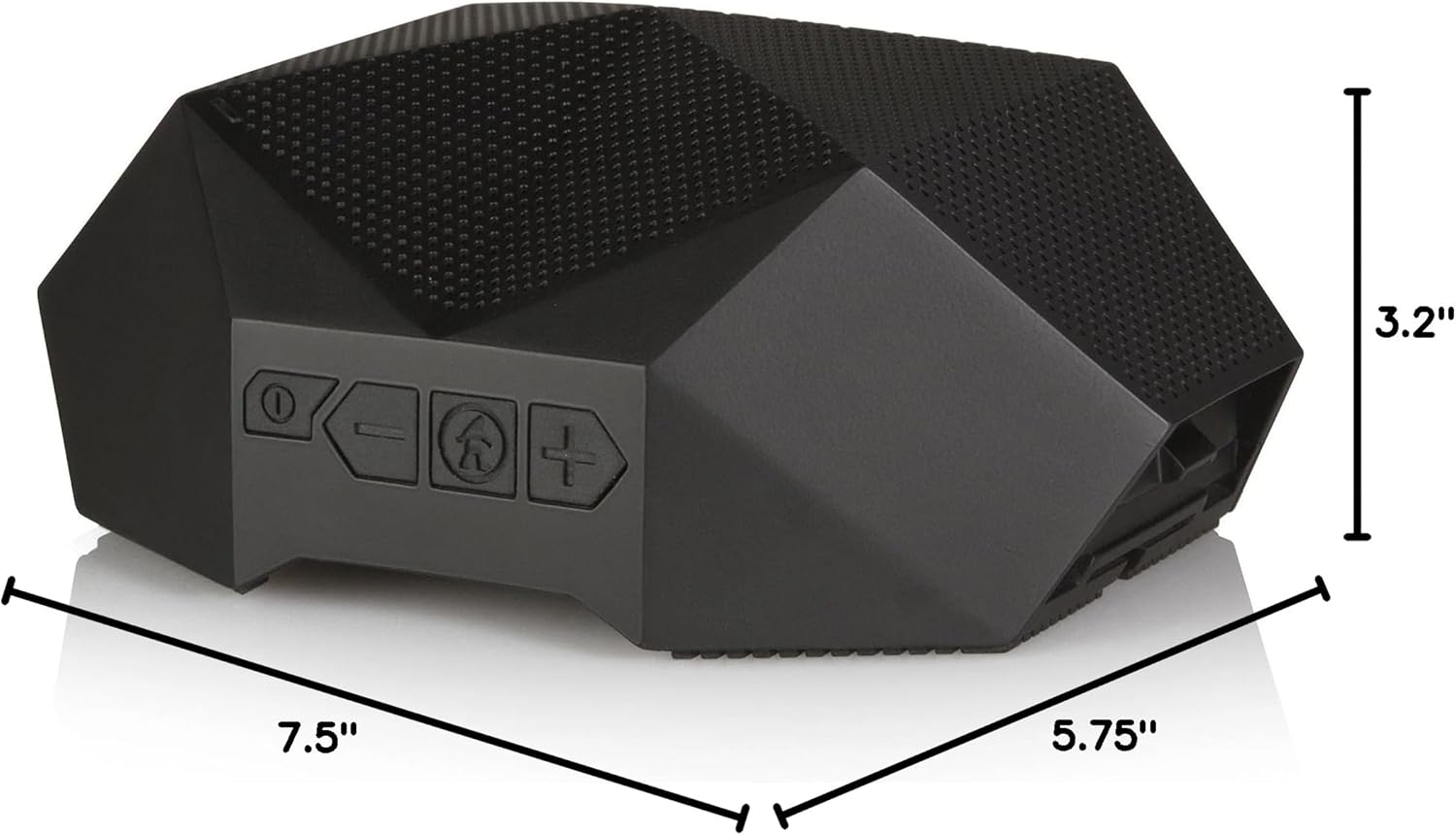
Figure 5: Physical dimensions of the Turtle Shell 4.0 speaker.
| Ciri | Perincian |
|---|---|
| Nama Model | OT4800-B |
| Jenis Pembesar Suara | Luar |
| Ciri Khas | Kalis air |
| Penggunaan yang Disyorkan | Dalaman/Luar |
| Peranti Serasi | Telefon Pintar, Tablet, Komputer Riba, Desktop |
| Jenis Pengawal | Kawalan Suara |
| warna | Hitam |
| Hayat Bateri | Sehingga 18 jam |
| Komponen yang Disertakan | USB charging cable, carry pouch, instructional manual |
| Dimensi Produk | 7.5"D x 5.75"W x 3.2"H |
| Penilaian Kalis Air | IPX7 |
| Kapasiti Bateri | 4000 mAh |
| Masa Mengecas | 3 Jam |
| Julat Bluetooth Maksimum | 65 Kaki |
| Berat Barang | 1.37 paun |
| Teknologi Ketersambungan | Bluetooth |
| Mod Keluaran Audio | Stereo |
| bahan | Mixed Plastic/Silicone |
Video Produk Rasmi
Watch this video to see the Turtle Shell speaker in action, demonstrating its ruggedness and suitability for outdoor activities like paddleboarding. Please note this video features the Turtle Shell 3.0, a previous model, but showcases similar core functionalities and durability relevant to the Turtle Shell 4.0.
Video 1: "SUP with the Turtle Shell 3.0 Speaker" by Outdoor Technology. This video demonstrates the speaker's use in a water environment.
Waranti dan Sokongan
Produk Outdoor Tech direka untuk ketahanan dan prestasi. Untuk maklumat jaminan dan sokongan pelanggan, sila lawati laman web rasmi Outdoor Tech. webtapak atau hubungi perkhidmatan pelanggan mereka secara langsung. Simpan bukti pembelian anda untuk sebarang tuntutan waranti.
Untuk bantuan lanjut, anda juga boleh merujuk kepada Outdoor Tech Store on Amazon.


