1. Pengenalan
The STRONG Leap-S3+ Google TV Box is a powerful media streaming adapter designed to enhance your entertainment experience. It provides easy access to applications, games, and streaming services via Google Play, transforming your television into a comprehensive entertainment hub. This device supports advanced audio and video technologies, ensuring a high-quality viewpengalaman dalam dan mendengar.
2. Kandungan Pakej
Sahkan bahawa semua item terdapat dalam pakej:
- STRONG Leap-S3+ Android TV Box
- Remote Control (with 2 AA batteries included)
- Penyesuai Kuasa (DC 12V/1A)
- Kabel HDMI
- Manual Pengguna (dokumen ini)

Image: The retail packaging of the STRONG Leap-S3+ Android TV Box, showing the device, remote control, and branding.
3. Panduan Persediaan
- Sambung ke TV: Connect one end of the HDMI cable to the HDMI port on the STRONG Leap-S3+ box and the other end to an available HDMI input on your television.
- Sambungkan Kuasa: Plug the power adapter into the DC 12V/1A port on the box and then into a power outlet.
- Sambungan Rangkaian (Pilihan): For a wired connection, connect an Ethernet cable from your router to the LAN port on the box. For Wi-Fi, you will configure this during the initial setup on screen.
- Masukkan Bateri: Open the battery compartment of the remote control and insert the two AA batteries, ensuring correct polarity.
- Hidupkan kuasa: Turn on your television and select the correct HDMI input source using your TV remote. The STRONG Leap-S3+ box should power on automatically.
- Persediaan Awal: Follow the on-screen instructions to complete the initial setup, including language selection, Wi-Fi connection (if not using Ethernet), and Google account login. Manual setup is recommended if automatic setup via Google Home encounters issues.

Image: Rear panel of the device illustrating the various connection ports including S/PDIF, HDMI, LAN, DC power input, and USB.
4. Arahan Operasi
4.1. Fungsi Alat Kawalan Jauh
The included remote control allows navigation through the Google TV interface. Key functions include:
- Pad Navigasi: Gunakan butang arah untuk beralih melalui menu dan memilih item.
- Butang OK: Mengesahkan pilihan.
- Butang Belakang: Kembali ke skrin sebelumnya.
- Butang rumah: Kembali ke skrin utama Google TV.
- Butang Pembantu Google: Activates voice control for searching content or controlling the device.
- Butang Kelantangan: Melaraskan kelantangan audio.
- Butang Apl Khusus: Akses pantas kepada perkhidmatan penstriman popular seperti Netflix, YouTube, Disney+ dan Prime Video.

Image: The remote control demonstrating the Google Assistant voice command feature, with a TV screen displaying search results.
4.2. Accessing Streaming Services and Apps
Once connected to the internet and logged into your Google account, you can access a wide range of content:
- Gedung Google Play: Download and install additional applications and games.
- Apl prapasang: Utilize dedicated buttons or navigate to pre-installed apps like Netflix, YouTube, Disney+, and Prime Video.
- Chromecast Terbina dalam: Cast content directly from your mobile phone or other compatible devices to your TV screen.

Image: A smartphone screen mirroring content to a large television, demonstrating the Chromecast built-in feature.

Image: A television screen showing the Google TV interface with icons for various streaming applications, alongside the STRONG Leap-S3+ box and remote.
5. Ciri-ciri Utama
- Resolusi UHD 4K: Supports Ultra High Definition (UHD) 2160p resolution for crisp and detailed visuals.
- Dolby Vision: Provides enhanced HDR (High Dynamic Range) for superior brightness, contrast, and color accuracy.
- Dolby Atmos: Delivers immersive, multi-dimensional audio that moves around you, creating a realistic sound experience.
- Chromecast Terbina dalam: Seamlessly cast movies, shows, photos, and more from your mobile device to your TV.
- Pembantu Google: Use voice commands via the remote control to search for content, control playback, and manage smart home devices.
- Ketersambungan yang meluas: Includes S/PDIF, HDMI, USB 2.0, LAN/Internet, Wi-Fi, and Bluetooth for versatile device connections and data transfer.

Image: Visual representation of 4K UHD 2160p resolution, highlighting fine detail.

Image: The Dolby Vision logo, indicating enhanced visual quality.

Image: The Dolby Atmos logo, representing immersive audio technology.
6. Penyelenggaraan
- Pembersihan: Gunakan kain lembut dan kering untuk membersihkan peranti. Jangan gunakan pembersih cecair atau bahan yang melelas.
- Pengudaraan: Pastikan peranti diletakkan di kawasan yang mempunyai pengudaraan yang baik untuk mengelakkan pemanasan melampau. Jangan halang bukaan pengudaraan.
- Kemas Kini Perisian: The device may receive automatic software updates. Ensure it is connected to the internet to receive these updates, which can improve performance and add new features.
- Storan: Apabila tidak digunakan untuk tempoh yang lama, cabut penyesuai kuasa dan simpan peranti di tempat yang sejuk dan kering.
7. Penyelesaian masalah
| Masalah | Kemungkinan Punca | Penyelesaian |
|---|---|---|
| Tiada kuasa/Peranti tidak boleh dihidupkan | Penyesuai kuasa tidak disambungkan atau rosak. | Ensure the power adapter is securely connected to the device and a working power outlet. Check if the outlet is functional. |
| Tiada gambar di TV | Incorrect HDMI input selected on TV; HDMI cable loose or faulty. | Verify your TV is set to the correct HDMI input. Check HDMI cable connections at both ends. Try a different HDMI port or cable. |
| Tiada bunyi | TV volume muted or too low; audio settings incorrect. | Increase TV volume. Check audio output settings on the STRONG Leap-S3+ box. Ensure Dolby Atmos is correctly configured if used. |
| Alat kawalan jauh tidak berfungsi | Batteries depleted or incorrectly inserted; remote not paired. | Replace batteries, ensuring correct polarity. Re-pair the remote control with the device if necessary (refer to on-screen instructions during initial setup or device settings). |
| Prestasi perlahan atau pembekuan | Poor internet connection; too many apps running in background; insufficient storage. | Check your internet connection speed. Close unused applications. Clear cache or uninstall unnecessary apps to free up storage. Restart the device. |
| Automatic setup via Google Home fails | Connectivity issues or software glitch. | Proceed with manual setup directly on the TV screen using the remote control. This often resolves such issues. |
8. Spesifikasi
| Ciri | Perincian |
|---|---|
| Jenama | kuat |
| Nama Model | LEAP-S3 plus |
| warna | putih |
| Jenis Produk | Box form factor |
| Teknologi Ketersambungan | Bluetooth, Ethernet, HDMI, USB, Wi-Fi |
| Jenis Penyambung | HDMI |
| Ciri Khas | 4K UHD, Chromecast, Browser |
| Resolusi | 4K (2160p) |
| Perkhidmatan Internet yang Disokong | Apple TV, Disney, Free Sat/Free View, Freesat/Freeview, Google TV, Magenta TV, Browser, Netflix, Prime Video, RTL, Wow, YouTube |
| Jenis Pengawal | Alat Kawalan Jauh |
| Peranti Serasi | Smartphone, Television, Screen |
| Bekalan Kuasa | DC 12V/1A |
| Dimensi (Anggaran) | 9.6 cm x 9.6 cm x 2.3 cm (from image) |
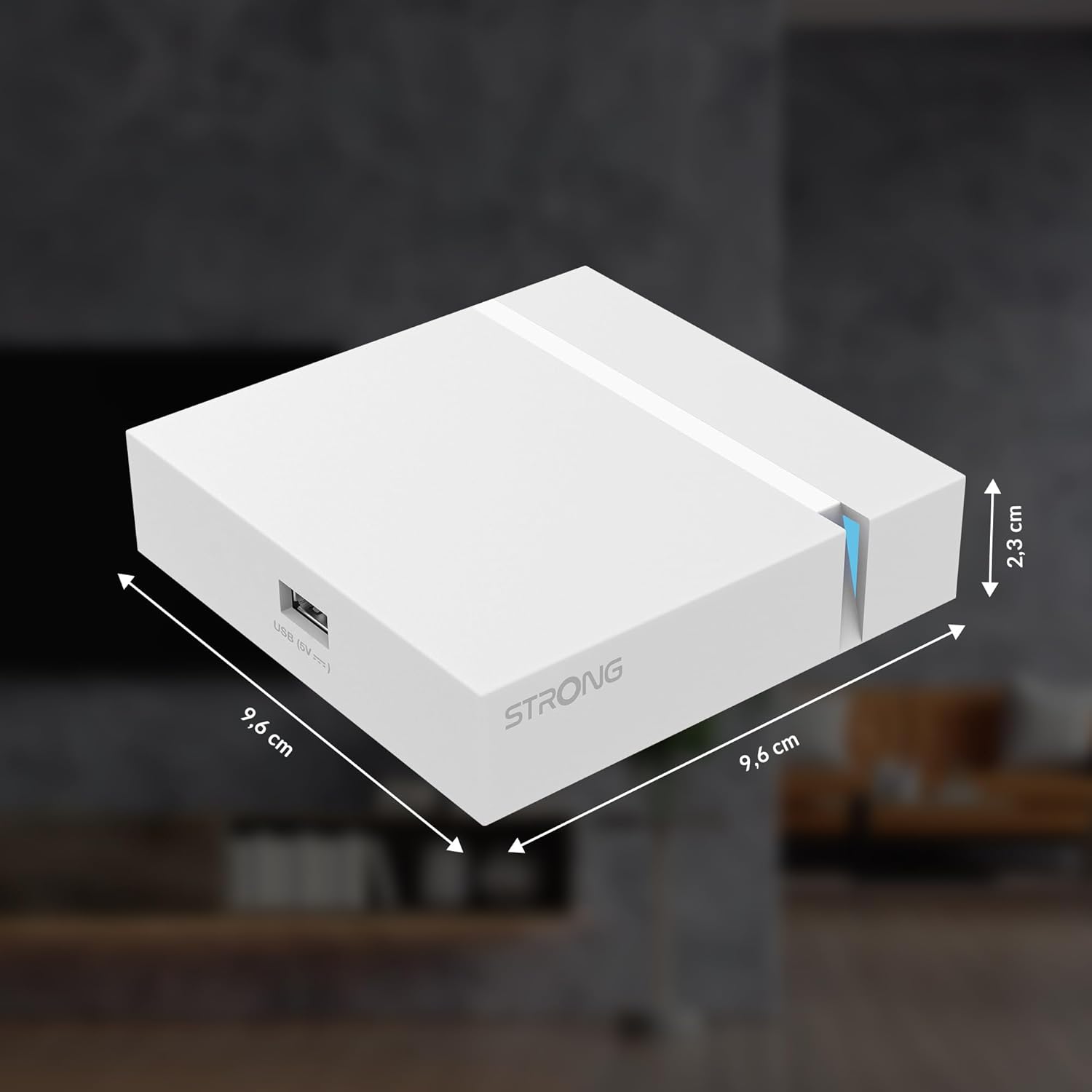
Image: The physical dimensions of the STRONG Leap-S3+ Android TV Box.
9. Waranti dan Sokongan
For warranty information and technical support, please refer to the documentation provided with your purchase or visit the official Strong website. Information regarding spare parts availability and software update guarantees is not available in this manual.


