1. Pengenalan
The Pronomic DX-50 USB MKII is a professional 4-channel DJ mixer designed for a wide range of applications, including discos, parties, restaurants, and presentations. Its user-friendly design ensures that both experienced and less experienced users can fully utilize its features. This manual provides detailed instructions for setting up, operating, and maintaining your mixer.
Key features include a recording function, integrated Bluetooth interface, USB player with transport controls, and multiple input channels.
2. Arahan Keselamatan Penting
- Baca Arahan: Baca semua arahan keselamatan dan pengendalian sebelum menggunakan produk ini.
- Kekalkan Arahan: Simpan arahan keselamatan dan pengendalian untuk rujukan masa hadapan.
- Perhatikan Amaran: Patuhi semua amaran pada produk dan dalam arahan pengendalian.
- Ikuti Arahan: Ikut semua arahan pengendalian dan penggunaan.
- Air dan Kelembapan: Do not use this apparatus near water (e.g., bathtub, washbowl, kitchen sink, laundry tub, wet basement, or swimming pool).
- Pengudaraan: Jangan sekat sebarang bukaan pengudaraan. Pasang mengikut arahan pengilang.
- haba: Jangan pasang berhampiran mana-mana sumber haba seperti radiator, daftar haba, dapur, atau radas lain (termasuk amppenghidup) yang menghasilkan haba.
- Sumber Kuasa: Use only power sources specified by the manufacturer.
- Perlindungan Kabel Kuasa: Lindungi kord kuasa daripada berjalan atau tersepit, terutamanya pada palam, bekas kemudahan dan tempat keluar dari radas.
- Pembersihan: Bersihkan hanya dengan kain kering.
- Servis: Jangan cuba servis sendiri produk ini kerana membuka atau menanggalkan penutup boleh mendedahkan anda kepada vol berbahayatage atau bahaya lain. Rujuk semua servis kepada kakitangan perkhidmatan yang berkelayakan.
3. Kandungan Pakej
Please check that all items listed below are included in your package. If any items are missing or damaged, contact your dealer immediately.
- Pronomic DX-50 USB MKII DJ Mixer
- Power Adapter (AC 12V)
- USB Stick (32 GB, if included in your specific bundle)
- Manual Pengguna (dokumen ini)
4. Produk Lebihview
Familiarize yourself with the various controls and connections on your DX-50 USB MKII mixer.
4.1 Kawalan Panel Hadapan
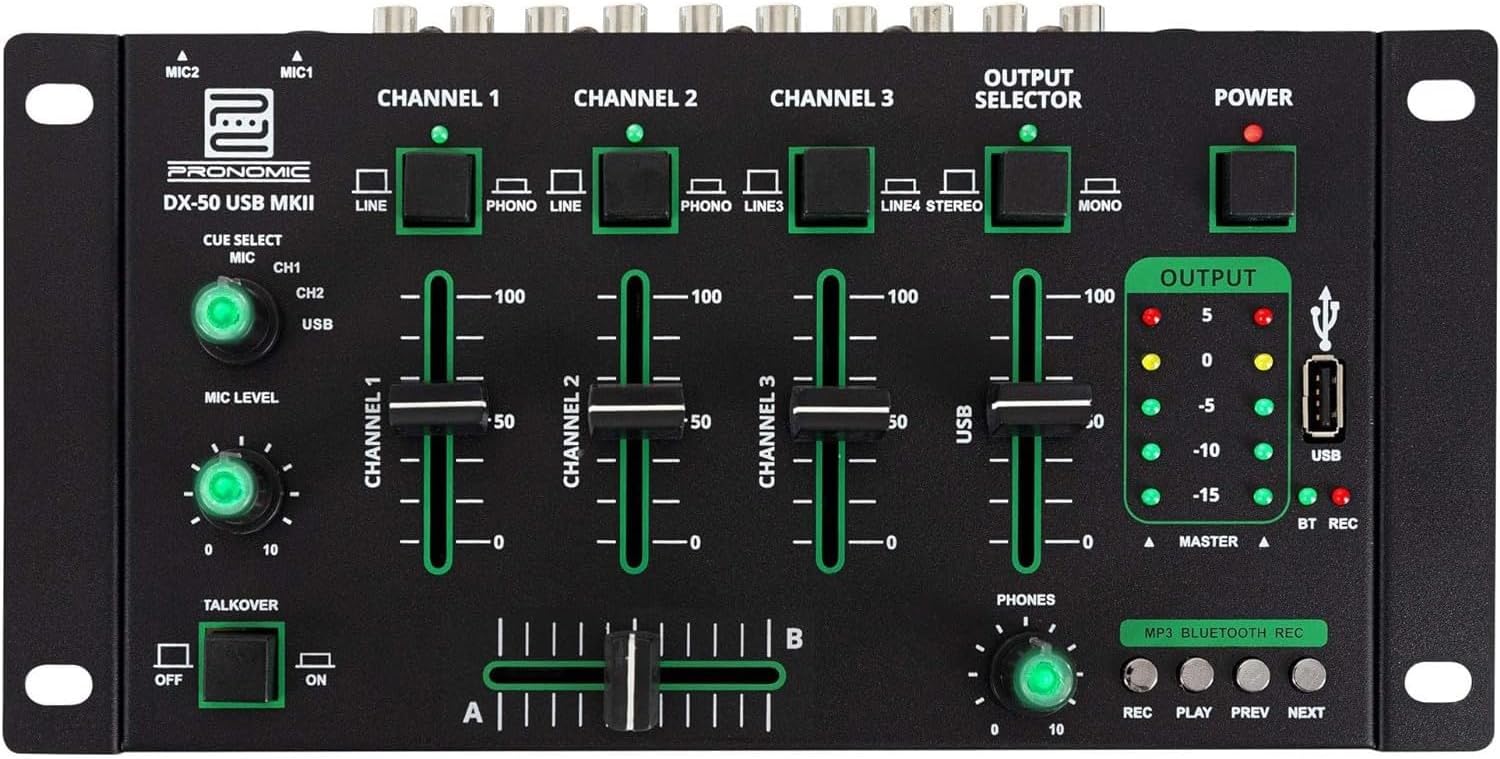
- MIC 1/2 Inputs: Sambungkan mikrofon.
- Channel 1-4 Input Selectors: Switch between LINE, PHONO, or USB/Bluetooth inputs for each channel.
- Faders saluran: Adjust the volume level for each channel.
- CUE Select Buttons: Route specific channels to the headphone output for monitoring.
- Tombol Aras MIC: Adjust the volume of the microphone inputs.
- Talkover Switch: Activates the talkover function, which automatically lowers music volume when speaking into the microphone.
- Pemilih Output: Choose between Stereo or Mono master output.
- Suis kuasa: Menghidupkan/mematikan pengadun.
- Meter Tahap Keluaran: LED indicators showing the master output level.
- Port USB: Connect a USB drive for MP3 playback and recording.
- MP3/Bluetooth/REC Player Controls: Buttons for Play/Pause, Previous, Next, and Record functions for the integrated player.
- Phones Level Knob: Melaraskan kelantangan output fon kepala.
- Crossfader (A/B): Blends between channels assigned to A and B.
4.2 Sambungan Panel Belakang

- AC 12V Power Input: Sambungkan penyesuai kuasa yang disediakan di sini.
- Output TELEFON: Bicu 6.3mm untuk menyambungkan fon kepala.
- MASTER OUT L/R (RCA): Connect to your main amppembesar atau pembesar suara berkuasa.
- Channel 1 & 2 Inputs (RCA Line/Phono): Connect turntables (Phono) or other line-level devices (CD players, media players). Use the front panel selector to switch.
- Channel 3 & 4 Inputs (RCA Line): Connect line-level devices.
- MIC 1 & 2 Inputs (6.3mm Jack): Sambungkan mikrofon.
5. Persediaan
Follow these steps to set up your Pronomic DX-50 USB MKII mixer:
- Sambungan Kuasa: Ensure the mixer's power switch is in the OFF position. Connect the supplied AC 12V power adapter to the "AC 12V" input on the rear panel of the mixer. Plug the adapter into a suitable power outlet.
- Master Output Connection: Connect the "MASTER OUT L/R" RCA outputs on the rear panel to the inputs of your amppembesar atau pembesar suara berkuasa.
- Sambungan Peranti Input:
- Meja putar: Connect turntables to the "CHANNEL 1" or "CHANNEL 2" RCA inputs. Set the corresponding input selector on the front panel to "PHONO".
- CD Players/Line Devices: Connect CD players, media players, or other line-level devices to "CHANNEL 1", "CHANNEL 2", "CHANNEL 3", or "CHANNEL 4" RCA inputs. Set the corresponding input selector on the front panel to "LINE".
- Mikrofon: Connect microphones to the "MIC 1" or "MIC 2" 6.3mm jack inputs on the rear panel.
- Sambungan Fon Kepala: Connect your headphones to the "PHONES" 6.3mm jack on the rear panel.
- USB Drive (Optional): If using a USB drive for playback or recording, insert it into the "USB" port on the front panel.
- Hidupkan kuasa: Once all connections are made, switch the mixer's power switch to the ON position. The power indicator LED will illuminate.
6. Arahan Operasi
6.1 Pencampuran Asas
- Pilih Input: For each channel, use the input selector switch (LINE/PHONO/USB/BT) to choose the desired audio source.
- Laraskan Kelantangan Saluran: Use the vertical faders for each channel to adjust its individual volume level.
- Output Induk: Monitor the "OUTPUT" LED meters and adjust the master volume knob (if present, otherwise rely on channel faders and amplifier volume) to achieve a suitable overall output level without clipping.
- Crossfader: Use the crossfader to smoothly transition between channels assigned to A and B. Channels 1 and 2 are typically assigned to the crossfader.
6.2 Penggunaan Mikrofon
- Connect your microphone to one of the MIC inputs on the rear panel.
- Adjust the "MIC LEVEL" knob on the front panel to control the microphone's volume.
- Fungsi Talkover: Activate the "TALKOVER" switch to automatically reduce the volume of the music when you speak into the microphone. This is useful for announcements.
6.3 Main Semula dan Rakaman USB
- Main balik USB: Masukkan pemacu USB yang mengandungi MP3 files into the "USB" port. Select "USB" as the input source for the dedicated USB channel. Use the "PLAY/PAUSE", "PREV", and "NEXT" buttons to control playback.
- Rakaman USB: Press the "REC" button to start recording the master output to the connected USB drive. Press "REC" again to stop recording. Ensure your USB drive has sufficient free space and is formatted correctly (FAT32 is commonly supported).
6.4 Kesambungan Bluetooth
- Aktifkan Bluetooth: Select "BT" as the input source for the dedicated Bluetooth channel. The mixer will enter pairing mode.
- Pasangkan Peranti: On your Bluetooth-enabled device (smartphone, tablet, etc.), search for available Bluetooth devices. Select "Pronomic DX-50 USB MKII" (or similar name) from the list to pair.
- Mainkan Audio: Once paired, you can play audio from your device through the mixer. Control playback from your device or using the mixer's transport controls (if supported by your device).
6.5 Monitoring with Headphones
- Connect headphones to the "PHONES" output.
- Use the "CUE SELECT" buttons to choose which channels you want to monitor in your headphones without affecting the main output.
- Adjust the "PHONES" level knob to set your desired headphone volume.
7. Penyelenggaraan
- Pembersihan: Disconnect the power before cleaning. Use a soft, dry cloth to wipe the surface of the mixer. Do not use liquid cleaners, aerosols, or solvents.
- Storan: Simpan pengadun di tempat yang sejuk dan kering jauh dari cahaya matahari langsung dan suhu yang melampau.
- Fader and Knob Care: Avoid excessive force when operating faders and knobs. Periodically check for dust or debris accumulation around moving parts.
- Pengurusan Kabel: Ensure cables are not kinked or strained, which can lead to damage.
8. Penyelesaian masalah
| Masalah | Kemungkinan Punca | Penyelesaian |
|---|---|---|
| Tiada kuasa | Power adapter not connected; Power switch off; Faulty power outlet. | Check power adapter connection; Ensure power switch is ON; Try a different power outlet. |
| No sound from main output | Master volume too low; Amplifier/speakers off or disconnected; Incorrect input selection; Channel faders down. | Increase master volume; Check amplifier/speaker connections and power; Verify correct input selected for channels; Raise channel faders. |
| Tiada suara dari fon kepala | Headphone volume too low; Headphones not connected; No CUE selected. | Increase PHONES level; Connect headphones properly; Press CUE button for desired channel. |
| Bluetooth tidak berpasangan | Mixer not in pairing mode; Device too far; Interference. | Ensure BT input is selected; Bring device closer; Restart mixer and device. |
| Main balik USB tidak berfungsi | Pemacu USB tidak dimasukkan dengan betul; Salah file format; USB drive not formatted correctly. | Re-insert USB drive; Ensure files are MP3; Format USB drive to FAT32. |
9. Spesifikasi
| Model | Pronomic DX-50 USB MKII |
| Bilangan Saluran | 4 |
| Teknologi Ketersambungan | Bluetooth, USB |
| Input Audio | RCA (line/phono), 6.3mm microphone, Bluetooth, USB |
| Jenis Penyambung Output | RCA (Master Out), 6.3mm (Phones) |
| Sumber Kuasa | Kabel Elektrik (penyesuai AC 12V) |
| Dimensions (without corner brackets and controls) | 222 x 129 x 28 mm (Lebar x Dalam x Tinggi) |
| Total Dimensions (with corner brackets and controls) | 267 x 136 x 51 mm (Lebar x Dalam x Tinggi) |
| Berat badan | 790 g |
10. Waranti dan Sokongan
Untuk maklumat jaminan dan sokongan teknikal, sila rujuk dokumentasi yang disediakan bersama pembelian anda atau hubungi peruncit anda. Simpan bukti pembelian anda untuk sebarang tuntutan jaminan.
For further assistance, you may also visit the official Pronomic webtapak atau hubungi bahagian perkhidmatan pelanggan mereka.