Arahan Keselamatan Penting
Sila baca semua arahan dengan teliti sebelum menggunakan perkakas. Simpan manual ini untuk rujukan masa hadapan.
- Jangan rendam perkakas, kord, atau palam ke dalam air atau cecair lain.
- Pastikan voltage yang ditunjukkan pada perkakas sesuai dengan sumber listrik tempatan andatage sebelum menyambung.
- Pengawasan rapi diperlukan apabila sebarang perkakas digunakan oleh atau berhampiran kanak-kanak.
- Jangan kendalikan sebarang perkakas dengan kord atau palam yang rosak, atau selepas perkakas tidak berfungsi atau rosak dalam apa jua cara.
- Cabut plag dari soket apabila tidak digunakan dan sebelum membersihkan. Biarkan sejuk sebelum memakai atau menanggalkan bahagian.
- Jangan letakkan perkakas pada dinding atau pada perkakas lain. Tinggalkan sekurang-kurangnya 10 cm ruang kosong di bahagian belakang dan sisi dan 10 cm ruang kosong di atas perkakas.
- Jangan letakkan apa-apa di atas perkakas.
- Semasa menggoreng udara panas, wap panas dilepaskan melalui bukaan saluran keluar udara. Jauhkan tangan dan muka anda pada jarak yang selamat dari wap dan dari bukaan alur keluar udara.
- Juga berhati-hati terhadap wap dan udara panas apabila anda mengeluarkan kuali dari perkakas.
- Segera cabut plag perkakas jika anda melihat asap gelap keluar dari perkakas. Tunggu sehingga pelepasan asap berhenti sebelum anda mengeluarkan kuali dari perkakas.
Produk Selesaiview
Familiarize yourself with the components of your LEHMANN Hot Air Fryer.

Rajah 1: Depan view of the LEHMANN 8L Hot Air Fryer, showcasing the digital display and the transparent window of the cooking basket filled with vegetables.

Rajah 2: The LEHMANN 8L Hot Air Fryer with its removable non-stick cooking basket pulled out, showing the interior cavity.

Rajah 3: Diagram illustrating the dimensions of the LEHMANN 8L Hot Air Fryer: 35.5 cm height, 38 cm depth, and 29.5 cm width.
Komponen:
- Unit Utama: menempatkan elemen pemanas dan kipas.
- Digital LED Touch Screen: For setting time, temperature, and selecting programs.
- Cooking Basket (8L capacity): Removable, non-stick, with transparent viewtetingkap masuk.
- pemegang: Untuk penyingkiran dan pemasukan bakul memasak yang selamat.
- Saluran Masuk/Saluran Udara: Untuk peredaran udara yang betul semasa operasi.
Persediaan dan Penggunaan Pertama
- Membongkar: Carefully remove all packaging materials and stickers.
- Pembersihan: Clean the cooking basket and any removable parts with hot water, dish soap, and a non-abrasive sponge. Wipe the main unit with a damp kain. Pastikan semua bahagian kering sepenuhnya sebelum digunakan.
- penempatan: Place the appliance on a stable, horizontal, and level surface. Do not place the appliance on non-heat-resistant surfaces. Ensure adequate ventilation around the appliance.
- Sambungan Kuasa: Palamkan kord kuasa ke salur keluar dinding yang dibumikan.
- Larian Awal (Pilihan tetapi Disyorkan): For the first use, it is recommended to run the air fryer empty for about 10-15 minutes at 180°C to burn off any manufacturing residues. A slight odor may be present, which is normal.
Arahan Operasi
Digital Touch Screen Control:

Rajah 4: The intuitive digital LED touch screen, showing temperature and time settings, along with various cooking program icons.

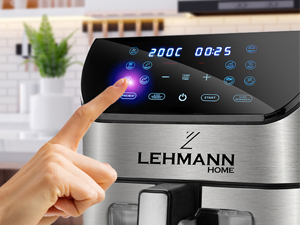
Rajah 5: A hand interacting with the touch screen, demonstrating the ease of setting functions.
The LEHMANN Hot Air Fryer features a digital LED touch screen for easy operation. You can manually adjust temperature and time or select from 12 pre-set cooking programs.
Program Memasak:
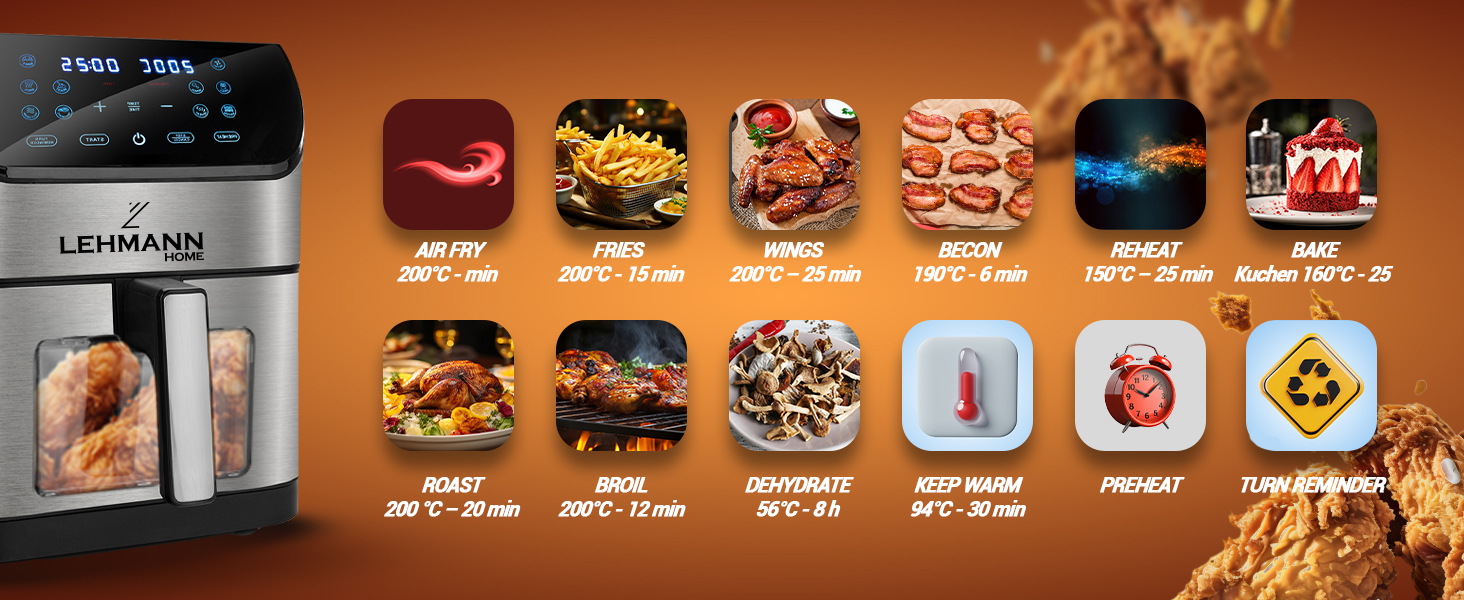
Rajah 6: Visual representation of the 12 pre-set cooking functions, including Air Fry, Fries, Wings, Bacon, Reheat, Bake, Roast, Broil, Dehydrate, Keep Warm, Preheat, and Turn Reminder.
The appliance offers 12 versatile functions for various cooking needs:
- Udara Goreng: General air frying.
- Kentang goreng: Dioptimumkan untuk kentang goreng rangup.
- sayap: Ideal for chicken wings.
- Bacon: For perfectly cooked bacon.
- Panaskan semula: Untuk memanaskan makanan yang telah dimasak sebelum ini.
- bakar: For baking cakes, pastries, etc.
- panggang: Untuk memanggang daging dan sayur-sayuran.
- Panggang: For browning or crisping food.
- Dehidrat: For drying fruits, vegetables, or jerky.
- Tetap Hangat: Mengekalkan suhu makanan selepas memasak.
- Panaskan: Heats the air fryer to the desired temperature before adding food.
- Peringatan Giliran: Prompts you to shake or turn food during cooking for even results.
Langkah Memasak Umum:
- Menyediakan makanan: Place your ingredients in the cooking basket. Do not overfill the basket to ensure proper air circulation.
- Masukkan Bakul: Luncurkan bakul memasak kembali ke dalam unit utama sehingga ia berbunyi klik pada tempatnya.
- Hidupkan kuasa: Press the power button on the touch screen.
- Select Program or Set Manually:
- Pre-set Program: Tap the icon for your desired cooking program. The appliance will automatically set the recommended temperature and time.
- Tetapan Manual: Use the temperature and time adjustment buttons (+/-) to set your desired cooking temperature (up to 200°C) and time.
- Mula Memasak: Press the "Start" button. The appliance will begin the cooking process.
- Pantau Kemajuan: Gunakan yang telus viewing window and internal light to monitor cooking progress without opening the basket.
- Shake/Turn (if prompted): If the "Turn Reminder" function is active or recommended for your food, the appliance will beep. Carefully remove the basket, shake or turn the food, and reinsert the basket to resume cooking.
- penyiapan: The appliance will beep when cooking is complete. Carefully pull out the basket using the handle.
- Hidangkan: Transfer the cooked food to a plate. Be cautious of hot oil or food.
- Matikan: Press the power button to turn off the appliance and unplug it from the wall outlet.
Penyelenggaraan dan Pembersihan
Pembersihan tetap memastikan prestasi optimum dan memanjangkan jangka hayat penggoreng udara anda.
Rajah 7: The non-stick cooking basket is dishwasher safe for convenient cleaning.
- Cabut plag dan Sejukkan: Sentiasa cabut plag penggoreng udara dan biarkan ia sejuk sepenuhnya sebelum dibersihkan.
- Bersihkan Bakul: The non-stick cooking basket is removable and dishwasher safe. For manual cleaning, wash with hot water, dish soap, and a non-abrasive sponge. For stubborn residue, soak the basket in hot water with dish soap for about 10 minutes.
- Bersihkan Bahagian Dalaman: Lap bahagian dalam perkakas dengan iklanamp kain. Jangan gunakan pembersih yang melelas atau pad penyental.
- Bersihkan Bahagian Luar: Lap bahagian luar penggoreng udara dengan iklanamp kain.
- Elemen Pemanas: Gunakan berus pembersih untuk mengeluarkan sebarang sisa makanan daripada elemen pemanas.
- Storan: Ensure all parts are dry before storing the appliance in a cool, dry place.
Menyelesaikan masalah
| Masalah | Kemungkinan Punca | Penyelesaian |
|---|---|---|
| Penggoreng udara tidak dihidupkan. | Perkakas tidak dipalamkan. Salur keluar kuasa tidak berfungsi. Basket is not inserted correctly. | Palamkan kord kuasa ke salur keluar dinding yang dibumikan. Check the power outlet by plugging in another appliance. Ensure the basket is fully pushed into the main unit until it clicks. |
| Makanan tidak dimasak sekata. | Basket is overloaded. Makanan tidak digoncang/dibalikkan. | Masak makanan dalam kelompok yang lebih kecil. Shake or turn food halfway through cooking time. |
| Asap putih datang dari perkakas. | Bahan-bahan berminyak sedang dimasak. Oil residue from previous use. | This is normal for greasy foods. Ensure proper ventilation. Bersihkan bakul dan bahagian dalam dengan teliti selepas setiap penggunaan. |
| Dark smoke coming from the appliance. | Makanan membakar. Kerosakan elemen pemanas. | Immediately unplug the appliance. Remove the basket and discard burnt food. If smoke persists after cleaning and with no food, contact customer support. |
| Makanan tidak rangup. | Not enough oil used (for some foods). Temperature too low or cooking time too short. | Berus ringan atau sembur makanan dengan minyak untuk hasil yang lebih rangup. Increase temperature or cooking time slightly. |
Spesifikasi
- Jenama: LEHMANN
- Nombor Model: LHODF-1880C
- warna: Hitam
- Dimensi (L x W x H): 35.5 x 37.6 x 40.2 cm (lebih kurang 13.98 x 14.80 x 15.83 inci)
- kapasiti: 8 Liter
- Kuasa: 1800 Watt
- Voltage: 230 Volt
- Bahan: Plastik, Logam
- Ciri Khas: Automatic shut-off, Temperature control, Timer, Programmable, Digital LED Touch Screen, Viewing Window, Internal Light, Non-stick coating, Dishwasher safe basket.
- Berat Barang: 6.1 Kilogram (lebih kurang 13.45 paun)
Waranti dan Sokongan
For warranty information and customer support, please refer to the warranty card included with your product or visit the official LEHMANN website. Please have your model number (LHODF-1880C) and purchase details ready when contacting support.
While specific warranty details are not provided here, LEHMANN is committed to providing high-quality home appliances and customer satisfaction.


