pengenalan
This manual provides comprehensive instructions for the setup, operation, and maintenance of your new HUAYU RM-L1678 remote control. This remote is designed for use with various AQUOS LCD LED Smart TV models, including GB234WJSA, GB346WJSA, GA455WJSA, GB139WJSA, and G8275WJSA. Please read this manual carefully to ensure proper use and to maximize the lifespan of your device.
1. Persediaan
1.1 Pemasangan Bateri
Alat kawalan jauh memerlukan dua bateri AAA (tidak disertakan). Ikuti langkah berikut untuk memasangnya:
- Cari petak bateri di belakang alat kawalan jauh.
- Luncurkan penutup bateri ke bawah atau tekan selak dan angkat untuk membuka.
- Masukkan dua bateri AAA, pastikan terminal positif (+) dan negatif (-) sepadan dengan gambar rajah di dalam petak.
- Gantikan penutup bateri dengan menggelongsorkannya semula ke tempatnya sehingga ia berbunyi dengan selamat.

Imej: Belakang view of the remote control with the battery compartment open, illustrating correct battery placement.
1.2 Penggunaan Awal
This remote control uses infrared technology and typically does not require programming for compatible AQUOS LCD LED Smart TVs. Simply point the remote towards your TV and press the Power button to test functionality. If the TV does not respond, ensure batteries are correctly installed and the remote has a clear line of sight to the TV's IR receiver.
2. Arahan Operasi
The HUAYU RM-L1678 remote control features standard buttons for TV operation. Below is a general guide to common button functions:
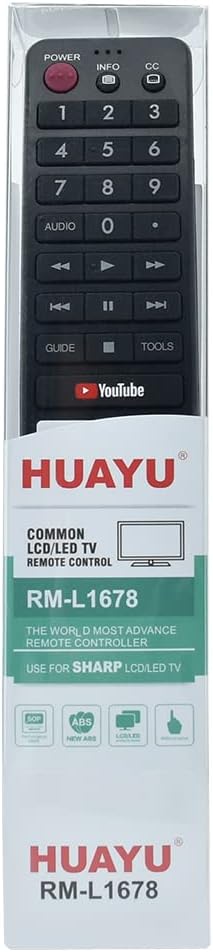
Imej: Depan view of the remote control, highlighting the button layout.
- Butang Kuasa: Menghidupkan atau mematikan TV.
- Butang Nombor (0-9): Directly select TV channels.
- Kelantangan Naik/Turun: Melaraskan tahap kelantangan TV.
- Saluran Atas/Bawah: Changes the TV channel sequentially.
- Butang Bisukan: Membisukan atau menyahredamkan bunyi TV.
- Butang Input/Sumber: Bertukar antara sumber input yang berbeza (HDMI, AV, dsb.).
- Butang Navigasi (Atas, Bawah, Kiri, Kanan, OK): Digunakan untuk menavigasi menu dan mengesahkan pilihan.
- Butang Kembali/Keluar: Kembali ke menu sebelumnya atau keluar dari menu semasa.
- Smart TV/App Buttons: Dedicated buttons for accessing smart TV features or specific applications like YouTube (if present and supported by your TV model).
Note: Specific button functionalities may vary slightly depending on your AQUOS TV model. Refer to your TV's user manual for detailed information on advanced features.
3. Penyelenggaraan
3.1 Pembersihan
To keep your remote control clean and functional:
- Lap permukaan dengan kain lembut dan kering.
- Untuk kotoran degil, ringankan dampen kain dengan air atau pembersih yang lembut dan tidak melelas. Jangan sembur pembersih terus ke alat kawalan jauh.
- Elakkan menggunakan bahan kimia, pelarut atau pad pembersih yang kasar, kerana ini boleh merosakkan kemasan alat kawalan jauh atau komponen dalaman.
3.2 Penggantian Bateri
Replace batteries when the remote's response becomes sluggish or stops working. Always replace both batteries at the same time with new AAA batteries. Do not mix old and new batteries or different types of batteries.
3.3 Penyimpanan
Store the remote control in a cool, dry place away from direct sunlight and extreme temperatures. If the remote will not be used for an extended period, remove the batteries to prevent leakage and potential damage.
4. Penyelesaian masalah
| Masalah | Kemungkinan Punca | Penyelesaian |
|---|---|---|
| Jauh tidak berfungsi | Bateri mati atau tidak dipasang dengan betul. | Gantikan bateri dengan yang baharu, memastikan kekutuban yang betul. |
| Jauh tidak bertindak balas | Obstruction between remote and TV's IR sensor; remote too far from TV. | Ensure a clear line of sight to the TV. Move closer to the TV. |
| Certain buttons not functioning | Dirt or debris under buttons; remote damage. | Clean the remote surface. If damage is suspected, consider replacement. |
| TV not responding to specific smart features | TV model does not support the feature; TV software issue. | Verify your TV model's compatibility with the feature. Consult your TV's manual or manufacturer support. |
5. Spesifikasi
- Nombor Model: RM-L1678
- Keserasian: AQUOS LCD LED Smart TVs (e.g., GB234WJSA, GB346WJSA, GA455WJSA, GB139WJSA, G8275WJSA)
- Sambungan Wayarles: Inframerah (IR)
- Sumber Kuasa: 2 x Bateri AAA (tidak termasuk)
- Saluran: 1
- Rujukan Pengilang: TK-1005004724793564
- ASIN: B0CTMTG93T
6. Waranti dan Sokongan
Produk ini disertakan dengan a Waranti 12 bulan dari tarikh pembelian. Waranti ini meliputi kecacatan pembuatan dan memastikan produk berfungsi seperti yang dimaksudkan di bawah penggunaan biasa.
If you encounter any issues with your product, such as receiving a damaged or incorrect item, please do not hesitate to contact us. We are committed to providing support and will respond to your inquiries within 24 hours.
Untuk sokongan, sila rujuk maklumat hubungan penjual pada platform pembelian.


