1. Produk Lebihview
The iWALK Portable Apple Watch Charger (Model LPW004C) is a compact and versatile 5000mAh power bank designed for charging Apple Watch models and USB-C compatible devices, including the iPhone 15 series, iPad Pro/Air series, and AirPods. It features a built-in USB-C cable for wired charging and an integrated magnetic wireless charging module for Apple Watch. The device also includes a foldable stand for convenient use.

Figure 1: iWALK Portable Apple Watch Charger (Model LPW004C).
2. Persediaan dan Penggunaan Awal
2.1 Apa yang ada di dalam Kotak
- iWALK Portable Apple Watch Charger (Model LPW004C)
- Pendiri boleh lipat terbina dalam
- Built-in USB Type-C cable
- Integrated magnetic charging module
2.2 Mengecas Power Bank
Before first use, fully charge the iWALK power bank. Connect a USB-C power adapter (not included) to the USB-C input/output port on the power bank. The LED indicator lights will flash to show the charging status. Once all lights are solid, the power bank is fully charged.

Figure 2: The power bank can be recharged via its USB-C port. Input/Output supports 15W, while a dedicated input port supports 10W.
2.3 Memahami Penunjuk LED
The power bank features LED lights to indicate its battery level and charging status:
- Cahaya Biru Pepejal: Indicates the power bank is active or fully charged.
- Flashing Blue Lights: Indicates the power bank is currently charging. The number of flashing lights corresponds to the current charge level.
- Tiada Lampu: The power bank is off or completely discharged.

Figure 3: Battery indicator lights and their corresponding charge levels.
2.4 Initial Setup Video
Video 1: This video demonstrates how to use the iWALK Portable Apple Watch Charger, including connecting an Apple Watch and a phone for charging.
3. Arahan Operasi
3.1 Charging Apple Watch
- Pastikan bank kuasa dicas secukupnya.
- Place your Apple Watch directly onto the magnetic wireless charging module on the power bank.
- The Apple Watch will begin charging automatically. The power bank's LED indicators will show activity.
The charger is compatible with Apple Watch Series 9/8/7/6/SE/5/4/3/2/1/Ultra/Ultra 2 (49mm, 45mm, 44mm, 42mm, 41mm, 40mm, 38mm).

Figure 4: Wireless charging of an Apple Watch on the power bank.
3.2 Charging USB-C Devices (e.g., iPhone 15)
- Cari kabel USB-C terbina dalam pada bank kuasa.
- Unfold the cable and plug it into the USB-C charging port of your device.
- The device will begin charging. The power bank's LED indicators will show activity.
The built-in USB-C cable supports 15W PD fast charging. It is compatible with iPhone 15 / 15 Plus / 15 Pro / 15 Pro Max, iPad Pro/Air Series, AirPods, and other Android mobile phones with USB-C ports. Nota: This charger is not applicable for older iPhone models (iPhone 14/13/12/11/XS/XR/X/8/7/6/SE) that use a Lightning connector.
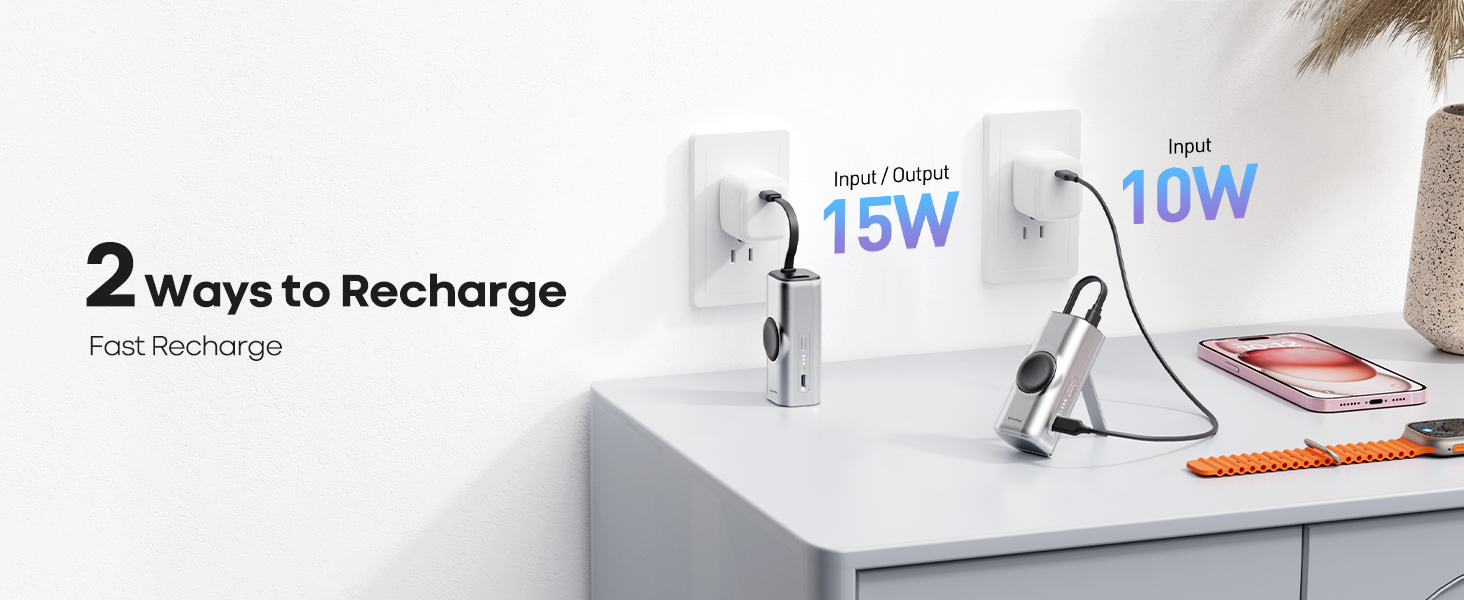
Figure 5: Wired charging of an iPhone 15 using the built-in USB-C cable.

Figure 6: Compatibility with USB-C port devices.
3.3 Pengecasan Serentak
The iWALK power bank allows for simultaneous charging of your Apple Watch and a USB-C device. Simply place your Apple Watch on the magnetic module and connect your USB-C device using the built-in cable.

Figure 7: Simultaneous charging of an Apple Watch and an iPhone.
3.4 Menggunakan Pendirian Boleh Lipat
The power bank includes a built-in foldable stand. Extend the stand from the side of the device to prop it up, allowing your Apple Watch to function as a bedside clock while charging.
Video 2: This video highlights the features and usage of the iWALK Portable Apple Watch Charger, including its compact size, charging capabilities, and the foldable stand.
4. Penyelenggaraan
4.1 Pembersihan
To clean the power bank, wipe it with a soft, dry cloth. Do not use harsh chemicals, cleaning solvents, or strong detergents. Ensure the device is powered off and disconnected from any power source before cleaning.
4.2 Penyimpanan
Store the power bank in a cool, dry place away from direct sunlight, extreme temperatures, and humidity. If storing for an extended period, charge the device to approximately 50% every three months to maintain battery health.
4.3 Langkah Keselamatan
- Jangan buka, ubah suai atau baiki peranti.
- Avoid dropping, impacting, or exposing the device to strong vibrations.
- Keep away from water, fire, and high temperatures.
- Jangan gunakan jika peranti rosak atau menunjukkan tanda-tanda terlalu panas.
5. Penyelesaian masalah
5.1 Peranti Tidak Mengecas
- Semak Caj Power Bank: Ensure the iWALK power bank itself is sufficiently charged. Refer to Section 2.3 for LED indicator meanings.
- Sambungan yang betul: For wired charging, ensure the USB-C cable is securely plugged into both the power bank and your device. For wireless charging, ensure your Apple Watch is correctly positioned on the magnetic module.
- Keserasian: Verify that your device is compatible with the charger. Note that older iPhones with Lightning ports are not supported by the built-in USB-C cable.
5.2 Pengecasan Lambat
- Kualiti Kabel: If using an external cable to charge the power bank, ensure it is a high-quality USB-C cable capable of 15W PD charging.
- Penyesuai Kuasa: When recharging the power bank, use a power adapter that supports 15W or 10W input for optimal speed.
- Pengecasan serentak: Charging multiple devices simultaneously may result in slightly slower charging speeds for each device.
5.3 Terlalu panas
It is normal for the power bank to become slightly warm during charging. If it becomes excessively hot, disconnect all devices and the power source immediately. Allow the unit to cool down before resuming use. Ensure proper ventilation and avoid covering the device during operation.
6. Spesifikasi
| Ciri | Spesifikasi |
|---|---|
| Nombor Model | LPW004C |
| Kapasiti Bateri | 5000 Miliamp Jam (mAh) |
| Dimensi Produk | 4.4 x 1.37 x 1.25 inci |
| Berat Barang | 11.7 auns |
| Teknologi Ketersambungan | USB, Wayarles |
| Jenis Penyambung | USB Jenis C |
| Ciri Khas | Apple Watch Charging, Built-in Cable, Compact, Mini, Foldable Stand |
| warna | Perak |
| Pengeluar | U2O Global Co., Ltd. |
7. Maklumat Waranti
iWALK products are manufactured to high quality standards. This product is covered by a limited warranty against defects in materials and workmanship. The specific terms and duration of the warranty may vary by region and retailer. Please retain your proof of purchase for warranty claims. For detailed warranty information, refer to the warranty card included with your product or visit the official iWALK webtapak.
8. Sokongan Pelanggan
For any questions, technical assistance, or support regarding your iWALK Portable Apple Watch Charger, please contact our customer service team. You can typically find contact information (email, phone, or support portal) on the official iWALK website or on the product packaging. Please have your model number (LPW004C) and proof of purchase ready when contacting support.