pengenalan
Terima kasih kerana membeliasing the SHARP XL-B530 Micro Component System. This system is designed to provide high-quality audio playback from various sources, including Bluetooth wireless streaming, CD, USB, AM/FM radio, and auxiliary input. This manual provides detailed instructions for setting up, operating, and maintaining your new audio system to ensure optimal performance and longevity.
Maklumat Keselamatan Penting
- Baca semua arahan dengan teliti sebelum digunakan.
- Simpan manual ini untuk rujukan masa hadapan.
- Jangan dedahkan unit kepada hujan atau lembapan.
- Pastikan pengudaraan yang betul di sekitar unit. Jangan halang bukaan pengudaraan.
- Jangan letakkan unit berhampiran sumber haba seperti radiator, daftar haba, dapur, atau radas lain (termasuk amppenghidup) yang menghasilkan haba.
- Lindungi kord kuasa daripada berjalan atau tersepit.
- Hanya gunakan lampiran/aksesori yang ditentukan oleh pengilang.
- Cabut plag radas ini semasa ribut petir atau apabila tidak digunakan untuk jangka masa yang lama.
- Rujuk semua servis kepada kakitangan perkhidmatan yang berkelayakan.
Kandungan Pakej
Sila pastikan semua item berikut disertakan dalam pakej anda:
- Main Unit (Micro Component System)
- Unit Pembesar Suara (x2)
- Alat Kawalan Jauh
- Kord Kuasa
- Antena FM
- Antena Gelung AM
- Manual Pengguna (dokumen ini)
Produk Selesaiview
Familiarize yourself with the components and controls of your SHARP XL-B530 system.
Main Unit and Speakers

Keseluruhannya view of the SHARP XL-B530 Micro Component System, including the main unit, two speakers, and the remote control.
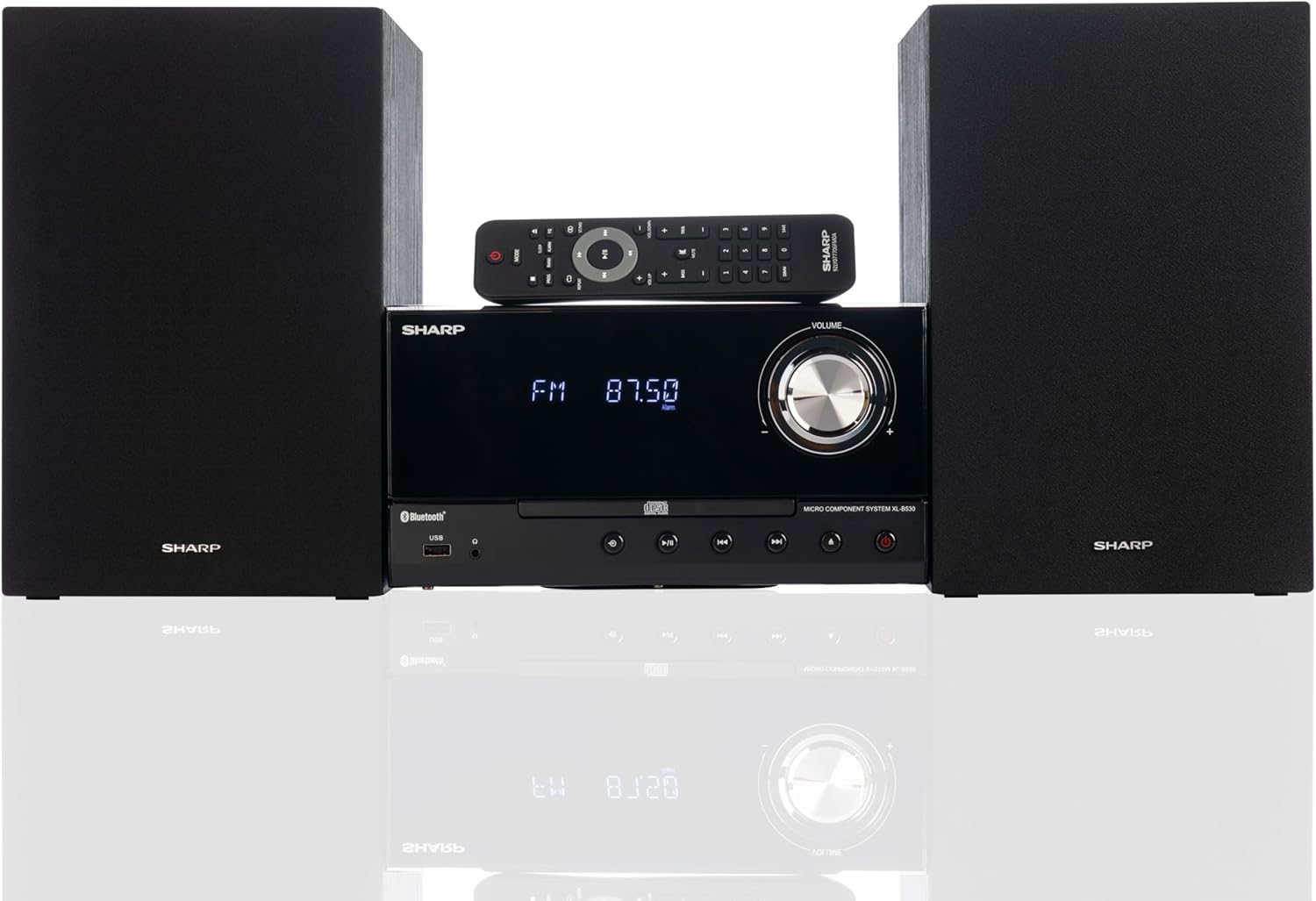
Front panel of the main unit, showing the LCD display, volume knob, CD tray, and control buttons.
Sambungan Panel Belakang

The rear panel of the main unit, featuring speaker terminals, FM antenna input, AM antenna input, and auxiliary input ports.
Alat Kawalan Jauh
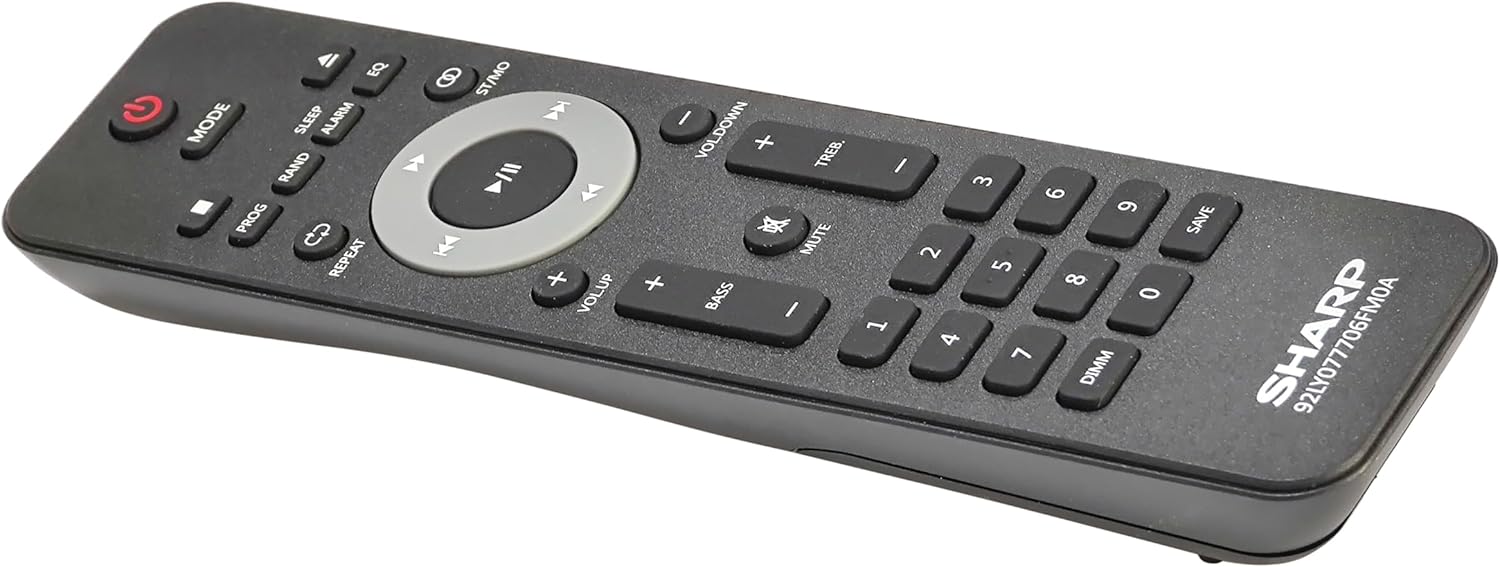
Terperinci view of the remote control, showing various function buttons for power, mode, playback, volume, and sound adjustments.
Persediaan
Follow these steps to set up your micro component system.
1. Sambungan Pembesar Suara
- Identify the left and right speaker cables.
- Connect the red (+) wire from each speaker to the red (+) terminal on the main unit's rear panel.
- Connect the black (-) wire from each speaker to the black (-) terminal on the main unit's rear panel.
- Ensure a secure connection for both speakers.
2. Sambungan Antena
- Antena FM: Connect the supplied FM wire antenna to the FM antenna jack on the rear panel. Extend the wire fully for best reception.
- Antena AM: Assemble the AM loop antenna and connect its wires to the AM antenna terminals on the rear panel. Rotate the antenna for optimal AM reception.
3. Sambungan Kuasa
- Ensure all other connections are made.
- Plug the power cord into the AC IN jack on the rear of the main unit.
- Insert the other end of the power cord into a wall outlet.
Arahan Operasi
This section details how to use the various functions of your SHARP XL-B530 system.
Hidupkan/Mati Kuasa
- Tekan ke KUASA button on the main unit or remote control to turn the system on or off.
Pemilihan Sumber
- Tekan ke MODE button on the main unit or remote control repeatedly to cycle through available sources: CD, Bluetooth, USB, FM, AM, AUX.
Main semula CD
- Tekan ke MODE button to select 'CD' mode.
- Tekan ke BUKA/TUTUP butang untuk membuka dulang CD.
- Place a CD (CD/MP3/WMA/CD-R/CD-RW) with the label side up into the tray.
- Tekan ke BUKA/TUTUP butang sekali lagi untuk menutup dulang. Main balik akan bermula secara automatik.
- guna MAIN/JEDA, BERHENTI, SKIP (forward/backward), and CARIAN butang untuk kawalan.
Berpasangan Bluetooth
- Tekan ke MODE button to select 'Bluetooth' mode. The display will show 'BT' and flash, indicating it's ready for pairing.
- Pada peranti Bluetooth anda (telefon pintar, tablet, dll.), dayakan Bluetooth dan cari peranti yang tersedia.
- Select 'SHARP XL-B530' from the list.
- Once paired, the display will stop flashing and show 'BT CONNECTED'. You can now stream audio from your device.
Main Balik USB
- Masukkan pemacu kilat USB ke dalam port USB di panel hadapan.
- Tekan ke MODE button to select 'USB' mode.
- The system will automatically detect and begin playing compatible audio files (MP3/WMA).
- Use playback controls similar to CD mode.
Radio AM/FM

The SHARP XL-B530 system displaying an FM radio frequency, highlighting its digital tuner capabilities.
- Tekan ke MODE button to select 'FM' or 'AM' mode.
- Imbasan Auto: Tekan dan tahan butang MAIN/JEDA button to automatically scan and save available stations.
- Penalaan Manual: Gunakan SKIP butang untuk melaraskan frekuensi yang dikehendaki secara manual.
- Stesen Pratetap: Use the number buttons on the remote to directly select saved preset stations.
Volume and Sound Adjustment

A close-up of one of the SHARP XL-B530 speakers, illustrating the adjustable bass and treble sound output.
- Kelantangan: Putar JILID tombol pada unit utama atau gunakan VOL + / VOL- butang pada alat kawalan jauh.
- Bes/Trebel: Gunakan BASS+ / BASS- dan TREB+ / TREB- buttons on the remote control to adjust sound characteristics.
- Kekerasan: Tekan ke KEBERKESANAN button on the remote to enhance bass and treble at low volumes.
- EQ: Tekan ke EQ button on the remote to cycle through preset equalizer modes.
Penyelenggaraan
Proper care will ensure the longevity of your system.
- Pembersihan: Use a soft, dry cloth to clean the exterior of the unit. For stubborn stains, dampen the cloth lightly with water. Do not use abrasive cleaners or solvents.
- Penjagaan CD: Pegang CD pada tepinya. Bersihkan CD kotor dengan kain lembut dan tidak berbulu, lap dari tengah ke luar.
- Pengudaraan: Ensure the ventilation openings are not blocked by dust or debris.
- Storan: Jika menyimpan unit untuk tempoh yang lama, cabut palamnya dari salur keluar kuasa dan simpan di tempat yang sejuk dan kering.
Menyelesaikan masalah
If you encounter issues with your system, refer to the following common problems and solutions.
| Masalah | Kemungkinan Punca | Penyelesaian |
|---|---|---|
| Tiada kuasa | Kord kuasa tidak disambungkan; Salur keluar kuasa tidak aktif | Pastikan kord kuasa dipasang dengan selamat; Cuba kedai lain |
| Tiada bunyi | Volume too low; Speakers not connected; Incorrect source selected | Increase volume; Check speaker connections; Select correct input source |
| CD tidak dimainkan | CD inserted incorrectly; CD is dirty or scratched; Incorrect mode | Insert CD correctly (label side up); Clean or replace CD; Select CD mode |
| Bluetooth tidak berpasangan | Bluetooth mode not selected; Device too far; Device already paired to another unit | Select Bluetooth mode; Move device closer; Disconnect from other devices and try again |
| Penerimaan radio yang lemah | Antenna not connected or positioned poorly; Interference | Connect and adjust antenna position; Move unit away from other electronic devices |
| Alat kawalan jauh tidak berfungsi | Bateri mati atau dipasang dengan salah; Halangan antara alat kawalan jauh dan unit | Replace batteries, check polarity; Remove any obstructions; Ensure remote is pointed at the unit's sensor |
Spesifikasi
| Ciri | Spesifikasi |
|---|---|
| Nombor Model | XL-B530(BK) |
| Kuasa Keluaran | Maksimum 200W (RMS 100W) |
| Ketersambungan | Bluetooth, USB, Aux Input |
| Keserasian Cakera | CD, CD-R/RW, MP3, WMA |
| Penala | AM/FM Stereo Digital Tuner (50 station presets) |
| Jenis Pembesar Suara | Stereo |
| Dimensi Produk (L x W x H) | 25 x 11 x 9.6 inci |
| Berat Barang | 18 paun |
| warna | Black Oak |
Waranti dan Sokongan
For warranty information and technical support, please refer to the warranty card included with your product or visit the official SHARP webtapak. Simpan resit pembelian anda sebagai bukti pembelian untuk sebarang tuntutan waranti.
For further assistance, you may contact SHARP customer service through their official channels.


