1. Pengenalan
The LTC Nimbleback NB831 is a versatile 75% mechanical keyboard designed for various computing environments. It offers multiple connectivity options, customizable features, and a compact layout. This manual provides detailed instructions for setting up, operating, and maintaining your keyboard.

Imej 1.1: Selesaiview of the LTC Nimbleback NB831 Mechanical Keyboard.
2. Kandungan Pakej
Sahkan bahawa semua item terdapat dalam pakej anda:
- LTC Nimbleback NB831 Mechanical Keyboard
- Penarik Kekunci
- Kabel USB (USB-A ke USB-C)
- Kad Manual Pengguna
- Replacement Switches (4 pieces)

Image 2.1: Contents included in the LTC Nimbleback NB831 package, featuring the keyboard, USB cable, keycap/switch puller, and extra switches.
3. Persediaan
3.1 Mod Kesambungan
The NB831 supports three connection modes:
- Wayarles 2.4GHz: Use the included USB dongle for a stable wireless connection.
- Bluetooth 5.0: Pair with up to three Bluetooth-enabled devices.
- Berwayar USB-C: Connect directly via the USB-C cable for a wired connection and simultaneous charging.

Image 3.1: Visual representation of the three connectivity modes: 2.4GHz wireless, Bluetooth 5.0, and USB-C wired.
3.2 Keserasian Sistem Pengendalian
The NB831 keyboard is compatible with Windows (Win7, Win8, Win10, Win11), iOS, and macOS operating systems. Use the following key combinations to switch between modes:
- Mod Windows: Tekan fn + A
- Mod macOS: Tekan Fn + S

Image 3.2: Illustration of switching between Windows and macOS modes using Fn key combinations.
3.3 Pelarasan Fizikal
The keyboard features 2-level adjustable feet for ergonomic typing angles. The USB dongle can be stored in a dedicated magnetic socket on the underside of the keyboard when not in use. The USB-C cable can be routed through three different channels (left, center, right) for neat cable management.

Image 3.3: Details of the keyboard's underside, showing 2-level feet, 3-side cable routing, and the magnetic dongle socket.
4. Arahan Operasi
4.1 Tombol Kawalan Kelantangan
The integrated volume knob allows for quick audio adjustments:
- Putar mengikut arah jam: Tingkatkan kelantangan.
- Putar lawan arah jam: Kurangkan volum.
- Tekan: Bisukan/Nyahbisukan audio.
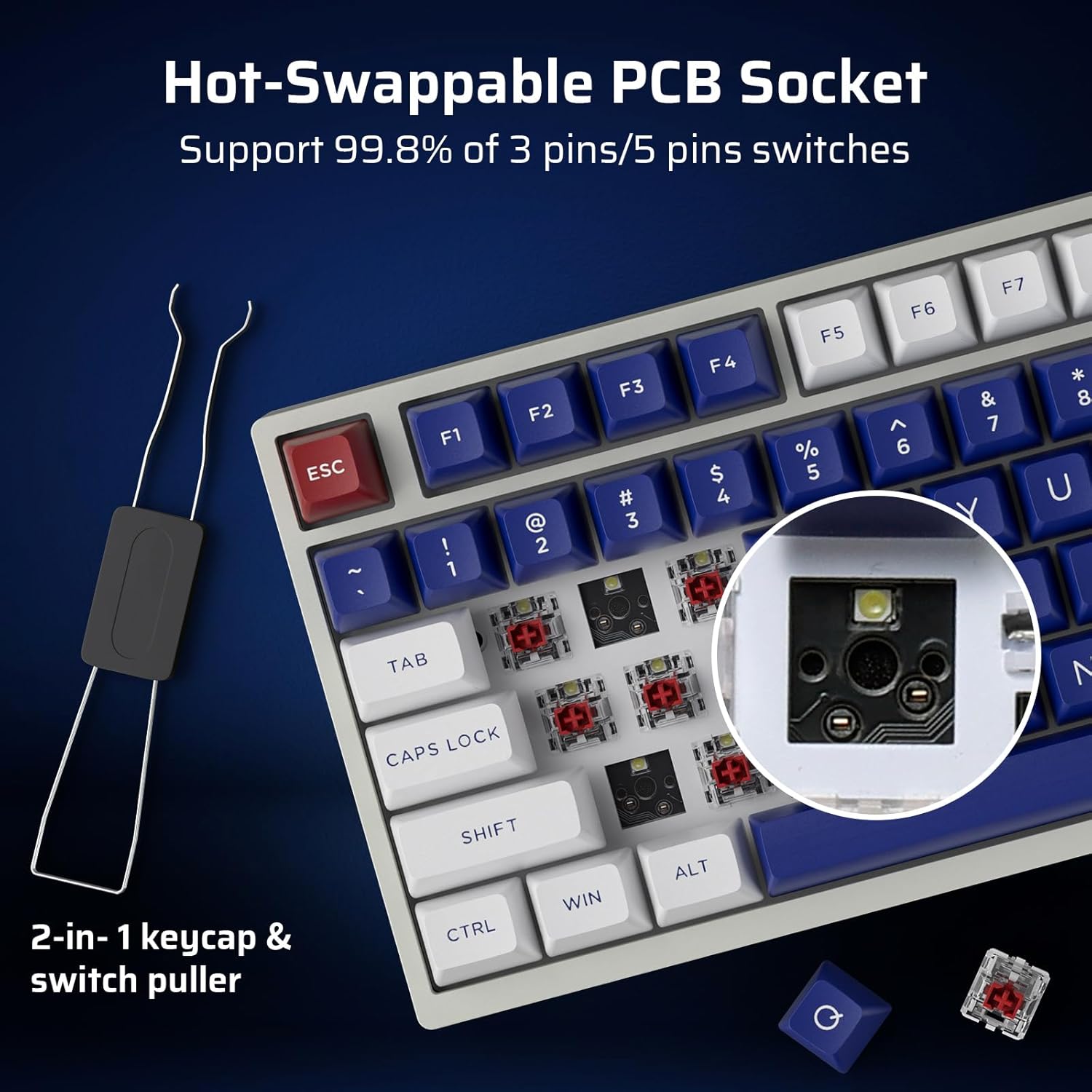
Image 4.1: Demonstrates the functionality of the convenient volume knob for adjusting audio levels and muting.
4.2 Lampu latar RGB
The keyboard features 18 dynamic RGB lighting modes. Control them using the following key combinations:
- Switch Backlight Modes: Tekan Fn + ↑ (Anak panah Atas)
- Switch Backlight Colors: Tekan Fn + ↓ (Anak panah ke bawah)
- Kelajuan Lampu Latar +: Tekan Fn + → (Anak Panah Kanan)
- Kelajuan Lampu Latar -: Tekan Fn + ← (Anak Panah Kiri)
- Lampu latar Hidup/Mati: Tekan Fn + \
- Restore Factory Mode: Tekan lama Fn + Ruang
4.3 Suis Boleh Tukar Panas
The NB831 features a hot-swappable PCB, allowing you to change mechanical switches without soldering. It supports both 3-pin and 5-pin MX-style switches (e.g., Gateron, Kailh). Use the included 2-in-1 keycap and switch puller for easy removal and installation.

Imej 4.2: Jarak dekat view of the hot-swappable PCB socket, demonstrating compatibility with different switch types.
4.4 Pro Software Support
Utilize the dedicated LTC software to customize your keyboard experience. The software allows you to:
- Remap key combinations.
- Assign macros for complex commands.
- Sesuaikan kesan dan warna pencahayaan RGB.

Image 4.3: Screenshot of the LTC Pro Software interface, showing options for key remapping, macro assignment, and RGB customization.
Video 4.1: Satu kajian terperinciview of the LTC Nimbleback NB831 keyboard, including a demonstration of its software features and customization options.
5. Penyelenggaraan
5.1 Pembersihan
To maintain optimal performance and appearance, regularly clean your keyboard. Use a soft, dry cloth to wipe the surface. For deeper cleaning, remove keycaps using the provided keycap puller and use compressed air to clear debris from between switches. The PBT keycaps are oil-resistant, making them easier to clean.
5.2 Penggantian Suis dan Kap Kekunci
Leverage the hot-swappable design to replace switches or keycaps. Use the included 2-in-1 tool to carefully remove keycaps first, then switches. Ensure new switches are aligned correctly before pressing them into the PCB to avoid bending pins.
5.3 Bunyi Dampening
The keyboard is designed with dual layers of sound-damping foam to minimize hollow sounds and reduce noise, contributing to a satisfying typing experience.

Image 5.1: Diagram illustrating the two-layer silencing foam structure within the keyboard, designed to reduce hollow sounds and noise.
6. Penyelesaian masalah
- Papan kekunci tidak bertindak balas: Ensure the keyboard is charged and properly connected (wired, 2.4GHz dongle, or Bluetooth paired). Try switching between connectivity modes.
- Isu berpasangan Bluetooth: Ensure the keyboard is in Bluetooth mode and discoverable. Remove previous pairings on your device and try re-pairing.
- Pencahayaan RGB tidak berfungsi: Check if the backlight is turned on using Fn + \. If issues persist, try restoring factory settings with Fn + Ruang (tekan lama).
- Perisian tidak mengesan papan kekunci: Ensure the keyboard is connected via USB-C wired mode when using the software. Check for software updates.
- Kebimbangan hayat bateri: Check the battery level by pressing Fn + Backspace. Ensure the keyboard is fully charged.
7. Spesifikasi
| Ciri | Perincian |
|---|---|
| Dimensi Produk | 12.64 x 5.24 x 1.65 inci |
| Berat Barang | 2.57 paun |
| Pengeluar | LTC |
| Nombor Model Item | NB831 |
| Bateri | 2 bateri Lithium Ion diperlukan (termasuk) |
| Teknologi Ketersambungan | Bluetooth, RF (2.4GHz), USB-C |
| Penerangan Papan Kekunci | Mechanical, 75% Layout (81-Keys) |
| Ciri Khas | Programmable Keys, Rechargeable, Volume Roller, Hot-Swappable |
| Backlighting papan kekunci | RGB |
7.1 Maklumat Bateri
The keyboard is equipped with a 4000mAh battery, providing up to 12 hours of continuous use with RGB backlight and up to 80 hours without. To check the battery level, press Fn + Backspace.

Image 7.1: Visual guide for checking the battery level using the Fn + Backspace key combination.
8. Waranti dan Sokongan
For warranty information, technical support, or customer service inquiries, please refer to the official LTC webtapak atau hubungi peruncit anda. Simpan resit pembelian anda untuk tuntutan waranti.


