pengenalan
Welcome to the SENTRY Ultra-Light Bluetooth Earbuds user manual. These earbuds are designed to provide a seamless and immersive audio experience, perfect for active lifestyles. With an ultra-light design, LED power display, and intelligent touch controls, you can enjoy high-quality sound and convenient operation. Please read this manual carefully to ensure proper use and maintenance of your new earbuds.
Kandungan Pakej
- SENTRY Ultra-Light Bluetooth Earbuds (Left and Right)
- Sarung Pengecas Mudah Alih
- Kabel Pengecas USB
- Manual Pengguna
Ciri-ciri Produk
- Paparan Kuasa LED: Transparent design on the charging case allows real-time battery monitoring.
- Reka bentuk padat: Ultra-compact and space-saving, making them highly portable.
- Bass Acoustic Design: Advanced dynamic drivers deliver crystal-clear audio with enhanced bass and treble.
- Kawalan Sentuhan Pintar: Effortlessly manage volume, music tracks, calls, and voice assistants.
- Stable Connections: Advanced Bluetooth technology ensures lag-free and reliable performance.
Produk Selesaiview
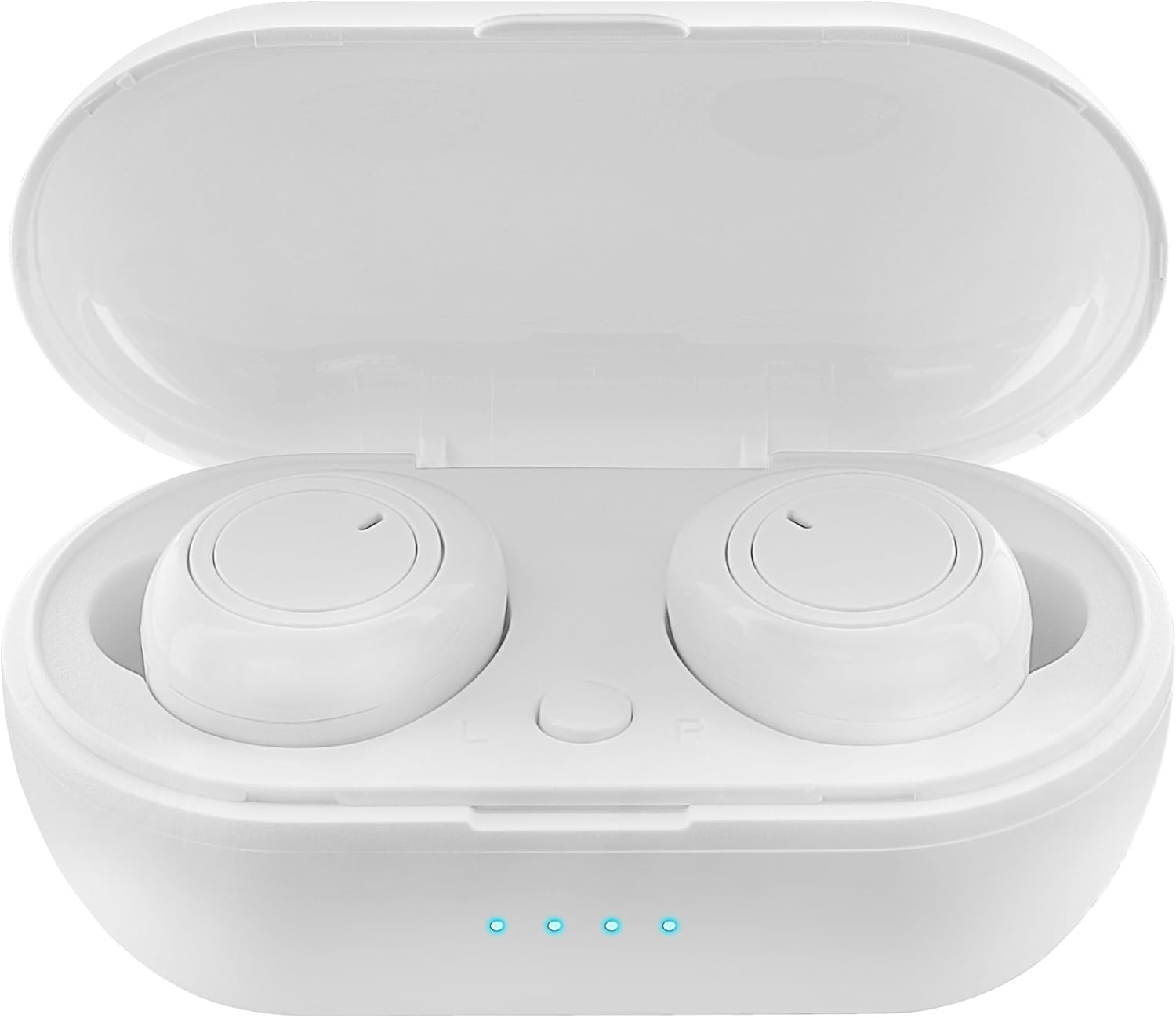
Figure 1: Earbuds in Charging Case with LED Indicators. The charging case features a transparent lid and three blue LED lights indicating battery status.

Figure 2: Individual Earbuds (Front View). Each earbud features a circular touch control area for easy operation.

Figure 3: Individual Earbuds (Side View). The ergonomic design ensures a comfortable and secure fit in the ear.
Persediaan
1. Mengecas Fon Telinga dan Sarung
- Letakkan fon telinga ke dalam bekas pengecasan. Pastikan mereka duduk dengan betul.
- Sambungkan kabel pengecas USB ke port pengecasan pada bekas dan ke sumber kuasa (cth., penyesuai dinding USB, port USB komputer).
- The LED display on the charging case will indicate the charging status. A full charge is indicated when all lights are solid.
- Allow approximately 1-2 hours for a full charge of both earbuds and the case.
2. Berpasangan dengan Peranti Anda
- Open the charging case. The earbuds will automatically enter pairing mode (indicated by flashing lights on the earbuds).
- Pada telefon pintar atau peranti berdaya Bluetooth anda, pergi ke tetapan Bluetooth.
- Cari untuk new devices and select "SENTRY Earbuds" (or similar name) from the list.
- Once connected, the earbud lights will stop flashing, and you will hear a confirmation tone.
- Fon telinga akan menyambung semula secara automatik ke peranti gandingan terakhir apabila dikeluarkan daripada sarung, jika Bluetooth didayakan pada peranti.
Arahan Operasi
Your SENTRY Ultra-Light Bluetooth Earbuds feature intelligent touch controls for easy management of your audio and calls.
| Fungsi | Tindakan |
|---|---|
| Main/Jeda Muzik | Ketik sekali pada salah satu fon telinga |
| Trek Seterusnya | Ketik dua kali pada fon telinga kanan |
| Trek Sebelumnya | Ketik dua kali pada fon telinga kiri |
| Jawab/Tamatkan Panggilan | Ketik sekali pada salah satu fon telinga |
| Tolak Panggilan | Tekan dan tahan salah satu fon telinga selama 2 saat |
| Aktifkan Pembantu Suara | Ketik tiga kali pada salah satu fon telinga |
| Kelantangan Naik | Tekan dan tahan Fon telinga kanan |
| Kelantangan Kurang | Tekan dan tahan Fon telinga kiri |
Penyelenggaraan
- Pembersihan: Gunakan kain lembut, kering, bebas serabut untuk membersihkan fon telinga dan bekas pengecas. Jangan gunakan bahan kimia yang keras atau bahan yang melelas.
- Storan: Apabila tidak digunakan, simpan fon telinga dalam bekas pengecasnya untuk melindunginya dan memastikan ia dicas. Simpan di tempat yang sejuk dan kering jauh dari cahaya matahari langsung dan suhu yang melampau.
- Penjagaan Bateri: Untuk memanjangkan hayat bateri, elakkan daripada menyahcas sepenuhnya fon telinga dan bekas pengecasan dengan kerap. Mengecasnya dengan kerap, walaupun tidak digunakan secara berterusan.
- Tahan Air: These earbuds are not water resistant. Avoid exposure to water, sweat, or high humidity.
Menyelesaikan masalah
- Fon telinga tidak berpasangan: Pastikan kedua-dua fon telinga dicas. Letakkannya semula ke dalam bekas, tutup penutupnya, kemudian bukanya semula untuk memasuki semula mod berpasangan. Semak tetapan Bluetooth peranti anda dan cuba sambungkan semula.
- Hanya satu fon telinga berfungsi: Try placing both earbuds back in the charging case, closing the lid, and then taking them out again. This often re-syncs them.
- Tiada bunyi: Periksa tahap kelantangan pada kedua-dua peranti dan fon telinga anda. Pastikan fon telinga disambungkan dengan betul ke peranti anda.
- Isu pengecasan: Ensure the charging cable is securely connected to both the case and the power source. Try a different USB port or charger. Clean the charging contacts on the earbuds and inside the case.
- Kualiti bunyi yang lemah: Ensure the earbuds are properly seated in your ears. Try cleaning any debris from the earbud grilles.
Spesifikasi
| Ciri | Perincian |
|---|---|
| Nama Model | 5002-407 |
| Teknologi Ketersambungan | Wayarles (Bluetooth) |
| Teknologi Komunikasi Tanpa Wayar | Bluetooth |
| Julat Umur (Perihalan) | Dewasa |
| Masa Mengecas | Approximately 1-2 Hours (for earbuds and case) |
| Peranti Serasi | Smartphones, Apple Devices |
| Jenis Kawalan | Kawalan Media |
| Ciri Kabel | Tanpa Kabel |
| Tahap Ketahanan Air | Bukan Tahan Air |
| Julat Kekerapan | 20Hz - 20kHz |
| Kaedah Kawalan | Sentuh |
| Hayat Bateri | Sehingga 12 Jam (dengan kes pengecasan) |
| Jenis Pemacu Audio | Pemandu Dinamik |
| Warna Sarung Tangan | putih |
| Bentuk alat dengar | Bulat |
| Jenama | SENTRY |
| warna | putih |
| Penempatan Telinga | Di Telinga |
| Faktor Bentuk | Di Telinga |
| Kawalan Bunyi | tiada |
Waranti dan Sokongan
SENTRY products are designed for reliability and performance. For information regarding warranty coverage and customer support, please refer to the warranty card included with your product or visit the official SENTRY webtapak. Anda juga boleh melawat Kedai SENTRY di Amazon untuk maklumat produk tambahan dan sumber sokongan.


