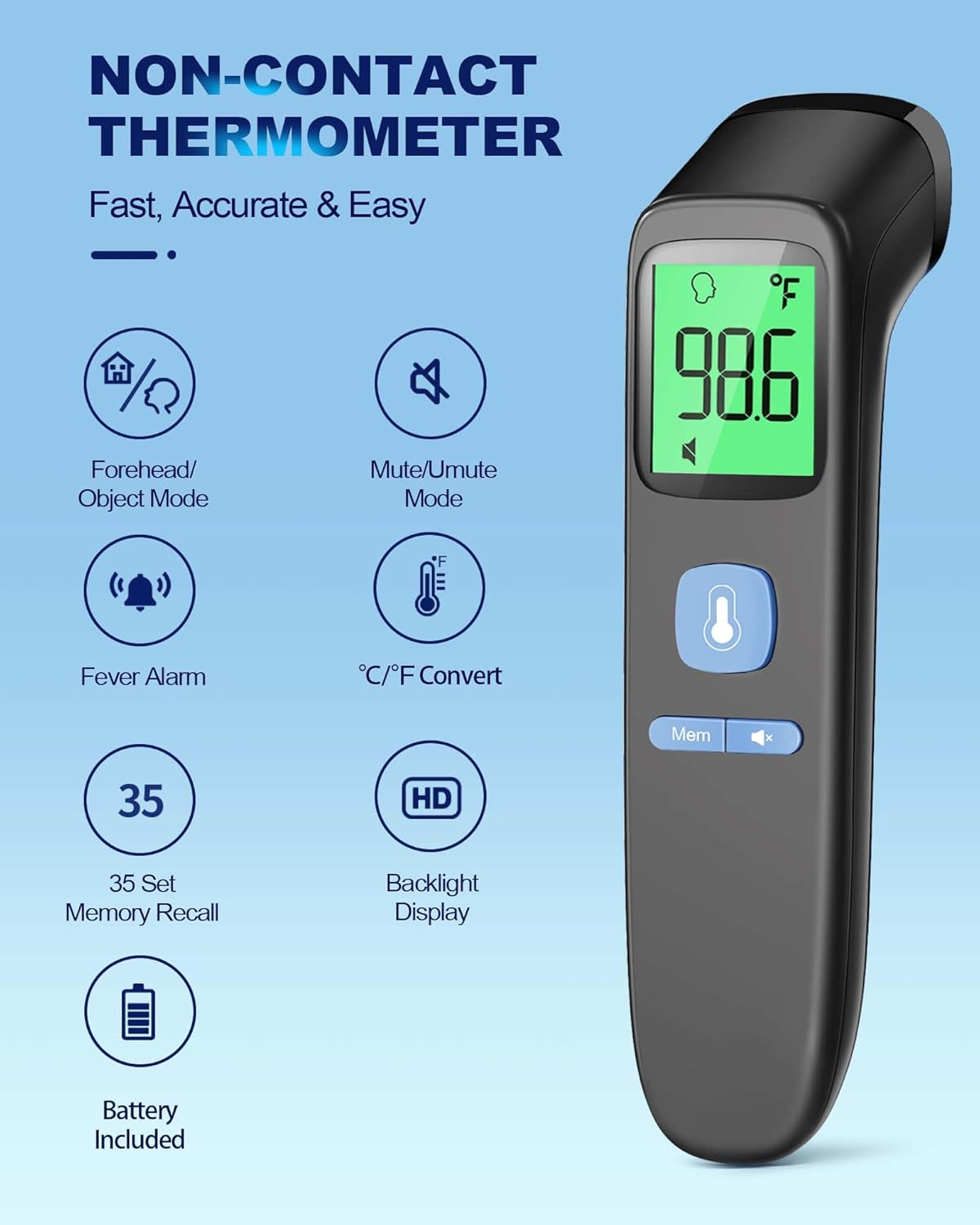
The ANMEATE No-Touch Forehead Thermometer is designed for swift, accurate, and reliable temperature measurements for individuals of all ages, including adults, kids, and babies. Its non-contact design ensures hygienic use, making it ideal for monitoring body temperature without physical contact. This manual provides comprehensive instructions for setup, operation, maintenance, and troubleshooting to ensure optimal performance and longevity of your device.
Key features include 1-second rapid readings, rigorous clinical testing for accuracy, and a user-friendly design. The device also incorporates a large display with 3 backlight indicators (Green, Yellow, Red) to visually communicate temperature levels, a one-touch mute mode for quiet operation, and a memory recall function to store up to 35 previous readings. A fever warning alarm is also integrated for immediate alerts.
Ciri-ciri Utama
Swift 1-Second Readings: Obtain accurate temperature readings rapidly.
Reliable and Accurate Measurements: Clinically tested for precision with a tiny error margin.
3 Backlight Indicators: Green (normal), Yellow (slightly elevated), Red (fever/abnormal) for easy interpretation.
35 Sets of Memory Storage: Track temperature trends over time.
One-Touch Mute Mode: For quiet operation, especially useful for sleeping individuals.
Fahrenheit/Celsius Switchable: Beralih antara unit suhu dengan mudah.
Fever Warning Alarm: Audible alert for abnormal temperatures.
Reka Bentuk Mesra Pengguna: Ergonomic and suitable for all ages (adults, kids, and babies).
Pakej Lengkap: Includes thermometer, 2 AAA batteries, and user manual.
Persediaan
Pemasangan Bateri
Your ANMEATE thermometer comes with 2 AAA batteries included. To install or replace batteries:
Cari penutup petak bateri di belakang termometer.
Luncurkan penutup ke bawah untuk membuka petak.
Masukkan 2 bateri AAA, pastikan kekutuban (+ dan -) yang betul seperti yang ditunjukkan di dalam petak.
Luncurkan penutup petak bateri kembali ke tempatnya sehingga ia berbunyi dengan selamat.
Image: Battery compartment with AAA batteries.
Video: Demonstrates how to install batteries and use the thermometer.
Arahan Operasi
Taking Temperature (Forehead Mode)
To measure body temperature:
Ensure the thermometer is in Forehead Mode (indicated by a human head icon on the display). If not, refer to "Switching Temperature Modes" below.
Hold the thermometer 0.3-1.5 inches (1-3 cm) away from the center of the forehead.
Press the measurement button (large button with thermometer icon).
The temperature reading will appear on the display within 1 second, accompanied by a corresponding backlight color.
Image: Non-contact forehead temperature measurement.
Video: Demonstrates how to use the thermometer for forehead temperature readings.
Taking Temperature (Object/Room Mode)
To measure the temperature of objects or a room:
Ensure the thermometer is in Object/Room Mode (indicated by a house icon on the display). If not, refer to "Switching Temperature Modes" below.
Point the thermometer at the object or area you wish to measure.
Tekan butang ukuran.
The temperature reading will be displayed.
Image: Multiple uses including object and room temperature measurement.
Video: Demonstrates switching between forehead and object/room temperature modes.
Switching Temperature Modes (Forehead/Object)
To switch between Forehead Mode and Object/Room Mode, ensure the device is OFF. Press and hold the 'Mem' button for approximately 3 seconds until the mode icon changes on the display (human head for forehead, house for object/room).
Switching Temperature Units (Fahrenheit/Celsius)
To switch between Fahrenheit (℉) and Celsius (℃) units, ensure the device is ON. Press and hold the 'Mute' button (speaker icon) for approximately 3 seconds until the unit changes on the display.
Video: Demonstrates how to switch between Fahrenheit and Celsius units.
Mod Redam
The thermometer features a one-touch mute mode for silent operation. This is particularly useful when taking temperatures of sleeping infants or children to avoid disturbance. Press the 'Mute' button (speaker icon) briefly to toggle the sound on or off.
Image: Silent mode for undisturbed temperature checks.
Video: Highlights the mute mode and memory recall features.
Ingat Ingatan
The thermometer can store up to 35 sets of previous temperature readings. To access memory recall, press the 'Mem' button briefly. Each press will cycle through the stored readings. This feature is useful for tracking temperature changes over time.
Backlight Indicators
The display features a color-coded backlight to indicate temperature status:
merah: High temperature, indicating a fever or abnormal reading, often accompanied by an alarm.
Image: Visual representation of backlight indicators.
Penyelenggaraan
Pembersihan
To ensure hygienic use and accurate readings, clean the thermometer regularly. Wipe the device with a soft, dry cloth. For disinfection, use an alcohol swab (70% isopropyl alcohol) to gently wipe the sensor and the body of the thermometer. Do not immerse the thermometer in water or any cleaning solutions.
Penyimpanan
Store the thermometer in a cool, dry place away from direct sunlight, extreme temperatures, and humidity. Keep it out of reach of children. The included pouch can be used for convenient and protective storage.
Video: Demonstrates the thermometer's features, including its compact size for storage.
Menyelesaikan masalah
Masalah
Kemungkinan Punca
Penyelesaian
"Lo" atau "Hai" dipaparkan
Suhu berada di luar julat yang boleh diukur.
Ensure proper distance from the forehead (0.3-1.5 inches). Ensure the environment temperature is within operating limits.
Bacaan tidak tepat
Improper measurement distance, dirty sensor, or unstable environment.
Verify correct distance. Clean the sensor. Avoid measuring in drafts or extreme temperature changes. Allow the thermometer to acclimate to room temperature for 30 minutes before use if moved from a different environment.
Paparan tidak dihidupkan
Bateri mati atau tidak dipasang dengan betul.
Periksa polariti bateri. Gantikan bateri jika perlu.
No sound in mute mode
Mute mode is activated.
Press the 'Mute' button to toggle sound on.
Spesifikasi
Ciri
Perincian
Dimensi Produk
6.43 x 1.54 x 1.56 inci; 3 auns
Nombor Model Item
FC-IR202
Bateri
2 bateri AAA diperlukan (termasuk)
Pengeluar
ANMEATE
Ciri Khas
Non-Contact, Low Battery Indicator, Ultra Clear Screen With Backlit, Fast Reading System, High Accuracy
warna
Hitam
Julat Umur (Perihalan)
Adult, Kid & Baby
Komponen yang Disertakan
1*Thermometer, 2*AAA Batteries, 1*User Manual, 1*Quick User Guide
Bahan Luar
plastik
Spesifikasi Met
FDA, CE, ISO 13485
Jenis Paparan
digital
Arahan Penjagaan Produk
Lap bersih
Kiraan Unit
1.0 Kiraan
Waranti dan Sokongan
Your ANMEATE No-Touch Forehead Thermometer comes with lifetime support. For any questions, concerns, or technical assistance, please refer to the contact information provided in your Quick User Guide or visit the official ANMEATE webtapak.
Dokumen Berkaitan - FC-IR202
ANMEATE SM24 Baby Monitor User Manual Comprehensive user manual for the ANMEATE SM24 Baby Monitor, covering setup, features, safety instructions, and troubleshooting. Learn how to install, operate, and maintain your ANMEATE baby monitor.
ANMEATE DY549 Video Baby Monitor User Manual User manual for the ANMEATE DY549 Video Baby Monitor, providing detailed instructions on safety, setup, operations, menu functions, specifications, troubleshooting, and warranty information.
Anmeate Baby Monitor SM24 User Manual Comprehensive user manual for the Anmeate SM24 Baby Monitor, covering setup, operation, features, troubleshooting, and safety instructions for optimal use.
Manual Pengguna Termometer Inframerah Tanpa Sentuhan FC-IR202 Terapi Medik Ketahui cara menggunakan Medic Therapeutics FC-IR202 Touchless Thermometer untuk pengukuran suhu yang tepat, selamat dan pantas. Manual pengguna ini merangkumi ciri, operasi, penjagaan, penyelesaian masalah dan spesifikasi untuk bacaan suhu dahi dan objek.