1. Produk Lebihview
The Genmitsu MD18 Rotary Roller is a versatile 3-in-1 accessory kit designed to expand the engraving capabilities of your Genmitsu L8 and Genmitsu Z6 machines. It enables precise engraving on cylindrical and irregularly shaped objects, offering enhanced flexibility for various projects.
This rotary roller features a multi-jaw chuck system that accommodates a wide range of object shapes and sizes. Its adjustable rotation mode allows for engraving at angles from 0 to 30 degrees, ensuring high accuracy and detailed results on diverse materials.

Figure 1: Genmitsu MD18 Rotary Roller with its accessories and examples of engraved items like bottles, glasses, baseballs, and rings.
2. Maklumat Keselamatan
Before operating the MD18 Rotary Roller, please read and understand this manual completely. Always refer to the safety guidelines provided with your Genmitsu L8 or Z6 engraving machine. Failure to follow safety instructions may result in injury or damage to equipment.
- Ensure the engraving machine is powered off and unplugged before connecting or disconnecting the rotary roller.
- Always wear appropriate personal protective equipment (PPE), such as safety glasses, when operating laser engraving equipment.
- Jangan sentuh bahagian yang bergerak semasa operasi.
- Pastikan bahan kerja berada dalam keadaan selamatamped to prevent movement during engraving.
- Operate in a well-ventilated area to dissipate fumes and dust generated during engraving.
3. Kandungan Pakej
Sahkan bahawa semua komponen terdapat dalam pakej anda:
- MD18 Rotary Roller Unit
- Multi-Jaw Chucks (various shapes: L-shaped, ladder-shaped, hexagonal)
- Connecting Cable (USB+6PIN terminal)
- Mounting Screws (if applicable for specific engraver models)
4. Panduan Persediaan
The MD18 Rotary Roller is designed for straightforward setup with no assembly required for the main unit. Follow these steps to integrate it with your Genmitsu L8 or Z6 engraver:
- Positioning the Rotary Roller: Place the MD18 Rotary Roller on a stable surface within the working area of your engraving machine. Ensure it is aligned correctly with the laser path.
- Connecting to the Engraver: Connect the provided USB+6PIN terminal cable from the MD18 Rotary Roller to the corresponding port on your Genmitsu L8 or Z6 engraving machine. Ensure the connection is secure.
- Konfigurasi Perisian: The MD18 is compatible with the software provided with Genmitsu L8 and Z6, as well as popular third-party software like LightBurn. Refer to your engraving machine's software manual for specific rotary axis setup instructions. Typically, you will need to enable the rotary axis function and input the correct steps per rotation for the MD18.
- Attaching Chucks: Select the appropriate multi-jaw chuck for your workpiece. The MD18 supports L-shaped, ladder-shaped, and hexagonal jaws to securely hold various objects. Attach the chosen jaws to the rotary chuck mechanism.
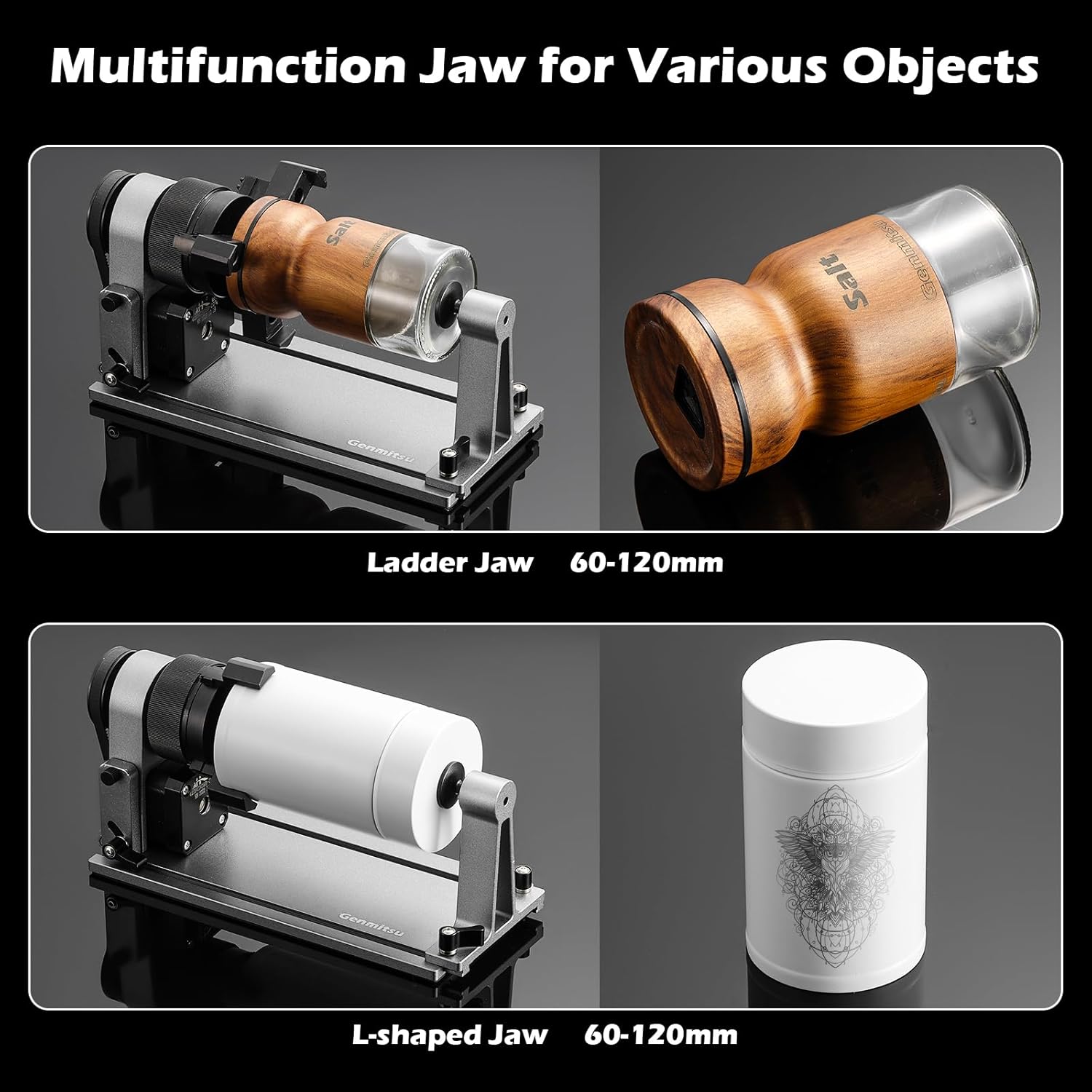
Gambar 2: Cthamples of the ladder jaw and L-shaped jaw in use, demonstrating their ability to hold objects with diameters between 60-120mm.

Figure 3: The multi-function jaw securely holding smaller objects like rings and spherical items, suitable for diameters between 10-80mm.
5. Panduan Operasi
Once the MD18 Rotary Roller is set up and connected, you can begin engraving cylindrical and irregular objects. Always perform test engravings on scrap material before working on your final piece.
- Securing the Workpiece:
- Open the chuck jaws by rotating the adjustment mechanism.
- Carefully place your cylindrical or irregularly shaped object into the chuck, ensuring it is centered and held firmly by the jaws.
- Tighten the chuck jaws until the workpiece is secure and cannot rotate independently or shift during engraving.
- Adjusting Rotation Angle: The MD18 allows for an adjustable engraving angle from 0 to 30 degrees. This feature is useful for engraving tapered objects or achieving specific artistic effects. Adjust the angle using the designated mechanism on the rotary roller base.
- Focusing the Laser: Ensure the laser focus is correctly set for the surface of your workpiece. Due to the curvature of cylindrical objects, precise focusing is crucial for optimal engraving quality.
- Memulakan Ukiran:
- Load your design into the engraving software.
- Configure the engraving parameters (speed, power, passes) according to your material and desired outcome.
- Start the engraving process from your software. The MD18 Rotary Roller will automatically rotate the workpiece as the laser engraves.

Figure 4: Illustration of the MD18's adjustable rotation angle, allowing for engraving on tapered or angled surfaces.

Gambar 5: Cthample of high-accuracy engraving on a cylindrical object, demonstrating the precision capabilities of the MD18 Rotary Roller.
Video 1: This video demonstrates the Genmitsu MD18 Rotary Roller in action, showcasing its use with the Genmitsu L8 engraver for various cylindrical and irregularly shaped objects, including a baseball and a cup. It highlights the 3-in-1 design and the ability to engrave long objects.
6. Penyelenggaraan
Proper maintenance ensures the longevity and optimal performance of your MD18 Rotary Roller.
- Pembersihan: Regularly clean the rotary roller, especially the chuck jaws and rollers, to remove dust, debris, and engraving residue. Use a soft, dry cloth. For stubborn residue, a slightly damp cloth can be used, ensuring no moisture enters electronic components.
- Pelinciran: Periodically check for smooth movement of mechanical parts. If any friction is observed, apply a small amount of light machine oil to the moving joints and threads of the chuck mechanism.
- Storan: When not in use, store the MD18 Rotary Roller in a clean, dry environment, away from direct sunlight and extreme temperatures.
7. Penyelesaian masalah
If you encounter issues with your MD18 Rotary Roller, refer to the following common problems and solutions:
| Masalah | Kemungkinan Punca | Penyelesaian |
|---|---|---|
| Rotary roller not responding. | Loose cable connection, incorrect software settings, power issue. | Check that the USB+6PIN cable is securely connected to both the rotary roller and the engraver. Verify rotary axis settings in your engraving software. Ensure the engraver is powered on. |
| Ukiran herot atau tidak sekata. | Bahan kerja tidak ditutup rapatamped, incorrect steps per rotation in software, chuck not square. | Ensure the workpiece is tightly secured in the chuck jaws. Double-check the steps per rotation setting in your software. Inspect the chuck for any misalignment or damage. |
| Chuck jaws are stiff or difficult to move. | Accumulated debris, lack of lubrication. | Clean the chuck mechanism thoroughly. Apply a small amount of light machine oil to the moving parts. |
8. Spesifikasi
- model: MD18
- Pengeluar: Genmitsu
- Berat Barang: 2.87 paun
- Dimensi Produk: 8.46 x 3.74 x 4.17 inci
- warna: Grey (Space Grey)
- Bahan: plastik
- Sumber Kuasa: AC/DC (via engraver connection)
- Ketepatan: Kurang daripada 0.01mm
- Max Engraving Speed: Up to 10,000mm/min
- Sudut Putaran: 0-30 degrees adjustable
- Jaw Compatibility: L-shaped (60-120mm), Ladder-shaped (60-120mm), Hexagonal (10-80mm)
9. Waranti dan Sokongan
The Genmitsu MD18 Rotary Roller comes with a one-year warranty from the date of purchase. This warranty covers manufacturing defects and material flaws under normal use.
For technical support, warranty claims, or any inquiries regarding your MD18 Rotary Roller, please contact Genmitsu customer support through their official website or the platform where you purchased the product. Please have your product model number (MD18) and proof of purchase ready when contacting support.
For more information and resources, visit the official Genmitsu Store: Genmitsu Store on Amazon.


