pengenalan
This manual provides essential instructions for the proper setup, operation, and maintenance of your 3nStar PTA0157-432 All-in-One POS System. Please read this manual thoroughly before using the device to ensure optimal performance and longevity.
Maklumat Keselamatan
Observe the following safety precautions to prevent damage to the device or injury to yourself and others:
- Jangan dedahkan peranti kepada air atau kelembapan berlebihan.
- Elakkan meletakkan peranti berhampiran sumber haba atau di bawah cahaya matahari langsung.
- Gunakan hanya penyesuai AC yang disediakan.
- Jangan cuba membuka atau membaiki peranti sendiri. Rujuk semua servis kepada kakitangan yang berkelayakan.
- Pastikan pengudaraan yang betul di sekeliling peranti semasa operasi.
Kandungan Pakej
Sahkan bahawa semua item terdapat dalam pakej:
- 3nStar PTA0157-432 All-in-One POS System
- Penyesuai AC
- Manual Pengguna (dokumen ini)
Produk Selesaiview
The 3nStar PTA0157-432 is a 15.6-inch All-in-One Point of Sale system designed for various business environments. It features a 10-point capacitive touchscreen, runs on Android 11, and is powered by a Quad-Core processor with 4GB RAM and 32GB storage. Integrated Wi-Fi and Bluetooth connectivity are also included.

Rajah 1: Depan view of the 3nStar PTA0157-432 All-in-One POS System, showcasing the 15.6-inch display and integrated stand.

Figure 2: A user interacting with the 10-point capacitive touchscreen of the POS system, demonstrating its touch responsiveness.

Rajah 3: Belakang view of the 3nStar POS System, showing the ventilation slots and the sturdy integrated stand.
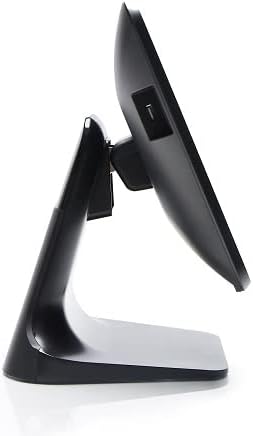
Rajah 4: Pro sampinganfile of the 3nStar POS System, highlighting its slim design and adjustable screen angle.
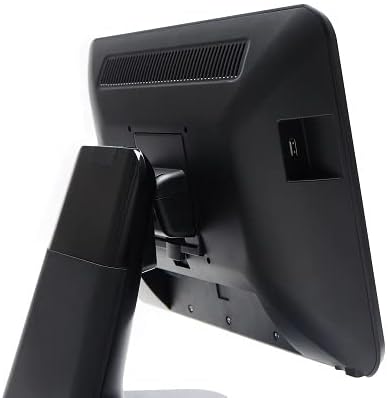
Rajah 5: Bahagian belakang view of the 3nStar POS System, illustrating the location of various connectivity ports for peripherals.
Persediaan
- Buka pembungkusan Sistem: Carefully remove the POS system and all accessories from the packaging.
- Letakkan Sistem: Place the POS system on a stable, flat surface, ensuring adequate ventilation around the device.
- Sambungkan Kuasa: Connect the AC adapter to the power input port on the back of the POS system, then plug the adapter into a standard electrical outlet.
- Kuasa Awal Hidup: Press the power button, usually located on the side or back of the display. The system will boot up to the Android 11 operating system.
- Konfigurasi Awal: Follow the on-screen prompts to complete the initial Android setup, including language selection, Wi-Fi connection, and Google account setup (optional).
- Sambung Peranti: Connect any necessary peripherals such as barcode scanners, receipt printers, or cash drawers to the available USB or other designated ports. Refer to the peripheral's manual for specific connection instructions.
Arahan Operasi
The 3nStar PTA0157-432 operates on Android 11, providing a familiar and intuitive user experience.
Navigasi Asas
- Skrin sentuh: Use your fingers to tap, swipe, pinch, and zoom on the 15.6-inch capacitive display.
- Skrin Utama: Access your installed applications and widgets from the main home screen.
- Laci Apl: Swipe up from the bottom of the screen or tap the app drawer icon to view semua aplikasi yang dipasang.
- Pemberitahuan: Leret ke bawah dari bahagian atas skrin untuk mengakses pemberitahuan dan tetapan pantas.
Menyambung ke Wi-Fi
- Pergi ke tetapan > Rangkaian & internet > Wi-Fi.
- Togol Wi-Fi On.
- Pilih rangkaian yang anda inginkan daripada senarai dan masukkan kata laluan jika digesa.
Menyambung Peranti Bluetooth
- Pergi ke tetapan > Peranti yang disambungkan > Keutamaan sambungan > Bluetooth.
- Togol Bluetooth On.
- Pastikan peranti Bluetooth anda berada dalam mod berpasangan.
- Select the device from the list to pair.
Using POS Software
The system is designed to run various Android-compatible Point of Sale applications. Install your preferred POS software from the Google Play Store or other trusted sources. Refer to your specific POS software's documentation for detailed usage instructions.
Penyelenggaraan
Membersihkan Peranti
- Skrin: Gunakan kain lembut dan tidak berbulu sedikit dampened with water or a screen cleaner specifically designed for electronic displays. Do not spray cleaner directly onto the screen.
- Badan: Wipe the exterior surfaces with a soft, dry cloth. Avoid abrasive cleaners or solvents.
- Pengudaraan: Ensure ventilation slots are free from dust and debris to prevent overheating. Use compressed air if necessary.
Kemas Kini Perisian
Regularly check for and install system updates for Android 11 to ensure optimal performance, security, and compatibility. Go to tetapan > Sistem > Kemas kini sistem.
Pengurusan Storan
Monitor the 32GB internal storage to ensure sufficient space for applications and data. Delete unnecessary files or uninstall unused applications to free up space. Go to tetapan > Penyimpanan.
Menyelesaikan masalah
| Masalah | Kemungkinan Punca | Penyelesaian |
|---|---|---|
| Peranti tidak dihidupkan. | Power cable not connected properly; AC adapter malfunction. | Ensure the AC adapter is securely connected to the device and a working power outlet. Test the outlet with another device. |
| Skrin sentuh tidak bertindak balas. | Software glitch; screen dirty; physical damage. | Restart the device. Clean the screen with a soft cloth. If the issue persists, contact support. |
| Isu sambungan Wi-Fi. | Kata laluan salah; di luar julat; isu penghala. | Verify Wi-Fi password. Ensure the device is within range of the router. Restart the router and the POS system. |
| Peripheral (e.g., printer) not detected. | Incorrect connection; driver issue; peripheral not powered on. | Check physical connections. Ensure the peripheral is powered on. Install necessary drivers or apps for the peripheral. Restart the POS system. |
Spesifikasi
| Ciri | Perincian |
|---|---|
| Nombor Model | PTA0157-432 |
| Sistem Operasi | Android 11 |
| Saiz Skrin | 15.6 Inci |
| Resolusi Skrin | 1920 x 1080 Piksel |
| Skrin sentuh | Kapasitif 10-titik |
| Pemproses | Quad-Core (Rockchip 3568, 2 GHz) |
| RAM | 4GB LPDDR4 |
| Penyimpanan | 32GB SSD (Flash Memory) |
| Grafik | Grafik Bersepadu |
| Ketersambungan | Wi-Fi, Bluetooth |
| Dimensi Produk (LxWxH) | 10 x 13 x 16 inci |
| Berat Barang | 11 paun |
| warna | Hitam |
Waranti dan Sokongan
For warranty information, technical support, or service inquiries, please refer to the official 3nStar weblaman web atau hubungi penjual semula sah anda. Simpan resit pembelian anda sebagai bukti pembelian untuk tuntutan jaminan.
Online resources and frequently asked questions may be available on the manufacturer's support page: 3nStar Support


