pengenalan
This user manual provides essential information for setting up, operating, maintaining, and troubleshooting your VIBOX I-45 Gaming PC. Please read this manual thoroughly before using your new computer to ensure optimal performance and longevity.
1. Persediaan
1.1 Membuka Kotak dan Kandungan Pakej
Carefully remove all components from the packaging. Ensure all items listed below are present. Retain the packaging for future transport or service needs.
- VIBOX I-45 Gaming PC (VTX-4 Black Tower)
- Kabel Kuasa
- Wi-Fi Network Adapter (300 Mbps)
- Dokumentasi (manual ini)
1.2 Menyambung Peranti
Before powering on your PC, connect all necessary peripherals.
- Pantau: Connect your monitor to the graphics output port (HDMI or DisplayPort) on the rear of the PC. Ensure the monitor is also connected to a power source.
- Papan Kekunci dan Tetikus: Sambungkan papan kekunci dan tetikus anda ke port USB yang tersedia.
- Rangkaian: For wired internet, connect an Ethernet cable to the LAN port. For wireless internet, ensure the included Wi-Fi adapter is installed or connected.
- Audio: Connect speakers or a headset to the audio output jacks.
- Kuasa: Sambungkan kabel kuasa ke input kuasa PC dan kemudian ke soket dinding.

Figure 1.2.1: Rear I/O Ports for connecting peripherals.
1.3 But Awal dan Persediaan Windows 11
After connecting all peripherals, press the power button on the front of the PC. The system will boot into Windows 11 Home. Follow the on-screen instructions to complete the initial setup, including language selection, network connection, and user account creation.

Figure 1.3.1: Windows 11 Home Operating System.
2. Arahan Operasi
2.1 Hidupkan/Mati dan Mulakan Semula
- Hidupkan kuasa: Tekan butang kuasa yang terletak pada panel hadapan.
- Tutup: Klik butang Mula dalam Windows, kemudian pilih Kuasa > Matikan.
- Mulakan semula: Klik butang Mula dalam Windows, kemudian pilih Kuasa > Mulakan semula.
2.2 Windows 11 Home Features
Your VIBOX I-45 comes pre-installed with Windows 11 Home, offering several features designed to enhance your computing experience:
- DirectStorage: Enables faster game loading times.
- AutoHDR: Automatically enhances visuals for improved graphics.
- Xbox Game Pass Integration: Seamless access to a library of games.
- Optimized CPU Performance: Enhanced performance for various tasks.
2.3 Kawalan Pencahayaan RGB
The VTX-4 case features Hex RGB Infinity 120mm fans. You can customize the lighting effects and colors using the dedicated RGB change button on the top panel or through compatible software if available.

Figure 2.3.1: Customizable RGB Fans.
3. Penyelenggaraan
3.1 Membersihkan PC Anda
Regular cleaning helps maintain performance and extends the lifespan of your computer.
- Luaran: Gunakan yang lembut, damp kain untuk mengelap permukaan luar. Elakkan bahan kimia yang keras.
- Penyingkiran habuk: Periodically use compressed air to clear dust from fan vents and internal components. Ensure the PC is powered off and unplugged before cleaning.
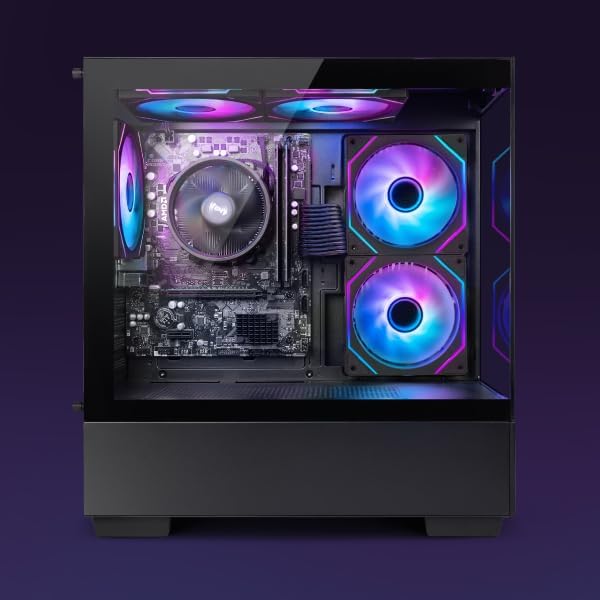
Figure 3.1.1: Internal components of the VIBOX I-45 PC.
3.2 Kemas Kini Perisian
Keep your operating system and drivers updated to ensure security, stability, and optimal performance.
- Kemas Kini Windows: Windows 11 automatically checks for updates. You can manually check by going to Settings > Windows Update.
- Kemas Kini Pemandu: Regularly check the VIBOX support website or component manufacturers' websites (AMD for CPU/GPU) for the latest drivers.
3.3 Sandaran Sistem
Sandarkan data penting anda secara kerap ke pemacu luaran atau storan awan untuk mengelakkan kehilangan data.
4. Penyelesaian masalah
This section addresses common issues you might encounter. For more complex problems, please contact VIBOX support.
4.1 Tiada Kuasa
- Ensure the power cable is securely connected to both the PC and the wall outlet.
- Sahkan alur keluar dinding berfungsi dengan memasang peranti lain.
- Check the power supply switch on the rear of the PC (if present) is in the 'On' position.
4.2 Tiada Paparan pada Monitor
- Confirm the monitor is powered on and correctly connected to the PC's graphics output port.
- Pastikan sumber input yang betul dipilih pada monitor anda.
- Try a different display cable if available.
4.3 Prestasi Perlahan
- Tutup aplikasi yang tidak perlu berjalan di latar belakang.
- Semak dan pasang sebarang kemas kini Windows atau pemacu yang belum selesai.
- Run a disk cleanup and defragmentation (for HDD, not typically needed for SSD).
- Imbas untuk perisian hasad atau virus.
4.4 Isu Ketersambungan Rangkaian
- Wi-Fi: Ensure the Wi-Fi adapter is properly installed and drivers are up to date. Check your router and internet connection.
- Ethernet: Verify the Ethernet cable is securely connected to both the PC and the router/modem. Check router status.
- Restart your router/modem and PC.
5. Spesifikasi
| Ciri | Spesifikasi |
|---|---|
| Jenama | VIBOX |
| Nombor Model | I-45 |
| warna | VTX-4 Black |
| Sistem Operasi | Windows 11 Home |
| Pemproses | AMD Ryzen 3 3200G (4 Cores, 3.6 GHz Base, up to 4.0 GHz Max) |
| Grafik | Integrated Radeon Vega 8 Graphics (2GB Shared Memory) |
| RAM | 16 GB DDR4 (3200 MHz Dual Channel) |
| Penyimpanan | 480 GB SSD |
| Max Memory Support | 128 GB |
| Wi-Fi | 802.11n (300 Mbps adapter included) |
| Port HDMI | 1 |
| Port USB 2.0 | 3 |
| Port USB 3.0 | 3 |
| Dimensi (L x W x H) | 36 x 20 x 41 cm |
| Peranti Serasi | Headset, Keyboard, Printer, Monitor, Mouse |
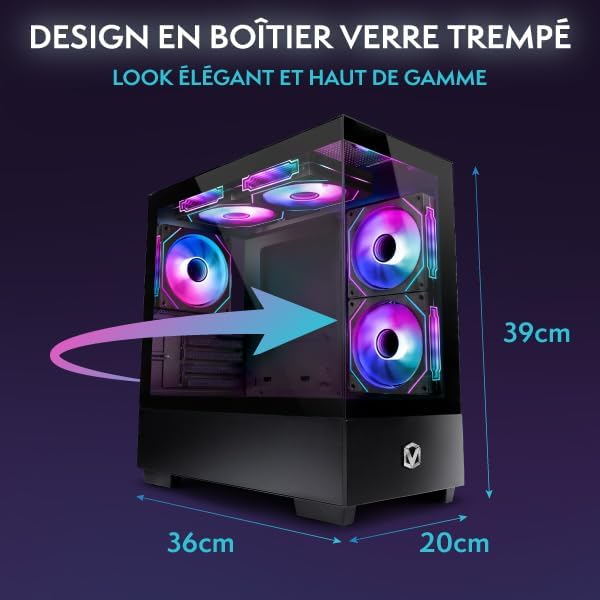
Figure 5.1.1: VIBOX I-45 PC Dimensions.
6. Maklumat Waranti
Your VIBOX I-45 Gaming PC comes with a manufacturer's warranty covering:
- bahagian: 2 Tahun
- Buruh: seumur hidup
Please retain your proof of purchase for warranty claims. For detailed terms and conditions, refer to the warranty card included with your product or visit the official VIBOX webtapak.
7. Sokongan
For technical assistance, troubleshooting beyond this manual, or warranty inquiries, please contact VIBOX customer support. You can find contact information on the official VIBOX Gaming webtapak atau melalui peruncit anda.
Sumber Dalam Talian:
- Lawati VIBOX Gaming Store on Amazon untuk maklumat produk dan kemas kini.


