1. Pengenalan
This manual provides essential information for the safe and efficient operation of your Metz MUD8500Z 43-inch 4K UHD Google Smart TV. Please read these instructions thoroughly before using the television and retain them for future reference. This television features a 43-inch Direct LED display with UHD 4K HDR resolution, integrated Google TV operating system, and a built-in soundbar with Wonder Audio technology.
2. Apa yang ada di dalam Kotak
Buka bungkusan televisyen anda dengan berhati-hati dan pastikan semua item berikut disertakan:
- Metz MUD8500Z 43-inch Smart TV
- Penyesuai Kuasa
- Alat Kawalan Jauh
- Manual Pengguna (dokumen ini)
- Komponen Kaki TV (jika berkenaan)
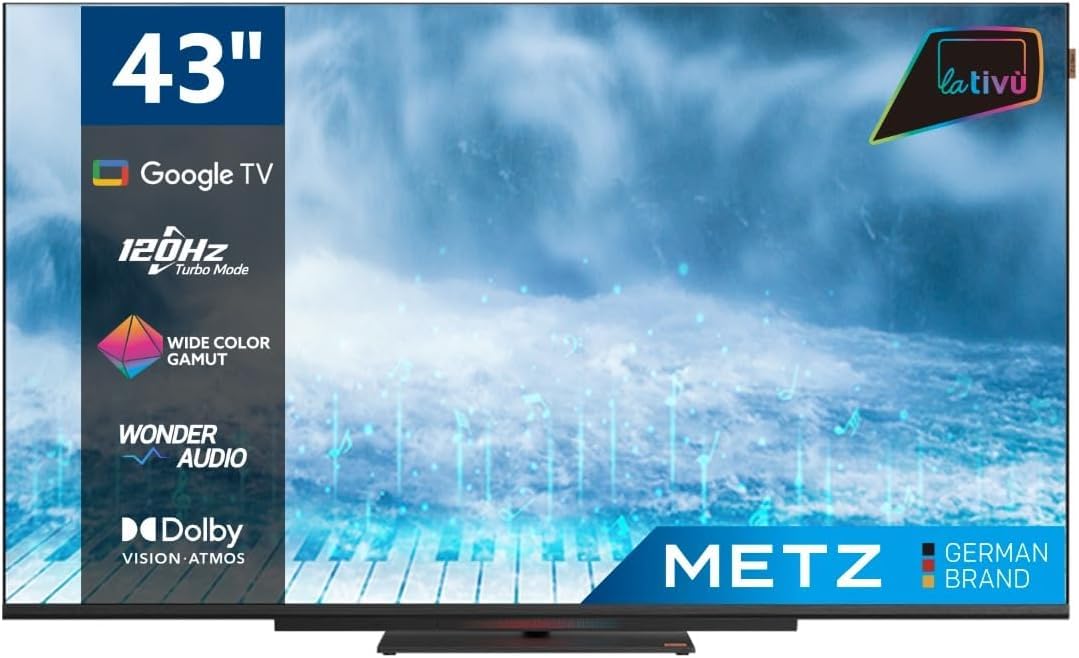
Imej: Depan view of the Metz MUD8500Z 43-inch Smart TV.
3. Persediaan
3.1. Membongkar dan Meletakkan
Keluarkan TV dari pembungkusannya. Letakkan TV di atas permukaan yang stabil dan rata atau pasangkannya pada dinding menggunakan pelekap VESA yang serasi (dijual berasingan). Pastikan pengudaraan yang mencukupi di sekitar TV.

Image: Diagram showing the dimensions of the Metz MUD8500Z TV (96.6cm width, 57cm height, 11cm depth).
3.2. Kuasa Penyambung
Connect the power adapter to the TV's power input, then plug the adapter into a wall outlet. The TV will enter standby mode.
3.3. Initial Setup (Google TV)
Setelah dihidupkan pertama, TV akan membimbing anda melalui proses persediaan awal. Ini termasuk:
- Pemilihan Bahasa: Pilih bahasa pilihan anda.
- Sambungan Rangkaian: Sambungkan TV ke rangkaian Wi-Fi rumah anda atau melalui kabel Ethernet.
- Log Masuk Akaun Google: Log masuk dengan akaun Google anda untuk mengakses ciri Google TV, apl dan pengesyoran diperibadikan.
- Imbasan Saluran: Imbas saluran TV yang tersedia (Antena/Kabel).
4. Arahan Operasi
4.1. Fungsi TV Asas
- Hidupkan/Mati Kuasa: Tekan butang kuasa pada alat kawalan jauh atau TV.
- Kawalan Kelantangan: Gunakan butang Kelantangan Naik/Turun pada alat kawalan jauh.
- Pemilihan Saluran: Gunakan butang Saluran Atas/Bawah atau pad nombor.
- Sumber Input: Press the 'Input' button to select HDMI, AV, or other connected devices.
4.2. Google TV Navigation
The Google TV interface provides access to streaming services, apps, and live TV. Use the directional pad and 'OK' button on your remote to navigate menus and select items.

Image: Remote control for the Metz Smart TV, highlighting dedicated buttons for popular streaming services and Google Assistant.
4.3. Pembantu Google
Your TV has an integrated Google Assistant. Press the Google Assistant button on your remote or use the built-in microphone for voice commands to search for content, control smart home devices, and more.
4.4. App Access
Access a wide range of applications from the Google Play Store directly on your TV. Navigate to the 'Apps' section on the Google TV home screen to browse, download, and manage your applications.

Image: Screenshot of the Google TV interface displaying various streaming applications.
5. Ciri-ciri
5.1. UHD 4K Resolution and HDR
Experience stunning visuals with a resolution of 3840x2160 pixels, providing exceptional clarity and detail. The 4K HDR (High Dynamic Range) support enhances contrast and color accuracy for a more lifelike picture.
5.2. Wide Color Gamut
The Wide Color Gamut technology allows the TV to display a broader spectrum of colors, resulting in more vibrant and realistic images.

Image: A visual comparison demonstrating the enhanced color range with Wide Color Gamut versus normal display.
5.3. Wonder Audio Soundbar
The integrated soundbar with Wonder Audio technology delivers an immersive and clear audio experience. This advanced sound processing algorithm improves treble and bass, offering a more realistic virtual surround sound.

Image: Diagram illustrating the internal structure of the Surging Soundbar, showing increased diaphragm area and net sound cavity volume.
5.4. Google TV Operating System
Powered by Google TV, this television provides a personalized experience with easy access to your favorite movies, shows, live TV, and apps from across your subscriptions. It also offers smart recommendations based on your viewtabiat.
5.5. 120Hz Turbo Mode
The 120Hz Turbo Mode enhances motion clarity, making fast-paced scenes and gaming content appear smoother and more fluid.

Image: Visual representation of the 120Hz Turbo Mode, illustrating enhanced smoothness for dynamic content.
5.6. Dolby Vision and Dolby Atmos
Enjoy cinematic picture quality with Dolby Vision, offering incredible brightness, contrast, and color. Dolby Atmos provides immersive, multi-dimensional audio that flows around you.
6. Sambungan
Your Metz MUD8500Z TV offers various ports for connecting external devices:
- HDMI (x3): Sambungkan pemain Blu-ray, konsol permainan, kotak set-top, dsb.
- USB 2.0 (x2): Sambungkan peranti storan USB untuk main balik media.
- LAN (Ethernet): Untuk sambungan internet berwayar.
- AV DI: Sambungkan peranti lama dengan output video komposit dan audio stereo.
- RF Input (Antenna/Satellite): Sambungkan antena terestrial atau satelit anda.
- Optik Keluar: For digital audio output to a sound system or soundbar.
- Slot CI: Untuk modul Antara Muka Biasa (cth, untuk perkhidmatan TV berbayar).

Imej: Terperinci view of the rear panel connections, including CI, AV IN, RF Input, USB 2.0, HDMI, Optical Out, and LAN ports.
7. Spesifikasi
| Parameter | Nilai |
|---|---|
| Nombor Model | MUD8500Z (S9147779) |
| Saiz Skrin | 43 Inci (108 cm) |
| Teknologi Paparan | LED |
| Resolusi | 4K UHD (3840x2160) |
| Kadar Segar Semula | 60 Hz (with 120Hz Turbo Mode) |
| Nisbah Aspek | 16:9 |
| Ketersambungan | Ethernet, HDMI (x3), USB (x2), Wi-Fi |
| Ciri Khas | Flat Screen, Google TV, Google Assistant, Wonder Audio Soundbar, HDR, Wide Color Gamut |
| Dimensi Produk (WxDxH) | 96.6 x 10.9 x 56.9 cm |
| Berat badan | 8.2 kg |
| Kelas Kecekapan Tenaga (SDR) | F |
| Penggunaan Kuasa (SDR) | 50.0 W |
| Kelas Kecekapan Tenaga (HDR) | G |
| Penggunaan Kuasa (HDR) | 90.0 W |
| Kuasa Sedia | 0.4 W |
For detailed energy information, please refer to the official EU energy label: https://eprel.ec.europa.eu/qr/1530402
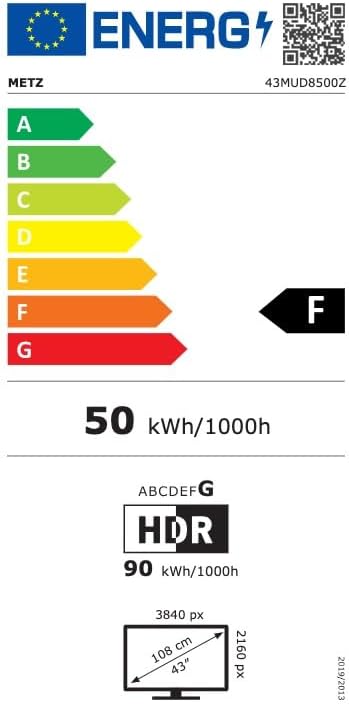
Image: EU Energy Label for the Metz MUD8500Z television, showing energy efficiency class F.
8. Penyelesaian masalah
If you encounter issues with your TV, consult the following common problems and solutions:
- Tiada Kuasa:
- Ensure the power cable is securely connected to both the TV and the wall outlet.
- Check if the wall outlet is functioning by plugging in another device.
- Press the power button on the remote or TV. - Tiada Gambar/Bunyi:
- Verify the correct input source is selected (e.g., HDMI 1, AV).
- Check all cable connections between the TV and external devices.
- For no sound, ensure volume is not muted or too low. - Alat Kawalan Jauh Tidak Berfungsi:
- Replace the batteries in the remote control.
- Ensure there are no obstructions between the remote and the TV's IR sensor.
- Point the remote directly at the TV. - Isu Sambungan Rangkaian:
- Restart your Wi-Fi router.
- Check Wi-Fi password and ensure it is entered correctly.
- Try connecting via an Ethernet cable if Wi-Fi issues persist. - Isu Kualiti Gambar (cth, kabur, herot):
- Check the resolution settings of the input source.
- Ensure the signal source (antenna, cable box, streaming) is stable.
- Adjust picture settings in the TV menu (brightness, contrast, sharpness).
Jika masalah berterusan selepas mencuba penyelesaian ini, sila hubungi sokongan pelanggan.
9. Penyelenggaraan
9.1. Membersihkan Skrin
Lap skrin perlahan-lahan dengan kain lembut yang tidak berbulu. Untuk tanda degil, ringankan dampen kain dengan air atau pembersih skrin khusus. Jangan gunakan bahan kimia yang keras atau bahan yang melelas.
9.2. Membersihkan Kabinet
Wipe the TV cabinet with a soft, dry cloth. Avoid using liquid cleaners directly on the TV.
9.3. Pengudaraan
Ensure that the ventilation openings on the back of the TV are not blocked. Proper airflow prevents overheating and prolongs the life of the TV.
10. Waranti dan Sokongan
The Metz MUD8500Z television comes with a standard manufacturer's warranty. According to specifications, the minimum general warranty duration provided by the supplier is 2 years.
For warranty claims, technical assistance, or further support, please refer to the contact information provided with your purchase documentation or visit the official METZ CONNECT webtapak.


