1. Pengenalan
Welcome to the user manual for your new SGIN 17 inch Laptop. This guide provides essential information to help you set up, operate, maintain, and troubleshoot your device. Please read this manual carefully before using your laptop to ensure proper function and safety.
1.1 Maklumat Keselamatan
- Jangan dedahkan komputer riba kepada suhu, kelembapan atau cahaya matahari langsung yang melampau.
- Elakkan meletakkan objek berat di atas komputer riba.
- Jauhkan cecair daripada peranti untuk mengelakkan kejutan elektrik atau kerosakan.
- Gunakan hanya penyesuai kuasa asal yang disertakan dengan komputer riba anda.
- Jangan cuba membuka atau membaiki komputer riba sendiri. Rujuk kepada kakitangan servis yang berkelayakan.
- Pastikan pengudaraan yang betul semasa digunakan untuk mengelakkan terlalu panas.
2. Produk Lebihview
Familiarize yourself with the components and ports of your SGIN 17 inch Laptop.

Rajah 2.1: Depan view of the SGIN 17 inch Laptop, showcasing its large 17.3-inch display, full-size keyboard, and touchpad.
2.1 Komponen dan Pelabuhan
Your laptop is equipped with various ports for connectivity and expansion.
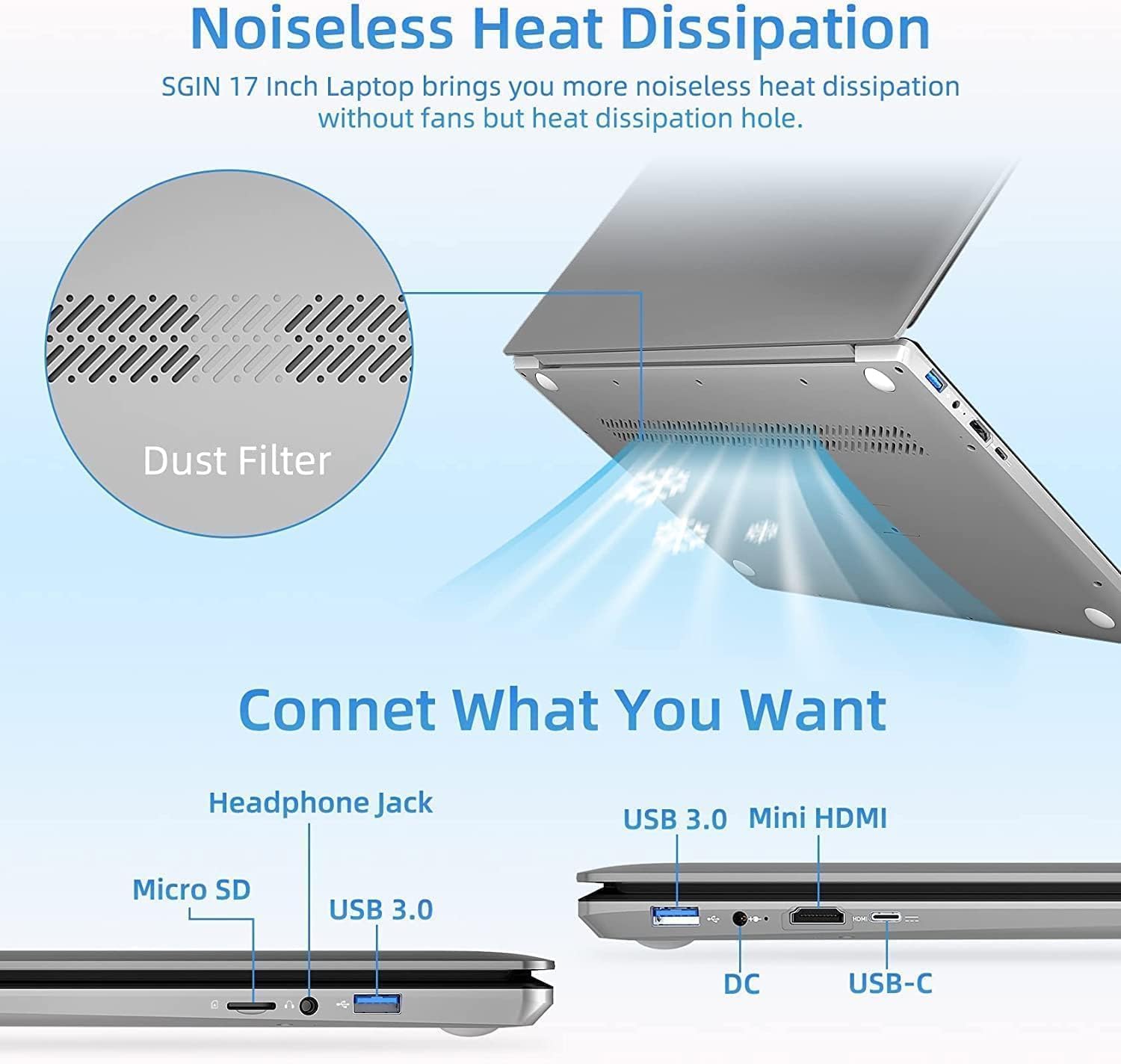
Rajah 2.2: Sisi view of the SGIN 17 inch Laptop highlighting the various input/output ports including USB 3.0, USB-C, Mini HDMI, Headphone Jack, Micro SD card slot, and DC power input.
- paparan: 17.3-inch Full HD (1920x1080) LED screen.
- Webcam: Bersepadu webcam untuk panggilan video dan persidangan.
- papan kekunci: Full-size keyboard with numeric keypad for comfortable typing.
- Pad sentuh: Multi-touch enabled touchpad for precise navigation.
- Port USB 3.2: For high-speed data transfer and connecting peripherals.
- Pelabuhan Jenis-C: Versatile port for data, display, and power delivery.
- Port HDMI Mini: Untuk menyambung ke paparan luaran atau projektor.
- Jack fon kepala: Untuk output audio ke fon kepala atau pembesar suara luaran.
- Slot Kad Mikro SD: Untuk mengembangkan storan atau memindahkan data daripada kad memori.
- DC-in Port: Untuk menyambungkan penyesuai kuasa bagi mengecas komputer riba.
3. Persediaan
3.1 Pengecasan Awal
Before first use, it is recommended to fully charge your laptop's battery. Connect the provided power adapter to the DC-in port on the laptop and then plug it into a power outlet. The charging indicator light will illuminate.
3.2 But Pertama dan Persediaan Sistem Pengendalian
- Tekan butang kuasa untuk menghidupkan komputer riba.
- Follow the on-screen instructions to complete the initial setup of the Windows 8.1 operating system. This includes selecting your language, region, accepting terms, and setting up user accounts.
- Connect to a Wi-Fi network when prompted to enable internet access.
4. Mengendalikan Komputer Riba Anda
4.1 Pengurusan Kuasa
- Menghidupkan: Tekan butang kuasa yang terletak pada dek papan kekunci.
- Mematikan: Klik butang Mula, kemudian Kuasa > Tutup.
- Mod tidur: Click the Start button, then Power > Sleep, or close the laptop lid.
- Mulakan semula: Klik butang Mula, kemudian Kuasa > Mulakan semula.
4.2 Menggunakan Papan Kekunci dan Pad Sentuh

Rajah 4.1: Jarak dekat view of the SGIN 17 inch Laptop's full-size keyboard and integrated numeric keypad, designed for comfortable and efficient typing.
The laptop features a full-size keyboard for comfortable typing and a dedicated numeric keypad for data entry. The touchpad supports multi-touch gestures for intuitive navigation, including scrolling, zooming, and switching applications.
4.3 Menyambung ke Rangkaian
Untuk menyambung ke rangkaian Wi-Fi:
- Klik ikon Wi-Fi dalam dulang sistem (sudut kanan bawah skrin).
- Pilih rangkaian yang anda inginkan daripada senarai.
- Enter the network security key (password) if prompted, then click Connect.
4.4 Sambungan Paparan Luaran
Use the Mini HDMI port to connect your laptop to an external monitor or projector. Connect one end of a Mini HDMI cable to your laptop and the other end to the display device. You may need to adjust display settings in Windows to extend or duplicate your screen.
4.5 Pemindahan Data
Utilize the USB 3.2 ports for connecting external hard drives, USB flash drives, and other peripherals for fast data transfer. The Micro SD card slot allows for easy access to data on compatible memory cards.
5. Penyelenggaraan
5.1 Membersihkan Komputer Riba
- Gunakan kain lembut dan tidak berbulu sedikit dampdiisi dengan air atau pembersih skrin untuk membersihkan paparan.
- For the keyboard and chassis, use a soft, dry cloth. Avoid abrasive cleaners.
- Periodically use compressed air to clear dust from vents to maintain optimal cooling.
5.2 Penjagaan Bateri

Figure 5.1: Illustration of the SGIN 17 inch Laptop's battery capacity (7.6V 8000mAh, 38Wh) and estimated usage time (up to 8 hours of video playback).
- Untuk memanjangkan hayat bateri, elakkan daripada menyahcas sepenuhnya bateri dengan kerap.
- Simpan komputer riba di tempat yang sejuk dan kering jika tidak digunakan untuk tempoh yang lama.
- It is normal for battery capacity to decrease over time with usage.
5.3 Penyimpanan dan Pengendalian
When transporting your laptop, use a protective sleeve or bag to prevent scratches and impacts. Avoid exposing the laptop to strong magnetic fields.
6. Penyelesaian masalah
This section addresses common issues you might encounter and provides basic solutions.
| Masalah | Kemungkinan Punca | Penyelesaian |
|---|---|---|
| Komputer riba tidak dihidupkan. | Battery is drained or power adapter is not connected properly. | Connect the power adapter and ensure it's plugged into a working outlet. Allow it to charge for a few minutes before attempting to power on again. |
| Paparan kosong atau berkelip. | Incorrect display settings, loose cable (if external monitor), or driver issue. | Press Fn + F7 (or similar function key) to cycle through display modes. Restart the laptop. Update graphics drivers if possible. |
| Isu sambungan Wi-Fi. | Penyesuai Wi-Fi dimatikan, kata laluan salah atau masalah penghala. | Ensure Wi-Fi is enabled (Fn + F5 or check settings). Re-enter Wi-Fi password. Restart your router and laptop. |
| Komputer riba berjalan perlahan. | Too many applications open, low storage space, or malware. | Close unnecessary applications. Free up disk space. Run a virus scan. |
Jika masalah berterusan selepas mencuba penyelesaian ini, sila hubungi sokongan pelanggan.
7. Spesifikasi Teknikal
Detailed specifications for your SGIN 17 inch Laptop (SGIN-M17S).

Figure 7.1: Diagram illustrating the Intel Core i3-5005U Processor, which powers the SGIN 17 inch Laptop, providing efficient performance.
| Ciri | Spesifikasi |
|---|---|
| Nama Model | SGIN-M17S |
| Saiz Skrin | 17.3 Inci |
| Resolusi Skrin | 1920 x 1080 piksel (HD Penuh) |
| Pemproses | Intel Core i3-5005U (2.4 GHz) |
| RAM | 4 GB DDR4 SDRAM |
| Pemacu Keras | 128 GB SSD (NVMe interface) |
| Pemproses bersama Grafik | Intel HD Graphics 5500 |
| Sistem Operasi | Windows 8.1 |
| Jenis Wayarles | 802.11b Wi-Fi |
| Bateri | 1 Lithium Ion battery (8000Wh, 38Wh, up to 8 hours video play) |
| Berat Barang | 6.34 paun |
| Dimensi Produk | 17.3 x 10 x 0.6 inci |
8. Waranti dan Sokongan
8.1 Maklumat Waranti
Your SGIN 17 inch Laptop comes with a Waranti 1 tahun from the date of purchase. This warranty covers manufacturing defects and malfunctions under normal use. It does not cover damage caused by misuse, accidents, unauthorized repairs, or natural disasters.
Sila simpan bukti pembelian anda untuk tuntutan waranti.
8.2 Sokongan Pelanggan
For technical assistance, warranty claims, or any other inquiries, please contact SGIN customer support through the official channels provided at the time of purchase or on the SGIN official website. When contacting support, please have your laptop's model number (SGIN-M17S) and purchase details ready.


