1. Pengenalan
Terima kasih kerana membeliasing the Wanbo X2 Pro Projector. This manual provides essential information for the safe and efficient operation of your device. Please read it thoroughly before use and retain it for future reference.
The Wanbo X2 Pro is a high-definition projector designed for home entertainment, offering 450 ANSI lumens brightness and 1280 x 720 pixel resolution, with integrated Wi-Fi connectivity for versatile media playback.
2. Maklumat Keselamatan
- Jangan lihat terus ke dalam kanta projektor apabila lamp sedang aktif.
- Pastikan pengudaraan yang betul di sekitar projektor untuk mengelakkan terlalu panas. Jangan halang bukaan pengudaraan.
- Gunakan hanya penyesuai kuasa yang dibekalkan dengan projektor.
- Jauhkan projektor daripada air, kelembapan dan bahan mudah terbakar.
- Elakkan meletakkan projektor pada permukaan yang tidak stabil.
- Jangan cuba membuka atau membaiki projektor sendiri. Hubungi kakitangan servis yang berkelayakan untuk mendapatkan bantuan.
- Unplug the projector during lightning storms or when unused for extended periods.
3. Kandungan Pakej
Sila pastikan semua item ada dalam pakej:
- Wanbo X2 Pro Projector
- Penyesuai Kuasa
- Alat Kawalan Jauh
- Manual Pengguna (dokumen ini)
4. Produk Lebihview
4.1 Depan View

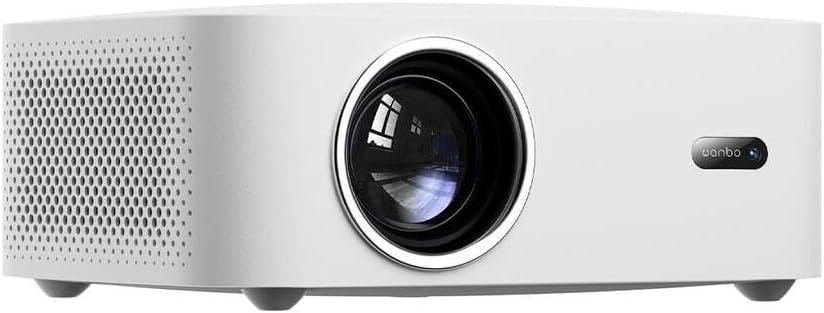
Rajah 1: Depan view of the Wanbo X2 Pro Projector. The large circular lens is prominently featured on the left, with the 'wanbo' brand logo and an indicator light on the right side of the front panel.
The front of the projector features the main projection lens and the Wanbo brand logo. An infrared receiver for the remote control may also be located here.
4.2 Bahagian View (Pengudaraan)
Rajah 2: sebelah view of the Wanbo X2 Pro Projector. This image shows the left side of the projector, featuring a large area of ventilation grilles designed to dissipate heat, ensuring stable operation.
The sides of the projector are equipped with ventilation grilles to ensure adequate airflow and prevent overheating during operation. Do not obstruct these vents.
4.3 Belakang View (Pelabuhan)

Rajah 3: belakang view of the Wanbo X2 Pro Projector. This panel includes multiple connectivity options: USB ports, HDMI ports, an AV input, a 3.5mm audio output, and the power input socket. An infrared receiver for the remote control is also visible.
Panel belakang menyediakan pelbagai pilihan sambungan:
- Port USB: For connecting USB storage devices (e.g., flash drives) to play media files.
- Port HDMI: For connecting external devices such as laptops, gaming consoles, or Blu-ray players.
- Input AV: For connecting older devices using a composite video and stereo audio cable.
- Output Audio (3.5mm): Untuk menyambungkan pembesar suara luaran atau fon kepala.
- Input Kuasa: Untuk menyambungkan penyesuai kuasa.
- Penerima IR: Untuk menerima isyarat daripada alat kawalan jauh.
5. Persediaan
5.1 Penempatan
Place the projector on a stable, flat surface. Ensure there is sufficient space around the projector for proper ventilation (at least 30 cm from walls or other objects). The ideal projection distance depends on the desired screen size.
5.2 Sambungan Kuasa
- Connect the power adapter to the Power Input port on the rear of the projector.
- Pasangkan hujung penyesuai kuasa yang satu lagi ke dalam soket elektrik yang sesuai.
- Lampu penunjuk kuasa pada projektor akan menyala.
5.3 Menyambung Peranti Luaran
- HDMI: Connect an HDMI cable from your source device (e.g., laptop, game console) to one of the HDMI ports on the projector.
- USB: Insert a USB flash drive into a USB port to access media files secara langsung.
- DARI: Gunakan kabel AV untuk menyambungkan peranti lama.
- Keluar Audio: Connect external speakers or headphones to the 3.5mm audio output jack if desired.
5.4 Initial Power-On and Focus Adjustment
- Tekan butang kuasa pada projektor atau alat kawalan jauh untuk menghidupkan peranti.
- Once the projector starts, a startup screen will appear.
- Adjust the focus ring around the lens (if manual) or use the remote control (if auto-focus) until the projected image is clear and sharp.
5.5 Pembetulan Keystone
If the projected image appears trapezoidal (wider at the top or bottom), use the keystone correction function. This can usually be found in the projector's settings menu or via a dedicated button on the remote control. Adjust until the image is rectangular.
6. Beroperasi
6.1 Alat Kawalan Jauh
The remote control allows you to navigate the projector's interface, select input sources, adjust volume, and access settings. Ensure batteries are correctly inserted.
6.2 Pemilihan Sumber Input
Press the "Source" or "Input" button on the remote control to cycle through available input sources (e.g., HDMI 1, HDMI 2, AV, USB, Wi-Fi/Smart features). Select the desired source.
6.3 Tetapan Gambar dan Audio
Access the projector's main menu to adjust picture settings (brightness, contrast, color, aspect ratio) and audio settings (volume, sound mode).
6.4 Sambungan Wi-Fi
- Navigasi ke menu "Tetapan".
- Select "Network" or "Wi-Fi Settings".
- Dayakan Wi-Fi dan pilih rangkaian yang anda inginkan daripada senarai.
- Masukkan kata laluan Wi-Fi jika digesa.
- Once connected, you can access online content or screen mirroring features.
6.5 Screen Mirroring / Casting
The Wanbo X2 Pro supports screen mirroring from compatible smartphones or tablets. Refer to the projector's on-screen instructions or your device's casting features (e.g., Miracast, AirPlay) for detailed steps.
7. Penyelenggaraan
7.1 Membersihkan Lensa
Use a soft, lint-free cloth specifically designed for optical lenses. Gently wipe the lens surface. Do not use abrasive cleaners or excessive force, as this can scratch the lens.
7.2 Membersihkan Badan Projektor
Lap bahagian luar projektor dengan kain lembut dan kering. Untuk tanda degil, sedikit damp cloth can be used, followed by a dry cloth. Avoid using harsh chemicals.
7.3 Pengudaraan
Regularly check and clean the ventilation grilles to ensure they are free from dust and debris. Blocked vents can lead to overheating and reduced projector lifespan.
7.4 Penyimpanan
When not in use for extended periods, store the projector in a cool, dry, dust-free environment. Consider using a protective cover to prevent dust accumulation.
8. Penyelesaian masalah
| Masalah | Kemungkinan Punca | Penyelesaian |
|---|---|---|
| Tiada imej ditayangkan |
|
|
| Imej kabur |
|
|
| Imej adalah trapezoid |
|
|
| Tiada bunyi |
|
|
9. Spesifikasi
| Ciri | Perincian |
|---|---|
| Jenama | Wanbo |
| Nama Model | X2 Pro |
| Nombor Model | WANBOX2PRO |
| Kecerahan | 450 ANSI Lumen |
| Resolusi | 1280 x 720 piksel (HD) |
| Ketersambungan | Wi-Fi, HDMI, USB, AV, 3.5mm Audio Out |
| Penggunaan Kuasa | 5 Watts (Light Source Power) |
| warna | putih |
10. Waranti dan Sokongan
The Wanbo X2 Pro Projector comes with a standard manufacturer's warranty. Please refer to the warranty card included in your package for specific terms and conditions, including the warranty period and coverage details.
For technical support, troubleshooting assistance beyond this manual, or warranty claims, please contact Wanbo customer service. Contact information can typically be found on the official Wanbo webtapak atau pada pembungkusan produk anda.
Please have your model number (WANBOX2PRO) and purchase information ready when contacting support.


