pengenalan
This manual provides detailed instructions for the installation, operation, and maintenance of your REDTIGER F7NP Dash Cam. Please read this manual thoroughly before using the product to ensure proper functionality and to maximize your driving safety and recording experience.
Kandungan Pakej
Sahkan bahawa semua item yang disenaraikan di bawah disertakan dalam pakej anda:
- REDTIGER F7NP Front Dash Camera
- Kamera Belakang
- Kit wayar keras OBD
- Kad Memori 128GB (diprapasang atau disertakan secara berasingan)
- Pendakap Pelekap (Cawan Sedutan atau Pelekat)
- Kabel Kuasa
- Kabel Kamera Belakang
- Manual Pengguna (dokumen ini)

Imej: Selesaiview of the REDTIGER F7NP Dash Cam and its included accessories, such as the main camera unit, rear camera, OBD hardwire kit, and a 128GB memory card.
Produk Selesaiview
The REDTIGER F7NP is a high-performance dual dash camera system designed to record your journeys in exceptional detail. Key features include:
- Kamera Depan: Records in 4K resolution with a 170° wide-angle lens, featuring the advanced STARVIS 2 sensor for superior image quality.
- Kamera Belakang: Records in 1080P resolution with a 140° wide-angle lens, providing comprehensive coverage of the vehicle's rear.
- GPS terbina dalam: Accurately records vehicle speed, location, and driving route.
- WiFi 5.8GHz terbina dalam: Enables fast connection to the companion mobile application for video management.
- WDR & HDR Technology: Enhances video clarity in varying light conditions, especially at night.
- G-Sensor: Detects sudden impacts and automatically locks important video files.
- Rakaman Gelung: Ensures continuous recording by overwriting the oldest files apabila kad memori penuh.
- Monitor Tempat Letak Kereta: Provides 24/7 surveillance when parked (requires OBD Hardwire Kit).

Image: Illustration of the dual recording capability of the F7NP Dash Cam, capturing 4K video from the front and 1080P from the rear simultaneously.

Image: Visual representation of the dash cam's superior night vision performance, highlighting the STARVIS 2 sensor, 6-layer optical lens, and WDR/HDR technology for clear low-light recording.
Persediaan dan Pemasangan
1. Memasukkan Kad Memori
- Pastikan cam dash dimatikan.
- Locate the memory card slot on the dash cam.
- Insert the provided 128GB memory card with the contacts facing the correct direction until it clicks into place.
- It is recommended to format the memory card within the dash cam settings upon first use.

Image: Depiction of the included 128GB memory card and the concept of loop recording, where older files are overwritten to ensure continuous recording.
2. Pemasangan Kamera Hadapan
- Bersihkan kawasan yang dipilih pada cermin depan anda, biasanya di belakangview mirror, to ensure a strong adhesion for the mounting bracket.
- Attach the mounting bracket (suction cup or adhesive) to the windshield.
- Slide the front dash cam onto the mounting bracket until it locks securely.
- Laraskan sudut kamera untuk memastikan gambar yang jelas view of the road ahead, avoiding obstruction from wipers or other vehicle components.
3. Pemasangan Kamera Belakang
- Pasang kamera belakang pada cermin depan belakang, pastikan ia jelas view.
- Route the rear camera cable neatly along the vehicle's headliner and A-pillars to the front dash cam.
- Connect the rear camera cable to the designated port on the front dash cam.
4. Power Connection (OBD Hardwire Kit)
The included OBD Hardwire Kit is required for enabling the 24/7 Parking Monitor feature.
- Locate your vehicle's OBD-II port, usually found under the dashboard on the driver's side.
- Connect the OBD plug of the hardwire kit to the vehicle's OBD-II port.
- Route the Type-C USB cable from the hardwire kit to the front dash cam and connect it to the power input port.
- Ensure the cables are tucked away safely and do not interfere with driving controls.

Imej: Terperinci view of the OBD Hardwire Kit, showing its OBD plug, integrated switch, and Type-C USB connector for powering the dash cam.
Arahan Operasi
1. Menghidupkan/Mematikan
The dash cam will automatically power on and begin recording when your vehicle's ignition is turned on (if connected via hardwire kit or cigarette lighter adapter). It will power off automatically when the ignition is turned off.
2. Rakaman Gelung
The F7NP dash cam continuously records video in short segments (e.g., 1, 3, or 5 minutes). When the memory card is full, the oldest unlocked files are automatically overwritten by new recordings. This ensures uninterrupted recording without manual intervention.
3. G-Sensor (Emergency Recording)
G-sensor terbina dalam mengesan kesan atau perlanggaran secara tiba-tiba. Apabila dicetuskan, ia secara automatik mengunci segmen video semasa, menghalangnya daripada ditulis ganti oleh rakaman gelung. Ini dikunci files disimpan dalam folder berasingan pada kad memori.
4. 24/7 Parking Monitor
With the OBD Hardwire Kit installed, the dash cam can monitor your vehicle even when parked. There are two modes:
- Mod G-Sensor: The camera remains in standby and starts recording if an impact is detected.
- Mod selang masa: The camera continuously records at a low frame rate, compressing hours of footage into minutes, providing comprehensive surveillance while minimizing storage usage.
Nota: The 24/7 Parking Monitor feature requires the included OBD Hardwire Kit for continuous power supply.

Image: Illustration of the 24-hour parking monitoring feature, showing how G-sensor mode detects impacts and time-lapse mode provides continuous surveillance.
5. Built-in GPS Tracking
The integrated GPS module records your vehicle's precise location, speed, and driving route. This data can be viewed during video playback using the Redtiger Cam app or dedicated PC viewer perisian.

Imej: Cthample of GPS tracking data displayed on a map, indicating the vehicle's route, speed, and coordinates, accessible via the companion app or PC software.
6. WiFi Connectivity & Redtiger Cam App
The F7NP features 5.8GHz WiFi for fast connection to your smartphone via the "Redtiger Cam" application. This allows you to:
- Praview live video feed from both cameras.
- Download recorded videos to your phone at speeds up to 20MB/s.
- Replay recorded footage.
- Check GPS data (route, speed, location).
- Laraskan tetapan kamera papan pemuka.
- Download the "Redtiger Cam" app from your smartphone's app store.
- Turn on the dash cam's WiFi (refer to on-screen menu or manual for specific steps).
- Connect your smartphone to the dash cam's WiFi network (SSID and password usually displayed on the dash cam screen).
- Open the Redtiger Cam app to access features.
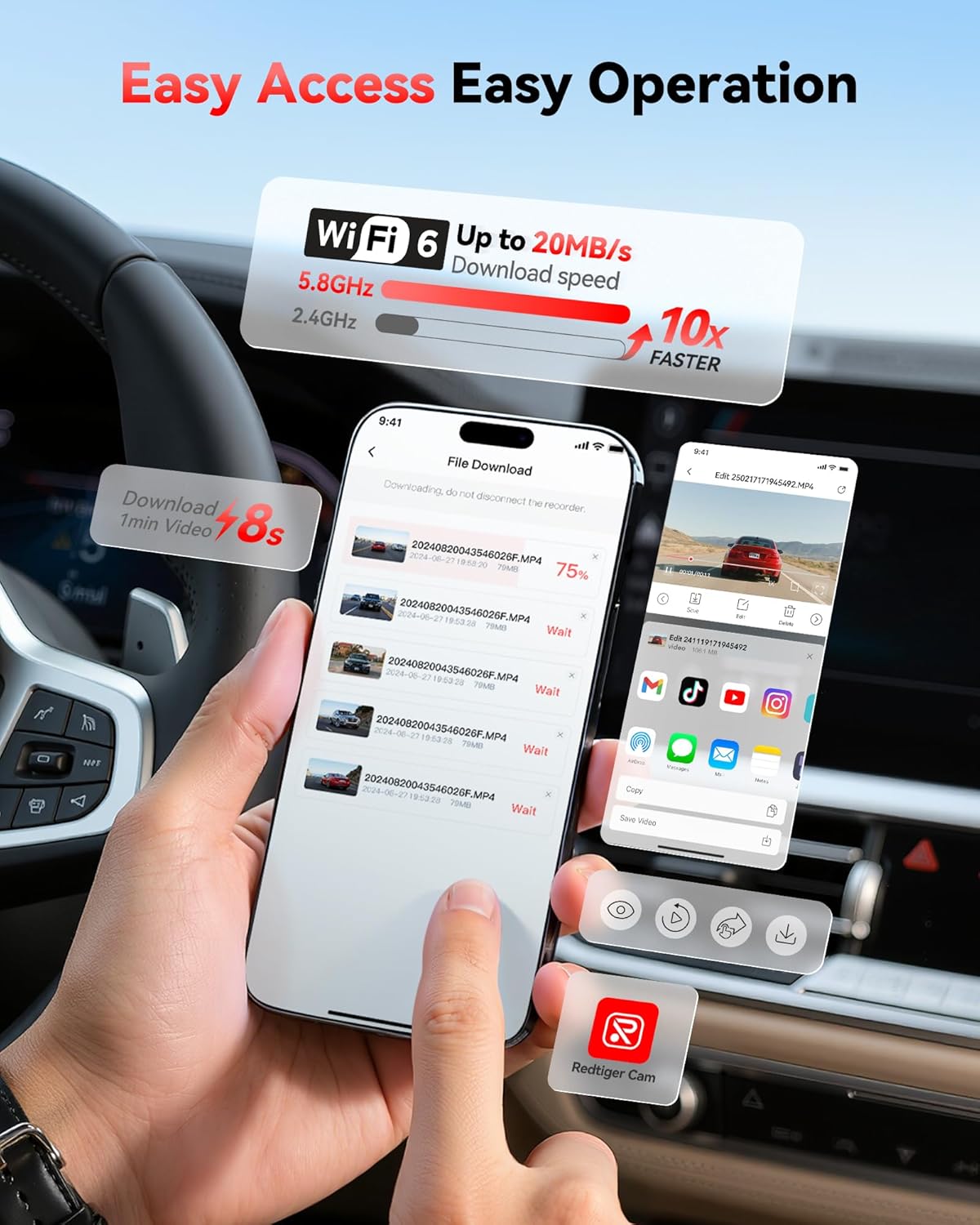
Image: Screenshot of the Redtiger Cam mobile application interface, demonstrating the fast download speeds of recorded videos via 5.8GHz WiFi.
Penyelenggaraan
1. Pengurusan Kad Memori
- Pemformatan: It is recommended to format the memory card every 2-4 weeks to maintain optimal performance and prevent data corruption. This can usually be done through the dash cam's settings menu or the Redtiger Cam app.
- Penggantian: Memory cards have a limited lifespan. If you experience frequent recording errors or corrupted files, consider replacing the memory card with a new, high-endurance card.
2. Pembersihan
- Kanta: Gently wipe the front and rear camera lenses with a soft, lint-free cloth to ensure clear video quality. Avoid abrasive materials or harsh chemicals.
- Skrin: Clean the dash cam screen with a soft, dry cloth.
- Badan: Wipe the dash cam body with a slightly damp cloth if necessary. Ensure no moisture enters the ports.
Menyelesaikan masalah
| Masalah | Kemungkinan Punca | Penyelesaian |
|---|---|---|
| Dash cam tidak dihidupkan. | No power supply; faulty cable; loose connection. | Check power cable connection to the dash cam and power source (OBD port or cigarette lighter). Ensure vehicle ignition is on. Test with a different power source if possible. |
| Rakaman berhenti atau files rosak. | Memory card full; memory card error; low-quality memory card. | Format the memory card regularly. Use a high-endurance U3 (or higher) microSD card. Replace the memory card if issues persist. |
| Isu sambungan WiFi dengan apl. | Incorrect WiFi password; app not updated; interference. | Ensure correct WiFi password. Restart dash cam and phone. Update "Redtiger Cam" app to the latest version. Try connecting in a different location to rule out interference. |
| GPS data not showing or inaccurate. | Poor GPS signal; dash cam not receiving satellite signals. | Pastikan cam dash mempunyai jernih view of the sky. Avoid mounting near metallic objects that could block the signal. Allow a few minutes for GPS lock after powering on. |
| Mounting bracket detaches from windshield. | Improper cleaning; extreme temperature changes; worn suction cup. | Clean the windshield thoroughly before mounting. Ensure the suction cup is clean. If using adhesive, ensure it's a fresh pad. Consider alternative mounting solutions if issues persist due to temperature fluctuations. |
Spesifikasi
| Ciri | Perincian |
|---|---|
| Nama Model | F7NP |
| Jenama | REDTIGER |
| Resolusi Kamera Depan | 4K (2160p) |
| Resolusi Kamera Belakang | 1080p |
| Sensor | STARVIS 2 |
| Apertur | F1.5 |
| Lensa | Kanta optik 6 lapisan |
| Depan Viewsudut | 170° |
| belakang Viewsudut | 140° |
| Ketersambungan | Wi-Fi 5.8GHz terbina dalam |
| Ciri Khas | GPS, Parking Monitor (G-Sensor, Time-lapse), WDR, HDR, Loop Recording |
| Komponen yang Disertakan | Hardwire Kit, 128GB Memory Card |
| Jenis Pemasangan | belakangview Mirror Mount or Windshield Mount |
| Kaedah Kawalan | Apl |
Waranti dan Sokongan
REDTIGER products are designed for reliability and performance. For specific warranty details, please refer to the warranty card included with your product or visit the official REDTIGER website. For technical support, troubleshooting assistance, or further inquiries, please contact REDTIGER customer service through their official channels or visit the REDTIGER Store on Amazon.


