1. Pengenalan
This user manual provides detailed instructions for the proper use and maintenance of the GODIAG GT100 Automotive Tools OBD II Breakout Box and the GODIAG FEM BDC New Type Test Platform. These tools are designed to assist automotive professionals and enthusiasts with vehicle diagnostics, ECU bench operations, and key programming tasks. Please read this manual thoroughly before operating the devices to ensure safe and effective use.
2. Kandungan Pakej dan Produkview
2.1 Kandungan Pakej
Sahkan bahawa semua item yang disenaraikan di bawah disertakan dalam pakej anda:
- GODIAG GT100 OBD II Breakout Box
- GODIAG FEM BDC New Type Test Platform
- Bekalan Kuasa (12V)
- DB25 Colored Jumper Cable
- OBD 2-in-1 Extension Cable
- 24pcs XWire Accessories
- 6pcs Banana Plugs
- Manual Pengguna (dokumen ini)
2.2 Produk Selesaiview


3. Arahan Persediaan
3.1 Setting up the GODIAG GT100 OBD II Breakout Box
- Sambungan Kuasa: Connect the provided 12V power supply to the DC (12V) input port on the GT100 unit.
- Vehicle Connection (for in-vehicle use): Plug the OBD 2-in-1 extension cable into the OBDII port of your vehicle and connect the other end to the GT100's OBDII input.
- ECU Bench Connection (for bench use): For bench operations, connect the ECU to the GT100 using appropriate cables and the DB25 colored jumper cable. Ensure correct pin assignments based on the ECU's wiring diagram.
- Sambungan Peranti Luaran: Connect your diagnostic scanner or programming tool to the "Tool Connector" or "ECU Connector" on the GT100 as required for your specific task.
3.2 Setting up the GODIAG FEM BDC New Type Test Platform
- Sambungan Modul: Connect the FEM/BDC module to the test platform using the designated connectors (CON7, CON8, Odometer Connector, FEM/BDC Power Connector). Refer to Figure 3.2.1 for connection points.
- Bekalan Kuasa: Ensure the FEM/BDC test platform receives adequate power. This can often be supplied via the GT100 or a dedicated power source.
- Sisipan Kunci: For key programming, insert the key into the designated slot on the FEM/BDC test platform.
- Connection to Diagnostic Tool: Connect the FEM/BDC test platform to your diagnostic or key programming tool (e.g., via the DB25 port) to initiate communication and operations.


4. Arahan Operasi
4.1 Using the GODIAG GT100 OBD II Breakout Box
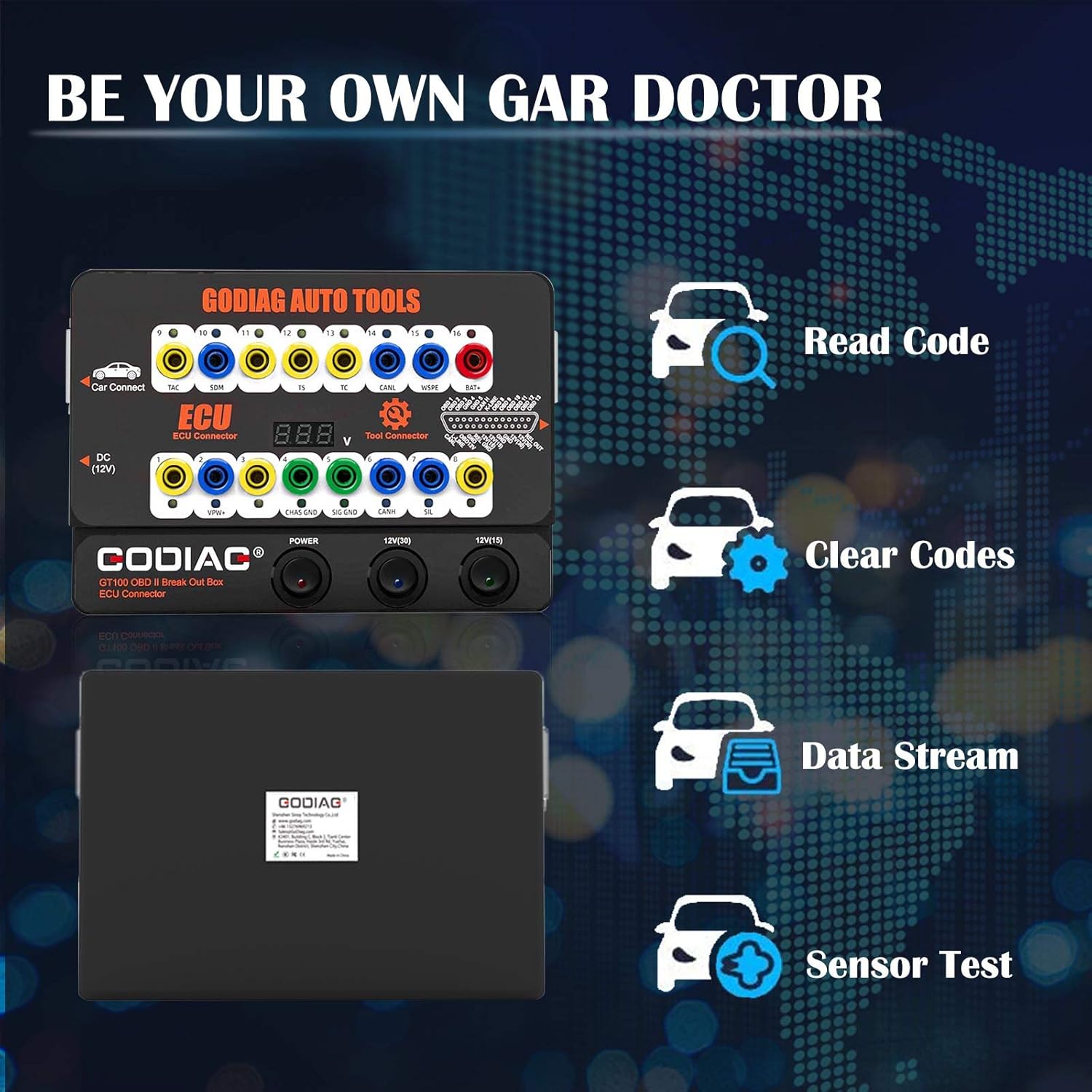
- Dashboard Illumination: The GT100 can be used to short-circuit banana plug connectors to illuminate the vehicle's dashboard, which is useful for testing or key programming when the car keys are lost.
- ECU Bench Tool: The GT100 allows powering an ECU on the bench for diagnostics, immobilizer work, and key programming. It can be powered by the included power adapter or via the vehicle's OBDII port.
- 16-Pin Design & Extension Cable: The input jack layout simulates the 16-pin OBDII interface, allowing quick and intuitive testing. All 16 pins can be easily connected when communicating with OBD2 scanners. The 1.2m extension cable provides flexibility.
- Sustaining ECU Power: Before replacing a vehicle's battery, connect the GT100 to sustain power to the vehicle's ECU. This prevents data loss, audio lock-up, or malfunctions due to power interruption to the ECU control module.
- Multi-ECU Connection: The GT100 supports connecting multiple ECU control modules simultaneously using the colored jumper wires for complex diagnostic or programming tasks.

4.2 Using the GODIAG FEM BDC New Type Test Platform
- Module Communication Test: This platform allows you to connect directly to the FEM/BDC module to test its communication capabilities and identify any malfunctions outside of the vehicle.
- Pengaturcaraan Utama: When used in conjunction with a compatible key programming tool, the FEM/BDC test platform facilitates key programming for BMW FEM/BDC modules on the bench.


5. Penyelenggaraan
- Pembersihan: Regularly wipe the devices with a soft, dry cloth. Do not use abrasive cleaners or solvents.
- Storan: Store the tools in a cool, dry place, away from direct sunlight and extreme temperatures. Keep them in their original packaging or a protective case when not in use to prevent damage.
- Penjagaan Kabel: Inspect cables and connectors regularly for signs of wear or damage. Replace any damaged cables immediately to ensure safe and reliable operation.
- Kemas Kini Perisian: Check the official GODIAG website for any available firmware or software updates for your tools to ensure optimal performance and compatibility with new vehicle models.
6. Penyelesaian masalah
If you encounter issues with your GODIAG GT100 or FEM BDC Test Platform, refer to the table below for common problems and their solutions.
| Masalah | Kemungkinan Punca | Penyelesaian |
|---|---|---|
| Peranti tidak dihidupkan. | No power supply, faulty cable, or power switch off. | Ensure power adapter is securely connected and plugged into a working outlet. Check power switches on the GT100. Test with a different power source if available. |
| Cannot establish communication with ECU/module. | Incorrect wiring, faulty cable, incompatible protocol, or module issue. | Verify all connections are correct and secure. Check pin assignments. Ensure the diagnostic tool supports the module's protocol. Test the module independently if possible. |
| Key programming fails. | Incorrect procedure, incompatible key, module issue, or software error. | Follow the key programming tool's instructions precisely. Ensure the key is compatible. Verify the FEM/BDC module is functioning correctly. Update programming software. |
| Dashboard does not light up using GT100. | Incorrect banana plug connection or vehicle specific issue. | Double-check the banana plug connections for short-circuiting. Ensure the vehicle's electrical system is functional. |
7. Spesifikasi
| Ciri | Perincian |
|---|---|
| Nama Produk | GODIAG GT100 Automotive Tools OBD II Breakout Box & GODIAG FEM BDC New Type Test Platform |
| Jenama | GODIAG |
| Nombor Model | GT100, FEM/BDC Test Platform |
| ASIN | B0CT4ZT3WJ |
| Input Voltage (GT100) | 12V DC (via power adapter or OBDII) |
| OBDII Pin Layout | Simulates standard 16-pin OBDII interface |
| Panjang Kabel Sambungan | 1.2m (OBD2 breakout box extension cable) |
| Keserasian | Universal OBDII vehicles (GT100), BMW FEM/BDC modules (FEM/BDC Test Platform) |
8. Waranti dan Sokongan
GODIAG products typically come with a manufacturer's warranty. Please refer to the warranty card included with your product or visit the official GODIAG website for detailed warranty terms and conditions. For technical support, product inquiries, or service requests, please contact GODIAG customer support through their official channels. Keep your purchase receipt as proof of purchase for warranty claims.
Official GODIAG Store: Visit the GODIAG Store on Amazon


