PELADN Mini PC WI-6 User Manual
Model: N95/16GB+512GB
Brand: PELADN
1. Pengenalan
Thank you for choosing the PELADN Mini PC WI-6. This compact and powerful desktop computer is designed for a wide range of applications, from office work and online education to home entertainment. Featuring the 12th Gen Intel Alder Lake-N95 processor, 16GB DDR4 RAM, and a 512GB SSD, it offers efficient performance in a small form factor. This manual provides essential information for setting up, operating, maintaining, and troubleshooting your new Mini PC.
2. Apa yang ada di dalam Kotak
Sila semak kandungan pakej anda untuk memastikan semua item ada:
- 1 x PELADN WI-6 Mini PC (N95/16GB+512GB)
- 1 x HD Cable
- 1 x VESA Mount dengan Skru
- 1 x Penyesuai Kuasa
- 1 x Manual Pengguna

Image: All items included in the PELADN Mini PC WI-6 package.
3. Produk Lebihview
3.1 Port Depan dan Belakang
Familiarize yourself with the various ports on your PELADN Mini PC:
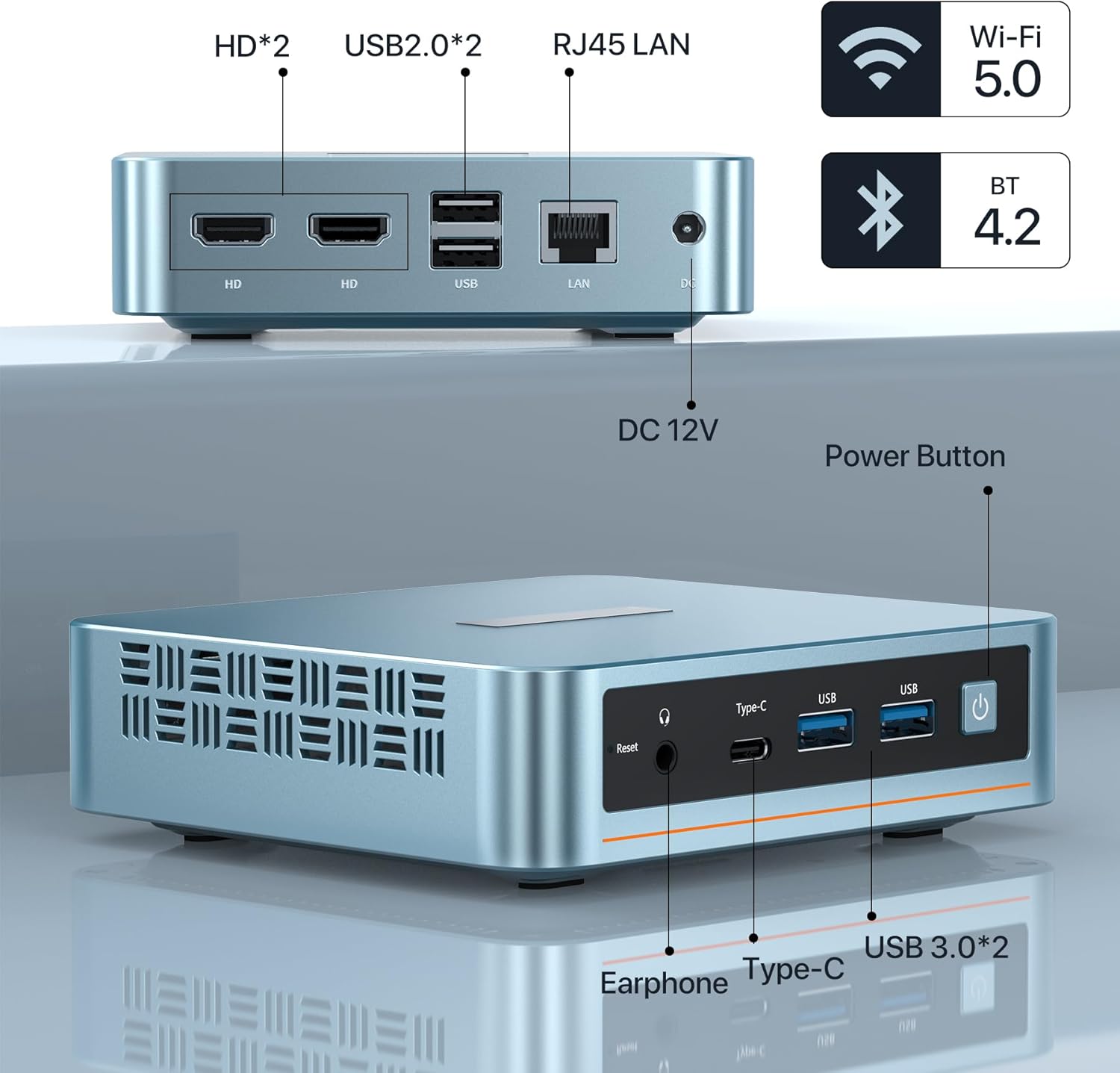
Imej: Depan dan belakang view of the PELADN Mini PC showing all available ports.
- Pelabuhan hadapan:
- Audio Jack (HP&MIC): For headphones and microphone.
- Type-C: Multi-functional port for data and video output.
- USB 3.0 (x2): High-speed data transfer ports.
- Power Button: To turn the device on/off.
- Reset Button: For system reset.
- Port Belakang:
- HD (x2): For connecting displays via HDMI.
- USB 2.0 (x2): Standard USB ports for peripherals.
- RJ45 1000M LAN: For wired network connection.
- DC Jack: For power input (12V).
3.2 Ciri-ciri Utama

Imej: Selesaiview of the PELADN Mini PC's core specifications.
- Pemproses: 12th Gen Intel Alder Lake-N95 (4C/4T, up to 3.4GHz, 6W TDP).
- Grafik: Intel UHD Graphics, supporting 4K 60Hz.
- RAM: 16GB DDR4 (3200MHz).
- Storan: 512GB M.2 2280 SSD (supports up to 2TB).
- Ketersambungan: WiFi 5, Bluetooth 4.2, RJ45 1000M LAN.
- penyejukan: Efficient fan cooling system for silent operation and performance.
- Sistem pengendalian: Pre-installed OS, also supports Linux, Ubuntu.
3.3 Komponen Dalaman

Imej: Meletup view illustrating the internal layout and components of the Mini PC.
The PELADN Mini PC features a well-designed internal structure, including the Alder Lake-N95 processor, a 512GB M.2 2280 SSD, 16GB DDR4 RAM, and an efficient cooling fan to maintain optimal operating temperatures.
4. Persediaan
4.1 Sambungan Awal
- Sambungkan Kuasa: Plug the power adapter into the DC Jack on the rear of the Mini PC, then plug the adapter into a power outlet.
- Paparan Sambungkan: Use the provided HD cable to connect your monitor to one of the HD ports on the Mini PC. For triple display, use both HD ports and the Type-C port with compatible adapters/cables.
- Sambung Peranti: Pasangkan papan kekunci dan tetikus USB anda ke port USB yang tersedia.
- Sambungan Rangkaian: For a wired connection, plug an Ethernet cable into the RJ45 LAN port. For wireless, ensure Wi-Fi is enabled in the operating system settings after initial boot.
- Hidupkan kuasa: Tekan butang kuasa di hadapan Mini PC.
4.2 Pemasangan Pemasangan VESA
The included VESA mount allows you to attach the Mini PC to the back of a compatible monitor or to a wall, saving desk space.

Image: Step-by-step guide for attaching the VESA mount to the Mini PC and a display.
- Pasangkan Pendakap pada Mini PC: Secure the VESA bracket to the back of the Mini PC using the provided screws.
- Attach to Display/Wall: Fix the bracket to the VESA mounting holes on the back of your display or to a wall using appropriate screws. Ensure it is securely fastened.

Image: Various placement options for the Mini PC, including VESA mount, desktop, and wall mount.
5. Arahan Operasi
5.1 Hidupkan/Mati Kuasa
- Untuk Menghidupkan: Tekan butang kuasa di hadapan Mini PC. Lampu penunjuk kuasa akan menyala.
- Untuk Mematikan: For safe shutdown, use the operating system's shutdown function. Alternatively, press and hold the power button for 5-7 seconds to force a shutdown (use only when necessary to prevent data loss).
5.2 Menyambung Peranti
The Mini PC supports a variety of peripherals via its USB, Type-C, and audio ports. Simply plug in your devices such as external hard drives, USB flash drives, printers, or speakers.
5.3 Triple-Display Setup
The PELADN Mini PC supports up to three 4K displays simultaneously, enhancing your productivity and entertainment experience.

Image: A visual representation of the Mini PC driving three independent displays.
Connect your displays using the two HD ports and the Type-C port. Ensure your cables and monitors support 4K resolution for optimal performance. Once connected, configure display settings within your operating system.
5.4 Senario Penggunaan
The PELADN Mini PC is versatile and suitable for various applications:

Kerja Pejabat

Online Education

Teater Rumah
6. Penyelenggaraan
To ensure the longevity and optimal performance of your PELADN Mini PC, follow these maintenance guidelines:
- Pembersihan: Regularly clean the exterior of the Mini PC with a soft, dry cloth. Use compressed air to gently clear dust from ventilation openings to prevent overheating. Do not use liquid cleaners directly on the device.
- Pengudaraan: Ensure the Mini PC is placed in a well-ventilated area. Do not block the air vents. Avoid placing it on soft surfaces like carpets or blankets that can obstruct airflow.
- Kemas Kini Perisian: Keep your operating system and drivers updated to the latest versions. This improves security, performance, and compatibility.
- Penutupan Selamat: Sentiasa matikan Mini PC dengan betul melalui sistem pengendalian untuk mengelakkan kerosakan data.
- Suhu: Operate the Mini PC within recommended temperature ranges. Avoid extreme hot or cold environments.
7. Penyelesaian masalah
This section addresses common issues you might encounter with your PELADN Mini PC.
| Masalah | Kemungkinan Punca | Penyelesaian |
|---|---|---|
| Mini PC does not power on. | No power, faulty power adapter, loose connection. | Check power cable and adapter connection. Ensure power outlet is working. Try a different power outlet. |
| Tiada paparan pada monitor. | Incorrect cable connection, monitor input not selected, faulty cable/monitor. | Ensure HD/Type-C cable is securely connected. Select correct input source on monitor. Test with a different cable or monitor if possible. |
| Prestasi perlahan. | Too many applications running, low disk space, outdated drivers, overheating. | Close unnecessary applications. Free up disk space. Update drivers and OS. Ensure proper ventilation. |
| Wi-Fi/Bluetooth not working. | Drivers not installed, disabled in OS, hardware issue. | Check device manager for driver status. Ensure Wi-Fi/Bluetooth is enabled in settings. Restart the Mini PC. |
| Peranti USB tidak dikenali. | Faulty USB port, driver issue, device incompatibility. | Try a different USB port. Update USB drivers. Test the device on another computer. |
8. Spesifikasi
Detailed technical specifications for the PELADN Mini PC WI-6:
| Ciri | Spesifikasi |
|---|---|
| Pemproses | Intel Alder Lake-N95 (4 Cores, 4 Threads, up to 3.4GHz) |
| Grafik | Intel UHD Graphics (4K@60Hz Triple-Display Support) |
| RAM | 16GB DDR4 (3200MHz) |
| Penyimpanan | 512GB M.2 2280 SSD (Expandable up to 2TB) |
| Sistem Operasi | Pre-installed OS (Supports Windows 11, Linux, Ubuntu) |
| Kesambungan Wayarles | WiFi 5, Bluetooth 4.2 |
| Kesambungan Berwayar | 1x RJ45 1000M LAN Port |
| Port USB | 2x USB 3.0, 2x USB 2.0 |
| Output Video | 2x HD 2.0, 1x Type-C |
| Port Audio | 1x Audio Jack (HP&MIC) |
| Input Kuasa | DC 12V |
| Dimensi (LxWxH) | 4.88 x 1.38 x 4.41 inci (124 x 35 x 112 mm) |
| Berat badan | lebih kurang 2 paun (0.9 kg) |
| warna | Biru |
9. Waranti dan Sokongan
Your PELADN Mini PC comes with a Waranti 1 tahun. For warranty service or technical support, please follow these steps:
- Login to your account on the platform where you purchased the product.
- Navigate to "My Orders".
- Find the order ID for your PELADN Mini PC.
- Click on "Contact Seller" to reach out to PELADN's support team.
PELADN aims to provide professional technical support and typically responds to inquiries within 24 hours. Additionally, the product may be eligible for a 30-day return and exchange policy, depending on the retailer's terms.


