pengenalan
Thank you for choosing the ErGear Whole Piece Standing Desk. This electric computer workstation is designed to enhance your home office experience with its seamless design, spacious work area, and ergonomic adjustability. This manual provides essential information for assembly, operation, maintenance, and troubleshooting to ensure optimal performance and longevity of your desk.

Figure 1: ErGear Whole Piece Standing Desk in a typical setup.
Maklumat Keselamatan Penting
Please read all instructions carefully before use. Failure to follow these instructions may result in injury or damage to the product.
- Do not place more than 176 lbs (79.8 kg) on the desk top to ensure stability and safety.
- Jauhkan kanak-kanak dan haiwan peliharaan dari meja semasa operasi.
- Pastikan semua kabel diuruskan dengan betul untuk mengelakkan kekusutan semasa pelarasan ketinggian.
- Jangan buka atau ubah suai komponen elektrik meja. Hubungi kakitangan yang berkelayakan untuk pembaikan.
- Elakkan meletakkan cecair terus di atas permukaan meja tanpa alas cawan pelindung.
Persediaan dan Perhimpunan
The ErGear Whole Piece Standing Desk is designed for hassle-free assembly. A detailed instruction manual and labeled hardware are included in the packaging to guide you through the process.
For comprehensive assembly steps, please refer to the official Installation Manual (PDF): Muat turun Manual Pemasangan
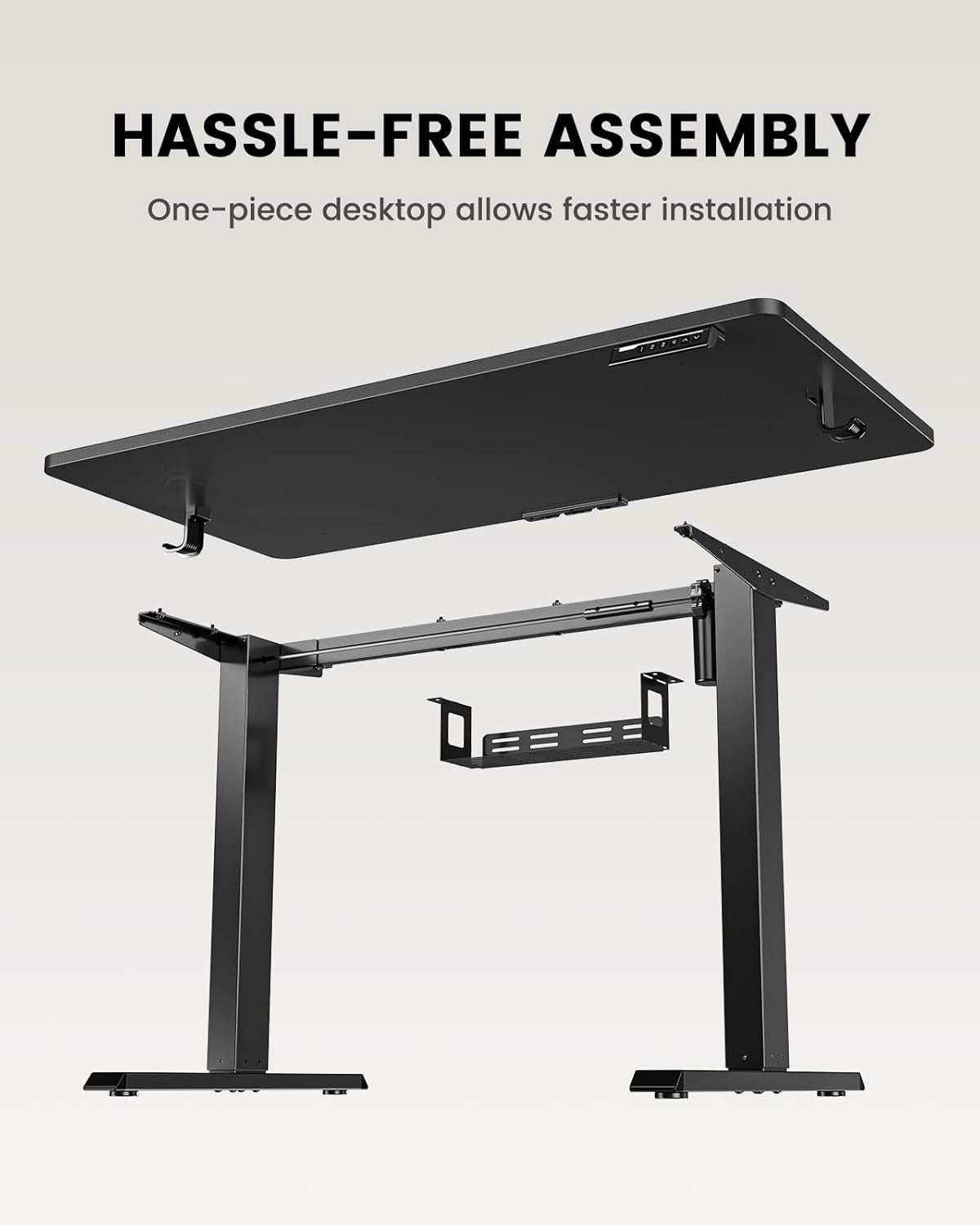
Figure 2: Components of the ErGear Standing Desk for assembly.
The one-piece desktop design simplifies installation compared to multi-piece desktops, allowing for quicker setup.
Arahan Operasi
The ErGear standing desk offers smooth and quiet electric height adjustment, allowing you to effortlessly switch between sitting and standing positions.
Pelarasan Ketinggian
The desk smoothly adjusts from a minimum height of 27.9 inches to a maximum height of 46.9 inches. Use the up and down arrow buttons on the control panel to achieve your desired height.
Pratetap Memori
The control panel features three memory preset buttons. To save a preferred height:
- Laraskan meja mengikut ketinggian yang anda inginkan.
- Press the 'M' button (or similar memory set button) followed by one of the numbered preset buttons (1, 2, or 3).
- The height is now saved. To recall a saved height, simply press the corresponding numbered button.
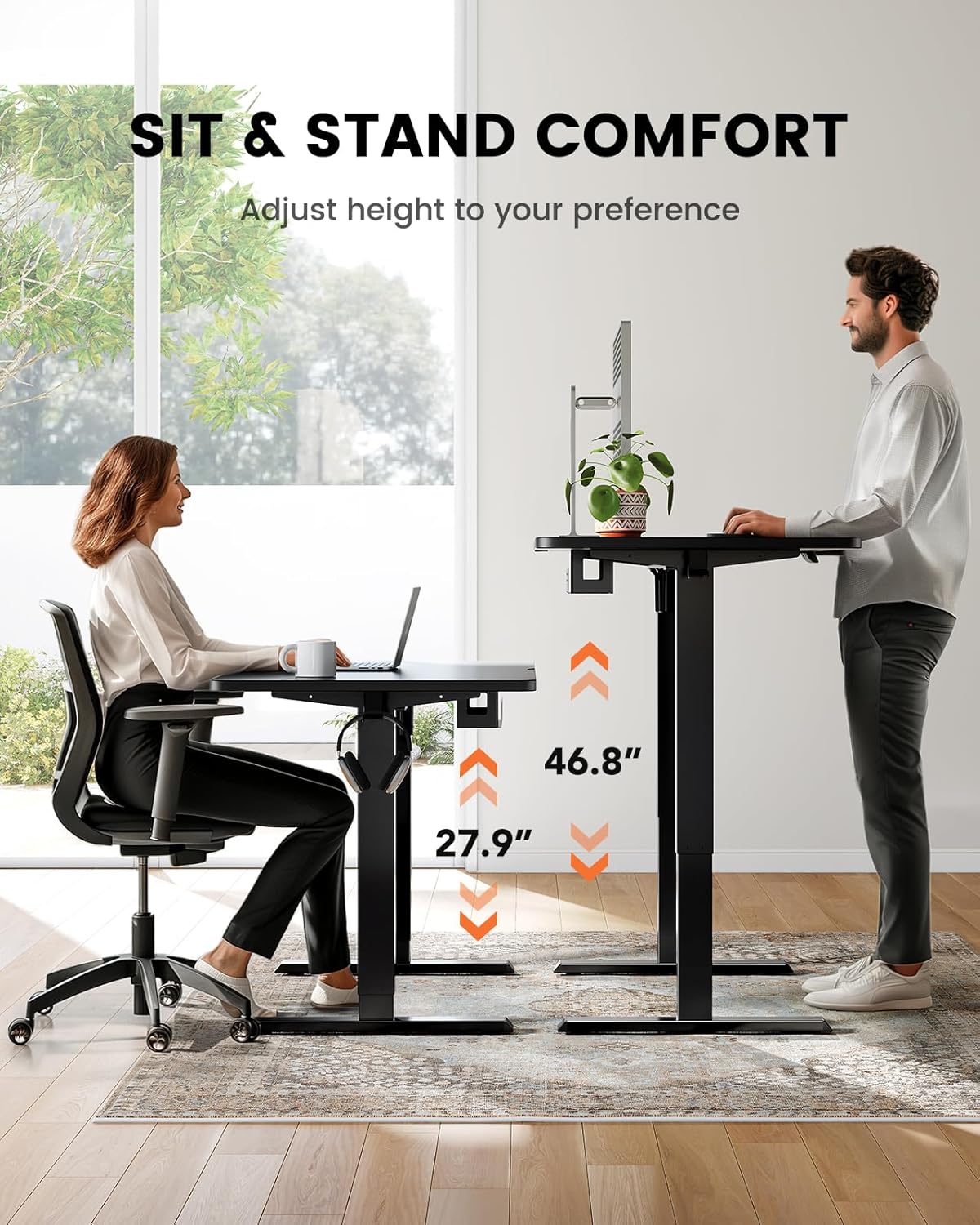
Figure 3: Sit and stand comfort with adjustable height.
Pengurusan Kabel
A cable management tray is attached underneath the desktop to help keep your workspace organized and clutter-free. Utilize this tray to route and secure power cords and other cables.
Video: Official ErGear brand video demonstrating desk features and usage.
Penyelenggaraan dan Penjagaan
To ensure the longevity and optimal performance of your ErGear standing desk, follow these simple maintenance guidelines:
- Pembersihan: Lap permukaan meja dengan lembut, damp kain. Elakkan bahan kimia yang keras atau pembersih kasar yang boleh merosakkan kemasan.
- Pengurusan Kabel: Periodically check and reorganize cables in the management tray to prevent tangles and ensure smooth operation.
- Penjagaan Motor: The electric motor is designed for durability. Avoid overloading the desk beyond its maximum weight capacity (176 lbs / 79.8 kg) to prevent strain on the motor.
- Pemeriksaan biasa: Ensure all screws and connections remain tight. Re-tighten if necessary.
Menyelesaikan masalah
If you encounter any issues with your ErGear standing desk, please refer to the following common troubleshooting tips. For more complex problems, contact customer support.
- Meja Tidak Bergerak: Periksa sama ada kord kuasa dipasang dengan kukuh pada meja dan soket kuasa yang berfungsi. Pastikan tiada halangan yang menghalang pergerakan meja.
- Pergerakan tidak sekata: Verify that the desk is placed on a flat, level surface. Check for any loose connections in the frame or legs.
- Pratetap Memori Tidak Berfungsi: Re-program the memory presets following the steps in the 'Operating Instructions' section.
- Bunyi Luar Biasa: A slight hum during operation is normal. If you hear grinding or loud noises, stop operation immediately and contact customer support.
Spesifikasi Produk
| Ciri | Spesifikasi |
|---|---|
| Jenama | ErGear |
| Nombor Model | EGESD64B |
| Dimensi Produk | 24"D x 48"W x 28"H |
| warna | Hitam |
| Gaya | moden |
| Bahan Asas | Keluli Tahan Karat |
| Jenis Bahan Atas | Buluh |
| Jenis Selesai | Dilukis |
| Jenis Pemasangan | Freestanding |
| Komponen yang Disertakan | Dulang Pengurusan Kabel |
| Ketinggian Minimum | 27.9 Inci |
| Ketinggian Maksimum | 46.9 Inci |
| Cadangan Berat Maksimum | 176 paun (79.8 kg) |
| Perhimpunan yang Diperlukan | ya |
| Jenis Waranti | Terhad |
Waranti dan Sokongan Pelanggan
The ErGear Whole Piece Standing Desk comes with a Limited Warranty. For specific terms and conditions, please refer to the warranty information provided with your purchase or contact ErGear customer service.
If you have any questions about assembly, product selection, or require technical assistance, please do not hesitate to contact our U.S.-based customer support team. We are here to help.
Sokongan Pelanggan: Please refer to your product packaging or the official ErGear website for the most current contact information (phone, email, or live chat).


