1. Pengenalan
This manual provides detailed instructions for the operation and maintenance of your SWOFY M4 MP3 Player. Please read this manual thoroughly before using the device to ensure proper functionality and to maximize your user experience.
2. Produk Lebihview
The SWOFY M4 is a versatile digital audio player featuring Bluetooth 5.3 connectivity, a 2.4-inch touch screen, and a range of functions including FM radio, e-book reader, video playback, and voice recording. It comes with 64GB of built-in storage, expandable up to 128GB with a Micro SD card.
2.1 Kandungan Pakej
- 1x SWOFY 64GB Bluetooth MP3 Player
- 1x Wired Earbuds
- 1x Kabel USB Jenis-C
- 1x Silicone Protective Case
- 1x Manual Pengguna
2.2 Susun atur Peranti
Familiarize yourself with the physical components of your SWOFY M4 MP3 Player.
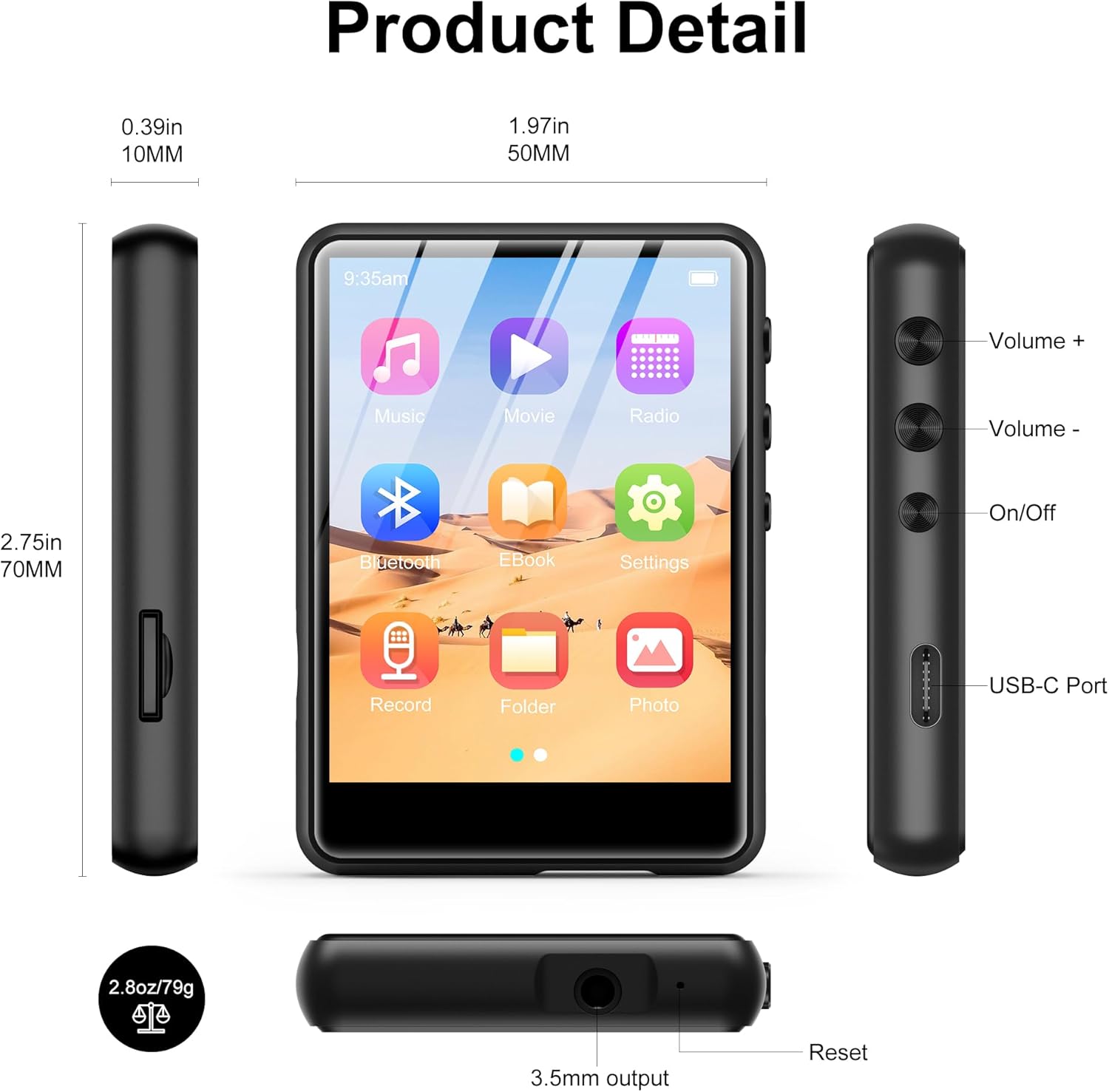
Imej 2.2.1: Bahagian hadapan, sisi, dan atas views of the SWOFY M4 MP3 Player, highlighting the 2.4-inch screen, Volume +/-, On/Off buttons, USB-C Port, 3.5mm output, Reset button, and Micro SD card slot.
- Skrin Sentuh IPS 2.4 inci: For navigation and display.
- Kelantangan +/- Butang: Laraskan tahap output audio.
- Butang Hidup/Mati: Hidupkan atau matikan peranti.
- Port USB-C: Untuk pengecasan dan pemindahan data.
- Bicu Stereo 3.5mm: Sambungkan fon kepala berwayar atau pembesar suara luaran.
- Slot Kad Mikro SD: For storage expansion up to 128GB.
- Butang Tetapkan Semula: To restart the device if it becomes unresponsive.
- Pembesar suara HD: Pembesar suara bersepadu untuk main balik audio.
3. Persediaan
3.1 Mengecas Peranti
Before first use, fully charge the MP3 player. Connect the provided USB Type-C cable to the device's USB-C port and the other end to a USB power adapter (not included) or a computer's USB port. The battery indicator on the screen will show charging status.

Imej 3.1.1: The SWOFY M4 MP3 Player connected via USB Type-C cable, illustrating its 300mAh battery capacity for long playback.
3.2 Menghidupkan/Mematikan
- Untuk Menghidupkan: Press and hold the On/Off button located on the side of the device until the screen illuminates.
- Untuk Mematikan: Press and hold the On/Off button until a power-off prompt appears on the screen. Select "Power Off" or continue holding until the screen turns off.
3.3 Loading Music and Files
Untuk memindahkan files ke pemain MP3 anda:
- Connect the MP3 player to your computer using the provided USB Type-C cable.
- Peranti ini akan muncul sebagai cakera boleh tanggal pada komputer anda.
- Drag and drop your music, video, image, or e-book files into the appropriate folders on the MP3 player.
- Keluarkan peranti dari komputer anda dengan selamat sebelum memutuskan sambungan kabel.

Imej 3.3.1: Memindahkan muzik files (MP3, WMA, APE, FLAC, WAV, OGG, DRM, ACELP) from a computer to the SWOFY M4 MP3 Player via USB-C.
The device supports various audio formats including MP3, WMA, APE, FLAC, WAV, OGG, DRM, and ACELP. For video and image files, ensure they are in compatible formats to avoid "unsupported format" errors.
3.4 Expanding Storage
The SWOFY M4 has 64GB of internal storage. You can expand this by inserting a Micro SD card (up to 128GB) into the dedicated slot on the side of the device.
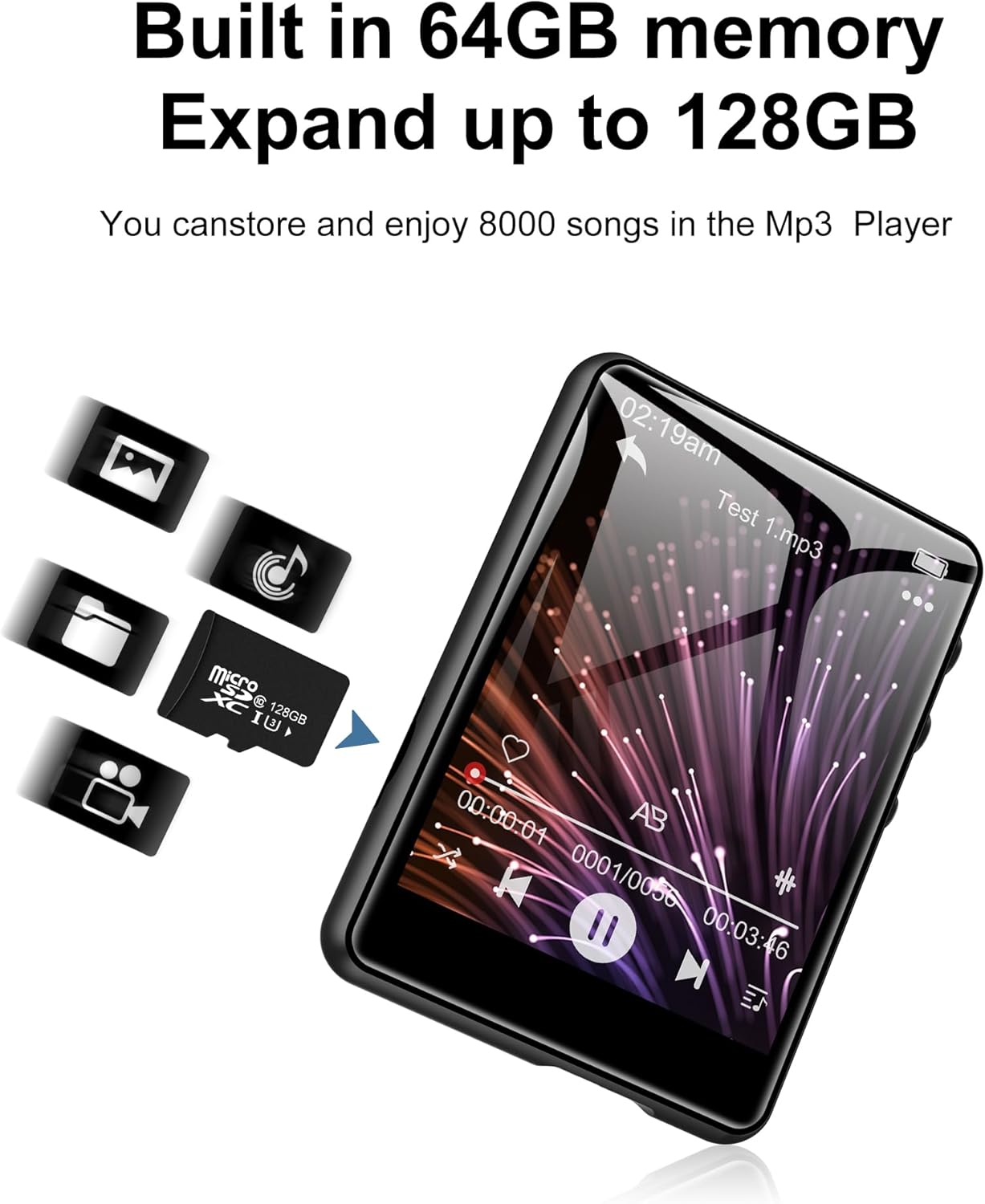
Imej 3.4.1: The SWOFY M4 MP3 Player with a Micro SD card, illustrating the expandable storage capability up to 128GB.
4. Arahan Operasi
4.1 Menavigasi Skrin Sentuh
The 2.4-inch touch screen allows for intuitive navigation. Tap icons to open applications, swipe to scroll, and use the back arrow icon to return to the previous screen.

Imej 4.1.1: A finger interacting with the 2.4-inch IPS touch screen of the SWOFY M4 MP3 Player, demonstrating its convenient operation.
4.2 Main balik Muzik
- From the main menu, tap the "Music" icon.
- Layari pustaka muzik anda mengikut artis, album, genre atau folder.
- Ketik lagu untuk memulakan main balik.
- Use the on-screen controls (play/pause, skip, volume) or physical volume buttons to manage playback.
- Access equalizer settings and playback modes (repeat, shuffle) from the music playback screen.

Imej 4.2.1: The music playback interface of the SWOFY M4, showing options for AB Repeat, 8-speed playback, two playback modes, and equalizer settings.
4.3 Kesambungan Bluetooth
The SWOFY M4 features Bluetooth 5.3 for wireless audio streaming.
- From the main menu, tap the "Bluetooth" icon or go to "Settings" and select "Bluetooth".
- Turn Bluetooth on. The device will scan for available Bluetooth devices.
- Pastikan fon kepala atau pembesar suara Bluetooth anda berada dalam mod berpasangan.
- Select your device from the list to pair. Once paired, audio will stream wirelessly.

Imej 4.3.1: The SWOFY M4 MP3 Player demonstrating Bluetooth 5.3 connectivity with both Bluetooth earbuds and a Bluetooth speaker for wireless audio.
4.4 Radio FM
Untuk menggunakan fungsi Radio FM:
- Connect wired headphones to the 3.5mm jack; they act as the antenna.
- From the main menu, tap the "Radio" icon.
- Perform an auto-scan to find available stations or manually tune to a frequency.

Imej 4.4.1: The SWOFY M4 MP3 Player showing the FM radio interface with wired headphones connected, which are necessary for antenna reception.
4.5 Pembaca E-Buku
To read e-books:
- Transfer compatible e-book files to the device (e.g., TXT format).
- Tap the "E-Book" icon from the main menu.
- Select an e-book to open it. Use the touch screen to turn pages.

Imej 4.5.1: The SWOFY M4 MP3 Player displaying an e-book, with a hand demonstrating page-turning via the touch screen.
4.6 Main balik Video
Peranti ini menyokong main balik video. Pastikan video files are in a compatible format for optimal performance.
- Transfer compatible video files ke peranti.
- Tap the "Movie" icon from the main menu.
- Pilih video untuk dimainkan.

Imej 4.6.1: The SWOFY M4 MP3 Player displaying a video in full-screen mode, demonstrating its video playback capability.
4.7 Perakam Suara
Untuk merakam audio:
- Tap the "Record" icon from the main menu.
- Ketik butang rakam untuk mula merakam.
- Tap again to pause/resume, and tap the stop button to end and save the recording.

Imej 4.7.1: The SWOFY M4 MP3 Player showing the voice recorder interface, indicating active recording with sound wave visualization.
4.8 Foto Viewer
Kepada view foto:
- Transfer compatible image files (e.g., JPEG) to the device.
- Tap the "Photo" icon from the main menu.
- Pilih imej untuk view. Swipe left or right to navigate through photos.

Imej 4.8.1: The SWOFY M4 MP3 Player displaying images, with a hand demonstrating swiping gestures to browse through photos.
5. Penyelenggaraan
- Pembersihan: Gunakan kain lembut dan kering untuk membersihkan peranti. Elakkan pembersih cecair atau bahan yang melelas.
- Storan: Store the MP3 player in a cool, dry place away from direct sunlight and extreme temperatures.
- Penjagaan Bateri: Untuk memanjangkan hayat bateri, elakkan daripada menyahcas sepenuhnya bateri dengan kerap. Cas peranti dengan kerap, walaupun tidak digunakan untuk tempoh yang lama.
- Perlindungan: Use the provided silicone protective case to guard against scratches and minor impacts.
6. Penyelesaian masalah
- Peranti tidak dihidupkan:
- Ensure the device is fully charged. If the issue persists, try pressing the reset button with a thin object (like a paperclip) and then attempt to power on again.
- "Unsupported format" error for files:
- Sahkan bahawa anda files (music, video, image) are in compatible formats. For music, MP3, WMA, APE, FLAC, WAV, OGG, DRM, ACELP are supported. For videos and images, specific formats may be required; refer to the product specifications or try converting files to common formats like JPEG for images or MP4 for videos.
- Tidak dapat menyambung ke komputer:
- Ensure the USB Type-C cable is securely connected to both the device and the computer. Try a different USB port or cable. Restart both the MP3 player and the computer. Ensure the device is powered on when connecting.
- Peranti Bluetooth tidak berpasangan:
- Ensure Bluetooth is enabled on both the MP3 player and the target device (headphones/speaker). Make sure the target device is in pairing mode and within range. Try turning Bluetooth off and on again on both devices.
- Kualiti bunyi yang lemah:
- Periksa audio file quality. Ensure headphones or speakers are properly connected and functioning. Adjust equalizer settings on the device. For wired connections, ensure the 3.5mm jack is fully inserted.
7. Spesifikasi
| Ciri | Perincian |
|---|---|
| Nombor Model | M4 |
| Dimensi | 2.75 x 1.97 x 0.4 inci |
| Berat Barang | 7.4 auns |
| Saiz Skrin | 2.4 Inci |
| Storan Dalaman | 64 GB |
| Storan Boleh Dikembangkan | Up to 128GB (Micro SD card) |
| Versi Bluetooth | 5.3 |
| Ketersambungan | Bluetooth, USB Jenis-C |
| Bateri | Polimer Litium 300mAh (termasuk) |
| Playback Time (wired earbuds) | Sehingga 50 jam |
| FM Radio Recording Time | Lebih kurang 7.5 jam |
| Format Audio yang Disokong | MP3, WMA, FLAC, APE, OGG, DRM, ACELP, WAV |
| Ciri Khas | Equalizer, FM Radio, Touch Screen, Video Playback, Voice Recorder |
8. Video Produk Rasmi
Video 8.1.1: An official product video from SWOFY Direct showcasing the features and design of the SWOFY M4 MP3 Player. This video demonstrates the device's multi-colored options, package contents, 2.4-inch touch screen, various ports, Bluetooth 5.3, and overall functionality.
9. Waranti dan Sokongan
For warranty information and technical support, please refer to the contact details provided on the product packaging or visit the official SWOFY webtapak. Simpan resit pembelian anda untuk tuntutan waranti.


