1. Pengenalan
Thank you for choosing TTQ Open Ear Headphones, Model CT26. These true wireless sports earbuds are designed to provide a comfortable listening experience while allowing you to remain aware of your surroundings. Featuring Bluetooth 5.3 connectivity, IPX7 waterproofing, and crystal-clear call quality, they are ideal for various activities including running, cycling, workouts, and driving. This manual will guide you through the setup, operation, and maintenance of your new headphones.
2. Kandungan Pakej
Sila sahkan bahawa semua item terdapat dalam pakej anda:
- TTQ Open Ear Headphones (Left and Right Earbuds)
- Kes Pengecasan
- Kabel Pengecas USB-C
- Manual Pengguna

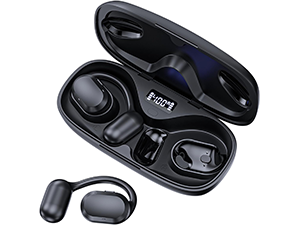
Imej: The TTQ Open Ear Headphones, Model CT26, displayed within their open charging case. The case features an LED digital power display indicating the battery level of both the case and the individual earbuds.
3. Produk Lebihview
The TTQ CT26 headphones feature an innovative open-ear design with flexible earhooks, ensuring comfort and stability during extended use. This design allows ambient sounds to be heard, enhancing safety in outdoor environments.

Imej: A person wearing the TTQ Open Ear Earbuds, demonstrating how the open-ear design sits comfortably outside the ear canal, allowing for situational awareness.

Imej: Two individuals cycling outdoors, both wearing TTQ Open Ear Headphones. This illustrates the product's suitability for sports and activities where awareness of surroundings is crucial for safety.
4. Persediaan
4.1 Mengecas Fon Kepala dan Sarung
Before first use, fully charge the headphones and the charging case. Connect the provided USB-C charging cable to the charging port on the case and a power source. The LED display on the charging case will show the battery percentage, and individual earbud charge indicators will light up during charging.
- A full charge provides up to 8 hours of music playtime or 9 hours of call time for the earbuds.
- The charging case extends total playtime to up to 36 hours.

Imej: The TTQ charging case with its lid open, showcasing the digital LED display that indicates the battery percentage of the case and the charging status of the earbuds. A USB-C charging port is visible at the front.
4.2 Berpasangan dengan Peranti Anda
- Pastikan fon kepala dicas.
- Open the charging case. The earbuds will automatically enter pairing mode, indicated by a flashing light (if applicable, refer to product specific light indicators).
- Pada peranti anda (telefon pintar, tablet, komputer), pergi ke tetapan Bluetooth dan hidupkan Bluetooth.
- Cari untuk available devices and select "CT26" from the list.
- Once connected, the earbuds will indicate successful pairing (e.g., a voice prompt or steady light).
Fon kepala akan disambungkan semula secara automatik ke peranti terakhir yang dipasangkan apabila dikeluarkan dari bekas, jika Bluetooth didayakan pada peranti.

Imej: A visual representation of Bluetooth 5.3 technology, showing a smartphone's Bluetooth settings screen with 'CT26' listed as a connected device, illustrating the stable and fast connection capability.
5. Arahan Operasi
The TTQ CT26 headphones feature a physical button for easy control of various functions.
Imej: A diagram illustrating the single button controls on the earbud, detailing actions for pause/play, answer/hang up, rejection, volume adjustment, switching songs, and activating Siri.
5.1 Main balik Muzik
- Main/Jeda: Press the button once (x1).
- Lagu Seterusnya: Press the button twice (x2).
- Lagu Sebelumnya: Press the button three times (x3).
- Kelantangan Naik/Turun: Press and hold the button for 2 seconds (Hold 2s).
5.2 Pengurusan Panggilan
- Jawab/Tamatkan Panggilan: Press the button once (x1).
- Tolak Panggilan: Press and hold the button for 2 seconds (Hold 2s).
The headphones feature dual-mic noise-cancelling technology for clearer calls by reducing environmental noise.

Imej: A man wearing TTQ Open Ear Headphones while holding a smartphone, illustrating the intelligent noise cancellation feature that boosts human voice and reduces environmental noise for clearer calls.
5.3 Pembantu Suara
- Aktifkan Pembantu Suara (Siri, Pembantu Google, dll.): Press the button three times (x3).
6. Penyelenggaraan
To ensure the longevity and optimal performance of your TTQ Open Ear Headphones, follow these maintenance guidelines:
- Pembersihan: Lapkan fon telinga dan bekas pengecas dengan kerap menggunakan kain lembut, kering dan tidak berbulu. Elakkan menggunakan bahan yang melelas atau bahan kimia yang keras.
- Tahan Air: The headphones are IPX7 waterproof, meaning they can withstand submersion in up to 1 meter of water for 30 minutes. They are resistant to sweat and rain, making them suitable for workouts. However, they are not designed for swimming or prolonged submersion. Ensure the charging port is dry before charging.
- Storan: Apabila tidak digunakan, simpan fon kepala dalam bekas pengecasnya untuk melindunginya daripada habuk dan kerosakan. Simpan di tempat yang sejuk dan kering jauh dari suhu yang melampau.

Imej: TTQ Open Ear Headphones and their charging case on a wet surface with water splashes, demonstrating their IPX7 waterproof rating, indicating resistance to rain and sweat.
7. Penyelesaian masalah
If you encounter issues with your TTQ Open Ear Headphones, please refer to the following common solutions:
- Tiada Bunyi/Kelantangan Rendah:
- Pastikan fon kepala dipasangkan dengan betul dan disambungkan ke peranti anda.
- Semak tahap kelantangan pada kedua-dua fon kepala dan peranti anda yang disambungkan.
- Pastikan fon telinga dicas.
- Isu Berpasangan:
- Pastikan Bluetooth didayakan pada peranti anda.
- Ensure the headphones are in pairing mode (flashing indicator).
- Matikan Bluetooth pada peranti berdekatan lain yang mungkin cuba disambungkan.
- Forget/remove "CT26" from your device's Bluetooth list and try pairing again.
- Mulakan semula peranti dan fon kepala anda (dengan meletakkannya semula di dalam bekas dan mengeluarkannya).
- Isu Pengecasan:
- Pastikan kabel pengecasan disambungkan dengan selamat pada kedua-dua bekas dan sumber kuasa.
- Cuba kabel USB-C dan penyesuai kuasa yang berbeza.
- Pastikan sesentuh pengecasan pada fon telinga dan dalam bekasnya bersih dan bebas daripada serpihan.
- Sambungan Terputus-putus:
- Ensure your device is within the Bluetooth range (up to 10 meters/33 feet).
- Avoid physical obstructions between the headphones and your device.
- Kurangkan gangguan daripada peranti wayarles lain.
Jika masalah berterusan selepas mencuba langkah ini, sila hubungi sokongan pelanggan.
8. Spesifikasi
| Ciri | Spesifikasi |
|---|---|
| Nama Model | CT26 |
| Teknologi Ketersambungan | Wayarles (Bluetooth) |
| Teknologi Komunikasi Tanpa Wayar | Bluetooth 5.3 |
| Julat Bluetooth | 10 Meter (33 Kaki) |
| Tahap Ketahanan Air | IPX7 Kalis Air |
| Penempatan Telinga | Buka Telinga |
| Faktor Bentuk | Wayarles Benar |
| Hayat Bateri (Earbud) | 8 Hours (Music) / 9 Hours (Calls) |
| Jumlah Masa Main dengan Sarung Pengecasan | Sehingga 36 Jam |
| Jenis Pemacu Audio | Pemandu Dinamik |
| Saiz Pemacu Audio | 16.2 Milimeter |
| Julat Kekerapan | 20 Hz - 20,000 Hz |
| Kawalan Bunyi | Pembatalan Bunyi Aktif (untuk panggilan) |
| Kaedah Kawalan | Butang Fizikal |
| Port Pengecasan | USB-C |
| Berat Barang | 7.8 auns (0.22 Kilogram) |
| bahan | plastik |
| UPC | 717977781312 |
9. Sokongan Pelanggan
For any questions, concerns, or if you receive a defective product, please do not hesitate to contact TTQ customer support. We are committed to providing solutions within 24 hours.
Please visit the official TTQ store on Amazon for more information and support resources: TTQ Store


