1. Pengenalan
This user manual provides detailed instructions for the setup, operation, maintenance, and troubleshooting of your GEEKOM Mini IT12 Mini PC. Please read this manual thoroughly before using the device to ensure proper functionality and longevity.
2. Apa yang ada di dalam Kotak
Upon opening your GEEKOM Mini IT12 package, you should find the following items:
- 1 x GEEKOM Mini IT12 Mini PC
- 1 x Kabel HDMI
- 1 x VESA Mount
- 1 x Penyesuai Kuasa
- 1 x Panduan Pengguna (dokumen ini)
Video: Unboxing GEEKOM Mini IT12. This video demonstrates the unboxing process and shows all included components.

Imej: The GEEKOM Mini IT12 shown with its VESA mount, demonstrating its compact size and mounting capability.
3. Produk Lebihview
The GEEKOM Mini IT12 is a compact yet powerful mini PC designed for various computing needs. It features a robust processor, ampmemori, dan pilihan sambungan serba boleh.
3.1 Panel Depan
Imej: Terperinci view of the front and rear ports on the GEEKOM Mini IT12.
- Pembaca Kad SD: For reading and writing data to SD cards.
- Port USB 3.2 Gen 2 (x2): High-speed data transfer ports.
- 3.5 mm Headphone Jack: For audio output to headphones or speakers.
- Butang Kuasa: Untuk menghidupkan/mematikan peranti.
3.2 Panel Belakang
- Bicu DC: Power input for the Mini PC.
- Port USB4 (x2): High-speed data transfer and display output, supporting up to 8K resolution.
- Pelabuhan LAN 2.5GbE: Untuk sambungan rangkaian berwayar berkelajuan tinggi.
- USB 3.2 Gen 2 Port (x1): Port pemindahan data berkelajuan tinggi.
- Port USB 2.0 (x1): Port USB standard untuk peranti persisian.
- Port HDMI 2.0 (x2): For connecting to displays, supporting up to 4K resolution.
4. Persediaan
Follow these steps to set up your GEEKOM Mini IT12 Mini PC:
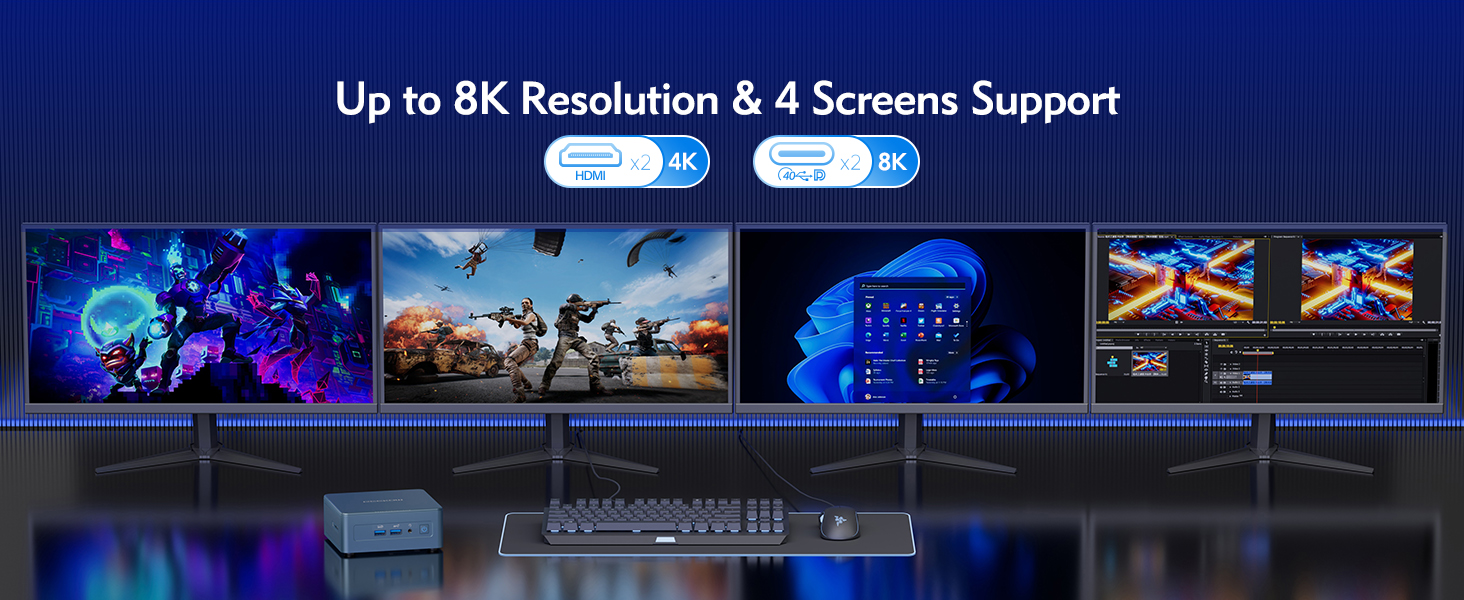
- Sambung ke Paparan: Use an HDMI cable to connect the Mini IT12 to your monitor or TV. The device supports up to four displays simultaneously via its HDMI and USB4 ports.
- Sambung Peranti: Palamkan papan kekunci, tetikus anda dan sebarang peranti USB lain ke dalam port USB yang tersedia.
- Sambungkan ke Rangkaian: For wired internet, connect an Ethernet cable to the 2.5GbE LAN port. For wireless internet, the device supports Wi-Fi 6E.
- Sambungkan Kuasa: Plug the power adapter into the DC Jack on the rear panel, then plug the adapter into a power outlet.
- Hidupkan kuasa: Tekan butang kuasa pada panel hadapan untuk menghidupkan Mini PC.
5. Beroperasi
The GEEKOM Mini IT12 comes pre-installed with Windows 11 Pro, offering a familiar and user-friendly operating environment.
5.1 But Permulaan dan Persediaan Windows
On the first boot, you will be guided through the Windows 11 Pro setup process. Follow the on-screen instructions to configure your language, region, network, and user account settings.
5.2 Sokongan Berbilang Paparan
The Mini IT12 supports up to four displays simultaneously, allowing for enhanced productivity and immersive experiences. Connect your displays to the available HDMI 2.0 ports and USB4 ports. You can configure display settings within Windows 11 Pro (Right-click on desktop > Display settings).

Imej: The GEEKOM Mini IT12 demonstrating its capability to support four screens simultaneously for enhanced productivity.
5.3 Kesambungan Wayarles
The Mini IT12 is equipped with Wi-Fi 6E and Bluetooth 5.2 for fast and reliable wireless connections. Connect to your wireless network via Windows settings and pair Bluetooth devices as needed.

Imej: Illustration of the GEEKOM Mini IT12's powerful Wi-Fi 6E and Bluetooth 5.2 capabilities, ideal for wireless peripherals and fast internet.
6. Penyelenggaraan dan Peningkatan
The GEEKOM Mini IT12 offers options for memory and storage expansion to enhance its performance and capacity.
6.1 Expanding RAM
The Mini IT12 supports dual-channel DDR4 SODIMM memory, expandable up to 64GB. Refer to the video below for detailed instructions on how to expand the RAM.
Video: How to expand RAM in GEEKOM Mini IT12. This video guides you through the process of installing additional RAM modules.
6.2 Installing an SSD
The Mini IT12 includes an M.2 2280 PCIe Gen 4 x4 SSD slot, expandable up to 2TB, and an M.2 2242 SATA SSD slot, expandable up to 1TB. Follow the video instructions for SSD installation.
Video: How to install an SSD in GEEKOM Mini IT12. This video demonstrates the steps for adding an SSD to your Mini PC.
6.3 Installing a Hard Disk Drive (HDD)
The Mini IT12 also features a 2.5" SATA HDD (7mm) slot, expandable up to 2TB. Watch the video below for guidance on HDD installation.
Video: How to install an HDD in GEEKOM Mini IT12. This video provides instructions for installing a hard disk drive.
7. Penyelesaian masalah
If you encounter issues with your GEEKOM Mini IT12, try the following common troubleshooting steps:
- Tiada Kuasa: Pastikan penyesuai kuasa disambungkan dengan selamat ke kedua-dua Mini PC dan soket kuasa yang berfungsi. Cuba soket atau penyesuai kuasa yang berbeza jika ada.
- Tiada Paparan: Check all HDMI/USB4 cable connections to your monitor. Ensure the monitor is powered on and set to the correct input source.
- Tiada sambungan internet: For wired connections, verify the Ethernet cable is properly connected. For Wi-Fi, check your router and ensure Wi-Fi is enabled in Windows settings.
- Prestasi Perlahan: Close unnecessary applications. Check for background updates. Consider upgrading RAM or storage if performance issues persist.
- Periferi Tidak Dikesan: Try connecting the peripheral to a different USB port. Ensure drivers are up to date.
Untuk bantuan lanjut, sila rujuk bahagian Waranti dan Sokongan.
8. Spesifikasi
Below are the key specifications for the GEEKOM Mini IT12 Mini PC:
| Ciri | Spesifikasi |
|---|---|
| Pemproses | 12th Gen Intel Core i7-12650H (10 Cores/16 Threads, up to 4.7GHz) |
| Grafik | Intel Iris Xe Graphics eligible |
| RAM | 32GB DDR4 RAM (Dual-channel, expandable up to 64GB) |
| Penyimpanan | 1TB PCIe Gen 4 SSD (expandable up to 2TB), M.2 2242 SATA SSD slot (expandable up to 1TB), 2.5" SATA HDD slot (expandable up to 2TB) |
| Sistem Operasi | Windows 11 Pro |
| Output Video | 2x HDMI 2.0 (4K), 2x USB4 (8K) - Supports up to 4 displays |
| Kesambungan Wayarles | Wi-Fi 6E, Bluetooth 5.2 |
| LAN | Port LAN 2.5GbE |
| Pelabuhan | 2x USB4, 3x USB 3.2 Gen 2, 1x USB 2.0, 2x HDMI 2.0, 1x SD Card Reader, 1x 3.5mm Headphone Jack, 1x DC Jack |
| Dimensi | 4.6 x 4.4 x 1.79 inci |
| Berat badan | 1.4 paun |

Imej: Berakhirview of the GEEKOM Mini IT12 highlighting its core specifications and features.
9. Waranti dan Sokongan
Your GEEKOM Mini IT12 Mini PC is covered by a manufacturer's warranty. For specific warranty terms and conditions, please refer to the warranty card included in your product packaging or visit the official GEEKOM webtapak.
For technical support, troubleshooting assistance, or service inquiries, please contact GEEKOM customer support through their official channels. You can typically find contact information on the GEEKOM webtapak atau dalam panduan pengguna yang disertakan.
Sumber Dalam Talian:
- GEEKOM Official Webtapak: www.geekompc.com
- E-mel Sokongan Pelanggan: support@geekompc.com


