1. Pengenalan
Thank you for choosing the JAZAVA 72-inch Smart Ceiling Fan with Lights. This manual provides detailed instructions for the safe installation, operation, and maintenance of your new ceiling fan. Please read this manual thoroughly before installation and keep it for future reference.

Imej 1.1: Selesaiview of the JAZAVA 72-inch Smart Ceiling Fan with included accessories.
2. Maklumat Keselamatan
AMARAN: Untuk mengurangkan risiko kebakaran, kejutan elektrik atau kecederaan diri, sentiasa ikuti langkah berjaga-jaga asas ini:
- Baca semua arahan sebelum memasang kipas.
- Ensure the installation site is suitable for supporting the fan's weight (approximately 26.6 pounds).
- Semua pendawaian mestilah mengikut kod elektrik nasional dan tempatan. Jika anda tidak biasa dengan pendawaian, rujuk juruelektrik yang bertauliah.
- Putuskan kuasa pada pemutus litar atau kotak fius sebelum memulakan pemasangan atau melakukan sebarang penyelenggaraan.
- Jangan kendalikan kipas dengan kord kuasa atau palam yang rosak.
- Elakkan meletakkan objek di laluan bilah kipas.
- Pastikan kipas dipasang pada ketinggian di mana bilah berada sekurang-kurangnya 7 kaki (2.1 meter) dari lantai.
3. Kandungan Pakej
Sahkan bahawa semua komponen yang disenaraikan di bawah disertakan dalam pakej anda:
- 1 x DC Motor and Housing
- 1 x LED Light and Lamp Shades
- 9 x Wood Blades
- 1 x Alat Kawalan Jauh
- Installation Accessories (including 5", 10", and 24" downrods)

Image 3.1: Product details and included components diagram.
4. Persediaan dan Pemasangan
The JAZAVA smart ceiling fan is designed for straightforward installation. A video guide and comprehensive instructions are included in the package. Ensure you have all necessary tools before beginning.
- Sediakan Tapak Pemasangan: Turn off power at the circuit breaker. Ensure the ceiling junction box is securely mounted and capable of supporting the fan's weight.
- Lekapkan Pendakap: Attach the mounting bracket to the ceiling junction box using the provided screws and washers.
- Pasang Downrod dan Motor: Select the appropriate downrod (5", 10", or 24") for your ceiling height. Securely attach it to the fan motor housing.
- Gantungkan Kipas: Angkat pemasangan kipas dengan berhati-hati dan gantungkannya pada pendakap pelekap.
- Dawai kipas: Connect the electrical wires according to the wiring diagram provided in the detailed manual. Ensure all connections are secure. Note: Some units may have reversed yellow and white wires in the light kit connector. If the light does not function correctly, verify wire alignment or consult customer support.
- Pasang Bilah: Securely attach the nine wooden blades to the motor housing.
- Pasang Kit Lampu LED: Connect and install the LED light kit and lamp warna.
- Pemeriksaan Akhir: Ensure all screws are tightened and connections are secure. Restore power at the circuit breaker.
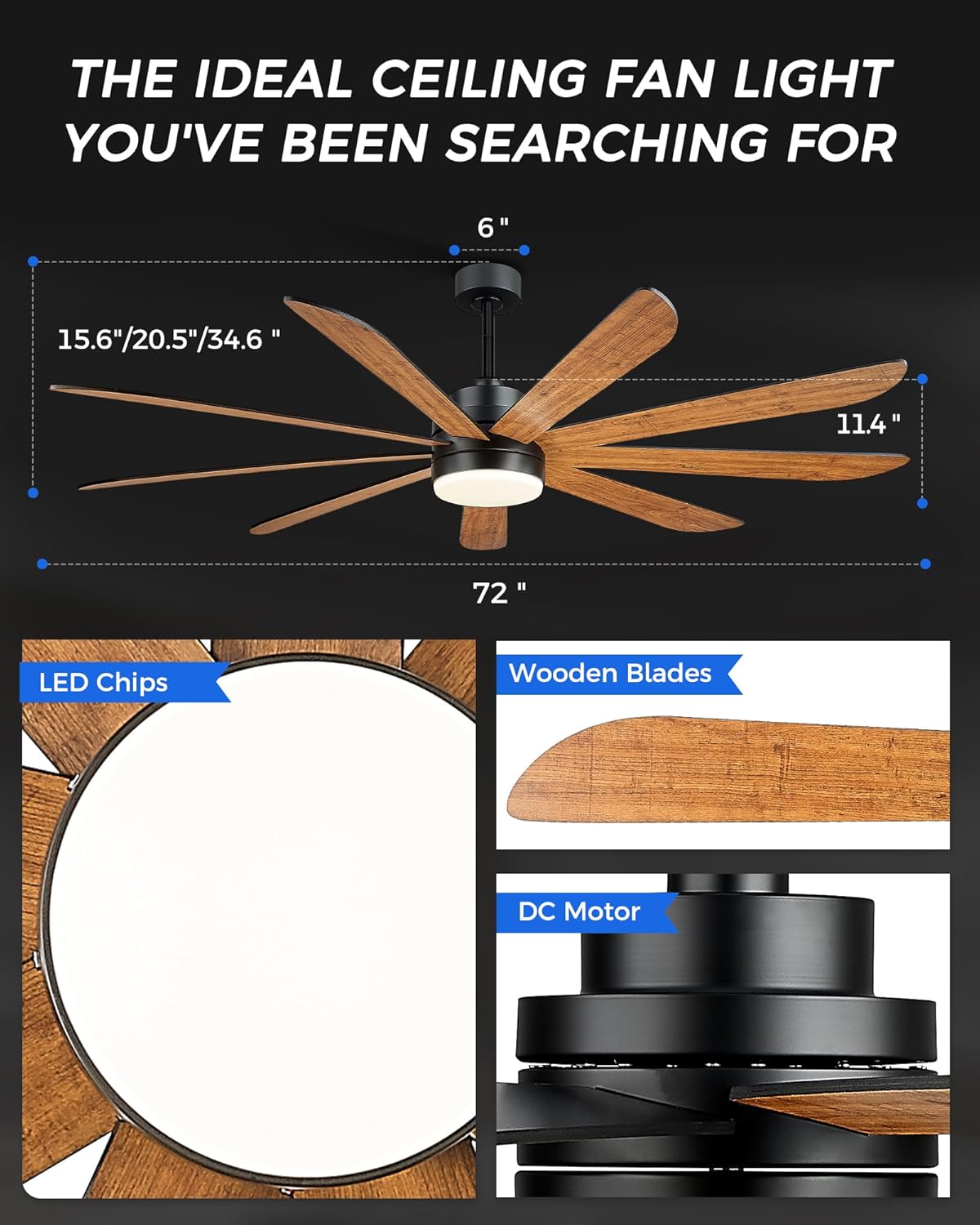
Image 4.1: Key components of the ceiling fan, including LED light, wooden blades, and DC motor.
5. Arahan Operasi
Your JAZAVA ceiling fan offers multiple control methods for convenience.
5.1. Alat Kawalan Jauh
The included remote control allows full functionality of the fan and light. Insert batteries (not included) into the remote. Follow the pairing instructions in the detailed manual if the remote does not respond immediately.
- Kipas HIDUP/MATI: Tekan butang kipas untuk menghidupkan atau mematikan kipas.
- Kelajuan Kipas: Adjust fan speed from 1 to 6 using the speed buttons.
- Lampu HIDUP/MATI: Tekan butang lampu untuk menghidupkan atau mematikan lampu.
- Suhu Warna Cahaya: Cycle through 3000K (Warm Light), 4000K (Natural Light), and 5000K (Cool Light) settings.
- Kecerahan Cahaya: Laraskan kecerahan daripada 10% kepada 100%.
- Pemasa: Tetapkan kipas untuk dimatikan selepas 1, 2 atau 4 jam.
- Hadapan/Undur: Switch between summer (forward, clockwise) and winter (reverse, counter-clockwise) modes.
5.2. TUYA Smart App Control
Download the TUYA Smart App (compatible with 2.4GHz WIFI) from your device's app store. Follow the in-app instructions to connect your fan to your home network. The app provides comprehensive control over all fan and light functions, including scheduling.
5.3. Kawalan Suara
Once connected to the TUYA Smart App, you can link your fan to voice assistants like Amazon Alexa or Google Assistant. Use voice commands to control fan speed, light settings, and turn the fan on/off.

Image 5.1: Demonstrating the three intelligent control systems: remote, app, and voice control.

Image 5.2: Explanation of the fan's reversible motor for summer and winter use.

Image 5.3: Customizable color temperature and brightness settings.

Image 5.4: Six wind speed settings for varied comfort levels.
6. Penyelenggaraan
Penyelenggaraan tetap memastikan prestasi optimum dan jangka hayat kipas siling anda.
- Pembersihan: Lap bilah kipas dan perumah motor secara berkala dengan kain lembutamp kain. Jangan gunakan pembersih atau pelarut yang melelas. Pastikan kuasa dimatikan sebelum membersihkan.
- Imbangan Bilah: If the fan wobbles, check that all blade screws are tight. A balancing kit (not included) can be used if necessary.
- Kit Cahaya: The LED light kit is designed for long life and typically does not require replacement. If issues occur, refer to troubleshooting or contact support.
7. Penyelesaian masalah
Rujuk bahagian ini untuk isu biasa dan penyelesaiannya.
| Masalah | Kemungkinan Punca | Penyelesaian |
|---|---|---|
| Kipas tidak bermula | No power; Loose wiring; Remote not paired or dead batteries. | Check circuit breaker; Verify all wire connections; Replace remote batteries or re-pair remote. |
| Cahaya tidak berfungsi | Loose wiring; Incorrect wiring of light kit; LED failure. | Check light kit wiring (ensure yellow to yellow, white to white); Verify connections; Contact customer support if LED is faulty. |
| Kipas bergoyang | Loose blades or mounting; Unbalanced blades. | Ensure all blade screws and mounting screws are tight; Use a blade balancing kit if necessary. |
| Kipas bising | Loose screws; Motor issue; Obstruction. | Check all screws for tightness; Ensure no wires or objects are touching the fan; If noise persists, contact support. |
| Smart features (App/Voice) not working | Incorrect Wi-Fi connection; App not configured; Voice assistant not linked. | Ensure fan is connected to 2.4GHz Wi-Fi; Reconfigure fan in TUYA Smart App; Relink app to voice assistant. |
8. Spesifikasi
| Ciri | Perincian |
|---|---|
| Jenama | JAVAVA |
| Nama Model | CF03-BK |
| warna | Matte Black & Dark Walnut |
| Dimensi Produk | 72"D x 72"W x 34.6"H |
| Berat Barang | 26.6 paun |
| Sumber Kuasa | Elektrik Bertali |
| Voltage | 120 Volt (DC) |
| Wattage (Cahaya) | 24 watt |
| Jenis Mentol | LED |
| Suhu Warna | 3000K, 4000K, 5000K (Dimmable) |
| Bilangan Bilah | 9 |
| Bilangan Tahap Kuasa | 6 (Kelajuan Kipas) |
| Kaedah Kawalan | Apl, Jauh, Suara |
| Penggunaan Dalaman/Luar | Indoor, Outdoor (Patio) |
| Kapasiti Aliran Udara | 7674 Cubic Centimeters Per Minute |
9. Waranti dan Sokongan
9.1. Maklumat Waranti
Every product purchased from our Amazon store is eligible for a 30-day replacement parts policy to ensure optimal performance. Furthermore, these items are protected by a one-year warranty from the date of shipment. This warranty encompasses all terms and conditions outlined in the original manufacturer's warranty. However, it does not extend to issues such as theft, loss, water-related damages, misuse by the customer, or deterioration of the product’s finish due to exposure to UV rays or coastal environments.
9.2. Sokongan Pelanggan
For any questions, technical assistance, or warranty claims, please contact our customer service team. We offer 24-hour support and maintain local stock for faster delivery of replacement parts if needed.
Refer to the contact information provided with your purchase or visit the JAZAVA official webtapak untuk butiran sokongan.