1. Pengenalan
The Gustard N18 PRO is a high-performance network switch specifically engineered for HiFi audio streaming applications. It is designed to enhance the integrity of network signals, thereby contributing to a cleaner and more accurate audio reproduction. This manual provides essential information for the proper setup, operation, and maintenance of your N18 PRO device.
2. Produk Lebihview dan Ciri
The Gustard N18 PRO incorporates advanced design principles to deliver optimal performance in audio networks. Key features include:
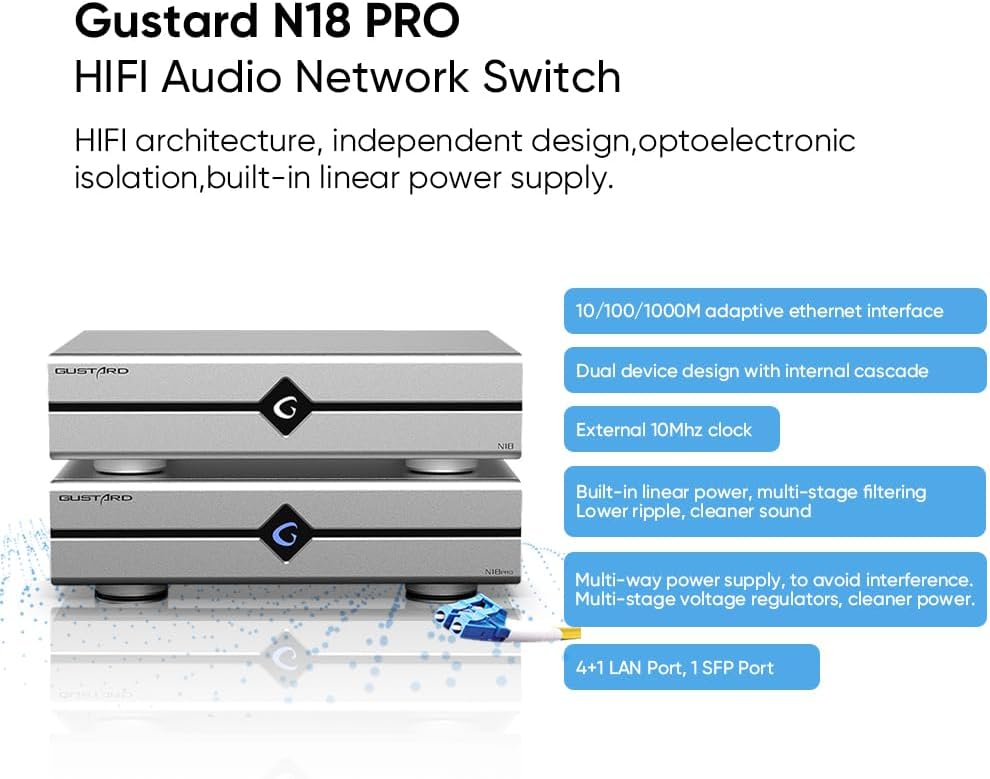
- Ethernet Port Interface: Equipped with one SFP (Small Form-Factor Pluggable) port and five 10/100/1000M adaptive Ethernet interfaces, providing versatile connectivity options for various audio components.
- External 10MHz Clock Support: The N18 PRO supports an external 10MHz clock input, which can significantly improve sound clarity and introduce a more analog characteristic to the audio output.
- Built-in Linear Power Supply: Features an audio-specific transformer and multi-stage filtering to ensure a lower ripple and cleaner power delivery, crucial for high-fidelity audio. It also includes a high current low voltage drop rectifier bridge.
- Multi-way Power Supply: Designed with multiple power supply paths to minimize internal interference and ensure stable operation. Multi-stage jilidtage regulators further contribute to cleaner power.
- Optoelectronic Isolation: Supports SFP fiber modules and includes a pluggable SFP opto-electronic converter module to effectively isolate network ripple, preventing digital noise from affecting the audio signal.

This image displays the Gustard N18 PRO network switch from both the front and rear perspectives. The front panel is minimalist with the Gustard logo, while the rear panel shows all input and output ports, including Ethernet, SFP, 10MHz clock input, and power.

A graphic highlighting the main features of the Gustard N18 PRO, including its HiFi architecture, independent design, optoelectronic isolation, built-in linear power supply, adaptive Ethernet interfaces, dual device design, external 10MHz clock support, multi-stage filtering, multi-way power supply, and port configuration (4+1 LAN, 1 SFP).
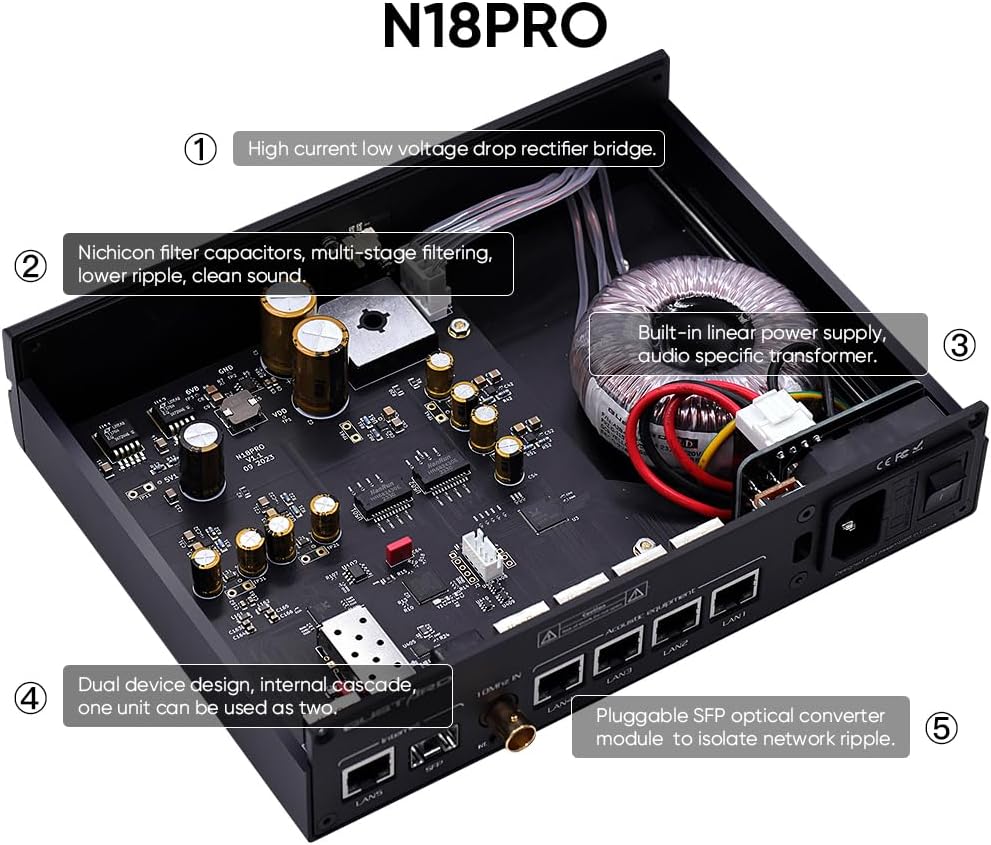
Satu dalaman view of the N18 PRO, showing key components such as the high current low voltage drop rectifier bridge, Nichicon filter capacitors, multi-stage filtering, built-in linear power supply with audio-specific transformer, dual device design, and the pluggable SFP optical converter module.
3. Persediaan
Follow these steps to set up your Gustard N18 PRO network switch:
- Membongkar: Carefully remove the N18 PRO from its packaging. Ensure all accessories are present.
- penempatan: Place the N18 PRO on a stable, flat surface with adequate ventilation. Avoid placing it near heat sources or in direct sunlight.
- Sambungan Kuasa: Connect the provided power cable to the AC power input on the rear panel of the N18 PRO. Ensure the voltage selection switch (if present and adjustable) matches your local power supply (e.g., 115V or 230V).
- Jaringan rangkaian:
- Connect your internet router or main network switch to the 'Internet' Ethernet port (LAN5) or the SFP port using an appropriate Ethernet cable or SFP module with fiber optic cable.
- Connect your audio streaming devices (e.g., network streamers, DACs with network input) to the 'Acoustic equipment' Ethernet ports (LAN1-LAN4).
- If using an external 10MHz clock, connect it to the '10MHz IN' BNC connector. Ensure the clock selection switch is set to 'EXT' for external clock usage.
- Hidupkan kuasa: Flip the power switch on the rear panel to the 'ON' position. The device will power on.
This image provides a clear diagram of the rear panel ports of the N18 PRO, labeling the Ethernet ports, SFP port, 10MHz clock input, clock selection switch, AC power input, fuse, voltage selection, and power switch.

This image illustrates how the Gustard N18 PRO achieves optical isolation using an SFP module and LC-LC fiber cables. It shows the network switch connected via fiber, emphasizing the separation of network ripple for cleaner audio.

A terperinci view of the rear panel focusing on the 10MHz clock input, highlighting its importance for enhanced sound quality and analog characteristics.
Pilihan Kesambungan
The Gustard N18 PRO can be integrated into various network configurations. Below are common setup diagrams:

Option 1: N18 + N18 PRO (Recommended)
This diagram illustrates a recommended connectivity option where the Gustard N18 and N18 PRO are used together. It shows how a router, NAS, and PC connect to the N18, which then connects to the N18 PRO, distributing signals to various audio equipment like DACs and streamers.

Option 5: N18 PRO Standalone
This diagram shows a connectivity option where only the Gustard N18 PRO is used. It details how a router, NAS, and PC connect directly to the N18 PRO, which then routes signals to various audio components.
4. Arahan Operasi
The Gustard N18 PRO is designed for straightforward operation:
- Once all connections are made and the device is powered on, the N18 PRO will automatically begin functioning as a network switch.
- No specific software or configuration is typically required for basic network switching functionality.
- Ensure that all connected audio devices are properly configured to receive network signals from the N18 PRO.
- If an external 10MHz clock is connected, verify that the 'Clock selection' switch on the rear panel is set to 'EXT' to utilize the external clock source. For internal clock, set it to 'INT'.
5. Penyelenggaraan
To ensure the longevity and optimal performance of your Gustard N18 PRO, observe the following maintenance guidelines:
- Pembersihan: Gunakan kain lembut dan kering untuk membersihkan bahagian luar peranti. Elakkan menggunakan pembersih cecair, aerosol atau bahan kasar, kerana ia boleh merosakkan kemasan atau komponen dalaman.
- Pengudaraan: Ensure that the ventilation openings are not blocked. Proper airflow is essential to prevent overheating.
- Persekitaran: Keep the device in a dry environment, away from excessive dust, humidity, and extreme temperatures.
- Matikan: If the device will not be used for an extended period, it is recommended to power it off and disconnect it from the mains power supply.
6. Penyelesaian masalah
If you encounter issues with your Gustard N18 PRO, refer to the following common troubleshooting steps:
- Tiada Kuasa:
- Check if the power cable is securely connected to both the N18 PRO and the wall outlet.
- Pastikan suis kuasa pada panel belakang berada dalam kedudukan 'ON'.
- Sahkan bahawa alur keluar dinding berfungsi dengan betul dengan memasangkan peranti lain.
- Check the fuse on the rear panel. If blown, replace it with a fuse of the same type and rating.
- Tiada Sambungan Rangkaian:
- Ensure all Ethernet cables are securely plugged into their respective ports on the N18 PRO and connected devices.
- Verify that your router or upstream network device is functioning correctly.
- If using the SFP port, ensure the SFP module is correctly inserted and the fiber optic cable is not damaged.
- Check the network status indicators on the N18 PRO and connected devices.
- Kualiti Audio / Bunyi Lemah:
- Ensure all audio components are properly connected and functioning.
- If using an external clock, verify its connection and ensure the 'Clock selection' switch is set to 'EXT'.
- Check for any ground loops or electrical interference in your audio system.
- Ensure the N18 PRO is placed away from other electronic devices that might cause interference.
If the issue persists after attempting these steps, please contact customer support for further assistance.
7. Spesifikasi
Detailed technical specifications for the Gustard N18 PRO HiFi Audio Network Switch:

A diagram showing the physical dimensions of the Gustard N18 PRO, including its length (220mm), width (170mm), and height (50mm).
| Ciri | Spesifikasi |
|---|---|
| Platform | Bukan Khusus Mesin |
| Voltage | 230 Volts (AC 115V/230V 50/60Hz) |
| Jenis Antaramuka | RJ45, SFP, BNC |
| Kadar Pemindahan Data | 10/100/1000 Megabits Per Second (adaptive) |
| Pengeluar | Gustard |
| Dimensi Produk (L x W x H) | 8.66 x 6.69 x 1.97 inches (220mm x 170mm x 50mm excluding protruding parts) |
| Berat Barang | 3.3 paun (1.5 Kilogram) |
| Bilangan Pelabuhan | 5 (1 SFP, 4 LAN) |
| warna | Hitam |
| Penggunaan Kuasa | <10W |
| 10M BNC Input | Input impedance 50 Ohm, 0dBm-20dBm |
8. Waranti dan Sokongan
Untuk maklumat waranti dan sokongan teknikal, sila rujuk dokumentasi yang diberikan bersama pembelian anda atau hubungi penjual secara terus. Simpan bukti pembelian anda untuk sebarang tuntutan waranti.


