pengenalan
The XCell H280 Headlamp is designed for versatile illumination, offering reliable brightness for various activities. This manual provides essential information for the safe and efficient use of your headlamp, meliputi persediaan, operasi, penyelenggaraan dan penyelesaian masalah.
Ciri-ciri utama termasuk:
- Pencahayaan Serbaguna: Four light modes, including white LED, white spotlight, red spotlight, and red flashing light for individual use.
- Pencahayaan Kuat: Up to 280 lumens and a light range of 120 meters provide strong brightness and reach.
- Flexible Tilt Angle: Lamp head is adjustable up to 90° to ensure optimal illumination in any situation.
- Compact and Comfortable: Lightweight design with an elastic and adjustable headband ensures high wearing comfort.
- Fungsi Praktikal: Includes time and memory function, quick shut-off, and IPX4 splash-water protection.
Persediaan
1. Pemasangan Bateri
The XCell H280 Headlamp requires three (3) AAA batteries for operation. Ensure correct polarity when inserting batteries.
- Locate the battery compartment on the rear of the headlamp unit.
- Buka penutup petak bateri.
- Insert three AAA batteries, matching the positive (+) and negative (-) terminals as indicated inside the compartment.
- Tutup penutup petak bateri dengan ketat untuk memastikan kalis air.
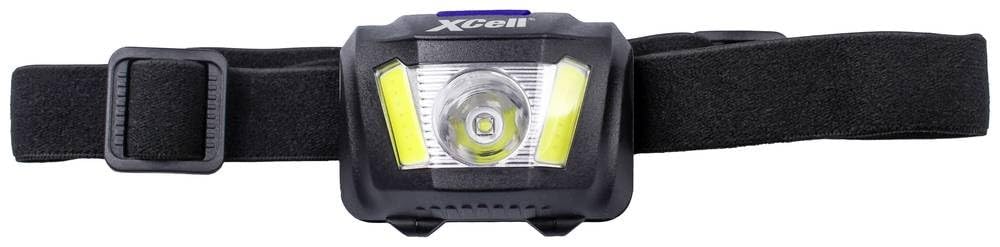
Image: XCell H280 Headlamp showing the main unit and adjustable strap. The battery compartment is located at the back of the main unit.
2. Melaraskan Ikat Kepala
The elastic headband is adjustable to provide a comfortable and secure fit for various head sizes.
- Letakkan kepalaamp atas kepala awak.
- Use the adjustable buckles on the side of the headband to tighten or loosen it until it fits snugly without being too tight.
- Pastikan headlamp unit is centered on your forehead.
Arahan Operasi
1. Hidupkan/Mati Kuasa
- Untuk memusingkan kepalaamp ON, press the power button located on the top of the unit.
- Untuk memusingkan kepalaamp DIMATIKAN, press and hold the power button for approximately 2 seconds. The quick shut-off function allows turning off from any mode by holding the button.
2. Menukar Mod Cahaya
The XCell H280 features four distinct light modes. Press the power button repeatedly to cycle through the modes:
- High (White LED): Maximum brightness (280 lumens) for extensive illumination.
- Medium (White LED): Reduced brightness (200 lumens) for general use and battery conservation.
- Low (White LED): Minimal brightness (80 lumens) for close-range tasks or extended battery life.
- Merah Berterusan: Red light for preserving night vision.
- Merah Berkelip: Red flashing light for signaling or emergency situations.
kepalaamp includes a memory function, which means it will turn on in the last used mode.
3. Melaraskan Sudut Kecondongan
Lamp head can be tilted up to 90 degrees to direct the light precisely where needed.
- Gently hold the headlamp unit and tilt it up or down to your desired angle.
- The mechanism is designed to hold the chosen angle securely.
Penyelenggaraan
1. Pembersihan
- Lap kepalaamp badan dengan lembut, damp kain. Jangan gunakan pembersih atau pelarut yang melelas.
- Bersihkan kanta lekap dengan lembut menggunakan kain mikrofiber untuk mengelakkan calar.
- Ikat kepala boleh dibasuh tangan dengan sabun dan air yang lembut, kemudian dikeringkan dengan udara.
2. Penggantian Bateri
- Replace all three AAA batteries simultaneously when the light output becomes dim or inconsistent.
- Always use new, high-quality alkaline AAA batteries for optimal performance.
- Buang bateri terpakai mengikut peraturan tempatan.
3. Penyimpanan
- Jika menyimpan headlamp for an extended period (more than one month), remove the batteries to prevent leakage and damage.
- Simpan kepalaamp di tempat yang sejuk dan kering, jauh daripada cahaya matahari langsung dan suhu yang melampau.
Menyelesaikan masalah
| Masalah | Kemungkinan Punca | Penyelesaian |
|---|---|---|
| Ketuaamp tidak menyala. | Bateri mati atau salah dimasukkan. | Gantikan bateri dengan yang baru, memastikan kekutuban yang betul (+/-). |
| Cahaya malap atau berkelip. | Kuasa bateri rendah. | Gantikan bateri dengan yang baru. |
| Ketuaamp dimatikan tanpa diduga. | Low battery power or loose battery connection. | Replace batteries. Check that batteries are securely seated in the compartment. |
| Water ingress (despite IPX4 rating). | Battery compartment not sealed properly or exposure to heavy water jets. | Ensure battery compartment cover is fully closed. IPX4 protects against splashes, not submersion or strong jets. Dry the unit thoroughly if exposed to water. |
Spesifikasi Teknikal
| Ciri | Perincian |
|---|---|
| Model | 149276 |
| Dimensi (L x W x H) | 58 x 43 x 35 mm |
| Berat badan | 60 gram |
| Bahan Perumahan | Getah/Plastik |
| Jenis Sumber Cahaya | LED |
| Output Cahaya (Tinggi) | 280 lumen |
| Output Cahaya (Sederhana) | 200 lumen |
| Output Cahaya (Rendah) | 80 lumen |
| Tempoh Pencahayaan | 3 hours (at max output) |
| Julat Cahaya | 120 meter |
| Mod Cahaya | High, Medium, Low, Continuous Red, Flashing Red |
| Tahan Air | IPX4 (Splash-water resistant) |
| Bekalan Kuasa | 3 x bateri AAA |
| Komposisi Bateri | Beralkali |
Maklumat Waranti
XCell products are manufactured to high-quality standards. This product is covered by a standard manufacturer's warranty against defects in materials and workmanship. Please refer to the warranty card included with your purchase or visit the official XCell webtapak untuk terma dan syarat jaminan terperinci. Simpan bukti pembelian anda untuk tuntutan waranti.
Sokongan Pelanggan
If you encounter any issues or have questions regarding your XCell H280 Headlamp that are not addressed in this manual, please contact XCell customer support. You can typically find contact information on the product packaging or the official XCell webtapak.
When contacting support, please have your product model number (149276) and a description of the issue ready.


