1. Produk Lebihview
The MokerLink 16-Port Gigabit Ethernet Switch is an unmanaged network switch designed for expanding network connectivity in home or small office environments. It features 16 Gigabit Ethernet ports, offering high-speed data transfer with plug-and-play simplicity. The fanless metal design ensures quiet and stable operation.

Gambar 1: Lebihview of the MokerLink 16-Port Gigabit Ethernet Switch, highlighting its full Gigabit ports, plug and play functionality, power-saving features, wall-mountable design, LED indicators, and fanless operation.
Ciri-ciri Utama:
- 16 Port Ethernet Gigabit: Provides 16 10/100/1000Mbps RJ45 ports for high-speed network connections.
- Pasang dan Main: Requires no configuration, making setup quick and easy.
- Reka bentuk tanpa kipas: Ensures silent operation, suitable for various environments.
- Logam Tahan Lama Casing: Offers robust protection and efficient heat dissipation.
- Cekap Tenaga: Features power-saving functionality (IEEE 802.3az EEE support) to reduce energy consumption.
- Peletakan Fleksibel: Supports desktop or wall-mount installation.
2. Kandungan Pakej
Sahkan bahawa semua item terdapat dalam pakej:
- 1 x MokerLink 16-Port Gigabit Ethernet Switch
- 1 x Power Adapter (DC 12V / 1.0A)
- 1 x Manual Pengguna (dokumen ini)
3. Persediaan dan Pemasangan
Follow these steps to set up your MokerLink Gigabit Ethernet Switch:
- Pilih Lokasi: Place the switch on a stable desktop or mount it on a wall. Ensure adequate ventilation around the device.
- Sambungkan Kuasa: Insert the DC plug of the power adapter into the switch's DC input port. Plug the other end of the power adapter into a standard electrical outlet. The power LED indicator will illuminate.
- Sambungkan Peranti Rangkaian: Connect your network devices (e.g., computers, printers, network-attached storage, routers, IP cameras, wireless access points) to any of the 16 RJ45 ports using standard Ethernet cables. The switch supports auto MDI/MDIX, so crossover cables are not required.
- Sahkan Sambungan: Once a device is connected, the corresponding port's LED indicator will light up (green for link, flashing for data transmission).
- Pemasangan Dinding (Pilihan): If wall mounting, use appropriate screws and anchors (not included) with the mounting holes on the switch.
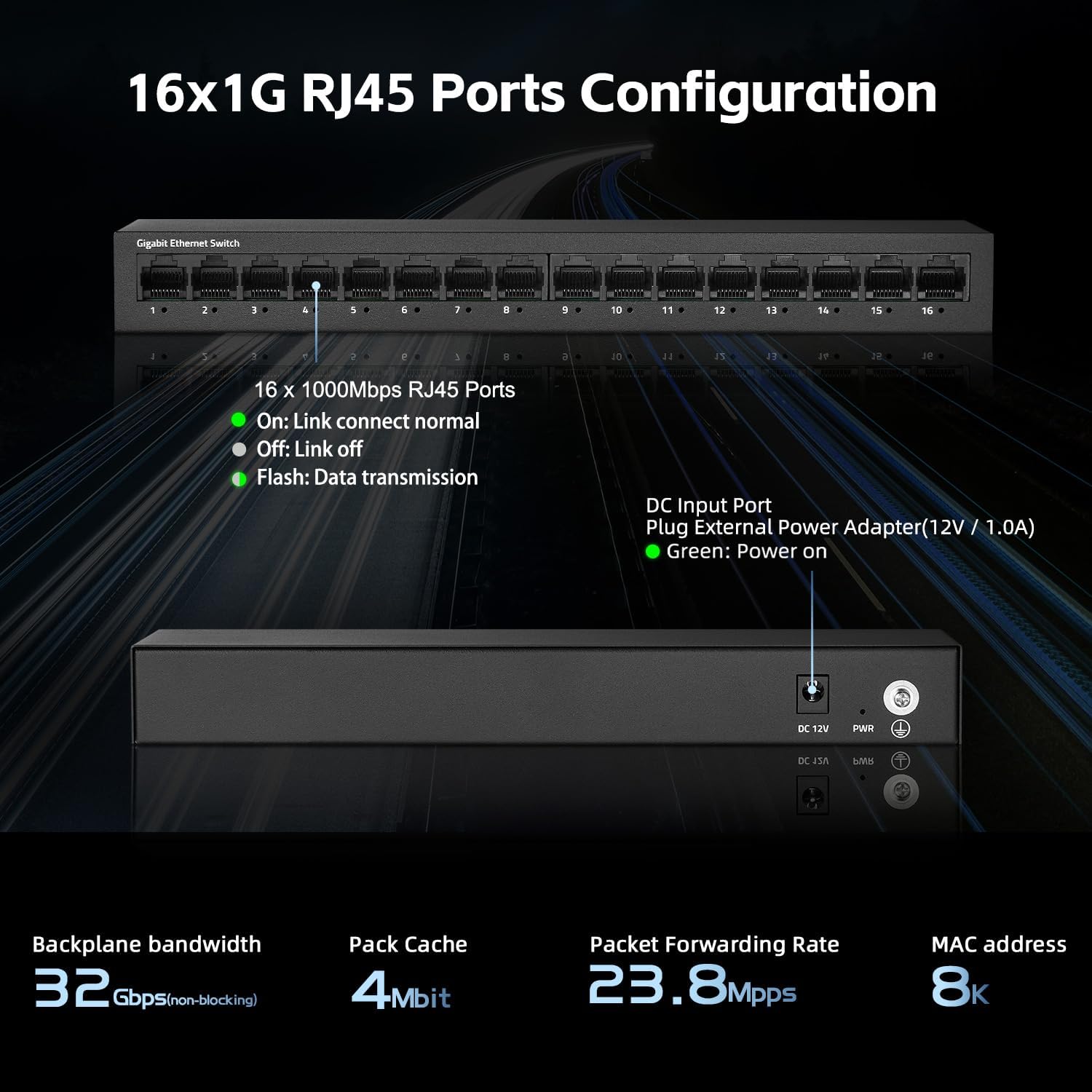
Rajah 2: Belakang view of the switch showing the DC input port and power LED indicator.

Figure 3: Ethernet cables connected to the switch ports.

Gambar 4: Cthample of the switch mounted on a wall, demonstrating its flexible placement options.
4. Arahan Operasi
The MokerLink 16-Port Gigabit Ethernet Switch is an unmanaged device, meaning it operates automatically without requiring user configuration. Simply connect your devices, and the switch will handle network traffic efficiently.
Penunjuk LED:
| Penunjuk | Status | Penerangan |
|---|---|---|
| Kuasa LED | hijau | Suis dihidupkan. |
| Port Link/Act LEDs (1-16) | Hijau (Pepejal) | A device is connected to the port, and the link is active. |
| Hijau (Berkelip) | Data sedang dihantar atau diterima melalui port. | |
| Mati | No device is connected, or the connected device is powered off/inactive. |

Rajah 5: Jarak dekat view of the port LED indicators, showing a green light for an active link.
Fungsi Automatik:
- Auto-Rundingan: Each port automatically detects the link speed of the connected network device (10/100/1000Mbps) and adjusts for compatibility and optimal performance.
- MDI/MDIX Automatik: Automatically detects the type of Ethernet cable (straight-through or crossover) and adjusts accordingly, eliminating the need for specific cable types.
- Non-Blocking Wire Speed: All ports can simultaneously transmit and receive data at their full wire speed without congestion.
5. Penyelenggaraan dan Penjagaan
To ensure the longevity and optimal performance of your MokerLink switch, follow these maintenance guidelines:
- Persekitaran: Operate the switch within its specified temperature range (0°C to 45°C). Avoid placing it in direct sunlight, near heat sources, or in areas with high humidity.
- Pembersihan: Gunakan kain lembut dan kering untuk membersihkan bahagian luar suis. Jangan gunakan cecair atau pembersih aerosol.
- Pengudaraan: Ensure that the ventilation holes on the sides of the switch are not blocked to allow for proper heat dissipation. The fanless design relies on natural convection.
- Bekalan Kuasa: Use only the provided power adapter. If the adapter is damaged, replace it with an equivalent approved adapter.
- Pengurusan Kabel: Organize network cables neatly to prevent strain on the ports and accidental disconnections.

Figure 6: The switch features a fanless metal design for efficient heat dissipation and energy saving.
6. Penyelesaian masalah
If you encounter issues with your MokerLink switch, refer to the following common troubleshooting steps:
- Tiada Kuasa:
- Pastikan penyesuai kuasa disambungkan dengan selamat pada suis dan soket elektrik yang berfungsi.
- Periksa sama ada alur keluar kuasa berfungsi dengan memasang peranti lain.
- Verify the power LED on the switch is illuminated.
- Tiada Pautan/Aktiviti di Pelabuhan:
- Pastikan kabel Ethernet disambungkan dengan selamat ke kedua-dua port suis dan peranti rangkaian.
- Check the status of the connected network device (e.g., computer is powered on, network adapter is enabled).
- Cuba kabel Ethernet yang berbeza.
- Cuba sambungkan peranti ke port lain pada suis.
- Verify the link/activity LED for the port is illuminated (solid green for link, flashing for activity).
- Kelajuan Rangkaian Perlahan:
- Ensure all connected devices and cables support Gigabit Ethernet (1000Mbps). The switch will operate at the lowest common speed.
- Periksa trafik rangkaian yang berlebihan atau aplikasi intensif lebar jalur yang berjalan pada peranti yang bersambung.
- Restart the switch by unplugging and replugging the power adapter.
- Sambungan Terputus-putus:
- Periksa kabel Ethernet untuk kerosakan.
- Ensure the switch is placed in a stable environment, free from excessive heat or electromagnetic interference.
- Check for loose power or Ethernet cable connections.
7. Spesifikasi
| Ciri | Penerangan |
|---|---|
| Model | 16*1G Unmanaged |
| Pelabuhan | 16 x Port RJ45 10/100/1000Mbps |
| Kapasiti Penukaran | 32 Gbps |
| Kadar Penghantaran Paket | 23.8 Mpps |
| Jadual Alamat MAC | 8K |
| Bingkai Jumbo | 9K (Standard for Gigabit Ethernet) |
| Piawaian | IEEE 802.3, IEEE 802.3u, IEEE 802.3ab, IEEE 802.3x, IEEE 802.3az |
| Jenis Antaramuka | RJ45 |
| Kaedah Penghantaran | Simpan-dan-Maju |
| Bekalan Kuasa | External Power Adapter (DC 12V / 1.0A) |
| Penggunaan Kuasa | Low power consumption (Energy Efficient Ethernet support) |
| Penunjuk LED | Power, Link/Act (per port) |
| Dimensi (L x W x H) | Kira-kira 10.16 x 5.04 x 3.23 inci (25.8 x 12.8 x 8.2 cm) |
| Berat Barang | Kira-kira 1.65 paun (0.75 kg) |
| Bahan Kes | logam |
| Suhu Operasi | 0°C hingga 45°C (32°F hingga 113°F) |
| Kelembapan Operasi | 10% hingga 90% tidak terkondensasi |
| Pemasangan | Desktop or Wall-Mount |

Figure 7: Visual representation of the switch's high port speed and switching capacity.
8. Video Produk Rasmi
The following videos provide additional information and visual guidance for the MokerLink 16-Port Gigabit Ethernet Switch:
Video 1: Produk Tamatview (0:38)
This short video provides a quick overview of the MokerLink 16-Port Gigabit Ethernet Switch, highlighting its main features and design.
Video 2: Detailed Features and Usage (2:11)
A more in-depth video demonstrating the features and typical usage scenarios of the Gigabit Ethernet Switch.
Video 3: Installation and Connectivity (1:38)
This video guides you through the physical installation and connection process for the switch.
Video 4: Key Highlights (0:36)
A concise video highlighting important aspects and benefits of the MokerLink switch.
Video 5: Advanced Overview (1:25)
This video offers a more advanced look at the switch's capabilities and performance.
Video 6: Quick Feature Spotlight (0:20)
A very brief video focusing on a specific feature or benefit of the switch.
Video 7: Comprehensive Demonstration (2:59)
This comprehensive video provides a full demonstration of the MokerLink 16-Port Gigabit Ethernet Switch, from unboxing to operation.
9. Waranti dan Sokongan
Maklumat Waranti: For details regarding the product warranty, please refer to the warranty card included with your purchase or contact the seller/manufacturer directly. Warranty terms may vary by region and retailer.
Sokongan Teknikal: If you require technical assistance or have questions not covered in this manual, please contact MokerLink customer support through their official webtapak atau peruncit tempat anda membeli produk tersebut.
Untuk maklumat lanjut, lawati MokerLink Store on Amazon.


