1. Pengenalan
This manual provides detailed instructions for the installation, operation, and maintenance of your Kolink Unity Solar ARGB Mesh Midi Tower Case. Please read this manual thoroughly before beginning installation to ensure proper setup and safe usage. This case is designed to house standard PC components, offering efficient cooling and customizable ARGB lighting.
2. Maklumat Keselamatan
- Sentiasa putuskan sambungan bekalan kuasa daripada soket dinding sebelum memasang atau menanggalkan sebarang komponen.
- Kendalikan semua komponen dengan berhati-hati untuk mengelakkan kerosakan akibat nyahcas elektrostatik (ESD). Pertimbangkan untuk menggunakan tali pergelangan tangan anti-statik.
- Avoid placing the case in direct sunlight, near heat sources, or in environments with excessive dust or humidity.
- Do not attempt to modify the case or its components. Unauthorized modifications may void your warranty and pose safety risks.
- Jauhkan bahagian-bahagian kecil, seperti skru, daripada kanak-kanak.
3. Kandungan Pakej
Sahkan bahawa semua item terdapat dalam pakej:
- Kolink Unity Solar ARGB Mesh Midi Tower Case
- Accessory Box (containing screws, cable ties, and standoffs)
- Manual Pengguna (dokumen ini)
4. Produk Lebihview
The Kolink Unity Solar ARGB Mesh Midi Tower Case features a mesh front panel for optimal airflow, pre-installed ARGB fans, and a tempered glass side panel to showcase your build.
4.1 Luaran Views

Rajah 4.1.1: Bahagian depan view of the Kolink Unity Solar ARGB Mesh Midi Tower Case, highlighting the mesh front panel and three illuminated ARGB fans.
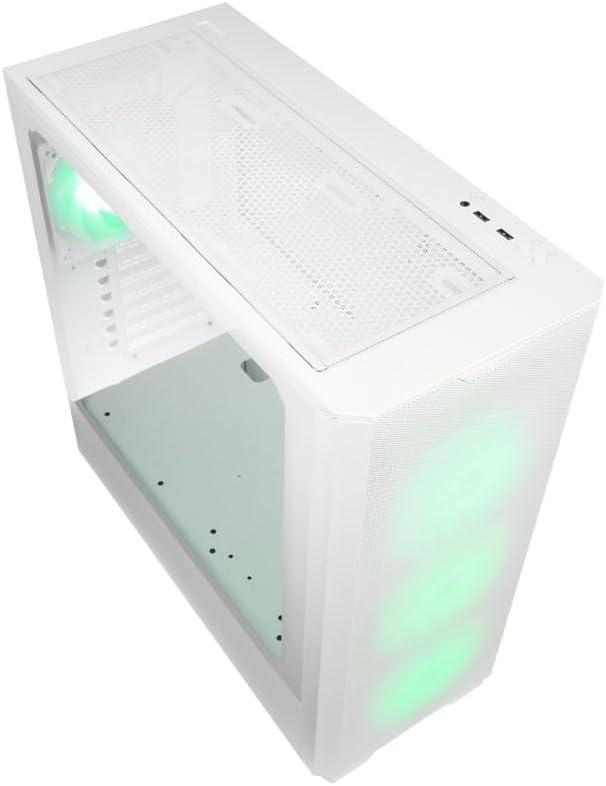
Rajah 4.1.2: Atas view of the case, showing the top mesh panel and front I/O ports.
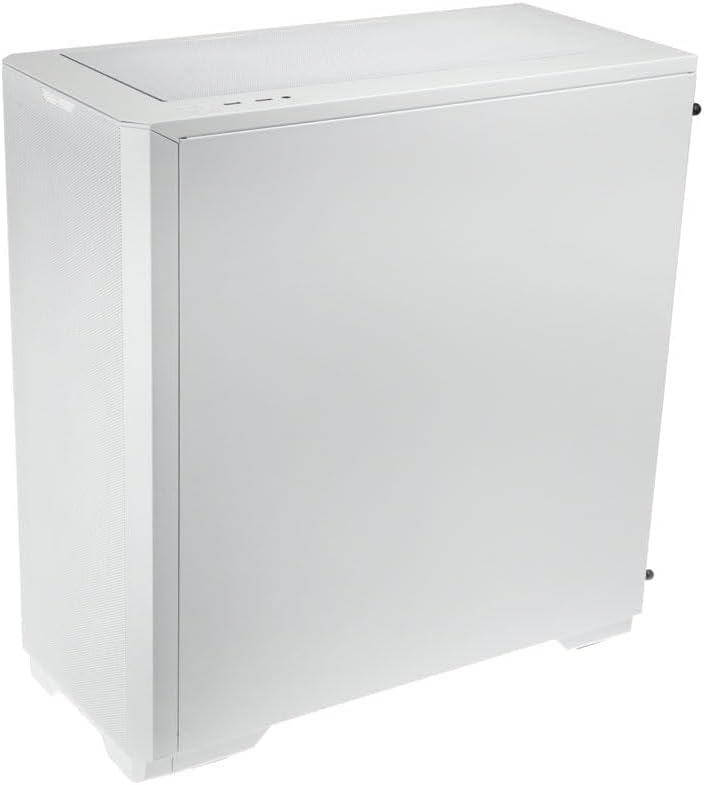
Rajah 4.1.3: Bahagian belakang view of the case, illustrating the solid right side panel.

Rajah 4.1.4: Composite image showing the front, rear, and tempered glass side panel of the case.
4.2 Front I/O Ports

Rajah 4.2.1: Close-up of the top-mounted front I/O panel, featuring audio jacks, USB ports, and control buttons.
The front I/O panel typically includes:
- Butang Kuasa
- Butang Tetapkan Semula
- Port USB 3.0 (x1)
- Port USB 2.0 (x2)
- HD Audio Jacks (Headphone/Microphone)
- ARGB Control Button (for pre-installed fans)
4.3 Internal Layout

Rajah 4.3.1: Dalaman view of the case, showing the motherboard tray, front fan mounts, and PSU shroud.

Rajah 4.3.2: Bahagian dalaman yang lain view, highlighting the rear fan mount and the spacious main chamber.

Rajah 4.3.3: Close-up of the pre-installed ARGB fans at the front of the case.

Rajah 4.3.4: View behind the motherboard tray, showing space for cable management and drive mounts.
5. Panduan Persediaan dan Pemasangan
Follow these steps to install your PC components into the Kolink Unity Solar case.
5.1 Menyediakan Kes
- Letakkan bekas di atas permukaan yang rata dan stabil.
- Remove the tempered glass side panel by unscrewing the thumbscrews at the rear and carefully pulling it away. Set it aside on a soft, non-abrasive surface.
- Remove the solid right side panel by unscrewing its thumbscrews and sliding it off.
5.2 Pemasangan Motherboard
- Pasang perisai I/O (jika berkenaan) ke dalam bukaan belakang bekas.
- Ensure the correct standoffs are installed for your motherboard form factor (ATX, Micro-ATX, Mini-ITX). Adjust or add standoffs as needed using the provided tools.
- Carefully align your motherboard with the standoffs and I/O shield.
- Pasangkan papan induk dengan skru yang disediakan. Jangan terlalu ketatkan.
5.3 Pemasangan Unit Bekalan Kuasa (PSU)
- Cari kawasan pelekap PSU di bahagian bawah belakang kes itu.
- Slide your PSU into the designated bay from the rear of the case.
- Align the PSU with the screw holes and secure it with the provided screws.
5.4 Storage Drive Installation (HDDs/SSDs)
The case supports multiple storage drives. Refer to the accessory box for specific mounting hardware.
- SSD 2.5": Mount directly onto the SSD trays located behind the motherboard tray or on the PSU shroud. Secure with screws.
- HDD 3.5": Install into the drive cage located under the PSU shroud. Slide the drive into the tray and secure it.
5.5 Pemasangan Kad Grafik (GPU) dan Kad Pengembangan
- Tanggalkan penutup slot PCIe yang diperlukan dari belakang kes itu.
- Insert your graphics card or other expansion cards into the appropriate PCIe slots on your motherboard.
- Secure the cards with the provided screws or retention clips.
5.6 Cable Management and Connections
- Connect all necessary power cables from the PSU to your motherboard, CPU, GPU, and storage drives.
- Connect the front I/O cables (USB, Audio, Power/Reset switches, ARGB control) to their respective headers on the motherboard. Refer to your motherboard manual for header locations.
- Route cables through the cutouts and tie-down points behind the motherboard tray to maintain a clean interior and optimize airflow. Use the included cable ties.
- Ensure the pre-installed ARGB fans are connected to the integrated ARGB controller or directly to an ARGB header on your motherboard (if supported).
6. Operating the ARGB Lighting
The Kolink Unity Solar case comes with pre-installed ARGB fans. You can control their lighting effects in two ways:
- Case ARGB Button: Use the dedicated ARGB control button on the front I/O panel to cycle through various lighting modes and colors.
- Perisian Papan Induk: If your motherboard has a 3-pin 5V ARGB header and compatible software (e.g., ASUS Aura Sync, MSI Mystic Light, Gigabyte RGB Fusion), you can connect the case's ARGB controller to the motherboard and synchronize lighting effects with other components. Refer to your motherboard manual for instructions on ARGB header connection and software usage.
7. Penyelenggaraan
Penyelenggaraan tetap membantu memastikan prestasi optimum dan jangka hayat komponen PC anda.
- Penapis Habuk: The case features removable dust filters on the front, top, and bottom. Periodically remove and clean these filters with compressed air or by rinsing them with water (ensure they are completely dry before reinstallation).
- Pembersihan Dalaman: Use compressed air to remove dust from inside the case, especially from fan blades, heatsinks, and other components. Perform this cleaning in a well-ventilated area.
- Pembersihan Luaran: Lap permukaan luar dengan lembut, damp kain. Elakkan bahan kimia yang keras atau pembersih yang kasar.
8. Penyelesaian masalah
Jika anda menghadapi masalah, rujuk langkah penyelesaian masalah biasa berikut:
- PC not powering on: Double-check all power connections from the PSU to the motherboard, CPU, and GPU. Ensure the front panel power switch cable is correctly connected to the motherboard header. Verify the PSU switch is in the 'ON' position.
- Fans not spinning/ARGB not lighting up: Check fan power connections and ARGB connections. Ensure ARGB cables are connected to the correct 3-pin 5V ARGB headers (not 4-pin 12V RGB headers). If using the case controller, ensure it is powered.
- Tiada output paparan: Ensure your graphics card is properly seated in its PCIe slot and all necessary power cables are connected. Verify your monitor cable is connected to the graphics card, not the motherboard's integrated graphics port (unless you are using integrated graphics).
9. Spesifikasi
Key specifications for the Kolink Unity Solar ARGB Mesh Midi Tower Case:
| Ciri | Spesifikasi |
|---|---|
| Jenama | KOLEKSI |
| Nama Model | Unity Solar |
| Nombor Model Item | UNITYSOLARWHT |
| Jenis Kes | Mid Tower |
| warna | putih |
| Keserasian Papan Induk | ATX, Micro ATX, Mini ITX |
| Kaedah Penyejukan | Udara |
| Jenis Pemasangan Bekalan Kuasa | Pelekap Bawah |
| Bilangan USB 2.0 Port | 2 |
| Jumlah Port USB | 2 (Note: Product description indicates 1x USB 3.0, 2x USB 2.0. Please verify with product packaging.) |
| Total Internal Bays | 4 (Mixed 2.5"/3.5" support) |
| Berat Barang | 2.2 paun |
10. Waranti dan Sokongan
For warranty information and technical support, please refer to the official KOLINK webtapak atau hubungi peruncit anda. Simpan bukti pembelian anda untuk tuntutan waranti.


