1. Pengenalan
The Ibiza MOBILE800 is a versatile, battery-powered 800W portable audio system designed for various events and mobile use. It features multiple audio input options, including Bluetooth, USB, microSD, and AUX, along with dedicated inputs for microphones and a guitar. The system also includes sound effects, adjustable EQ, TWS (True Wireless Stereo) functionality, integrated lighting modes, and a recording feature. Its built-in wheels and trolley handle ensure easy transport.
This manual provides essential information for the safe and efficient operation of your MOBILE800 audio system. Please read it thoroughly before use and retain it for future reference.
2. Arahan Keselamatan
- Baca semua arahan sebelum mengendalikan peranti.
- Jauhkan unit daripada air, kelembapan dan suhu yang melampau.
- Jangan buka casing. Tiada bahagian yang boleh diservis pengguna di dalamnya. Rujuk semua servis kepada kakitangan yang berkelayakan.
- Gunakan hanya penyesuai kuasa yang disediakan untuk mengecas.
- Pastikan pengudaraan yang betul di sekeliling unit untuk mengelakkan terlalu panas.
- Elakkan meletakkan objek berat pada unit.
- Do not expose the battery to excessive heat or direct sunlight.
- Buang bateri secara bertanggungjawab mengikut peraturan tempatan.
3. Kandungan Pakej
Sila pastikan semua barang ada semasa membuka bungkusan:
- Ibiza MOBILE800 Portable Party Audio System
- Mikrofon Berwayar
- Penyesuai Kuasa
- Manual Pengguna (dokumen ini)
4. Produk Lebihview
4.1. Bahagian Depan dan Bahagian Sisi View

Imej ini memaparkan bahagian hadapan view of the Ibiza MOBILE800 portable audio system. It highlights the integrated trolley handle at the top, sturdy wheels at the bottom, and the vibrant multi-color LED lighting that frames the main speaker grille. A wired microphone and its connecting cable are shown in the foreground, indicating included accessories.
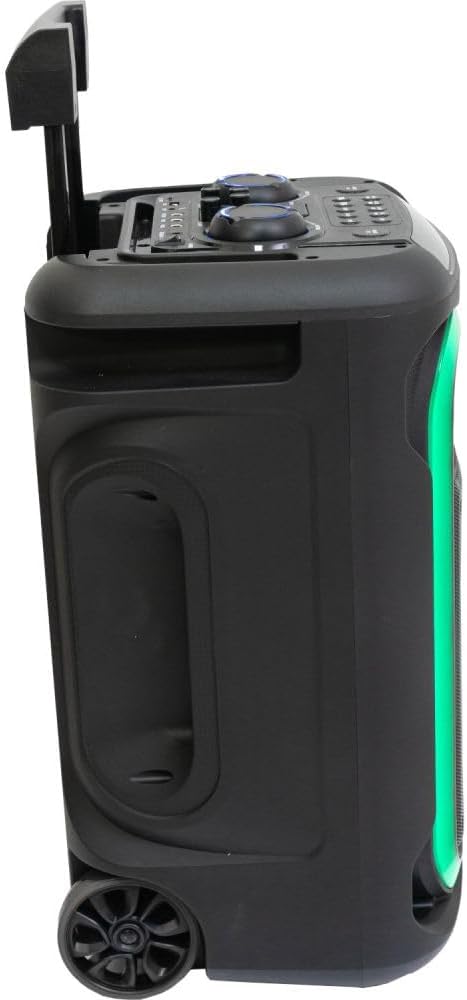
Imej ini menunjukkan satu sisi view of the Ibiza MOBILE800 with its trolley handle fully extended, illustrating its readiness for transport. The side panel includes a recessed handle for easy lifting, and the dynamic LED lighting along the front edge is visible.
4.2. Panel Kawalan

Ini atas-bawah view details the control panel of the Ibiza MOBILE800. It features various rotary knobs for adjusting volume, bass, treble, echo, and delay. Below these, a row of buttons provides control for mode selection, track navigation (previous, next), play/pause, record, TWS pairing, X-Bass activation, and LED lighting modes. Input ports for TF card, USB, AUX, Guitar, and two Microphones (MIC1, MIC2) are clearly labeled, along with the DC 15V power input and the main power switch (ON/OFF).
4.3. Ciri-ciri Kemudahalihan
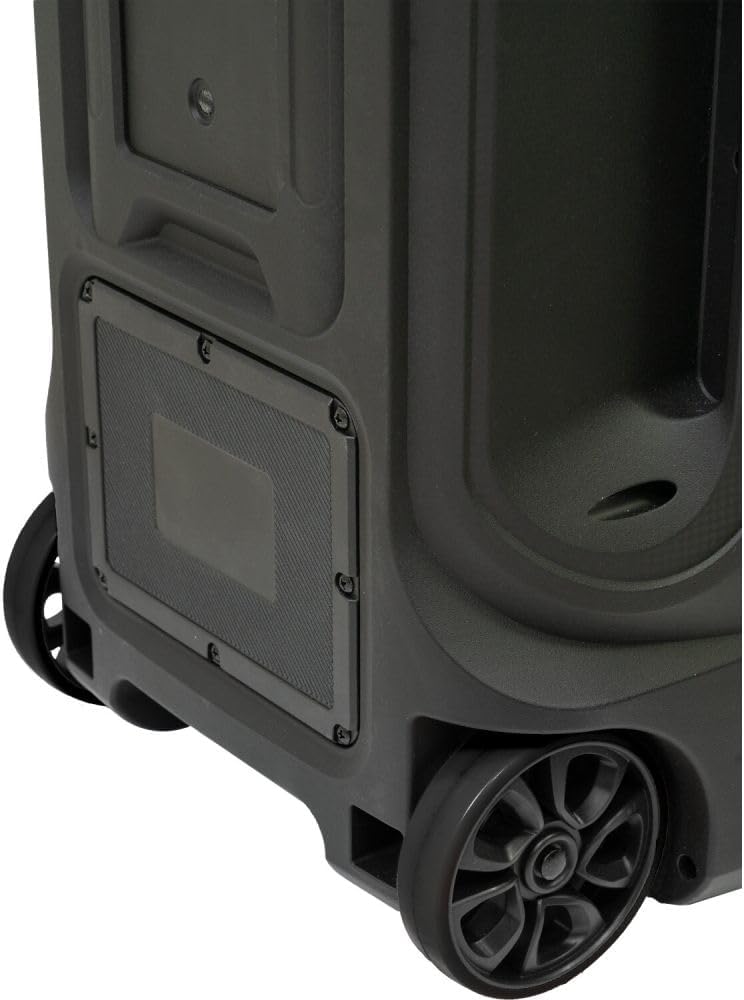
This close-up image focuses on the bottom rear section of the Ibiza MOBILE800, showcasing its robust wheels and the integrated mechanism for the trolley handle. These features are designed to facilitate easy and convenient transportation of the audio system.
5. Persediaan
5.1. Mengecas Bateri
- Connect the provided power adapter to the DC 15V input port on the control panel.
- Palamkan penyesuai kuasa ke dalam salur keluar kuasa yang sesuai.
- The charging indicator (if available) will illuminate. Allow sufficient time for a full charge before first use (typically 4-6 hours).
- Unit boleh digunakan semasa mengecas.
5.2. Kuasa Awal Hidup
- Ensure the unit is charged or connected to power.
- Locate the POWER switch on the control panel.
- Flip the switch to the 'ON' position. The display will light up, indicating the unit is active.
6. Arahan Operasi
6.1. Memilih Mod Input
Tekan ke MODE button repeatedly to cycle through available input sources: Bluetooth, USB, microSD, and AUX.
6.2. Sambungan Bluetooth
- Switch the unit to Bluetooth mode using the MODE button. The display will show 'BLUE' or a similar indicator, and a pairing tone may sound.
- On your mobile device, enable Bluetooth and search for 'MOBILE800'.
- Select 'MOBILE800' to pair. A confirmation tone will sound upon successful connection.
Fungsi Stereo Tanpa Wayar Sejati (TWS)
To connect two MOBILE800 units for stereo sound:
- Ensure both MOBILE800 units are powered on and in Bluetooth mode.
- On one unit (this will be the master), press and hold the TWS button. It will search for the other unit.
- Once connected, a confirmation tone will sound, and both units will play in stereo.
- Connect your mobile device to the master unit via Bluetooth as described above.
6.3. USB/MicroSD Playback
- Insert a USB drive or microSD card into the respective port.
- The unit will automatically switch to USB or microSD mode and begin playback. If not, press the MODE butang.
- Gunakan SEBELUM, SETERUSNYA, dan MAIN/JEDA buttons for media control.
6.4. Input AUX
- Sambungkan peranti audio luaran (cth., telefon pintar, pemain MP3) ke AUX input using a 3.5mm audio cable.
- Switch the unit to AUX mode using the MODE butang.
- Kawal main balik daripada peranti anda yang disambungkan.
6.5. Input Mikrofon dan Gitar
- Connect the wired microphone to either MIC1 or MIC2 input.
- Sambungkan gitar ke GITAR input.
- Laraskan kelantangan mikrofon menggunakan MIC.VOL tombol.
- Laraskan kelantangan gitar menggunakan GT.VOL tombol.
- Gunakan ECHO dan KELEWATAN knobs to add effects to the microphone/guitar sound.
- Tekan ke MIC.PRI button to activate microphone priority, which automatically lowers music volume when speaking into the microphone.
6.6. Pelarasan Bunyi
- JILID: Melaraskan kelantangan induk keseluruhan.
- ASAS: Melaraskan output frekuensi rendah.
- Treble: Melaraskan output frekuensi tinggi.
- X-BASS: Press this button to activate or deactivate the bass boost function for enhanced low-end sound.
6.7. Mod Pencahayaan
Tekan ke MOD LED button repeatedly to cycle through different integrated lighting effects or to turn the lights off.
6.8. Fungsi Rakaman
The unit can record audio from microphone/guitar inputs directly to a connected USB drive or microSD card.
- Ensure a USB drive or microSD card is inserted.
- Connect your microphone or guitar.
- Tekan ke REC butang untuk mula merakam.
- Tekan ke REC butang sekali lagi untuk menghentikan rakaman.
- Dirakam files will be saved to the USB drive or microSD card.
7. Penyelenggaraan
- Pembersihan: Gunakan kain lembut dan kering untuk membersihkan bahagian luar unit. Jangan gunakan pembersih atau pelarut yang melelas.
- Penjagaan Bateri: To prolong battery life, avoid fully discharging the battery frequently. Recharge the unit regularly, even if not in use, to maintain battery health. Store in a cool, dry place.
- Storan: When storing the unit for extended periods, ensure it is fully charged and stored in a dry environment.
8. Penyelesaian masalah
| Masalah | Kemungkinan Punca | Penyelesaian |
|---|---|---|
| Tiada kuasa | Bateri habis; Suis kuasa dimatikan; Penyesuai kuasa tidak disambungkan. | Charge the battery; Turn the power switch ON; Connect the power adapter securely. |
| Tiada bunyi | Kelantangan terlalu rendah; Mod input salah; Peranti tidak disambungkan dengan betul. | Increase master volume; Select correct input mode; Check cable connections or Bluetooth pairing. |
| Bluetooth tidak berpasangan | Unit not in Bluetooth mode; Device too far; Interference. | Ensure unit is in Bluetooth mode; Move device closer; Restart both devices. |
| Mikrofon/Gitar tidak berfungsi | Volume knob too low; Cable not connected; Microphone/Guitar issue. | Increase MIC.VOL/GT.VOL; Ensure cables are fully inserted; Test with another microphone/guitar if possible. |
| Sambungan TWS gagal | Units too far apart; One unit not in Bluetooth mode. | Ensure both units are in Bluetooth mode and close to each other; Try re-initiating TWS pairing. |
9. Spesifikasi
| Ciri | Perincian |
|---|---|
| Nombor Model | 10-5591 |
| Output Kuasa | 800 W (Puncak) |
| Sumber Muzik | Bluetooth, USB, microSD, AUX |
| Input | 1x Guitar, 2x Microphone (6.35mm), 1x AUX (3.5mm) |
| Kesan | Echo, Delay, Bass Boost (X-BASS) |
| Jenis Bateri | Lead Acid 12 V 7 A |
| Bekalan Kuasa | 15 Vdc 2 A |
| Penggunaan Kuasa | 120 W |
| Kekerapan Bluetooth | 2402-2480 MHz |
| Dimensi (L x W x H) | 350 x 300 x 590 mm (13.78 x 11.81 x 23.23 inci) |
| Berat badan | 11.35 kg (25 lbs) |
| bahan | plastik |
| Komponen yang Disertakan | Wired Microphone, Power Adapter |
10. Waranti dan Sokongan
The Ibiza MOBILE800 audio system is covered by a manufacturer's warranty against defects in materials and workmanship. Please refer to the warranty card included with your product or contact your retailer for specific warranty terms and conditions.
For technical support, troubleshooting assistance, or service inquiries, please contact the retailer where you purchased the product or visit the official Ibiza Sound webtapak untuk maklumat hubungan.


