pengenalan
MASINGO Soprano X2 is a portable karaoke machine designed for versatile audio entertainment. It features a 40-watt speaker system with an 8-inch woofer and 1.5-inch tweeter, two wireless microphones, and multiple connectivity options including Bluetooth, USB, MicroSD, Aux, and FM radio. This manual provides detailed instructions for setting up, operating, and maintaining your Soprano X2 to ensure optimal performance and enjoyment.

Image: The Soprano X2 machine being transported, highlighting its portability with a retractable handle and wheels.
Kandungan Pakej
Sila sahkan bahawa semua item yang disenaraikan di bawah disertakan dalam pakej anda:
- 1 x Soprano X2 Karaoke Machine
- 2 x Mikrofon Tanpa Wayar
- 1 x Penyesuai Kuasa (DC 9V)
- 1 x Device Holder
- Kabel AUX 1 x 3.5 mm
- 1 x 3.5 mm AUX-RCA TV Cable
- 1 x Alat Kawalan Jauh
- 1 x Manual Pengguna (dokumen ini)

Image: A visual representation of the Soprano X2 machine and its complete set of accessories.
Produk Selesaiview
Familiarize yourself with the main components of your Soprano X2 karaoke machine.

Image: The Soprano X2 karaoke machine with its primary accessories.
Susun atur Panel Kawalan
The top panel of the Soprano X2 houses all controls for power, mode selection, and audio adjustments.

Image: Labeled diagram of the Soprano X2 control panel.
Persediaan
1. Mengecas Unit
- Connect the included DC 9V power adapter to the "DC 9V input" port on the control panel and plug it into a power outlet.
- The unit's internal battery will begin charging. A full charge provides up to 8 hours of operation.
- Adalah disyorkan untuk mengecas unit sepenuhnya sebelum penggunaan pertama.
2. Installing Microphones
- Each wireless microphone requires 2 AA batteries (not included). Open the battery compartment at the bottom of the microphone and insert the batteries, observing polarity.
- Turn on the microphones using their respective power switches. They will automatically connect to the Soprano X2 unit when the unit is powered on.
- Utilize the microphone clips on the side of the machine for convenient storage.

Image: Wireless microphones with notes on quick synchronization and battery requirements.
3. Attaching the Tablet Holder
- Secure the device holder to the designated slot on top of the Soprano X2 unit.
- Adjust the holder to accommodate your tablet or smartphone for lyric display.
Arahan Operasi
1. Hidupkan/Mati Kuasa
- To power on the Soprano X2, press and hold the power button on the control panel.
- Untuk mematikan kuasa, tekan dan tahan butang kuasa sekali lagi.
2. Pemilihan Mod
- Press the "Mode" button on the control panel to cycle through available input modes: Bluetooth, Aux, USB, MicroSD, and FM Radio.
3. Sambungan Bluetooth
- Select Bluetooth mode on the Soprano X2. The unit will enter pairing mode, indicated by a flashing Bluetooth icon or voice prompt.
- On your smart device (phone, tablet), enable Bluetooth and search for "MASINGO X2" in the list of available devices.
- Select "MASINGO X2" to pair. Once connected, a confirmation sound or steady light will indicate successful pairing.
4. USB/MicroSD Playback
- Insert a USB drive or MicroSD card containing audio files into the respective port on the control panel.
- The unit will automatically switch to USB or MicroSD mode and begin playing music. Use the playback controls (play/pause, next/previous track) on the control panel or remote.
5. Radio FM
- Select FM Radio mode.
- Use the tuning controls on the panel or remote to scan for and select radio stations.
6. Real-Time Karaoke Mode
- This feature allows you to remove original vocals from any song playing via Bluetooth, USB, or MicroSD.
- While music is playing, activate the karaoke mode function (refer to the control panel diagram for the specific button, often labeled "Vocal Cut" or similar). The machine will process the audio to minimize original vocals, allowing you to sing along.
7. Sambungan TV
- Melalui Bluetooth: Pair your TV's Bluetooth audio output with the Soprano X2 as described in the Bluetooth Connection section.
- Via Aux to RCA Cable: Connect one end of the included 3.5mm AUX-RCA TV cable to the AUX input on the Soprano X2 and the RCA ends to the audio output ports on your TV.
- This allows you to display lyrics on your TV while the audio plays through the Soprano X2.

Image: Soprano X2 connected to a television for lyric display.
8. Pelarasan Audio
- Kelantangan Mesin: Adjust the overall sound output of the unit.
- Tiga kali ganda: Control the high-frequency sounds for clarity.
- Bes: Control the low-frequency sounds for depth.
- Gema: Add an echo effect to your vocals.
- Kelantangan mikrofon: Adjust the volume of the wireless microphones independently.
Penyelenggaraan
- Pembersihan: Use a soft, dry cloth to clean the exterior of the machine. Do not use liquid cleaners or abrasive materials.
- Penjagaan Bateri: For optimal battery life, fully charge the unit before long periods of storage. If storing for an extended time, charge the battery every 3-6 months. Remove AA batteries from microphones if not in use for prolonged periods.
- Storan: Store the Soprano X2 in a cool, dry place away from direct sunlight and extreme temperatures.
Menyelesaikan masalah
| Masalah | Kemungkinan Punca | Penyelesaian |
|---|---|---|
| Unit tidak dihidupkan | Bateri lemah; Penyesuai kuasa tidak disambungkan atau rosak. | Charge the unit using the power adapter. Ensure the adapter is securely connected and the outlet is functional. |
| Tiada keluaran bunyi | Kelantangan terlalu rendah; Mod input salah; Peranti tidak disambungkan dengan betul. | Increase machine volume. Select the correct input mode. Reconnect your audio source (Bluetooth, Aux, USB, MicroSD). |
| Microphones not working or experiencing interference | Microphone batteries low or incorrectly inserted; Microphones not powered on; Interference from other wireless devices. | Replace AA batteries in microphones, ensuring correct polarity. Turn on microphones. Move away from other wireless devices or sources of interference. |
| Penggandingan Bluetooth gagal | Soprano X2 not in pairing mode; Device too far; Bluetooth disabled on device. | Ensure Soprano X2 is in Bluetooth pairing mode. Keep devices within range. Enable Bluetooth on your smart device. Forget previous pairings and try again. |
Spesifikasi
Detailed technical specifications for the MASINGO Soprano X2 Karaoke Machine:
- model: X2
- Output Wattage: 40 Watt
- Sistem pembesar suara: Woofer 8 inci, tweeter 1.5 inci
- Teknologi Ketersambungan: Bluetooth, Aux, USB, MicroSD, FM Radio
- Jenis Bateri: Ion Litium (dalaman)
- Hayat Bateri: Sehingga 8 jam
- Mikrofon: 2 x Wireless VHF microphones (AA battery powered)
- Sumber Kuasa: Battery Powered, DC 9V Adapter
- Berat Barang: 11 paun
- Dimensi Produk (L x W x H): 12 x 11 x 19 inci
- Jenis Pemasangan: Lantai Berdiri
- Peranti Serasi: Telefon Pintar, Tablet
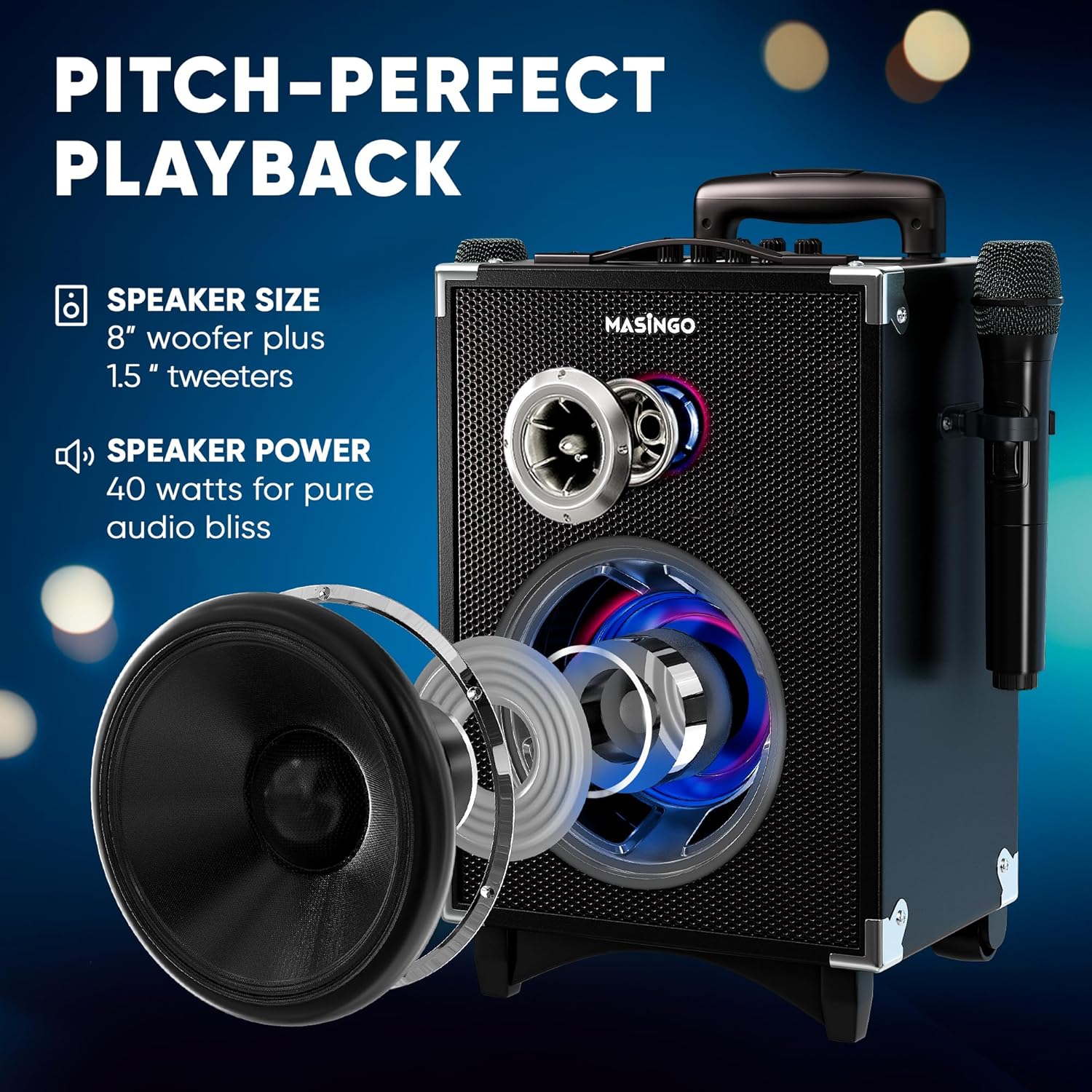
Image: Diagram illustrating the internal speaker components and power output.
Waranti dan Sokongan
For warranty information, please refer to the warranty card included in your product packaging or visit the official MASINGO website. For technical support, troubleshooting assistance, or any inquiries regarding your Soprano X2 karaoke machine, please contact MASINGO customer service through their official channels.
Sokongan dalam talian: Visit the MASINrasmi GO webtapak untuk Soalan Lazim dan sumber sokongan.
Maklumat Hubungan: Refer to your product packaging or the MASINGO webtapak untuk butiran hubungan perkhidmatan pelanggan terkini.


