Produk Selesaiview
This manual provides detailed instructions for the Syncwire Bluetooth 5.4 FM Transmitter Car Adapter, Model SW-XC965. This device allows you to stream audio wirelessly from your Bluetooth-enabled devices to your car's FM radio, make hands-free calls, and fast charge multiple devices simultaneously.
Ciri-ciri Utama
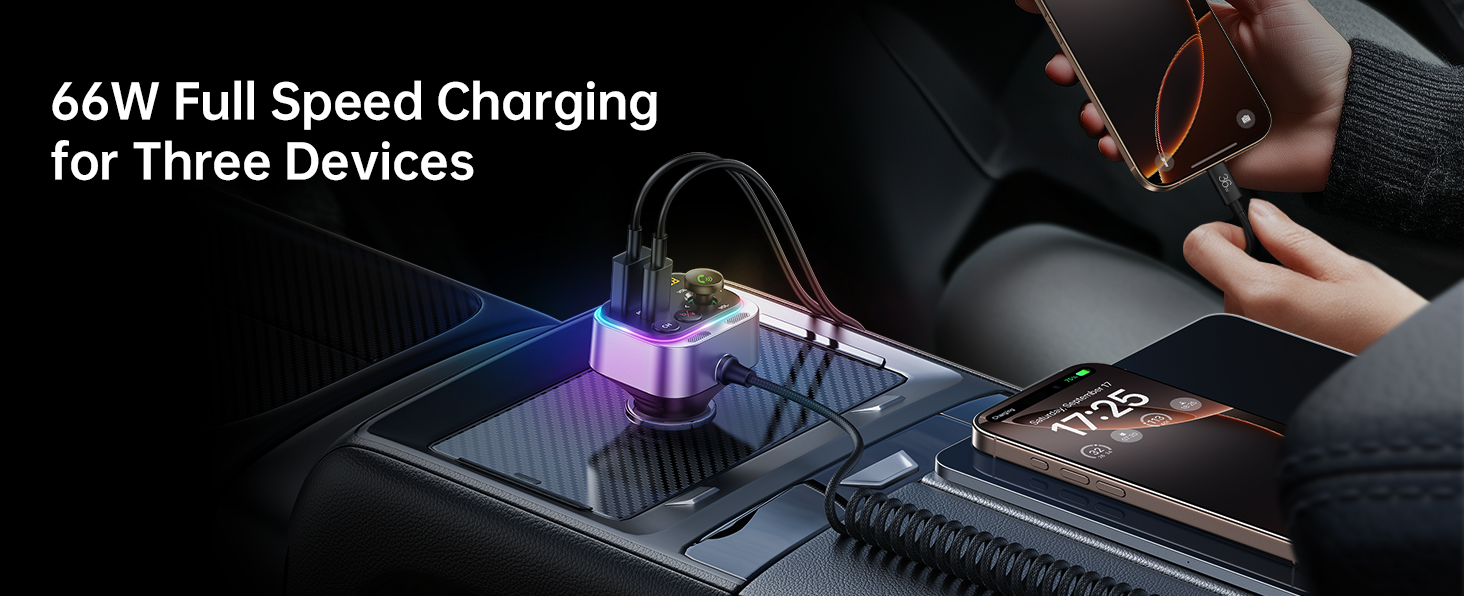
- 66W Fast Charge Adapter with USB-C Coiled Cable
- Latest Bluetooth 5.4 Chip for stable connection
- Stronger Dual Mics with CVC Noise Reduction for clear calls
- Bass Boosted & Hi-Fi Stereo Music
- LED Ambient Light Control
- Wide Compatibility with smartphones and vehicles (12-24V)


Apa yang ada dalam Kotak
- Penyesuai Kereta Pemancar Bluetooth 5.4 FM Syncwire
- Waranti 3 Tahun
Arahan Persediaan
Langkah 1: Hidupkan
Insert the Syncwire FM Transmitter into your car's cigarette lighter socket. The device will power on automatically and its LED display will light up.
Step 2: Tune FM Radio
Select an unused FM frequency on your car's radio. Choose a frequency that has no existing radio station broadcasting on it, typically indicated by static or a clear, empty channel.

Adjust your car's FM radio to an empty frequency, such as 103.00 MHz. Step 3: Match FM Frequency
On the Syncwire FM Transmitter, adjust its FM frequency to match the one you selected on your car radio. Use the 'CH' button or the multi-function knob to change the frequency.
Step 4: Pair Bluetooth
On your smartphone or Bluetooth-enabled device, enable Bluetooth and search for available devices. Select "SW-XC965" from the list to pair. Once paired, audio from your device will be transmitted to your car's speakers.
Pair your mobile device with the transmitter by selecting "SW-XC965" in your Bluetooth settings.
Arahan Operasi
Kawal Selesaiview
- Paparan FM: Shows the current FM frequency.
- Multifunction Button (FM+/- / Volume+/- / Answer/Hang up/Reject):
- Putar untuk melaraskan kelantangan.
- Tekan untuk menjawab/menamatkan panggilan.
- Long press to reject calls.
- Tekan pendek untuk memainkan/menjeda muzik.
- Rotate to change FM frequency (after pressing CH button).
- Butang CH: Press to enter FM frequency adjustment mode.
- Deep Bass/Light Switch ('b' button):
- Short press to activate/deactivate Deep Bass mode.
- Long press to turn the LED ambient light on/off.
- Large Mic: Untuk panggilan bebas tangan.
- Kabel USB-C: Integrated coiled cable for charging.
- QC 3.0 Port: Quick Charge 3.0 USB-A port for fast charging.
- Pelabuhan PD 30W: Power Delivery 30W USB-C port for fast charging.
Main balik Muzik
Once paired via Bluetooth, music from your device will automatically play through your car's FM radio.
Deep Bass & Hi-Fi Stereo
To enhance your audio experience, press the 'b' button to toggle between standard mode and deep bass mode. This feature provides authentic Hi-Fi sound with boosted bass.

Panggilan Bebas Tangan
The transmitter features a dual-mic system with CVC noise suppression and echo-canceling technology for clear call quality.

- Jawab Panggilan: Tekan pendek Butang Multifungsi.
- Tamatkan Panggilan: Short press the Multifunction Button during a call.
- Tolak Panggilan: Tekan lama Butang Pelbagai Fungsi.
Mengecas Peranti
The Syncwire FM Transmitter is equipped with a 66W combined power output, including a PD 3.0 port, a QC 3.0 port, and a 6ft built-in coiled USB-C cable. This allows you to charge up to three devices simultaneously.


LED Ambient Light Control
The transmitter features a vibrant LED display. You can turn the light on or off by long pressing the 'b' button according to your preference.

Penyelenggaraan
To ensure optimal performance and longevity of your Syncwire FM Transmitter:
- Pastikan peranti bersih dengan mengelapnya dengan kain lembut dan kering.
- Elakkan daripada mendedahkan peranti kepada suhu yang melampau, cahaya matahari langsung atau lembapan.
- Do not attempt to disassemble or repair the device yourself. Refer to authorized service personnel for any repairs.
- Ensure the cigarette lighter socket is clean and free of debris for a stable connection.
Menyelesaikan masalah
| Masalah | Penyelesaian |
|---|---|
| No power/device not turning on |
|
| Kualiti audio statik atau lemah |
|
| Bluetooth tidak bersambung |
|
| Pengecasan lambat atau tidak berfungsi |
|
Spesifikasi
| Ciri | Perincian |
|---|---|
| Nombor Model | SW-XC965 |
| Versi Bluetooth | 5.4 |
| Input Voltage | 12-24V |
| Port Pengecasan | 1x PD 3.0 (USB-C), 1x QC 3.0 (USB-A), 1x Integrated USB-C Coiled Cable |
| Jumlah Kuasa Output | Sehingga 66W |
| Mikrofon | Dual Mics with CVC Noise Reduction |
| Panjang Kabel | 6ft (1.8m) coiled USB-C cable |
| Berat Barang | 3.84 auns (0.11 Kilogram) |
| Dimensi | 3.62 x 3.46 x 1.93 inci |
Waranti dan Sokongan
This Syncwire product comes with a 3-year warranty. For technical support, warranty claims, or further assistance, please visit the official SYNCWIRE webtapak atau hubungi perkhidmatan pelanggan mereka.
Official SYNCWIRE Store: SYNCWIRE Amazon Store
Maklumat Keselamatan
Refer to general wireless audio adapter safety guidelines.
Video Produk
Video ini menyediakan visual overview of the Syncwire Bluetooth 5.4 FM Transmitter, showcasing ciri dan reka bentuknya.


