1. Pengenalan
The Phomemo M833 Portable Bluetooth Thermal Printer is a versatile, inkless printing solution designed for convenience and efficiency. It supports various document types and paper sizes, making it ideal for business, home, office, and travel use. This manual provides detailed instructions for setting up, operating, maintaining, and troubleshooting your M833 printer.

Image: The Phomemo M833 portable printer shown with various documents, including contracts, academic research, and checklists, illustrating its versatility in printing different content types. A smartphone displaying the Phomemo app is also visible, indicating wireless connectivity.
2. Apa yang ada di dalam Kotak
Upon unboxing your Phomemo M833 printer, please verify that all the following components are included:
- 1 x M833 Portable Printer
- 1 x US-letter thermal paper roll (pre-installed in printer)
- 1 x Beg Penyimpanan Baldu
- 1 x Kabel Pengecasan USB-C
- 1 x Manual arahan
Video: An unboxing and quick setup demonstration of the Phomemo M833 printer, showing the contents of the box, how to open the printer, insert paper, and initiate a print. This video highlights the compact size and ease of use.
3. Persediaan
3.1 Pengecasan Awal dan Penghidupan Kuasa
Before first use, fully charge the printer using the provided USB-C cable. Connect the cable to the printer's USB-C port and a compatible USB power adapter (not included, typically a phone charger). The indicator light will show charging status. Once charged, press and hold the power button to turn the printer on.
3.2 Memuatkan Kertas Terma
The M833 printer uses thermal paper only. Standard copy paper is not compatible. To load paper:
- Open the printer cover by gently pressing the release buttons on the sides.
- Insert the thermal paper roll or fan-fold paper into the paper compartment, ensuring the printable side (smoother side) faces the thermal print head.
- Adjust the movable clips to secure the paper width.
- Tutup penutup pencetak sehingga ia berbunyi klik pada tempatnya.
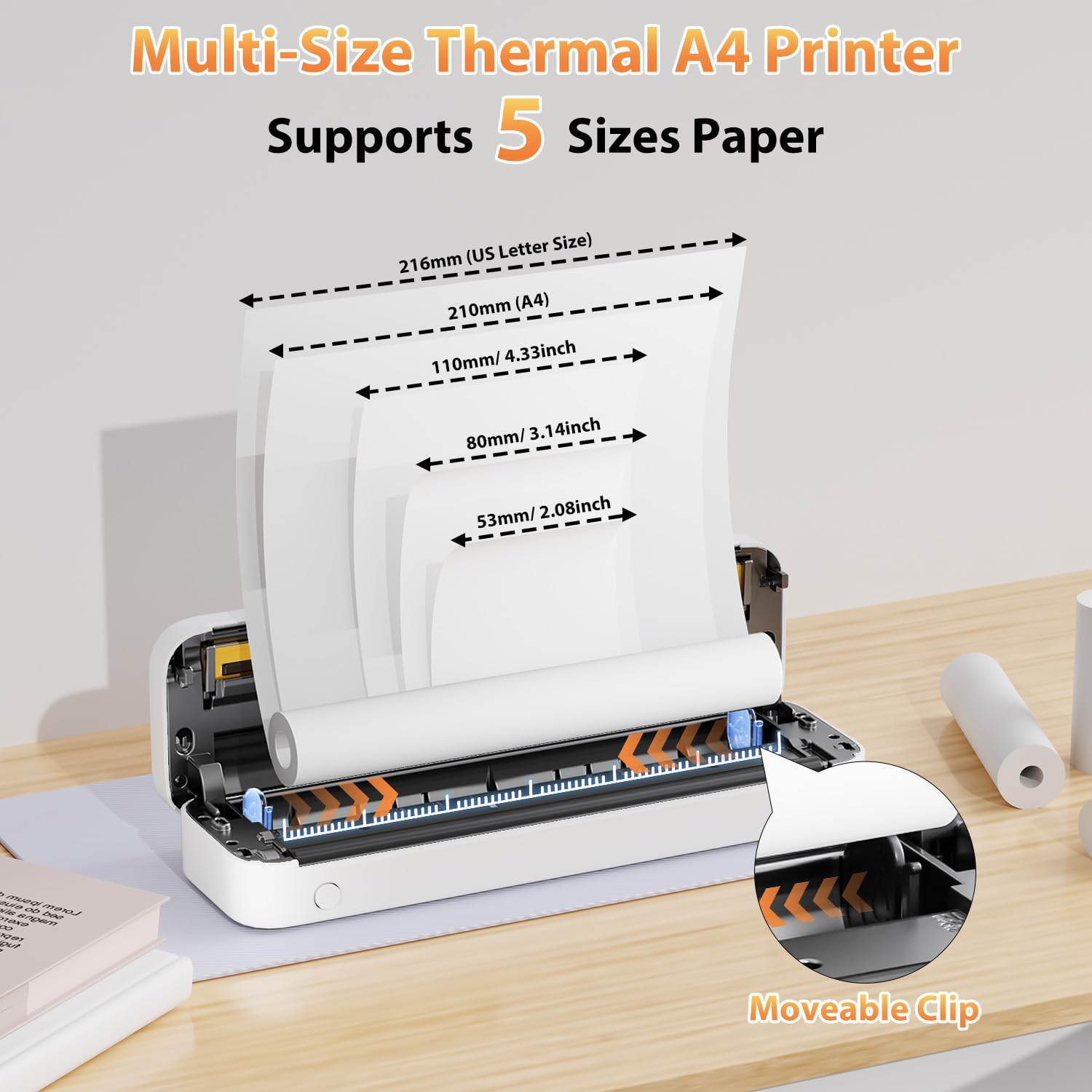
Image: The Phomemo M833 printer with its cover open, illustrating how to load different sizes of thermal paper, including US Letter, A4, and smaller widths (110mm, 80mm, 53mm). The movable clip mechanism for adjusting paper width is highlighted.
3.3 Pemasangan dan Kesambungan Perisian
The M833 printer supports both mobile and computer connectivity.
- For Smartphones (Bluetooth):
Download the "Phomemo" APP from your device's app store (App Store for iOS, Google Play for Android). Do not connect via Bluetooth directly from your phone's settings. Open the Phomemo app and connect to the M833 printer from within the app.

Image: A visual guide demonstrating the three steps for connecting the Phomemo M833 printer to a smartphone: 1) Download the "Phomemo" app, 2) Enable Bluetooth on the device, and 3) Connect the M833 printer within the app for printing.
- For Computers (USB-C):
melawat m833.phomemo.com to download the appropriate driver for your operating system (Windows, Mac OS, Chrome, Linux). Connect the printer to your PC using the provided USB-C cable.

Image: A step-by-step illustration for connecting the Phomemo M833 printer to a PC: 1) Connect the printer via USB cable, 2) Download the driver from m833.phomemo.com, and 3) Select the M833 printer for printing.

Image: The Phomemo M833 printer demonstrating both Bluetooth wireless and USB-C wired connectivity options, compatible with various operating systems including Windows, Mac OS, Chrome, Linux, iOS, Android, and iPad.
4. Arahan Operasi
4.1 Mencetak daripada Peranti Mudah Alih
Once connected via the Phomemo app:
- Buka apl Phomemo.
- Select the type of content you wish to print (e.g., Document Print, Print Web, Print Images, Scan).
- Navigate to and select your desired file (PDFs, Word files, images, web content are supported).
- Adjust print settings such as copies, page range, and orientation within the app.
- Tap the print button to begin printing.

Image: A smartphone screen displaying the Phomemo app, showing various file types (Picture, Excel, TXT, PDF, Word) that can be printed wirelessly via Bluetooth to the M833 printer, illustrating its broad compatibility for different printing needs.
4.2 Mencetak daripada Komputer
After installing the driver and connecting via USB-C:
- Buka dokumen atau imej yang ingin anda cetak pada komputer anda.
- Pilih "Cetak" daripada menu aplikasi (cth., File > Cetak).
- Choose "Phomemo M833" as your printer.
- Adjust print preferences as needed (e.g., paper size, orientation).
- Klik "Cetak" untuk menghantar kerja ke pencetak.
4.3 Jenis dan Saiz Kertas yang Disokong
The M833 printer is designed for thermal paper. It supports various sizes, including:
- US Letter (8.5'' x 11'')
- A4 (210mm x 297mm)
- Roll paper: 2.08'' (53mm), 3.14'' (80mm), 4.33'' (110mm)
- Fan-fold paper
- Kertas pemindahan tatu

Image: The Phomemo M833 printer displayed with three different paper feeding methods: single sheet paper, fan-fold paper, and roll paper, highlighting its compatibility with various thermal paper formats including 2", 3", 4", A4, and Letter sizes.
4.4 Kualiti Cetakan
The M833 printer delivers sharp, smudge-free prints with a resolution of 300DPI. For optimal print quality, ensure you are using high-quality thermal paper and that the print head is clean.

Image: A side-by-side comparison illustrating the superior 300DPI precision of the Phomemo M833 printer ("Our") compared to another printer ("Other"), showcasing clearer text and graphics in a business research document.
5. Penyelenggaraan
5.1 Membersihkan Kepala Cetak
To maintain print quality and prolong the life of your printer, regularly clean the thermal print head. Use a lint-free cloth lightly dampened with isopropyl alcohol. Gently wipe the print head from center to edge. Ensure the printer is off and cool before cleaning.
5.2 Pengendalian dan Penyimpanan Kertas
Thermal paper is sensitive to heat and light. Store thermal paper in a cool, dry place away from direct sunlight and excessive heat to prevent premature blackening or fading. Avoid touching the thermal coating excessively.
5.3 Penjagaan Bateri
The M833 printer is equipped with a 2600mAh battery. For optimal battery life, avoid fully discharging the battery frequently. If storing the printer for an extended period, charge it to about 50-70% and recharge every few months.

Image: A close-up of the Phomemo M833 printer's internal battery compartment, highlighting its 2600mAh capacity and fast charging capability via Type-C, indicating a powerful and long-lasting portable power source.
6. Penyelesaian masalah
| Masalah | Kemungkinan Punca | Penyelesaian |
|---|---|---|
| Pencetak tidak dihidupkan | Bateri lemah; Butang kuasa tidak ditekan dengan betul. | Cas pencetak sepenuhnya. Tekan dan tahan butang kuasa selama beberapa saat. |
| Tidak dapat menyambung melalui Bluetooth | Not connecting through the Phomemo app; Bluetooth off on device. | Ensure Bluetooth is enabled. Connect through the Phomemo app, not directly from device settings. Restart both printer and device. |
| Kualiti cetakan buruk / Cetakan pudar | Low battery; Dirty print head; Low quality thermal paper; Paper loaded incorrectly. | Charge the printer. Clean the print head. Use high-quality thermal paper. Ensure paper is loaded correctly with the printable side facing the print head. |
| Kesesakan kertas | Paper loaded incorrectly; Foreign object in paper path. | Turn off the printer. Carefully open the cover and remove any jammed paper or obstructions. Reload paper correctly. |
| Pencetak tidak dikenali oleh PC | Pemacu tidak dipasang; Sambungan USB longgar. | Install the correct driver from m833.phomemo.com. Ensure the USB-C cable is securely connected. Try a different USB port or cable. |
7. Spesifikasi
| Ciri | Perincian |
|---|---|
| Model | M833 |
| Teknologi Percetakan | terma |
| Resolusi Cetakan | 300 DPI (304 Dots Per Inch) |
| Ketersambungan | Bluetooth, USB Jenis-C |
| Peranti Serasi | Laptops, PC, Smartphones, Tablets (Android, iOS) |
| Saiz Media Maks | 8.5 x 11 inch (US Letter), A4 |
| Jenis Kertas yang Disokong | Thermal paper (US Letter, A4, 2", 3", 4" rolls, fan-fold, tattoo transfer paper) |
| Kapasiti Bateri | 2600mAh |
| Berat Barang | 1.65 paun (lebih kurang 750 gram) |
| Dimensi Produk | 12.2 x 4.49 x 3.62 inci (lebih kurang 31 x 11.4 x 9.2 cm) |
| Kelajuan Cetakan Maks (Monokrom) | 6 ppm |
8. Waranti dan Sokongan
For warranty information, technical support, or service inquiries, please refer to the contact details provided on the official Phomemo webtapak atau pembungkusan produk. Simpan resit pembelian anda sebagai bukti pembelian untuk tuntutan waranti.
Official Phomemo Webtapak: www.phomemo.com


