1. Pengenalan
This manual provides detailed instructions for the installation, operation, and maintenance of your Alpine HDS-990 Hi-Res Digital Media Player and Alpine HDP-D90 14-Channel Amplifier. Please read this manual thoroughly before using the product to ensure proper and safe operation.
The Alpine Status system is engineered to deliver an unparalleled audio experience, supporting Hi-Res Audio files at 192kHz/24bit, the current industry standard for high-fidelity music playback.
2. Produk Lebihview
2.1. Alpine HDS-990 Hi-Res Digital Media Player
The HDS-990 is a high-resolution digital media audio source designed for superior sound quality. It features a compact system control panel and a hide-away black box for flexible installation. The hi-res color display provides all playback data, including album cover artwork.

Figure 2.1: Alpine HDS-990 Digital Media Player control unit. This image shows the front panel of the HDS-990 with its display, rotary encoder, and control buttons.
Ciri-ciri utama termasuk:
- High-performance RCA outputs.
- Optical TOSLINK port for digital audio connection.
- 4x 50 Watts hi-resolution amplified speaker output options.
- USB Host and Mix Port for various media inputs.

Figure 2.2: Alpine HDS-990 Digital Media Player black box. This image displays the main processing unit of the HDS-990, designed to be hidden from view.
2.2. Alpine HDP-D90 14-Channel Amplebih hidup
The HDP-D90 is a 14-channel amplifier with integrated digital signal processing (DSP), providing powerful and precise audio amplification. It delivers 50 watts RMS x 8 channels and 80 watts RMS x 4 channels, making it suitable for complex audio systems.

Figure 2.3: Alpine HDP-D90 14-Channel Amplifier. This image shows the top view of the HDP-D90 amplifier, highlighting its sleek design and status indicator.
Ciri-ciri utama termasuk:
- Integrated Digital Signal Processing for fine-tuning audio.
- Multiple output channels for versatile speaker configurations.
- Robust power delivery for high-fidelity sound.
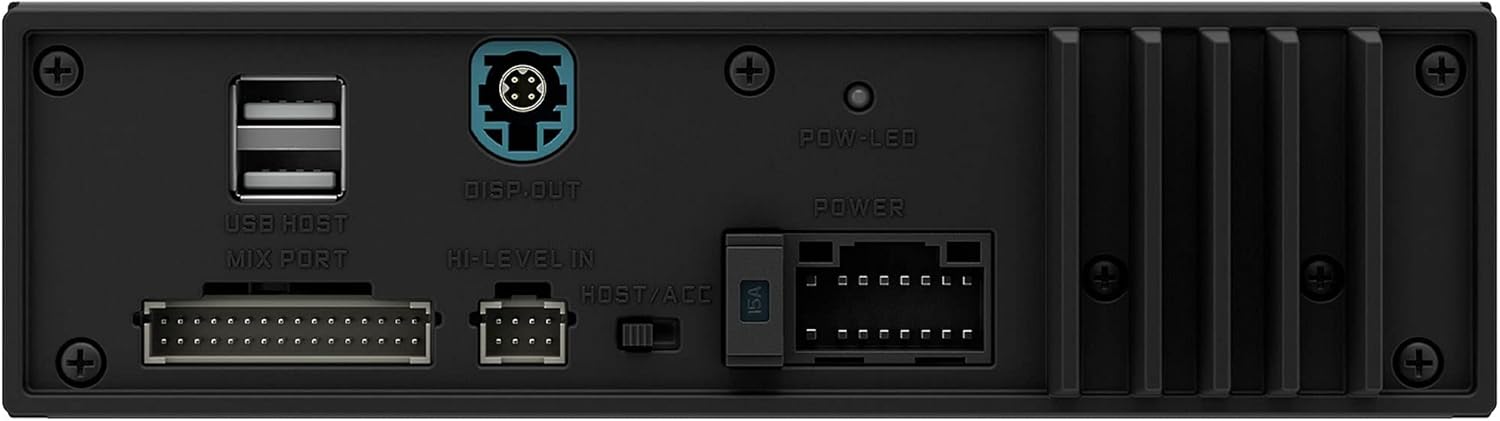
Figure 2.4: Alpine HDP-D90 Amplifier rear connections. This image details the power, ground, and speaker output terminals on the HDP-D90 amplebih hidup.
3. Persediaan dan Pemasangan
Proper installation is crucial for optimal performance. It is highly recommended that installation be performed by a qualified professional.
3.1. Senarai Semak Prapemasangan
- Pastikan bateri kenderaan telah diputuskan sambungannya sebelum memulakan sebarang pendawaian.
- Gather all necessary tools: wire strippers, crimpers, screwdrivers, multimeter.
- Confirm all components are present: HDS-990 control unit, HDS-990 black box, HDP-D90 amplifier, wiring harnesses.
3.2. Lokasi Pemasangan
Choose mounting locations that are dry, well-ventilated, and away from direct heat sources or moving parts.
- HDS-990 Control Unit: Typically mounted in the dashboard for easy access and visibility.
- HDS-990 Black Box: Can be hidden under a seat, behind the dashboard, or in the trunk.
- HDP-D90 Amplebih hidup: Suitable locations include under a seat, in the trunk, or mounted to a custom amplifier rack. Ensure adequate airflow around the amplebih hidup.
3.3. Sambungan Pendawaian
Refer to the detailed wiring diagrams provided in the separate installation guide for your specific vehicle. General connections include:
- Kuasa dan Tanah: Connect the HDP-D90 amplifier directly to the vehicle's battery with appropriate gauge power and ground wires. Ensure a solid ground connection to the vehicle chassis.
- Hidupkan Jauh: Connect the remote turn-on lead from the HDS-990 black box to the HDP-D90 amplebih hidup.
- Isyarat Audio: Connect the RCA outputs from the HDS-990 black box to the inputs of the HDP-D90 amplifier. Utilize the optical TOSLINK connection for the highest fidelity digital audio transfer if supported by your setup.
- Keluaran Pembesar suara: Connect speaker wires from the HDP-D90 amplifier's output terminals to your vehicle's speakers. Pay close attention to polarity.
- HDS-990 Control Unit to Black Box: Connect the control unit to the black box using the supplied proprietary cable.

Gambar 3.1: Lebihview of Alpine HDS-990 and HDP-D90 components. This image shows both the HDS-990 control unit and black box, along with the HDP-D90 amplifier, illustrating the complete system.
4. Arahan Operasi
4.1. Menghidupkan/Mematikan
The system will power on automatically when the vehicle's ignition is turned to the ACC or ON position, provided the remote turn-on wire is correctly connected. To power off, turn the ignition to the OFF position.
4.2. Basic Controls (HDS-990)
- Pengekod Rotary: Turn to adjust volume. Press to confirm selections in menus.
- Butang SRC: Press to cycle through available audio sources (USB, Bluetooth, Optical, etc.).
- Main/Jeda: Mengawal main balik media.
- Skip/Track: Navigates between tracks or menu items.
- Menu/Tetapan: Accesses system settings and audio adjustments.
4.3. Pemilihan Sumber Audio
Use the SRC button on the HDS-990 control unit to select your desired audio source. The display will show the currently active source.
- USB: Sambungkan pemacu USB yang mengandungi audio files. The HDS-990 supports various high-resolution formats.
- Bluetooth: Pair your mobile device via Bluetooth for wireless audio streaming.
- Optik: For external digital audio sources connected via the TOSLINK port.
4.4. Sound Customization (HDP-D90 DSP)
The HDP-D90's integrated DSP allows for extensive sound customization. Access these settings through the HDS-990's menu system. Adjustments may include:
- Penyama: Fine-tune frequency response for optimal sound.
- Crossover: Set frequency cut-offs for different speaker types.
- Pembetulan Masa: Adjust delay for each speaker to ensure sound arrives at the listening position simultaneously.
- Kawalan Tahap: Independently adjust output levels for each channel.
For detailed DSP adjustments, refer to the dedicated DSP software manual or consult an Alpine authorized dealer.
5. Penyelenggaraan
Regular maintenance ensures the longevity and optimal performance of your Alpine system.
5.1. Pembersihan
- Control Unit Display: Gunakan kain lembut dan tidak berbulu untuk mengelap paparan dengan lembut. Untuk kotoran degil, sedikitampen kain dengan air atau pembersih selamat skrin. Elakkan bahan yang melelas atau bahan kimia yang keras.
- Komponen: Wipe down the HDS-990 black box and HDP-D90 amplifier with a dry, soft cloth. Ensure no dust or debris accumulates in ventilation openings.
5.2. Fuse Replacement (HDP-D90)
The HDP-D90 amplifier is protected by fuses. If the amplifier fails to power on, check the fuses. Always replace blown fuses with new ones of the exact same type and rating (e.g., 30A ATC fuse). Using an incorrect fuse can cause damage or fire.
Figure 5.1: HDP-D90 Amplifier fuse location. This image highlights the fuse compartment on the HDP-D90 amppanel belakang liifier.
5.3. Kemas Kini Perisian
Periodically check the Alpine website for firmware updates for both the HDS-990 and HDP-D90. Updates can improve performance, add new features, or resolve bugs. Follow the instructions provided with the update files berhati-hati.
6. Penyelesaian masalah
If you encounter issues with your Alpine system, refer to the following common problems and solutions. If the problem persists, contact Alpine customer support or an authorized service center.
| Masalah | Kemungkinan Punca | Penyelesaian |
|---|---|---|
| No Power to HDS-990/HDP-D90 | Blown fuse; Loose power/ground connection; Remote turn-on issue. | Check and replace fuses; Verify all power and ground connections are secure; Ensure remote turn-on wire receives 12V when ignition is on. |
| Tiada Keluaran Bunyi | Incorrect source selected; Muted volume; Loose RCA/speaker connections; DSP settings misconfigured. | Select correct audio source; Increase volume; Check all audio cables and speaker wires; Reset DSP settings to default or reconfigure. |
| Bunyi Herot | Gain set too high; Speaker impedance mismatch; Damaged speaker/wiring. | Laraskan amplifier gain settings; Verify speaker impedance matches amplifier output; Inspect speakers and wiring for damage. |
| Isu Sambungan Bluetooth | Device not paired; Interference; Bluetooth module error. | Ensure device is in pairing mode and HDS-990 is discoverable; Move closer to the unit; Try re-pairing or resetting Bluetooth settings. |
7. Spesifikasi
Below are the key specifications for the Alpine HDS-990 and HDP-D90 system.
7.1. Alpine HDS-990 Digital Media Player
- Format Audio yang Disokong: Hi-Res Audio (192kHz/24bit), FLAC, WAV, MP3, WMA, AAC.
- Ketersambungan: USB Host, Bluetooth, Optical TOSLINK, RCA Outputs.
- AmpOutput yang ditetapkan: 4 x 50 Watts (Hi-Res amplified speaker output options).
- paparan: Hi-Res Color Display.
7.2. Alpine HDP-D90 14-Channel Amplebih hidup
- Saluran: 14-Channel (12-channel with DSP).
- Output Kuasa RMS: 50 Watts RMS x 8 channels + 80 Watts RMS x 4 channels.
- Jumlah Output Wattage: 200 Watts (as per product specifications, likely referring to a specific configuration or peak).
- Mod Output Audio: Stereo.
- Konfigurasi Saluran Bunyi Sekeliling: 7.1 (via DSP).
- Ciri Khas: Pemprosesan Isyarat Digital (DSP).
7.3. General System Specifications
- Jenama: Alpine
- Nombor Model: HDS-990 (Digital Media Player), HDP-D90 (Amplebih hidup)
- Teknologi Ketersambungan: RCA
- Peranti Serasi: Penceramah
- Tarikh Mula-mula Tersedia: 26 Disember 2023
8. Waranti dan Sokongan
Alpine products are designed and manufactured to the highest quality standards. For warranty information, please refer to the warranty card included with your product or visit the official Alpine webtapak. Simpan bukti pembelian anda untuk tuntutan waranti.
For technical support, service, or further inquiries, please contact Alpine customer service or an authorized Alpine dealer. You can find contact information on the official Alpine webtapak: www.alpine-usa.com


