pengenalan
This manual provides comprehensive instructions for the installation, operation, and maintenance of the Zapco HB-410-ADSP 10-Channel DSP / 8-Channel Class D Amplifier. The HB-410-ADSP is designed to integrate advanced digital sound processing with efficient amplification, offering a versatile solution for car audio systems. Please read this manual thoroughly before using the device to ensure proper functionality and longevity.

Imej: Depan view of the Zapco HB-410-ADSP amppenguat, pertunjukancasinreka bentuk dan penjenamaannya yang padat.
Ciri dan Spesifikasi
Ciri-ciri Utama:
- 10-Channel Digital Sound Processor (DSP): Equipped with a 31-band equalizer for precise audio tuning.
- 8-Saluran Kelas D Amplebih hidup: Delivers 70 Watts (Max) per channel.
- Pilihan Input: Includes 4-channel high-level inputs and 2-channel RCA inputs for versatile source connectivity.
- Pilihan Output: Features 10-channel RCA outputs for system expansion.
- Keserasian Palam & Main: Designed for straightforward integration into existing audio systems.
- Bluetooth 5.1 Streaming: Enables wireless audio playback from compatible devices.
- Integrated Music Player: Supports various audio formats including MP2, MP3, MP4, WMA, APE, FLAC, AAC, M4A, WAV, AIF, and AIFC.
- DSP Control Tools: Accessible via PC software and a dedicated mobile application.
Spesifikasi Teknikal:
| Nombor Model | HB-410-ADSP |
| AmpKuasa yang lebih hidup | 8 x 70 Watt (Max) |
| Bilangan Saluran | 10 (DSP), 8 (Amplebih hidup) |
| Dimensi Produk (L x W x H) | 160 mm x 115 mm x 45 mm (6.3 x 4.53 x 1.77 inci) |
| Berat badan | Kira-kira 6 Pound |
| Jenis Pemasangan | Lekapan Permukaan |
| Versi Bluetooth | 5.1 |
| Format Audio yang Disokong | MP2, MP3, MP4, WMA, APE, FLAC, AAC, M4A, WAV, AIF, AIFC |
Persediaan dan Pemasangan
Proper installation is crucial for optimal performance. It is recommended that installation be performed by a qualified professional. Ensure the vehicle's battery is disconnected before beginning any wiring.
Sambungan Habisview:
- Sambungan Kuasa: Connect the +12V, GND, and REM (Remote Turn-On) wires to the appropriate terminals.
- Input Tahap Tinggi: Use the 4-channel high-level inputs for direct connection to factory head unit speaker outputs.
- Input RCA: Utilize the 2-channel RCA inputs for aftermarket head units or other audio sources.
- Output RCA: The 10-channel RCA outputs allow for connection to additional amplifiers or external audio processors.
- Keluaran Pembesar suara: Connect your speakers to the designated speaker output terminals.
- USB PC: Connect to a computer for DSP software control and configuration.

Imej: Terperinci view of the Zapco HB-410-ADSP's input and output terminals, including RCA, high-level, power, and USB connections.
Arahan Operasi
The HB-410-ADSP offers extensive control over your audio system through its Digital Sound Processor and integrated features.
Digital Sound Processor (DSP) Control:
The DSP can be configured using either a PC application or a mobile application. Both interfaces provide access to the 31-band equalizer and other DSP tools for fine-tuning your audio.
- Perisian PC: Sambungkan amplifier to your computer via the PC USB port. Install the Zapco DSP software to access the full graphical user interface (GUI) for detailed adjustments.
- Apl Mudah Alih: Download the Zapco Harmony DSP mobile application from your device's app store. Connect via Bluetooth to control basic DSP functions and the integrated music player.
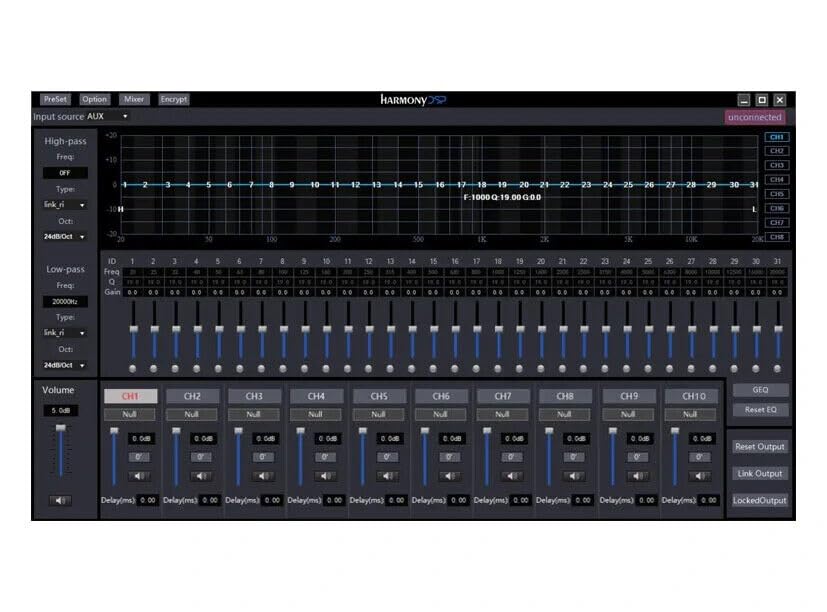
Imej: Screenshot of the Zapco Harmony DSP PC software, showing the 31-band equalizer and channel controls for precise audio tuning.
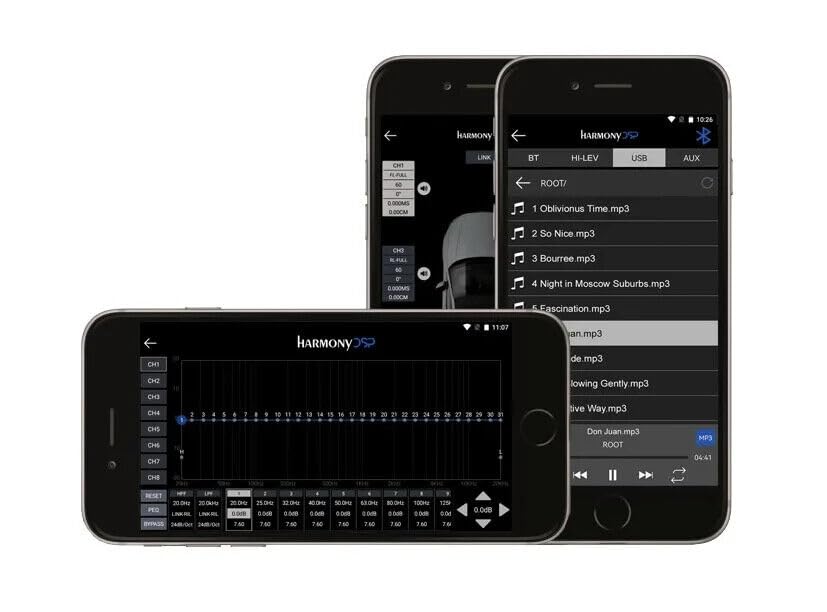
Imej: Screenshots of the Zapco Harmony DSP mobile application on a smartphone, illustrating the interface for Bluetooth streaming and DSP adjustments.
Penstriman Bluetooth:
To stream audio wirelessly, enable Bluetooth on your mobile device and pair it with the HB-410-ADSP. The device name will typically appear as "Zapco HB-410-ADSP" or similar. Once paired, you can play audio from your device through the amplebih hidup.
Integrated Music Player:
The amplifier includes a built-in music player that supports various file formats. You can manage and play music files directly through the mobile application.
Penyelenggaraan
The Zapco HB-410-ADSP is designed for durability and requires minimal maintenance. Follow these guidelines to ensure its continued performance:
- Pembersihan: Gunakan kain lembut dan kering untuk membersihkan bahagian luar amplifier. Avoid using harsh chemicals or abrasive cleaners.
- Pengudaraan: Memastikan bahawa amplifier's ventilation openings are not obstructed to prevent overheating.
- Sambungan: Periksa semua sambungan pendawaian secara berkala untuk memastikan ia selamat dan bebas daripada kakisan.
- Persekitaran: Pasangkan amplifier in a location that is protected from excessive moisture, dust, and extreme temperatures.
Menyelesaikan masalah
If you encounter issues with your Zapco HB-410-ADSP, refer to the following common problems and solutions:
- Tiada Kuasa:
- Check all power connections (+12V, GND, REM) for proper contact and voltage.
- Sahkan bahawa bateri kenderaan telah dicas.
- Inspect any inline fuses for continuity.
- Tiada Output Audio:
- Pastikan semua kabel input dan output disambungkan dengan kukuh.
- Check the source device (head unit, phone) for audio output.
- Verify DSP settings; ensure channels are not muted or gain is not set too low.
- Confirm speaker connections are correct and speakers are functional.
- Audio Herot:
- Reduce input gain if the signal is clipping.
- Periksa keserasian impedans pembesar suara dengan amplebih hidup.
- Review DSP equalizer and crossover settings for anomalies.
- Mobile App Issues (Input/Output Mapping):
- Some users have reported inconsistencies with input channel mapping to outputs when using the mobile application. If precise mapping is required, it is recommended to use the PC software for configuration.
- Ensure the mobile app is updated to the latest version.
- Masalah Kesambungan Bluetooth:
- Memastikan amplifier is in pairing mode or discoverable.
- Delete previous pairings on your mobile device and re-attempt pairing.
- Move the mobile device closer to the amplifier to rule out range issues.
Waranti dan Sokongan
For warranty information, please refer to the documentation provided with your purchase or visit the official Zapco website. If you require technical assistance or have questions not covered in this manual, please contact Zapco customer support through their official channels.
Sumber Dalam Talian: For additional support and software downloads, visit the Zapco Store on Amazon or the official Zapco webtapak.


