pengenalan
The Logitech K585 Multi-Device Slim Wireless Keyboard is designed for seamless multi-tasking across various devices. This manual provides comprehensive instructions for setting up, operating, maintaining, and troubleshooting your keyboard to ensure optimal performance and longevity.

The Logitech K585 keyboard, showcasing its slim design and rose color, with a built-in cradle for devices.
Apa yang ada dalam Kotak
Sahkan bahawa semua komponen terdapat dalam pakej anda:
- Papan Kekunci Wayarles Ramping Berbilang Peranti Logitech K585
- 2 AAA batteries (pre-installed or separate)
- Logitech Unifying USB receiver
- User documentation (this manual)

An illustration of the items included in the product packaging: the K585 keyboard and two AAA batteries.
Persediaan
1. Pemasangan Bateri
The keyboard requires two AAA batteries for operation. If not pre-installed, open the battery compartment located on the top edge of the keyboard, insert the batteries, and close the compartment. The Unifying USB receiver is also stored in this compartment.
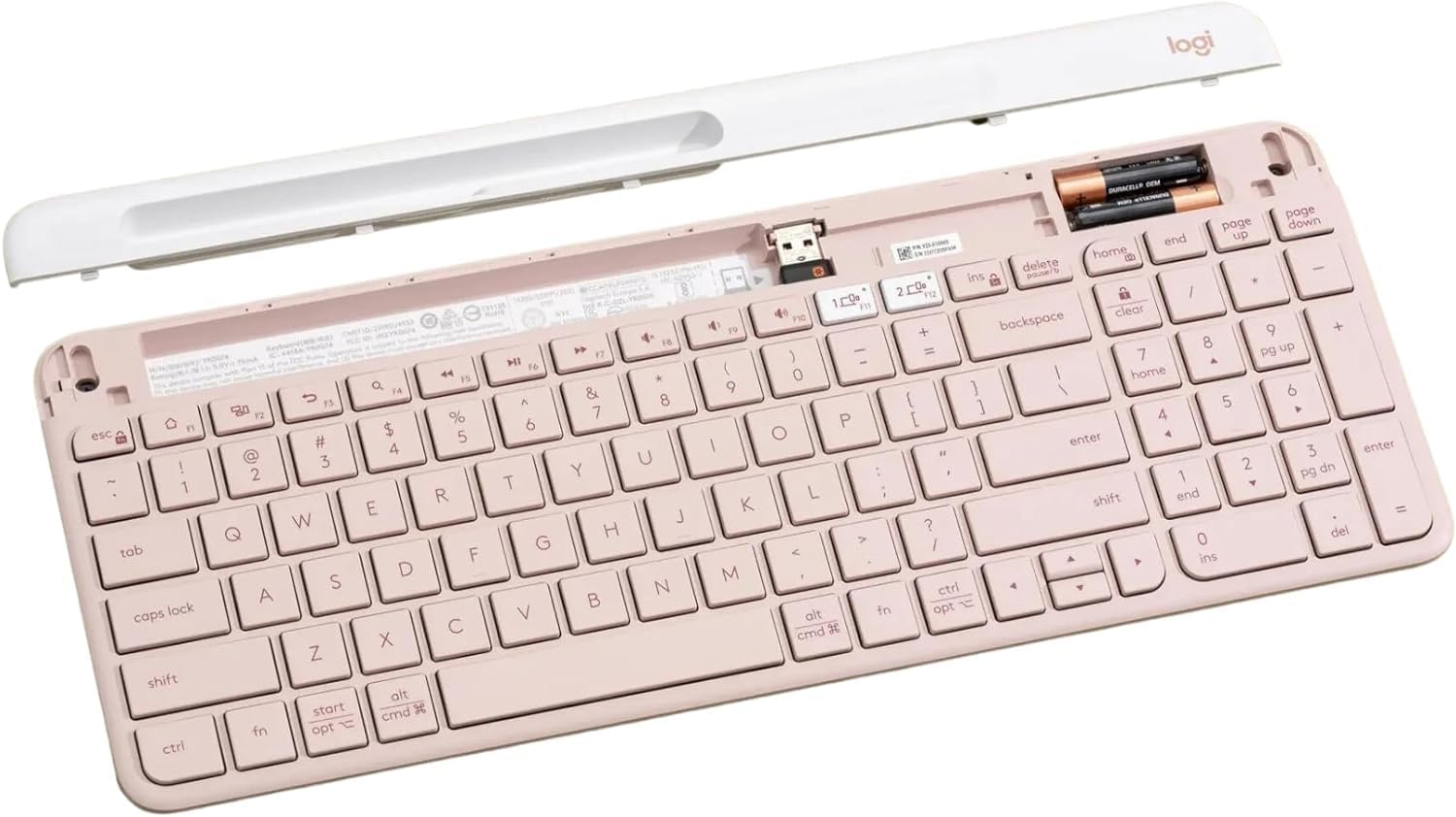
dalaman view of the keyboard, highlighting the battery slots and the dedicated storage for the USB receiver.
2. Connecting via USB Receiver
- Remove the Unifying USB receiver from the battery compartment.
- Palamkan penerima USB ke dalam port USB yang tersedia pada komputer anda.
- Turn on the keyboard using the power switch located on the right side.
- Papan kekunci sepatutnya bersambung secara automatik ke peranti anda.
3. Menyambung melalui Bluetooth
The K585 keyboard supports Bluetooth Low Energy (BLE) for wireless connection.
- Pastikan papan kekunci dihidupkan.
- Press and hold one of the Easy-Switch keys (1 or 2) for three seconds until the LED light above the key starts blinking rapidly. This indicates pairing mode.
- On your device (computer, tablet, smartphone), go to Bluetooth settings and select
Dokumen Berkaitan - K585 ROSE

Panduan Persediaan Papan Kekunci Berbilang Peranti Logitech K585
Panduan persediaan komprehensif untuk Papan Kekunci Tanpa Wayar Logitech K585 Pelbagai Peranti Langsing. Ketahui cara memasang bateri, menyambung melalui penerima USB atau Bluetooth, memasangkannya dengan berbilang peranti dan memilih susun atur OS.
Manual Pengguna Papan Kekunci Bluetooth Berbilang Peranti Logitech K480
A comprehensive guide to setting up, connecting, and troubleshooting the Logitech K480 Multi-Device Bluetooth Keyboard for seamless operation with computers, tablets, and smartphones across various operating systems.
Logitech K780 Multi-Device Keyboard: Features, Setup, and Connectivity Guide
Explore the Logitech K780 Multi-Device Keyboard. This guide covers its features, how to connect to computers, phones, and tablets via Bluetooth Smart or Unifying receiver, and enhanced functions for various operating systems.
Papan Kekunci Berbilang Peranti Logitech K780: Ciri, Kesambungan dan Panduan Persediaan
Temui Papan Kekunci Berbilang Peranti Logitech K780, papan kekunci serba boleh yang direka untuk pertukaran lancar antara komputer, telefon pintar dan tablet. Panduan ini memperincikan cirinya, pilihan ketersambungan dwi (Bluetooth Smart and Unifying Receiver), fungsi yang dipertingkatkan dan arahan persediaan untuk pelbagai sistem pengendalian.
Tastiera Logitech K780 Berbilang Peranti: Funzionalità, Connettività dan Layout
Melengkapkan semua yang terbaik Logitech K780 Multi-Device, anda boleh mendapatkan kemudahan yang sesuai, datang bersama-sama dengan ciri-ciri Bluetooth Pintar dan Penyatuan, mengubahsuai dan susun atur doppio untuk pelbagai sistem operasi.
Logitech K780 Multi-Device Keyboard: Seamless Connectivity for All Your Devices
Explore the Logitech K780 Multi-Device Keyboard. Learn how to connect and use this versatile keyboard with your computer, tablet, and smartphone via Unifying or Bluetooth Smart for enhanced productivity. Discover its features, setup, and multi-device pairing.