1. Pengenalan
Thank you for choosing the Geek Smart L7 Robot Vacuum and Mop. This device is designed to provide efficient and thorough cleaning for your home, combining powerful vacuuming with intelligent mopping capabilities. Featuring advanced LDS navigation, Wi-Fi connectivity, and smart app control, the L7 ensures a customized cleaning experience for various floor types, including carpets and hard floors.
This manual provides essential information for the safe operation, setup, maintenance, and troubleshooting of your robot vacuum. Please read it carefully before use and retain it for future reference.
2. Arahan Keselamatan
To reduce the risk of injury or damage, read and follow all safety precautions when setting up, using, and maintaining your robot vacuum.
- Perkakas ini boleh digunakan oleh kanak-kanak berumur 8 tahun ke atas dan orang yang kurang keupayaan fizikal, deria atau mental atau kurang pengalaman dan pengetahuan jika mereka telah diberi penyeliaan atau arahan mengenai penggunaan perkakas dengan cara yang selamat dan memahami bahaya yang terlibat .
- Kanak-kanak harus diawasi untuk memastikan mereka tidak bermain dengan perkakas.
- Pembersihan dan penyelenggaraan pengguna tidak boleh dibuat oleh kanak-kanak tanpa pengawasan.
- Use only the original power adapter provided by the manufacturer.
- Jangan gunakan robot dalam persekitaran yang mempunyai nyalaan api terbuka atau bahan mudah terbakar.
- Jauhkan rambut, pakaian longgar, jari dan semua bahagian badan daripada bukaan dan bahagian yang bergerak.
- Do not operate the robot in rooms where an infant or child is sleeping.
- Jangan gunakan robot untuk mengutip serpihan besar, cecair atau objek terbakar.
- Ensure the robot is placed on a stable surface and cannot fall from high places.
- Turn off the robot and unplug the charging dock before cleaning or maintenance.
3. Kandungan Pakej
Sahkan bahawa semua komponen ada dan dalam keadaan baik semasa membongkar.
- Geek Smart L7 Robot Vacuum and Mop
- Dok Pengecasan
- Penyesuai Kuasa
- Berus Sisi (2 pasang)
- Berus Utama
- Dust Bin (680ML)
- 2-in-1 Water Tank & Dust Bin (350ML water tank & 260ML dust bin)
- Kain Mop (2)
- High-Efficiency Filter (pre-installed in dust bin)
- Alat Pembersihan
- Manual Pengguna
4. Produk Lebihview
Komponen Vakum Robot

Image: The Geek Smart L7 Robot Vacuum, showcasing its top view with control buttons, LDS sensor, and accompanying accessories like the charging dock and replacement filters.
- LDS Navigation Sensor: Located on top, for precise mapping and navigation.
- Butang Kawalan: Power/Clean, Home/Recharge.
- Bampar Hadapan: Mengesan halangan.
- Berus Sisi: Sapu serpihan ke laluan berus utama.
- Berus Utama: Collects dirt and debris.
- Roda Memandu: Allow movement across various surfaces.
- Mengecas Kenalan: Connect with the charging dock.
- Dust Bin / Water Tank: Removable compartments for dust collection and water for mopping.
Dok Pengecasan
The charging dock provides power to recharge the robot's battery. It should be placed in an open area with sufficient clearance.
5. Persediaan
5.1 Penempatan Dok Pengecasan
- Place the charging dock against a wall in an open area.
- Ensure there is at least 0.5 meters (1.6 feet) of clear space on both sides of the dock and 1.5 meters (4.9 feet) in front.
- Sambungkan penyesuai kuasa ke dok pengecasan dan pasangkannya ke salur keluar dinding.
- Ensure the power indicator on the charging dock illuminates.
5.2 Pengecasan Awal
- Place the robot onto the charging dock, ensuring the charging contacts align.
- The robot will automatically begin charging. Allow it to fully charge before its first use (approximately 4-5 hours).
5.3 Sambungan dan Pemetaan Apl

Image: The Geek Smart L7 Robot Vacuum actively scanning its environment using LDS navigation to create a detailed map, with digital map representations floating above it.
- Download the Geek Smart app from your mobile device's app store (available for iOS and Android).
- Daftar akaun dan log masuk.
- Follow the in-app instructions to add your L7 robot vacuum. This typically involves connecting to the robot's Wi-Fi hotspot and then connecting the robot to your home Wi-Fi network.
- Once connected, initiate a full cleaning cycle. The robot will use its LDS navigation to create an accurate map of your home. This map will be saved in the app for future use, allowing for features like selective room cleaning and setting no-go zones. The robot can save up to 5 different maps.
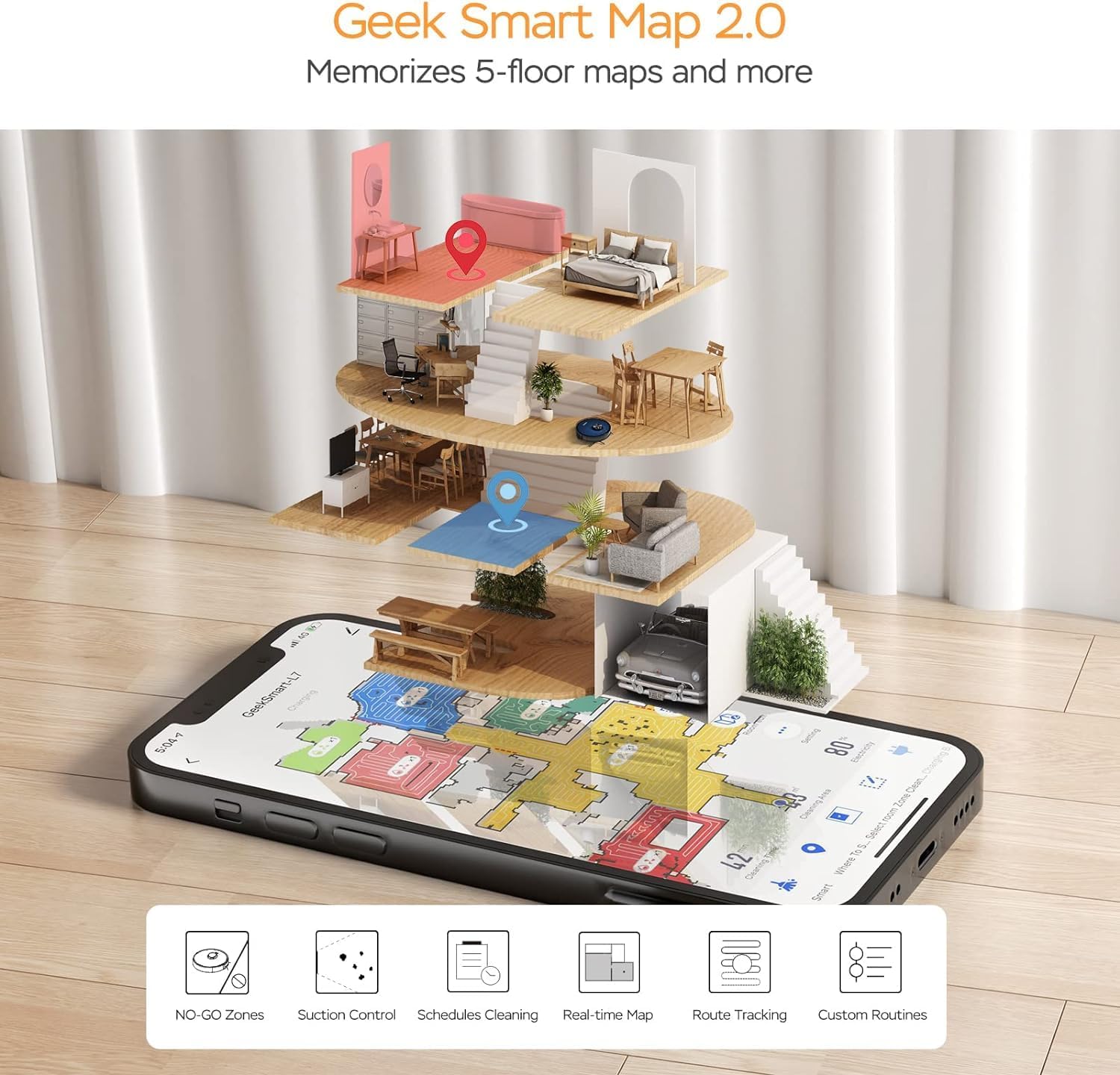
Image: A smartphone screen displaying the Geek Smart app interface, showing a color-coded floor plan map with various cleaning zones and controls.
6. Arahan Operasi
6.1 Memulakan dan Menghentikan Pembersihan
- Mula Membersihkan: Press the Power/Clean button on the robot or tap "Start Cleaning" in the app. The robot will begin a full cleaning cycle.
- Jeda Pembersihan: Press the Power/Clean button during operation or tap "Pause" in the app.
- Pembersihan Resume: Press the Power/Clean button again or tap "Resume" in the app.
- Return to Dock: Press the Home/Recharge button on the robot or tap "Recharge" in the app. The robot will return to its charging dock.
6.2 Mod Pembersihan
The L7 offers various cleaning modes to suit different needs.

Image: The Geek Smart L7 Robot Vacuum demonstrating its 2-in-1 sweeping and mopping capabilities on a hard floor, with debris being swept and a damp mop trail visible.
- Pembersihan Auto: The robot intelligently plans its cleaning path using LDS navigation.
- Memvakum: Utilizes up to 2700Pa suction power to clean dirt and debris from various surfaces.
- Mengemop: Attach the mop cloth and fill the 2-in-1 water tank. The electronic water tank allows for adjustable water output.
- Vakum & Mop (Serentak): The robot can vacuum and mop simultaneously when the 2-in-1 tank is installed.
- Carpet Boost Mode: The robot automatically increases suction power when it detects carpeted areas for deeper cleaning.

Image: The Geek Smart L7 Robot Vacuum actively cleaning a hard floor, with a visual representation of its powerful 2700Pa suction lifting debris.

Image: The Geek Smart L7 Robot Vacuum transitioning from a hard floor to a carpet, illustrating its Carpet Boost Mode with enhanced suction indicated by glowing lines.

Image: The Geek Smart L7 Robot Vacuum positioned on a floor split between marble and wood, illustrating its integrated mopping system and adjustable water output for different surfaces.
6.3 Ciri Kawalan Aplikasi
The Geek Smart app unlocks advanced cleaning customization.
- Pembersihan Bilik Terpilih: Choose specific rooms or areas on the map for cleaning.
- No-Go Zones / No-Mop Zones: Draw virtual boundaries on the map to prevent the robot from entering certain areas or mopping carpets.
- Invisible Walls: Create virtual walls to restrict the robot's movement.
- Penjadualan: Set cleaning schedules for automatic operation at desired times.
- Pelarasan Kuasa Sedutan: Manually adjust the suction level.
- Water Output Adjustment: Control the water flow for mopping.

Image: The Geek Smart L7 Robot Vacuum operating quietly (65dB) in a living room, demonstrating its low noise level suitable for homes with sleeping individuals or pets.
7. Penyelenggaraan
Regular maintenance ensures optimal performance and extends the lifespan of your robot vacuum. Always turn off the robot and unplug the charging dock before performing any maintenance.
7.1 Mengosongkan Tong Habuk
- Tekan butang pelepas tong habuk dan tarik keluar tong habuk.
- Open the dust bin cover and empty the contents into a trash can.
- Clean the filter and dust bin with the provided cleaning tool or a soft brush.
- Pasang semula tong habuk.
7.2 Cleaning the 2-in-1 Water Tank & Dust Bin
- Remove the 2-in-1 tank from the robot.
- Empty any remaining water from the water tank compartment.
- Kosongkan ruang debu dan bersihkan penapis.
- Rinse the water tank compartment with clean water. Do not immerse the entire tank in water, especially the electronic components.
- Allow all parts to air dry completely before reassembling and reinstalling.
7.3 Membersihkan Berus Utama
- Flip the robot over and press the release tabs to remove the main brush cover.
- Angkat berus utama.
- Use the cleaning tool to remove hair and debris tangled around the brush and its bearings.
- Pasang semula berus utama dan penutup.
7.4 Membersihkan Berus Sisi
- Tarik perlahan-lahan berus sisi ke atas untuk mengeluarkannya.
- Remove any hair or debris. If brushes are bent, soak them in warm water for a few minutes to reshape.
- Press the brushes back into place until they click.
7.5 Membersihkan Penderia dan Mengecas Kenalan
- Use a clean, dry cloth to wipe the cliff sensors (located on the bottom of the robot), wall sensors (on the side), and the charging contacts on both the robot and the charging dock.
- Ensure the LDS sensor on top is also clean and free of obstructions.
8. Penyelesaian masalah
If you encounter issues with your robot vacuum, refer to the following table for common problems and solutions.
| Masalah | Kemungkinan Punca | Penyelesaian |
|---|---|---|
| Robot tidak dihidupkan | Bateri lemah; Matikan kuasa | Place robot on charging dock; Ensure power switch is on. |
| Robot tidak boleh mengecas | Charging contacts dirty; Charging dock not powered | Bersihkan kenalan pengecasan pada robot dan dok; Pastikan dok dipalamkan. |
| Robot kerap tersangkut | Halangan di atas lantai; Sensor tebing kotor | Clear cables and small objects; Clean cliff sensors. |
| Prestasi pembersihan yang lemah | Tong habuk penuh; Berus kusut; Penapis tersumbat | Empty dust bin; Clean main and side brushes; Clean or replace filter. |
| Fungsi mengemop tidak berfungsi | Water tank empty; Mop cloth dry; Water outlet clogged | Fill water tank; Moisten mop cloth; Clean water outlet. |
| Isu sambungan apl | Incorrect Wi-Fi password; Router too far; Robot offline | Verify Wi-Fi credentials; Move robot closer to router; Restart robot and router. |
9. Spesifikasi
| Ciri | Spesifikasi |
|---|---|
| Jenama | Geek Pintar |
| Nama Model | L7 |
| Jenis Navigasi | 360° LiDAR |
| Kuasa Sedutan Maks | 2700 Pa |
| Kapasiti Bateri | 2600 mAh |
| Masa Jalanan Maks | 130 minit |
| Kapasiti Tong Debu | 680 ML |
| Water Tank Capacity (2-in-1) | 350 ML |
| Tahap Kebisingan | Sub-65 dB |
| Dimensi Produk | 12.59"L x 12.59"W x 3.74"H |
| Berat Barang | 13.39 paun |
| Peranti Serasi | Amazon Echo |
| UPC | 764773837187 |
10. Waranti dan Sokongan
Geek Smart products are manufactured to the highest quality standards. For warranty information, technical support, or customer service inquiries, please refer to the contact information provided on the product packaging or visit the official Geek Smart webtapak.
Sila simpan bukti pembelian anda untuk tuntutan waranti.


