1. Pengenalan
Terima kasih kerana membeliasing the LDNIO BC AU BS Portable Outdoor Bluetooth Speaker. This manual provides essential information for the safe and efficient operation of your device. Please read it thoroughly before use and retain it for future reference.
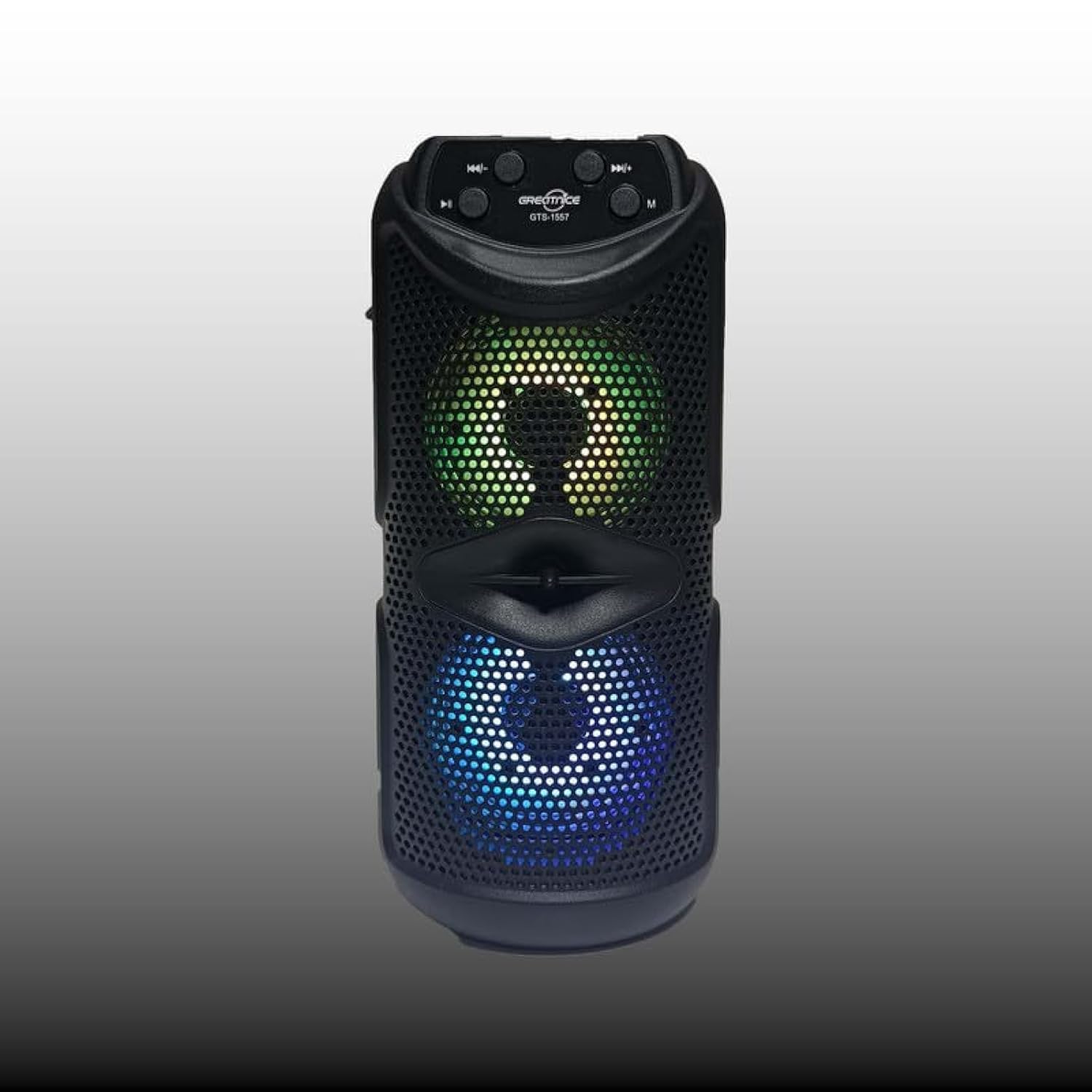
Rajah 1.1: Depan view of the LDNIO BC AU BS Portable Outdoor Bluetooth Speaker. This image displays the speaker's main body, control panel at the top, and the dual speaker grilles with internal lighting visible.
2. Ciri-ciri Produk
- Bunyi Berkualiti Tinggi: 10W output for clear and powerful audio.
- Kesambungan Tanpa Wayar: Bluetooth for seamless audio streaming.
- Main Semula Pelbagai Fungsi: Supports FM radio, USB drive, and TF card playback.
- Stereo Tanpa Wayar Sejati (TWS): Connect two speakers for an enhanced stereo experience.
- Fungsi Karaoke: Integrated support for karaoke.
- Pencahayaan Dinamik: Color-changing lights for bass boost and visual appeal.
- Reka Bentuk Mudah Alih: Easy-to-carry handle, suitable for outdoor use.
- Hayat Bateri yang Panjang: Sehingga 8 jam penggunaan dengan sekali cas.
- Penceramah Dwi: Features dual 4-inch subwoofers for rich sound.
3. Kandungan Pakej
Sila semak pakej untuk item berikut:
- LDNIO BC AU BS Portable Outdoor Bluetooth Speaker
- Kabel Pengecas USB
- Manual Pengguna (dokumen ini)
Jika terdapat sebarang barang yang hilang atau rosak, sila hubungi peruncit anda.
4. Maklumat Keselamatan
- Jangan dedahkan pembesar suara kepada suhu yang melampau, cahaya matahari langsung atau kelembapan yang tinggi.
- Elakkan daripada menjatuhkan atau menundukkan pembesar suara kepada impak yang kuat.
- Jangan buka atau cuba membaiki pembesar suara sendiri. Ini akan membatalkan jaminan.
- Keep the speaker away from water and other liquids to prevent electric shock or damage.
- Use only the provided or a certified charging cable.
- Bersihkan pembesar suara dengan kain lembut dan kering. Jangan gunakan pembersih yang kasar.
5. Persediaan
5.1 Mengecas Speaker
- Sambungkan kabel pengecas USB ke port pengecas pembesar suara.
- Sambungkan hujung kabel USB yang satu lagi ke penyesuai kuasa USB yang serasi (tidak disertakan) atau port USB komputer.
- Lampu penunjuk pengecasan akan menyala, biasanya merah, semasa pengecasan.
- Once fully charged, the indicator light will change color or turn off (refer to specific model behavior). A full charge provides up to 8 hours of playback.
5.2 Menghidupkan/Mematikan
- Untuk menghidupkan, tekan dan tahan Butang kuasa (usually marked with ⏻) for a few seconds until you hear an audible prompt or see the indicator lights activate.
- Untuk mematikan, tekan dan tahan Butang kuasa again for a few seconds until the speaker powers down.
5.3 Berpasangan Bluetooth
- Pastikan pembesar suara dihidupkan dan dalam mod Bluetooth. Jika tidak, tekan butang Butang mod (M) to switch to Bluetooth mode. The Bluetooth indicator light will flash, indicating it's ready for pairing.
- Pada peranti mudah alih anda (telefon pintar, tablet, komputer riba), dayakan Bluetooth dan cari peranti yang tersedia.
- Select "LDNIO BC AU BS" (or similar name) from the list of found devices.
- Sebaik sahaja dipasangkan, pembesar suara akan mengeluarkan pengesahan yang boleh didengar dan lampu penunjuk Bluetooth akan berhenti berkelip dan kekal kukuh.
- Anda kini boleh memainkan audio daripada peranti anda melalui pembesar suara.
5.4 Other Playback Modes
- Radio FM: Tekan ke Butang mod (M) to switch to FM radio. Use the Previous/Next Track buttons to scan for stations.
- Kad USB/TF: Insert a USB drive or TF (MicroSD) card into the respective port. The speaker will automatically switch to USB/TF mode and begin playing audio files.
- TWS (Stereo Wayarles Sejati): To pair two LDNIO BC AU BS speakers for stereo sound, ensure both speakers are on and in Bluetooth mode. On one speaker, press and hold the butang TWS (if available, or a specific pairing button) until it enters TWS pairing mode. The speakers will connect automatically.
6. Arahan Operasi

Rajah 6.1: Close-up of the speaker's control panel and illuminated dual speakers. The control panel typically includes buttons for power, mode, play/pause, and track navigation/volume.
6.1 Fungsi Butang
- Butang Kuasa (⏻): Tekan dan tahan untuk menghidupkan/mematikan kuasa.
- Butang Mod (M): Short press to switch between Bluetooth, FM, USB, and TF card modes.
- Butang Main/Jeda (⏸): Tekan pendek untuk memainkan atau menjeda audio.
- Previous Track / Volume Down Button (⏮): Tekan sebentar untuk trek sebelumnya. Tekan dan tahan untuk mengurangkan kelantangan.
- Next Track / Volume Up Button (⏭): Tekan sebentar untuk trek seterusnya. Tekan dan tahan untuk meningkatkan kelantangan.
6.2 Kawalan Kelantangan
Adjust the volume by pressing and holding the Kelantangan Naik (⏭) or Kelantangan Kurang (⏮) buttons. You can also control the volume from your connected device.
6.3 Mod Cahaya
The speaker features color-changing lights. Specific controls for light modes may vary. Typically, a dedicated Butang cahaya or a long press on the Butang mod (M) can cycle through different light patterns or turn them off.
6.4 Fungsi Karaoke
To use the karaoke function, connect a microphone (not included) to the designated microphone input port on the speaker. Adjust the microphone volume as needed using the speaker's controls or the microphone's own controls.
7. Penyelenggaraan
- Pembersihan: Wipe the speaker's exterior with a soft, dry, lint-free cloth. Do not use liquid cleaners or aerosols.
- Storan: Apabila tidak digunakan untuk tempoh yang lama, simpan pembesar suara di tempat yang sejuk dan kering, jauh dari cahaya matahari langsung dan suhu yang melampau.
- Penjagaan Bateri: Untuk memanjangkan hayat bateri, elakkan daripada menyahcas sepenuhnya bateri dengan kerap. Cas pembesar suara dengan kerap, walaupun tidak digunakan.
8. Penyelesaian masalah
| Masalah | Kemungkinan Punca | Penyelesaian |
|---|---|---|
| Speaker tidak dihidupkan. | Bateri habis. | Cas pembesar suara sepenuhnya. |
| Tiada bunyi. | Volume is too low; device not paired; incorrect mode. | Increase volume on speaker and device; ensure proper Bluetooth pairing; switch to correct playback mode (Bluetooth, USB, TF, FM). |
| Gandingan Bluetooth gagal. | Pembesar suara tidak dalam mod berpasangan; peranti terlalu jauh; gangguan. | Ensure speaker is in Bluetooth pairing mode (flashing indicator); move device closer to speaker; restart both devices. |
| Penerimaan radio FM yang lemah. | Isyarat lemah. | Letakkan semula pembesar suara ke kawasan dengan penerimaan yang lebih baik. |
9. Spesifikasi
- Nama Model: BC AU BS
- Jenis pembesar suara: Luaran, Mudah Alih
- Ketersambungan: Wayarles (Bluetooth)
- Kuasa Output Maksimum Pembesar Suara: 10 Watt
- Diameter subwufer: Dwi 4 Inci
- Konfigurasi Saluran Bunyi Sekeliling: 2
- Ciri Khas: Bluetooth, Portable, Wireless, FM Radio, USB Playback, TF Card Playback, TWS, Karaoke Function, Color-changing Lights
- Peranti Serasi: Komputer riba, Telefon Pintar, Tablet
- Jenis Pemasangan: Atas meja
- Anggaran Dimensi Pakej: 12 x 12 x 8 cm
- Anggaran Berat Pakej: 2 kg
10. Waranti dan Sokongan
LDNIO products are designed to provide reliable performance. For warranty information, please refer to the warranty card included with your purchase or contact your local retailer. For technical support or inquiries, please visit the official LDNIO webtapak atau hubungi bahagian perkhidmatan pelanggan mereka.


